12 DevOps engineering
The chapter explains how AI is becoming a first-class part of modern DevOps, reshaping everything from infrastructure automation to code review and testing. It introduces three practical integration patterns: wrapping complex commands with natural language interfaces, augmenting development with coding assistants (including organization-specific API assistants enriched with internal standards and docs), and automating repetitive or high-volume tasks. Rather than starting with theory, the authors ground the discussion in real-world workflow integration and then connect those practices to GenAIOps fundamentals for running AI in production.
The centerpiece case study describes converting nearly 7,000 PowerShell tests from Pester v4 to v5 using AI-driven tools. The team combined Aider’s repository-aware automation with Cline’s IDE integration, iteratively refining prompts from generic to example-led instructions and codifying standards in a conventions file. They processed files individually, then in small batches, and used focused, multi-pass transformations for large files to maintain accuracy. Prompt caching reduced cost and latency across repetitive work, keeping the entire project under roughly fifty dollars while achieving fast throughput and consistent results. Beyond syntax updates, AI improved naming, structure, and PowerShell practices, with different models excelling at different tasks—larger models for full-file rewrites and smaller, cheaper models for targeted edits—leaving only a small tail of manual fixes and culminating in a complete, high-quality migration.
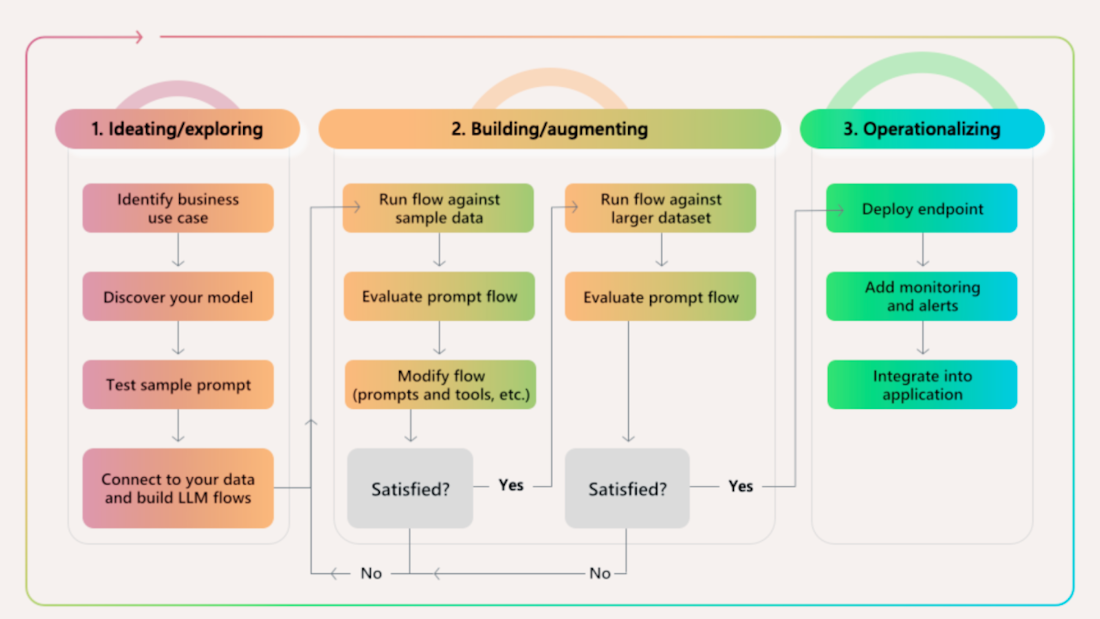
Building on these practices, the chapter outlines the GenAIOps lifecycle as a DevOps-aligned approach for AI systems: ideation (use cases, model selection, early prompts, data access), build (iterative testing, evaluation, and scaling), and operationalization (deployment, monitoring, alerts, and governance). It emphasizes versioning prompts, monitoring model performance, grounding outputs in trusted data, and keeping feedback loops tight. A practical workshop example demonstrates how to design a production-ready copilot that retrieves answers from real product data, using familiar deployment and observability patterns. The core message: pair disciplined DevOps fundamentals with AI tooling and model fit-for-purpose, and large-scale, previously daunting code and system changes become systematic, affordable, and reliable.
The GenAIOps Lifecycle (Image courtesy of Microsoft''s Nitya Narasimhan, PhD)
Prompts used to write this chapter
- Here’s a script that’s basicaly a step-by-step of a larger script. The larger script has also been provided for context. Please provide a complete list of summary bulletpoints. I’ll start: "First pass: Add
#Requires -Module Pester v5to the file" - I’m a DevOps Engineer and I find GenAI ops the most relatable because it’s similar to what I already do. Would you agree that it’s the closest in practice vs MLOps and LLMOps?
- Please convert this markdown table to asciidoc
- I find that providing example code is VERY effective - much better than explaining in words. Why is that?
FAQ
What are the most practical ways to integrate AI into existing DevOps workflows?
Three approaches worked best:
- Wrap commands and advanced processes with AI to translate natural language (for example, “migrate the Northwind database”) into PowerShell, kubectl, or cloud CLI commands.
- Use coding assistants and API assistants that understand your codebase, docs, naming, and standards to generate reliable code.
- Automate repetitive tasks (docs, dependency updates, maintenance) with AI-driven task automation.
How did you convert nearly 7,000 Pester tests from v4 to v5 with AI, and what were the results?
- Tools: Aider (CLI, Git-aware) + Cline (VS Code integration).
- Process: Iterative prompt refinement, single-file then small batches, focused passes for large files, prompt caching, CI feedback.
- Outcomes: ~7,000 tests migrated, under $50 total, main refactor ~20 seconds per file, GPT-4-mini fixed ~700 files in ~2 hours, one developer spent ~2 days on manual cleanup, 100% success after cleanup passes.
When should I use Aider vs. Cline for AI-assisted refactoring?
- Aider: Best for command-line workflows, repository-wide context, targeted or multi-file edits, automatic Git commits, and in-chat commands like /add, /run, /model.
- Cline: Best inside VS Code for step-by-step tasks, running terminal commands, watching outputs, headless browser work, and flexible use of different model providers.
- Note: Their Git integration can occasionally revert to older code during updates—discard and retry to resolve.
What prompt engineering tactics improved reliability for large-scale code changes?
- Avoid vague prompts; explicitly list required changes.
- Show, don’t just tell—provide real examples from your codebase demonstrating the exact target style and structure.
- Iterate on a single file, then scale to small batches (~20) once stable.
- Maintain a conventions.md (about 1,400 tokens) with standards; use models with larger context windows.
How did you batch and manage the migration safely and efficiently?
- Batching: Start with 5 files, grow to ~20 as confidence increases; monitor after each batch.
- Error handling: Use Cline for quick CI/CD fixes; document common failures and refine prompts.
- Version control: Commit after each successful batch; use separate branches for batches of 20–50.
- Retries: Use Aider’s retry mechanism during API overloads.
What’s the strategy for handling large or complex files during AI conversion?
Split the work into multiple focused passes instead of one big prompt, particularly for files over ~7.5 KB. Example passes:
- Add #Requires -Module Pester v5.
- Move setup into BeforeAll.
- Normalize assertion syntax (for example, Should -Be).
- Fix parameter validation blocks.
- Update mocks.
- Resolve scoping issues.
- Standardize variable declarations.
- Normalize Context naming.
- Final cleanup/formatting.
This approach cost about $0.03 per file across nine passes using GPT-4o-mini.
What is prompt caching, and how does it reduce cost and improve consistency?
Prompt caching stores repeated context (instructions, patterns) for 5–10 minutes so subsequent requests can reuse it more cheaply and consistently. It’s ideal for repetitive, similarly structured files like tests.
- OpenAI: Caching is provided by default.
- Claude-based tools: Opt-in is required.
- Tooling: Cline supports caching automatically; Aider enables it via a parameter.
Which AI models worked best for different tasks in the migration?
- Full-file, complex rewrites: Larger models like Claude were most consistent.
- Targeted, surgical edits: GPT-4-mini was effective and economical (about $0.007 per file); it also processed ~700 files in about 2 hours for fixes.
- Multi-pass large-file flow: GPT-4o-mini cost roughly $0.03 per file across nine passes.
Match model to task to control cost and maintain quality.
Beyond test migrations, where else can AI assist DevOps and engineering work?
- Code modernization: Framework upgrades, API version changes, legacy pattern cleanup, convention standardization, reorganizing code.
- System updates: Config changes across fleets, dependency bumps in scripts, data format conversions, endpoint updates, standardized error handling.
- Content migration: Docs format conversion, spec updates, comment standardization, platform moves, sweeping text changes.
What is GenAIOps, and how do I get started applying it in practice?
- Scope: GenAIOps manages generative AI apps end to end. Compared to MLOps (general ML pipelines) and LLMOps (LLM-specific), GenAIOps spans all generative, multi‑modal systems.
- Lifecycle: Ideation (use case, model selection, sample prompts, data), Build (tests, evaluation, iterate, scale), Operationalize (deploy endpoints, monitor, alert, integrate).
- Hands-on start: Microsoft’s “Build a Retail Copilot” workshop shows grounded generation, data integration, and monitoring with Prompty/Promptflow. Resources: aka.ms/aitour/contoso-chat, aka.ms/aitour/contoso-chat/workshop, aka.ms/aitour/WRK550.
- Cross-cloud: Similar concepts map to AWS SageMaker Pipelines and Google Vertex AI.

 AI for Everyday IT ebook for free
