10 Software engineering
Software engineering teams can extend applications with generative AI using familiar REST patterns rather than deep ML expertise. The chapter explains how models are invoked like any other web service and emphasizes function calling: you define expected outputs, and the model returns structured JSON that your code parses and acts on. It contrasts simple, stateless Chat Completions with stateful Assistants that retain context across turns, and clarifies the model’s conversation roles (system, user, assistant) to anchor consistent behavior. Similar capabilities exist in other ecosystems, but the focus is on OpenAI’s straightforward implementation and how it fits into everyday development workflows.
A hands-on thread builds a database copilot that translates natural language into SQL, validates the query for safety, and then executes it within your own code path. Developers embed schema and guardrails in the system role, then define two core functions—one to generate SQL and another to examine it for validity and risk—so the app receives predictable JSON to enforce additional validation, permissions, and error handling before touching production data. Practical considerations include context token limits, read-only access, and iterative prompt refinement. Beyond databases, the same function-calling pattern powers real-world automations—such as cleaning HR exports and populating SharePoint—improving accuracy, consistency, and throughput without large rewrites.
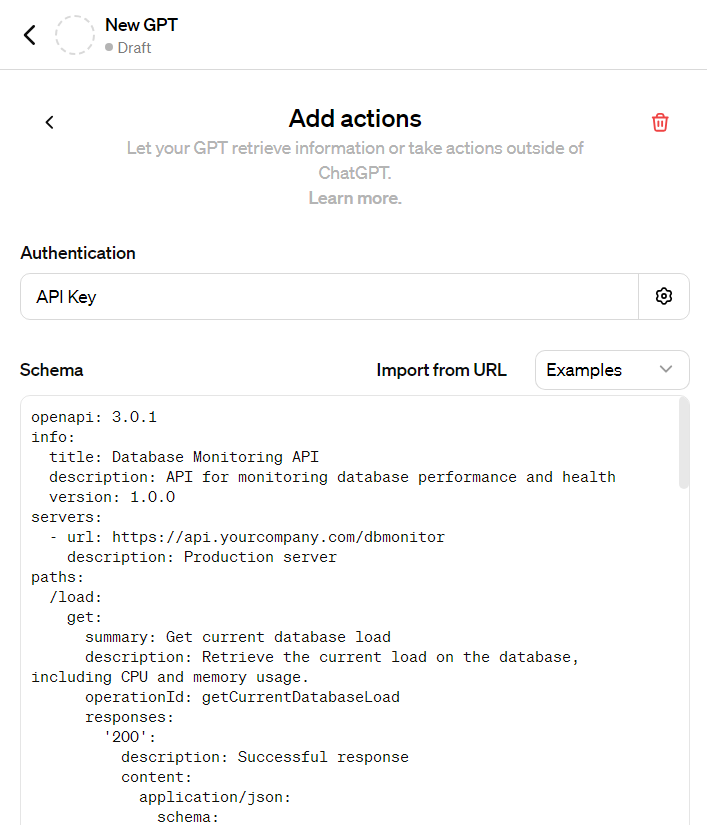
The chapter also introduces GPT Actions, which let a GPT call external APIs described by an OpenAPI spec. Whereas function calling structures the model’s output for your app to execute, GPT Actions extend the model with live data and services; they’re useful for tasks like interactive API exploration but come with trade-offs such as operation limits, latency, and less granular control. Strong security practices—authentication, least privilege, input/output filtering, rate limiting, and monitoring—are essential for both approaches. Used together, GPT Actions can fetch real-time data while function calling standardizes downstream processing, enabling end-to-end assistants that are both capable and operationally safe.
Assistants simple conversation overview
Chatbot answering a question about the Northwind sample database
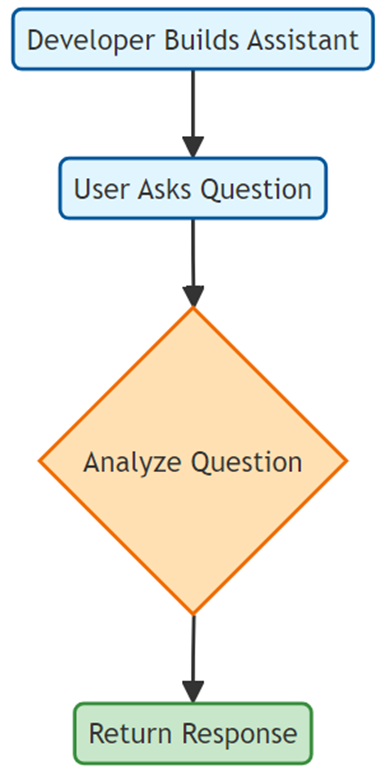
Flowchart illustrating the process of building and using an AI assistant
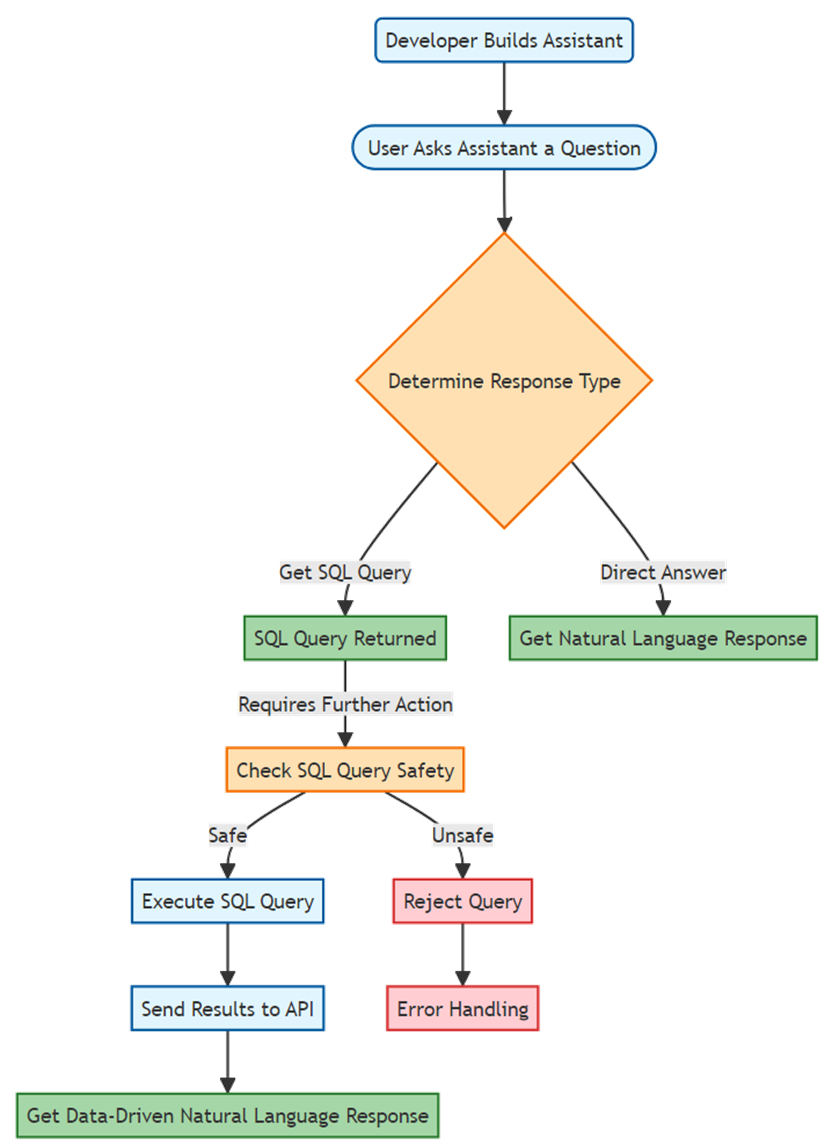
Diagram illustrating the process of handling a user query with an AI assistant
Adding a GPT Action
Prompts used in this chapter
- I’d like to move the attached case study to somewhere in the attached chapter. can you pls suggest a spot
FAQ
What does “function calling” mean in OpenAI’s API, and why is it useful for software engineering?
Function calling is an API feature that lets you define functions with schemas so the model returns structured JSON matching those functions. Your app then parses that JSON and takes action. This makes AI integration predictable and easy to wire into existing logic, enabling tasks like generating SQL, extracting fields from documents, or creating typed outputs your code can trust.Does the model actually execute my code when using function calling?
No. The model does not run your code or call your functions directly. It chooses a function you defined and emits a JSON object with the function name and arguments. Your application receives that JSON, validates it, and executes the corresponding code. This gives you full control over security, input validation, and error handling.When should I use Chat Completions vs. the Assistants API?
- Chat Completions: Best for simple, stateless interactions and ad‑hoc Q&A. They can still use tools like function calling.- Assistants API: Best for copilots and apps that need persistent context, consistent behavior, and multi‑turn conversations. Assistants can also use function calling and other tools.
How do the system, user, and assistant roles affect results?
- System: Sets durable instructions, constraints, and context (for example, database schema and goals). It guides every response.- User: Carries the user’s request or data input.
- Assistant: The model’s response, which may be free text or structured JSON when using function calling. Clear, precise system instructions and user prompts produce better, more reliable outcomes.
Can I build a database copilot without exposing my database to the internet?
Yes. You don’t open firewall ports or run local agents for the model. Instead, you push context (like schema) to the model in the system message, have it generate SQL via function calling, validate it, execute it locally (e.g., with PowerShell’s Invoke-DbaQuery or your language of choice), and send results back to the model to summarize for the user.How do the get_sql_query and examine_sql functions work together?
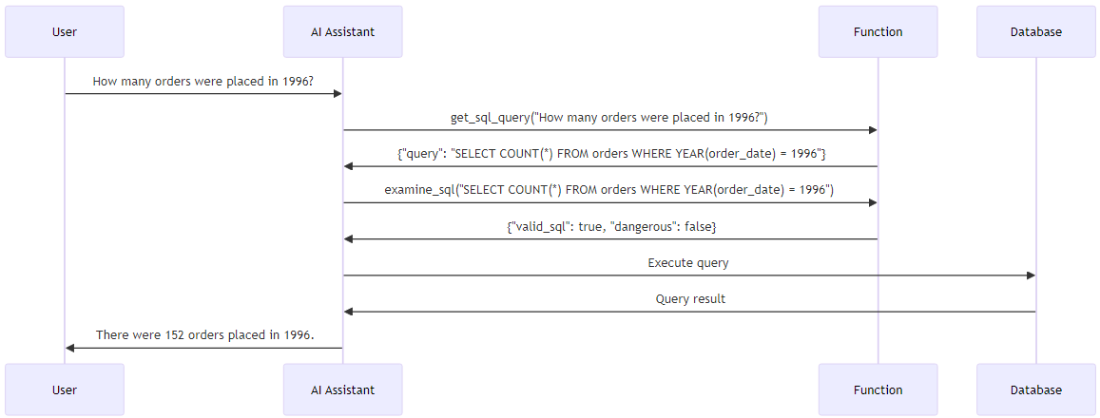
- get_sql_query: Generates a SQL statement based on the user’s natural‑language request and the provided schema.- examine_sql: Validates the generated SQL for correctness and risk (e.g., potentially destructive operations).
Typical flow: model generates SQL → your app calls examine_sql → if safe, your app runs the query and returns results for the model to summarize. If unsafe, you block execution and return a safe alternative or an error message.
How do token limits impact my system prompt and function definitions?
Models have context limits (e.g., GPT‑4o/GPT‑4 Turbo with Vision ~128k tokens; GPT‑3.5 Turbo ~4096 tokens). System instructions, schema text, conversation history, and function definitions all count toward that limit. Be concise: include only the schema details you need, compress long instructions, and balance function complexity against available context.What security practices should I follow when executing AI‑generated outputs?
- Validate and sanitize all inputs and parameters from the model.- Filter outputs to catch potentially harmful content before execution.
- Use least privilege (e.g., read‑only DB accounts).
- Implement robust error handling to avoid leaking sensitive info.
- Apply rate limiting to avoid abuse.
- Log and monitor tool calls for anomalies. Treat the model’s validation as an extra layer, not your only safeguard.
What are GPT Actions, and how are they different from function calling?
GPT Actions connect GPTs to external APIs via an OpenAPI spec so the model can fetch real‑world data or perform actions. Function calling structures the model’s output for your app to process. Key differences:- GPT Actions: Model calls your API directly within ChatGPT, great for exploring or integrating real‑time services; limited by factors like a ~30‑operation cap per Action, latency, API drift, and debugging complexity.
- Function calling: Your app stays in control; you parse JSON and decide what to execute inside your environment.
Can I combine GPT Actions with function calling, and what are good use cases?
Yes. Use GPT Actions to fetch external data (e.g., monitoring metrics, stock prices, calendars) and function calling to process, validate, and act on that data inside your app. Examples:- Pull DB performance metrics via a monitoring API (Action), then generate alerts or summaries (function calling).
- Retrieve real‑time prices (Action), then analyze and produce recommendations (function calling).
Always apply the same security and context discipline you’d use for either feature alone.

 AI for Everyday IT ebook for free
