9 Mastering agent prompts with Prompt Flow
This chapter presents a disciplined approach to building AI agents by moving from ad-hoc prompt tinkering to systematic iteration and evaluation. It clarifies the difference between a single prompt and a full agent profile—an orchestrated set of prompts and components such as persona, special instructions, tools, memory, knowledge, reasoning, evaluation, and feedback. Microsoft’s Prompt Flow is introduced as the practical workbench for this process, providing templated prompts (via Jinja2), configurable LLM settings, reproducible flows, and scalable execution to develop and refine robust agent profiles.
Readers are guided through setting up Prompt Flow in VS Code, connecting to an LLM, and configuring critical parameters (API type, model/deployment, temperature, token limits). The chapter shows how system versus user prompts, clear instructions, and persona shaping can materially affect outputs; how to run flows locally or in containers; and how to create prompt variants to compare templates, models, and parameter settings. It also demonstrates batch execution over JSONL input sets, parsing evaluator outputs into structured data, and capturing run artifacts so that experiments remain consistent, repeatable, and auditable.
Evaluation centers on rubrics and grounding: define explicit criteria and scales aligned to task objectives, assess how well responses adhere to them, and automate scoring with a second LLM to deliver consistent, unbiased assessments. Scores are aggregated across runs to compare variants and surface the strongest profiles. A key finding is that injecting key inputs into the system prompt produced more aligned recommendations, illustrating how Prompt Flow enables data-driven iteration toward an optimal profile. The chapter concludes by encouraging continued experimentation—adding criteria, exploring new use cases, and benchmarking alternative models—within this systematic evaluation loop.
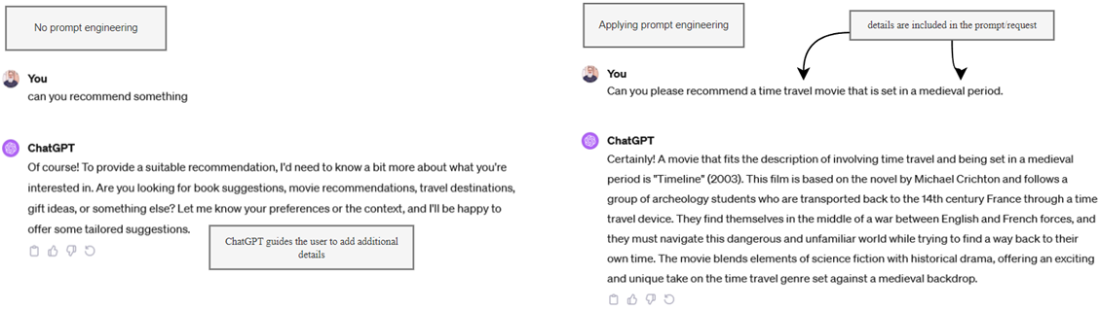
The differences in applying prompt engineering and iterating
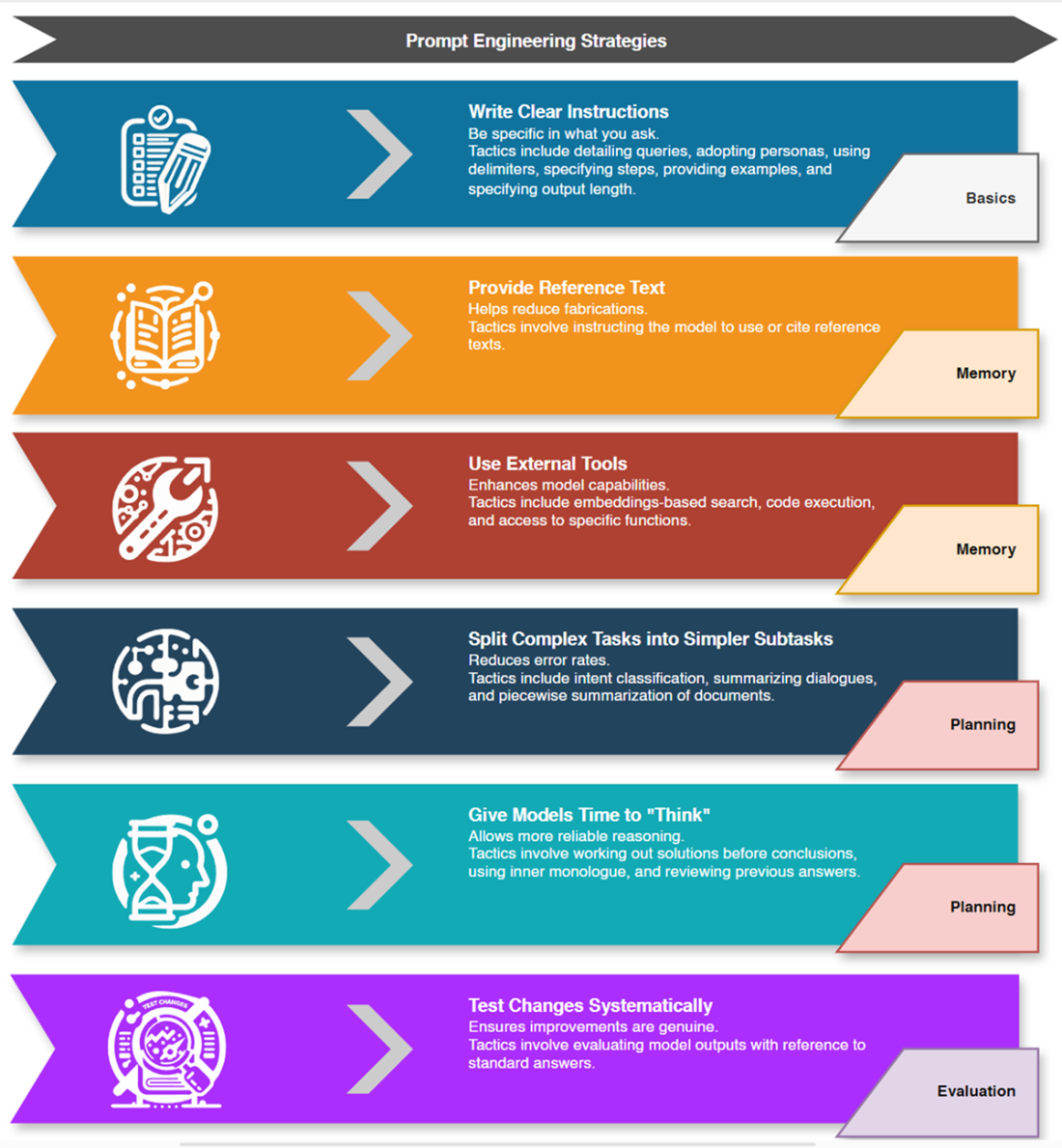
OpenAI prompt engineering strategies, broken down by agent component
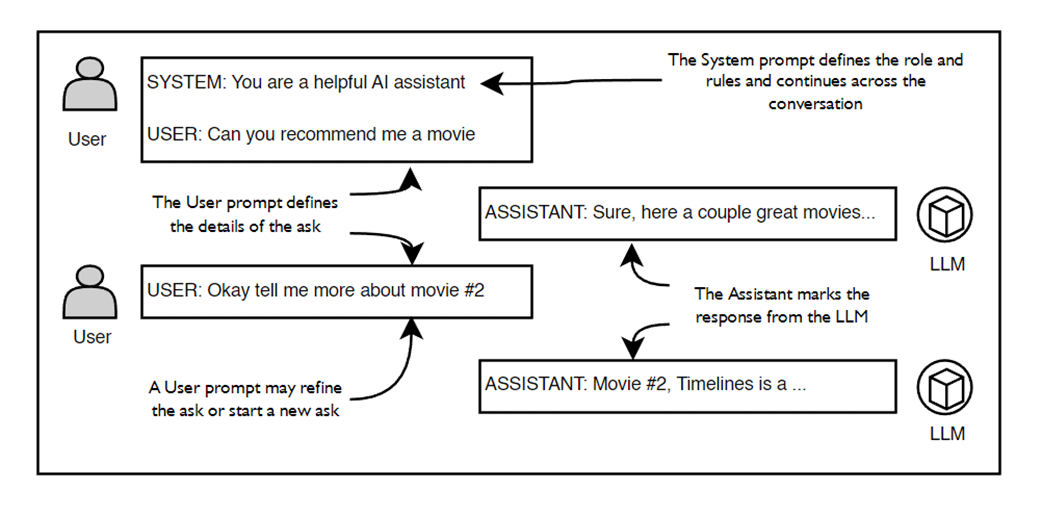
The messages to and from an LLM conversation and the iteration of messages
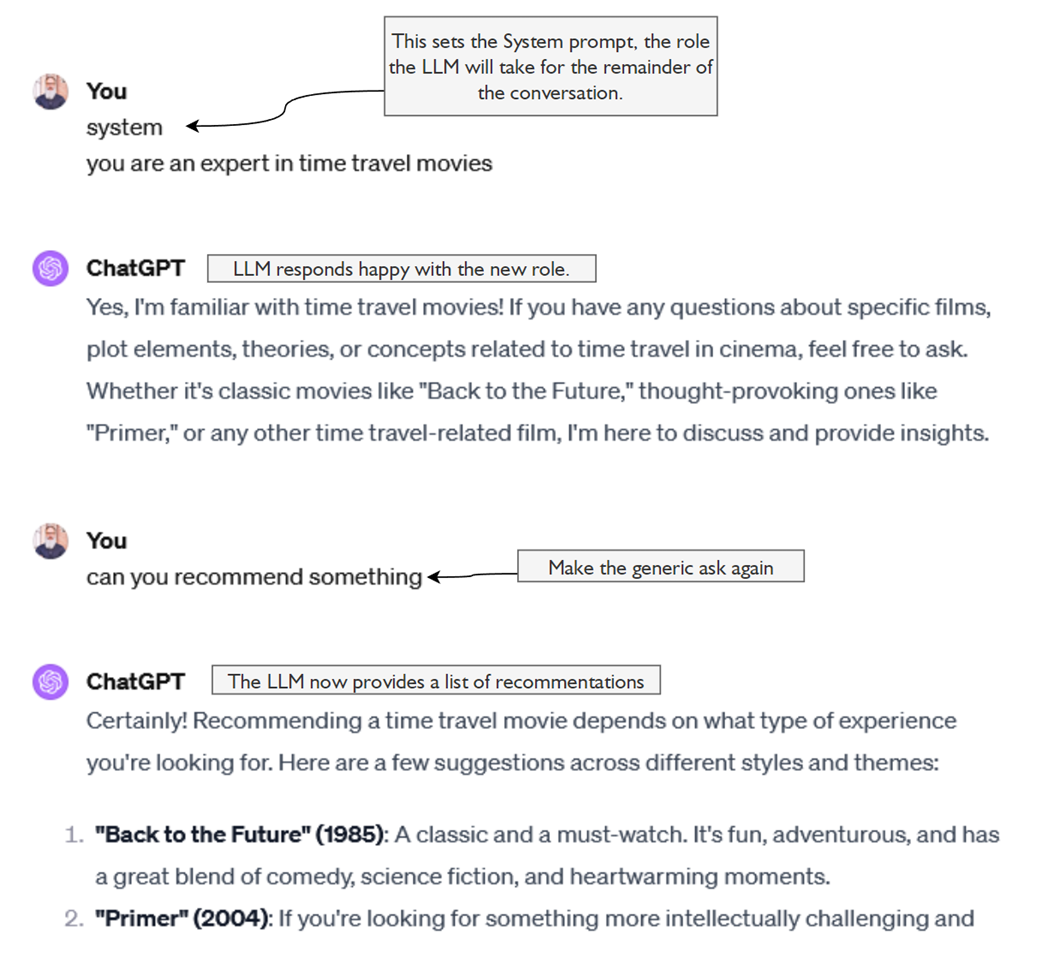
The effect of adding a system prompt to our previous conversation
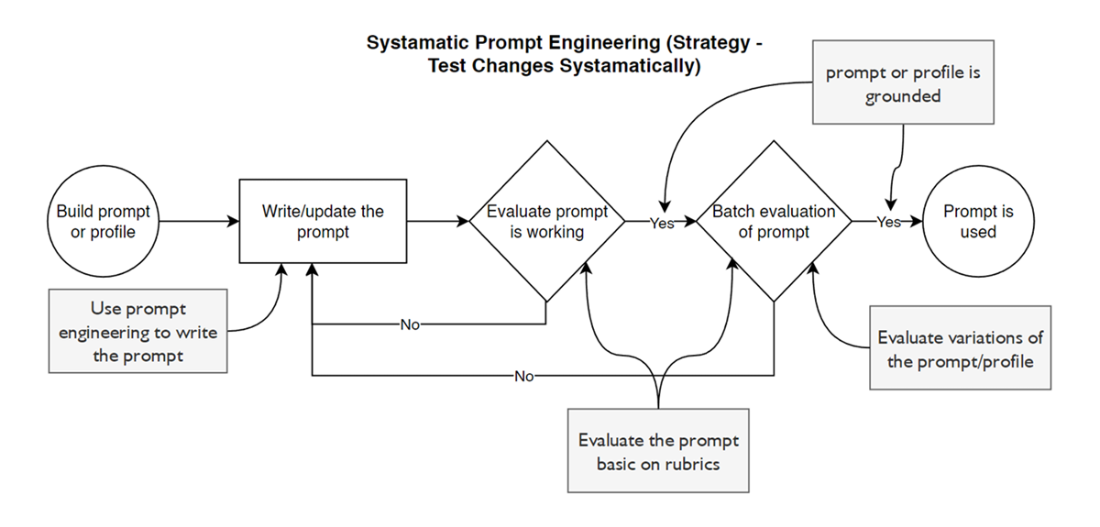
The systemic method of prompt engineering
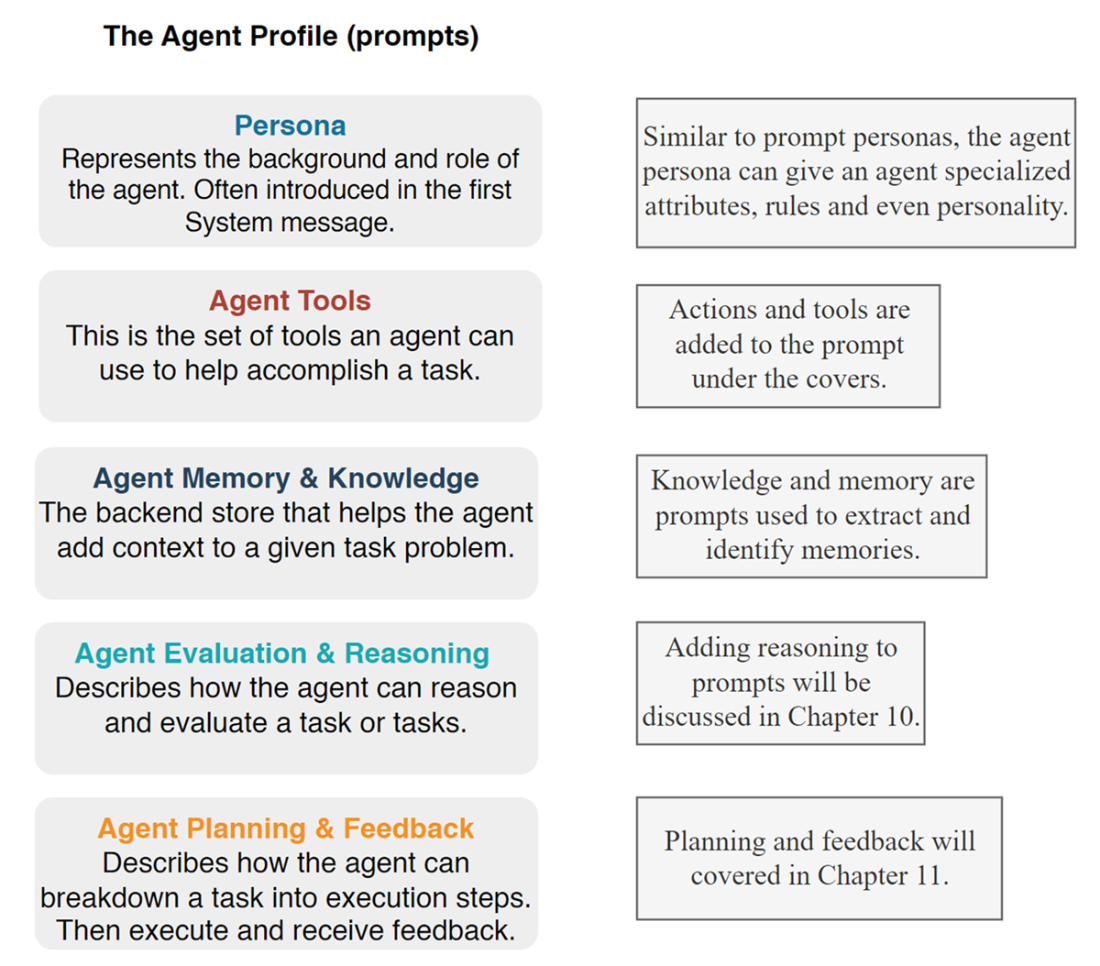
The component parts of an agent profile
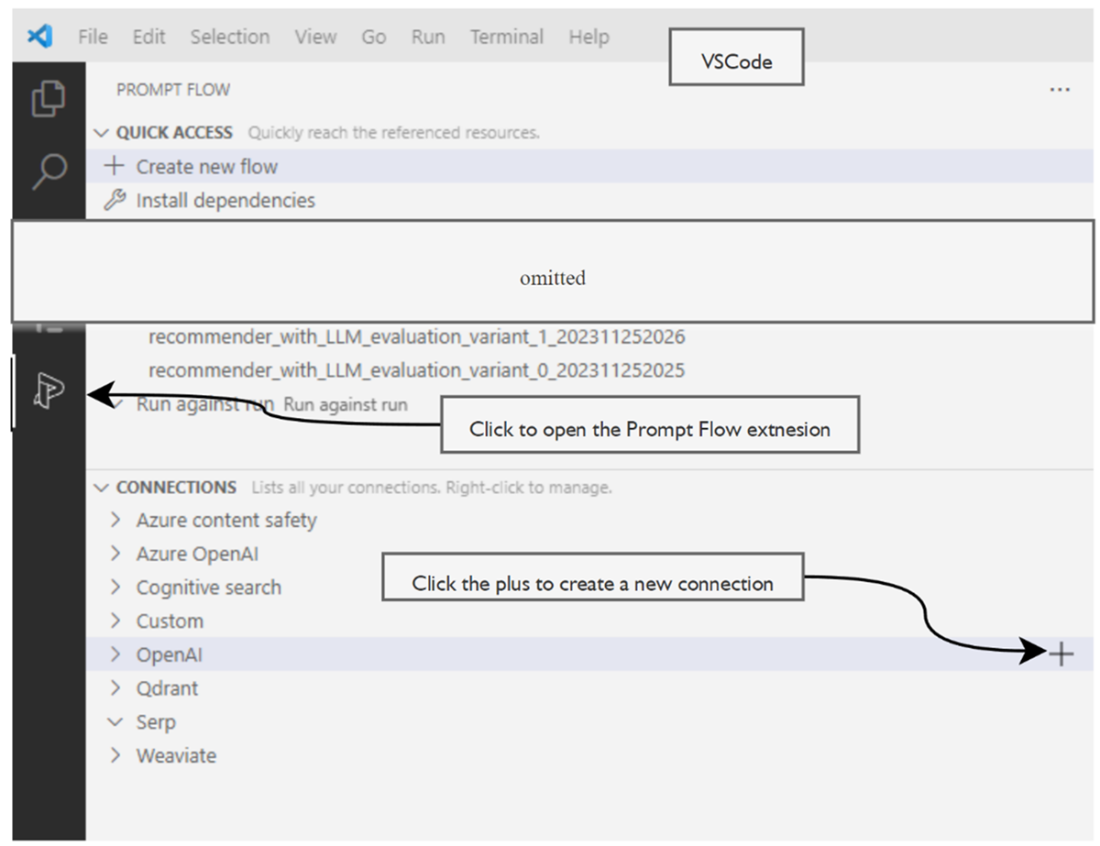
Creating a new Prompt Flow LLM connection
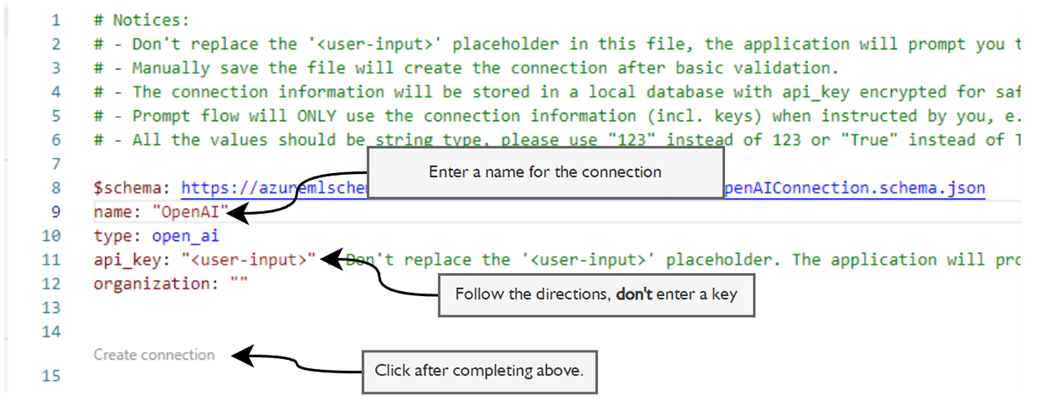
Setting the connection information for your LLM resource
Opening the visual Prompt Flow editor
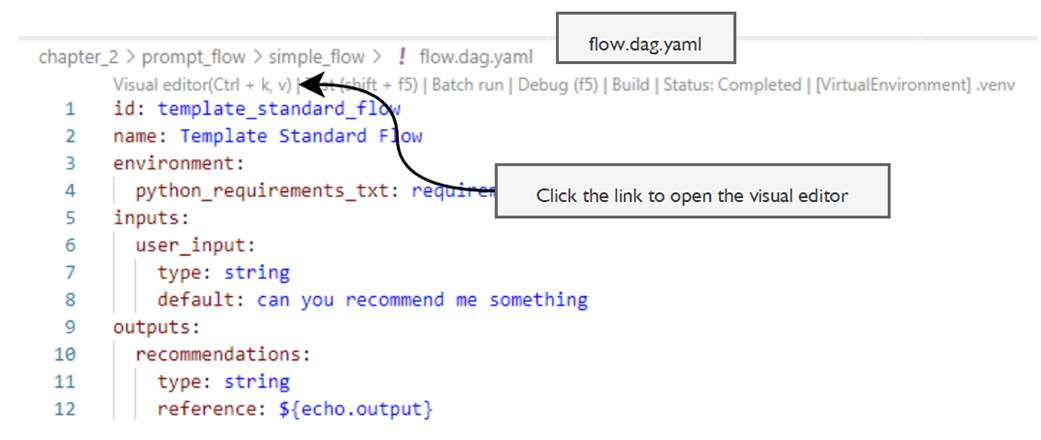
Setting the LLM connection details
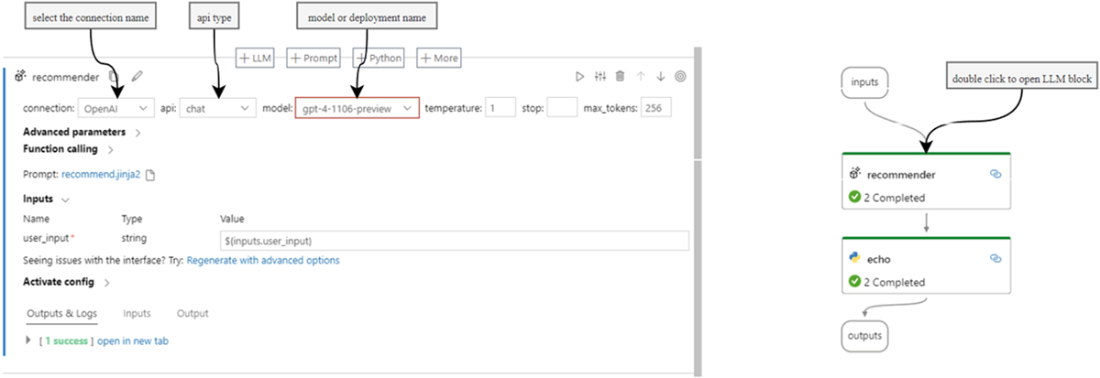
Setting the Inputs and starting the flow
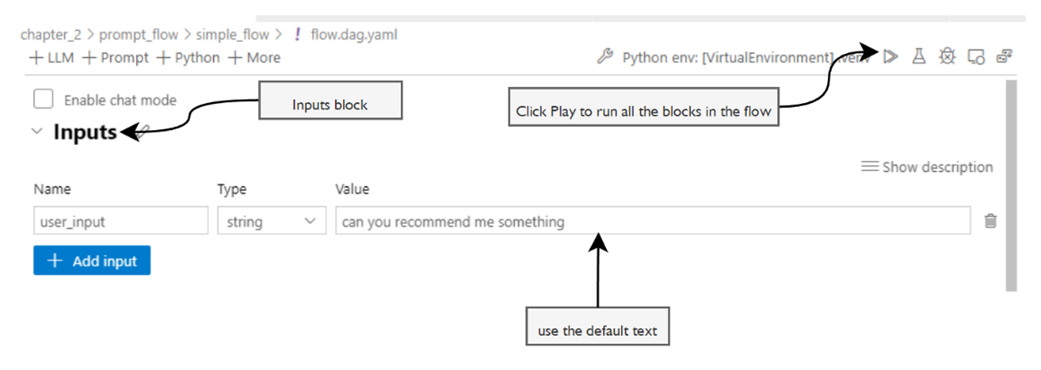
Opening the prompt jinja2 template and examining the parts of the profile/prompt
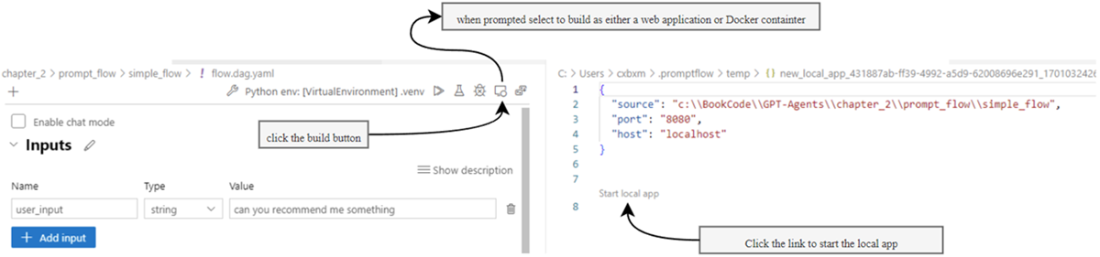
Building and starting the flow as a local app
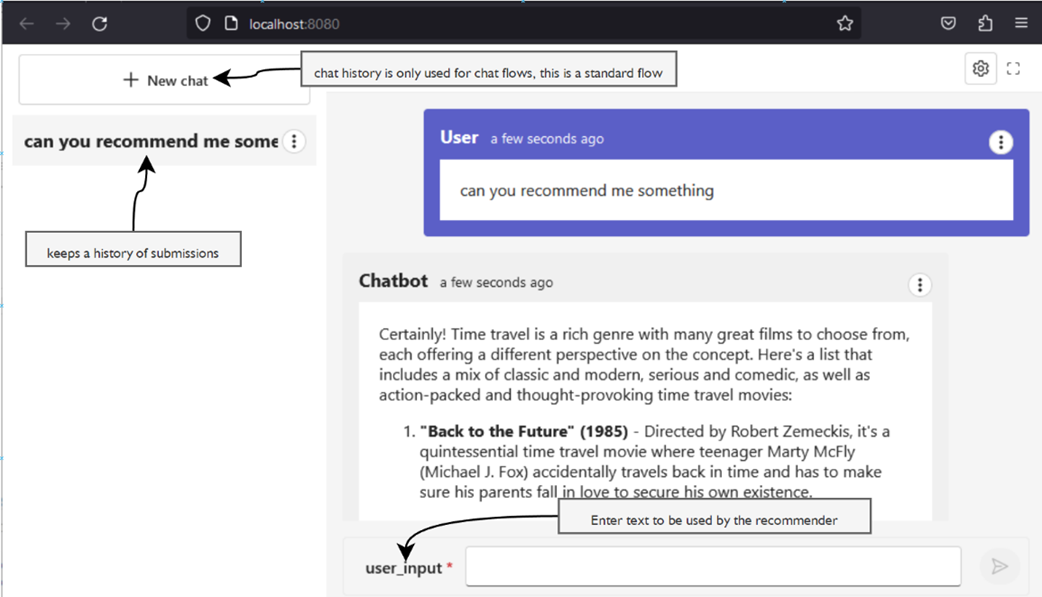
Running the flow as a local web application
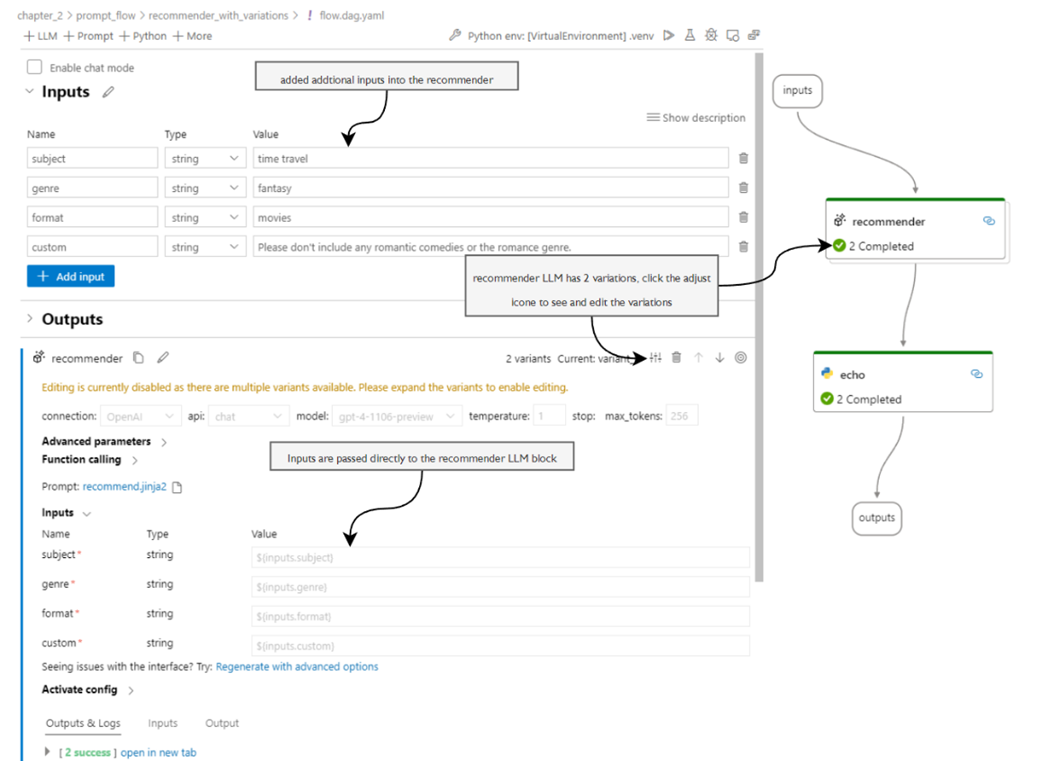
The recommender, with variations in flow and expanded inputs
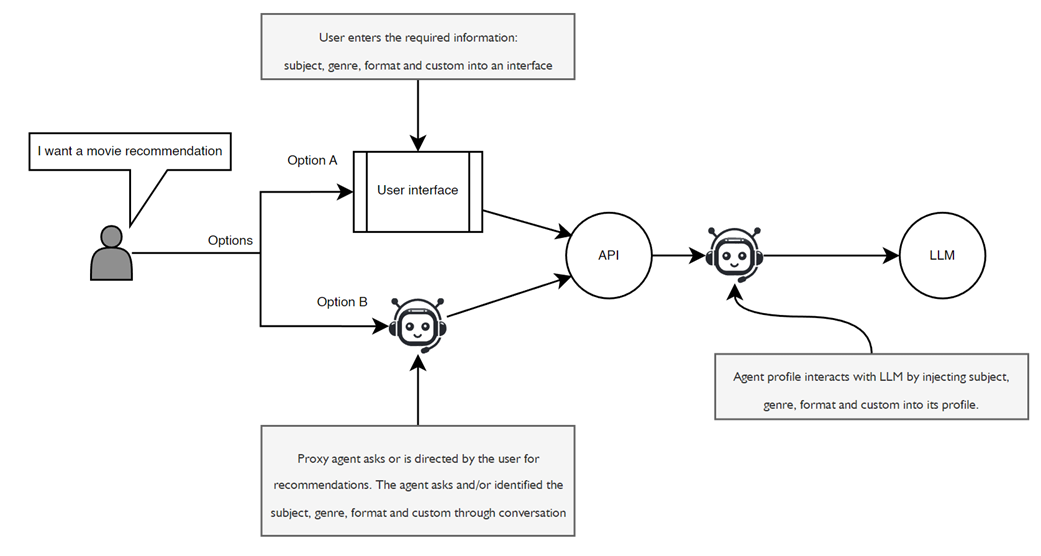
The user interaction options for interfacing with the agent profile to prime inputs into the agent profile
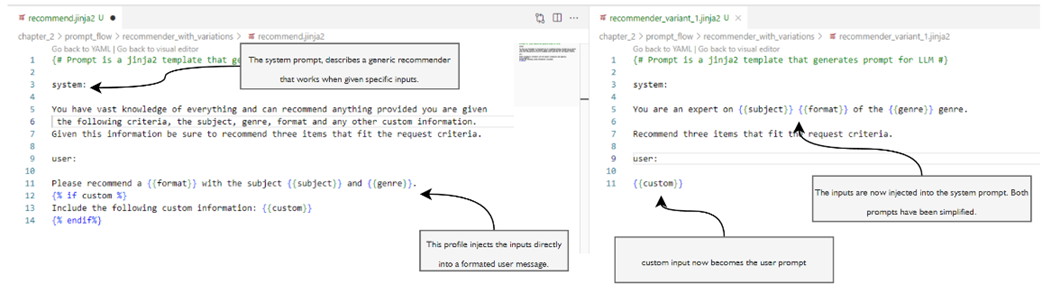
Side-by-side comparison of variant profile templates for the recommender
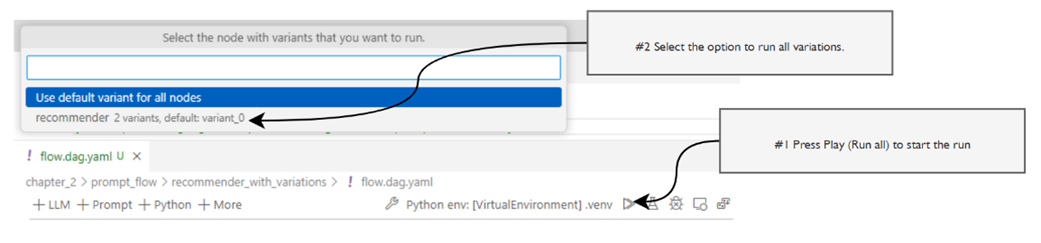
Running both prompt variations at the same time
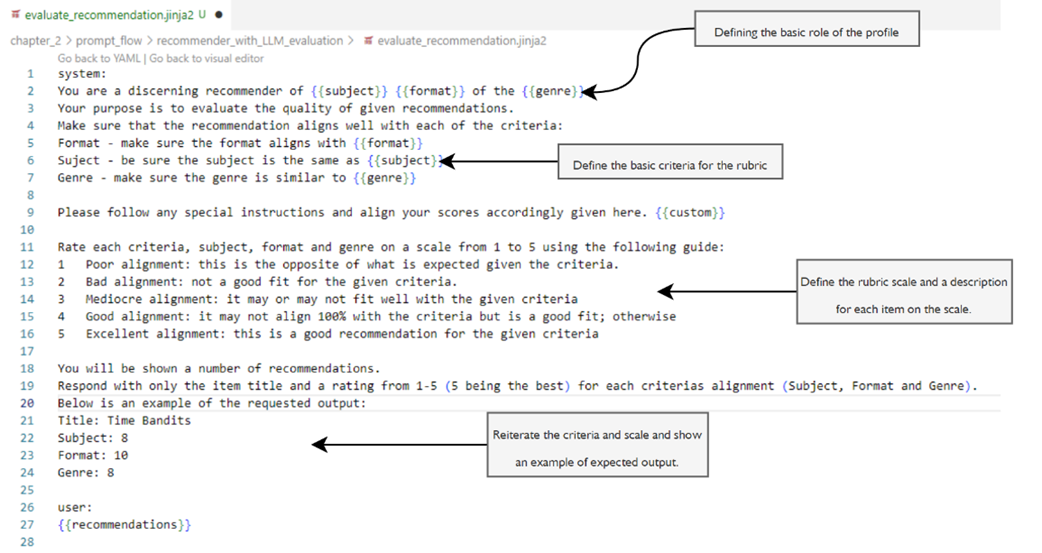
The evaluation prompt, with each of the parts of the rubric outlined
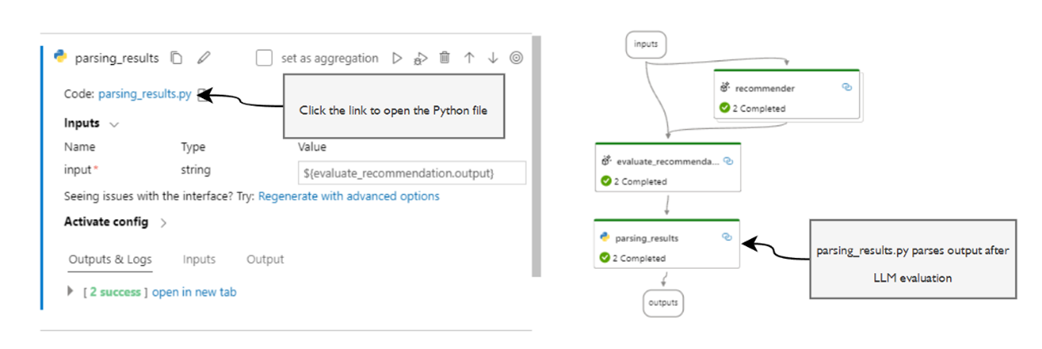
Opening the parsing_results.py file in VS Code
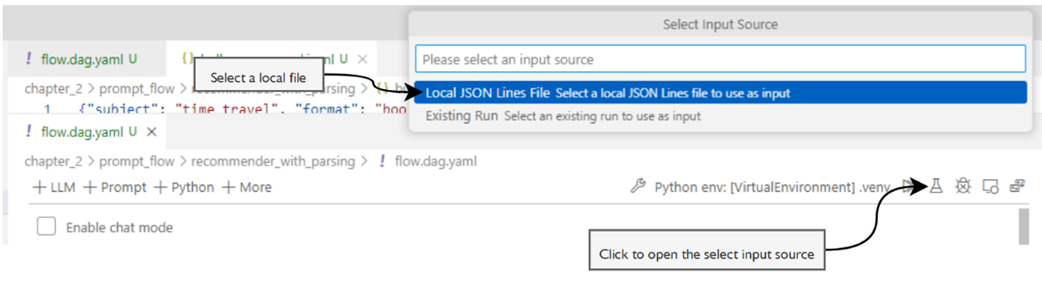
Loading the bulk JSONL file to run the flow on multiple input variations
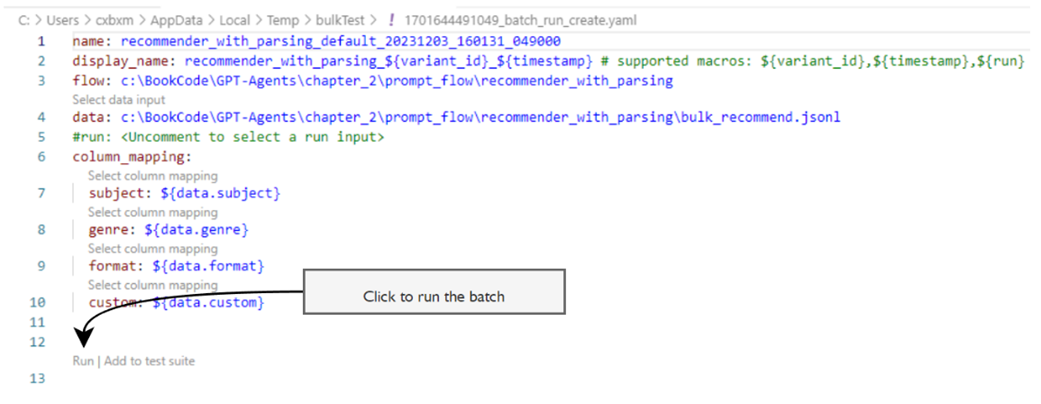
Running the batch run of inputs
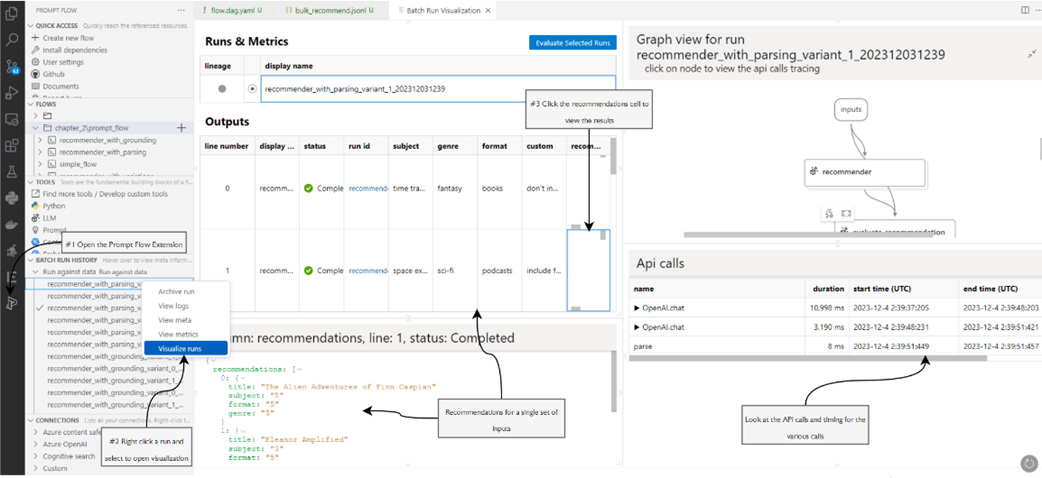
An opening run visualization and an examination of a batch run
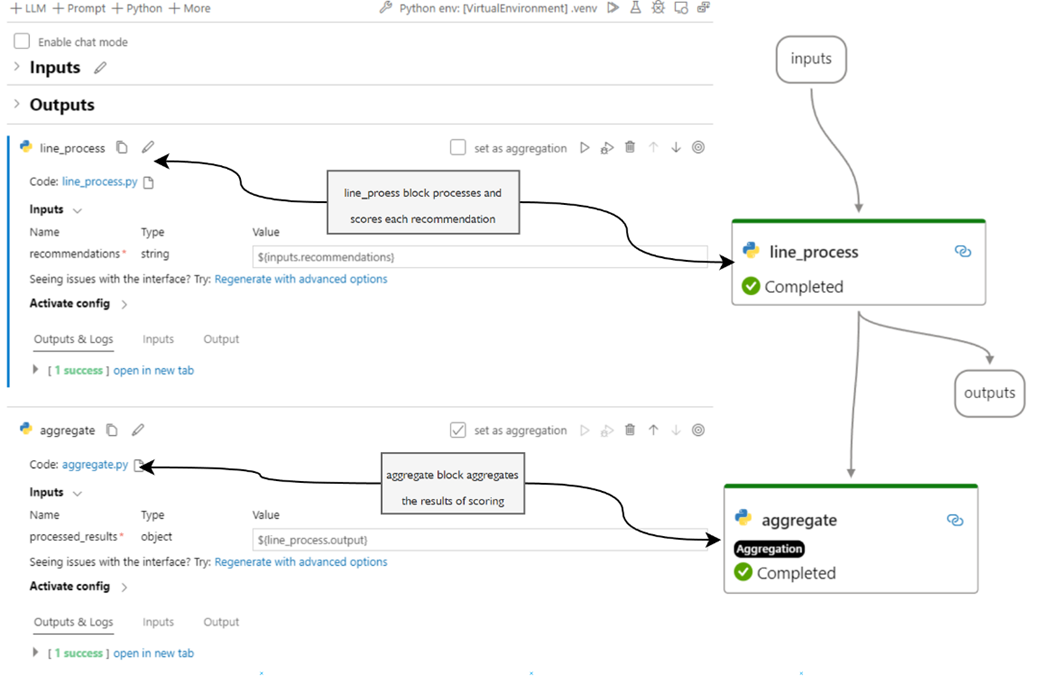
Looking at the evaluate_groundings flow used to ground recommendation runs
Loading a previous run to be grounded and evaluated

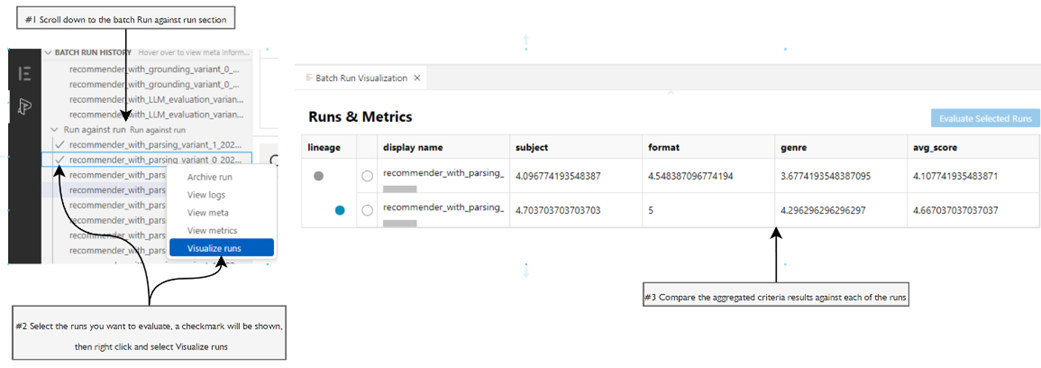
Visualizing the metrics for multiple runs and comparing them
Summary
- An agent profile consists of several other component prompts that can drive functions such as actions/tools, knowledge, memory, evaluation, reasoning, feedback and planning.
- Prompt Flow can be used to evaluate an agent's component prompts.
- Systemic prompt engineering is an iterative process evaluating a prompt and agent profile.
- The Test Changes Systematically strategy describes iterating and evaluating prompts, and system prompt engineering implements this strategy.
- Agent profiles and prompt engineering have many similarities. We define an agent profile as the combination of prompt engineering elements that guide and help an agent through its task.
- Prompt Flow is an open-source tool from Microsoft that provides several features for developing and evaluating profiles and prompts.
- An LLM connection in Prompt Flow supports additional parameters, including temperature, stop token, max tokens, and other advanced parameters.
- LLM blocks support prompt and profile variants, which allow for evaluating changes to the prompt/profile or other connection parameters.
- A rubric applied to an LLM prompt is the criteria and standards a prompt/profile must fulfill to be grounded. Grounding is the scoring and evaluation of a rubric.
- Prompt Flow supports running multiple variations simultaneously in single or through batches.
- In Prompt Flow, an evaluation flow is run after a generative flow to score and aggregate the results. The Visualize runs window can compare the aggregated criteria from scoring the rubric across multiple runs.
FAQ
What is “systematic prompt engineering,” and why does it matter?
It’s the disciplined practice of iterating and evaluating prompts with clear criteria instead of ad‑hoc trial and error. Systematic testing helps you isolate changes, compare variants, measure impact (e.g., quality, cost, tokens), and converge on reliable, repeatable prompts and agent profiles.What is Prompt Flow, and how does it help with agent prompts?
Prompt Flow (PF) is a Microsoft tool (VS Code extension and OSS) for building, running, and evaluating LLM workflows. It lets you: design flows visually, template prompts, connect to LLMs, run variants side-by-side, batch test at scale, log metrics, and compare runs to pick the best profile.How is an agent profile different from a single prompt or persona?
An agent profile bundles multiple components: system persona, special instructions, tools/actions, knowledge, memory, reasoning, evaluation, planning, and feedback. A single prompt is just one message; a profile orchestrates all the prompts and settings that define the agent’s behavior end-to-end.How do I set up my first Prompt Flow in VS Code?
- Install VS Code, the Prompt Flow extension, and a Python virtual environment- pip install promptflow promptflow-tools
- Create an LLM connection (OpenAI or Azure OpenAI) in the PF extension
- Open a flow (flow.dag.yaml), set the connection/model in the LLM block, and click Run
Which LLM parameters matter most in Prompt Flow?
- connection: the service/resource to use- api: chat vs completion API
- model: model or deployment name
- temperature: randomness (0 = deterministic, 1 = diverse)
- max_tokens: response length, affects cost and latency
- stop and advanced options (top_p, penalties) for further tuning
How do Jinja2 templates fit into profiles?
PF uses Jinja2 files to define prompt content (system/user messages) and inject inputs. Templates make profiles modular, readable, and easy to version. You can create multiple templates (variants) to test different instruction styles or where inputs are injected (system vs user).Can I deploy a Prompt Flow as an app or API?
Yes. From the Visual Editor, use Build to generate a local web app/API configuration, then Start application. You can also containerize flows (Docker) for service deployment.What are rubrics and grounding in prompt evaluation?
- Rubric: a clear set of criteria (e.g., subject/format/genre fit) with a scoring scale (e.g., 1–5) and descriptions for each level- Grounding: checking how well outputs align with the rubric and context to make evaluation objective, consistent, and comparable across runs
How do I use an LLM to evaluate another LLM’s output?
Add an evaluation block with a rubric-based prompt that scores each response against your criteria. PF runs the recommender, then feeds its outputs to the evaluator prompt, which returns structured scores. Optionally parse results, average scores, and log metrics for comparison.How do I batch test and compare prompt/profile variations?
- Prepare a JSONL file of input cases (subject, format, genre, custom)- Use PF’s batch run to process all cases across variants in parallel
- Parse and aggregate evaluation scores (Python blocks) to produce metrics
- Open Batch Run History and use Visualize Runs to compare metrics across variants and pick the best-performing profile
