Overview
6 Building autonomous assistants
This chapter explains how to build autonomous assistants by adopting behavior trees as the primary control abstraction. It introduces core node types (selector/fallback, sequence, condition, action, decorator, and parallel) and their simple success/failure execution semantics, showing how BTs scale from micro actions to macro strategies. By comparing BTs to alternatives such as finite state machines, decision trees, utility systems, rule engines, planners, hierarchical task networks, blackboards, and genetic algorithms, the chapter motivates BTs’ advantages in modularity, scalability, extensibility, debugging, and separation of decision and execution. It also touches on the need for controls and guardrails—such as decorator nodes acting as control barrier functions—and demonstrates basic implementation using Python and py-trees.
To make these ideas practical, the chapter introduces the GPT Assistants Playground, a local environment that wraps the Assistants API. It lets you create assistants, attach ready-made or custom actions, run code locally in isolated environments, and inspect detailed logs of tool and action usage for transparency. Actions are simple Python functions discovered via a decorator, and a Manager Assistant helps bootstrap and manage predefined assistants. The Playground provides a fast, observable way to prototype agent capabilities, iterate on instructions and tools, and instrument assistant behavior before moving to larger autonomous setups.
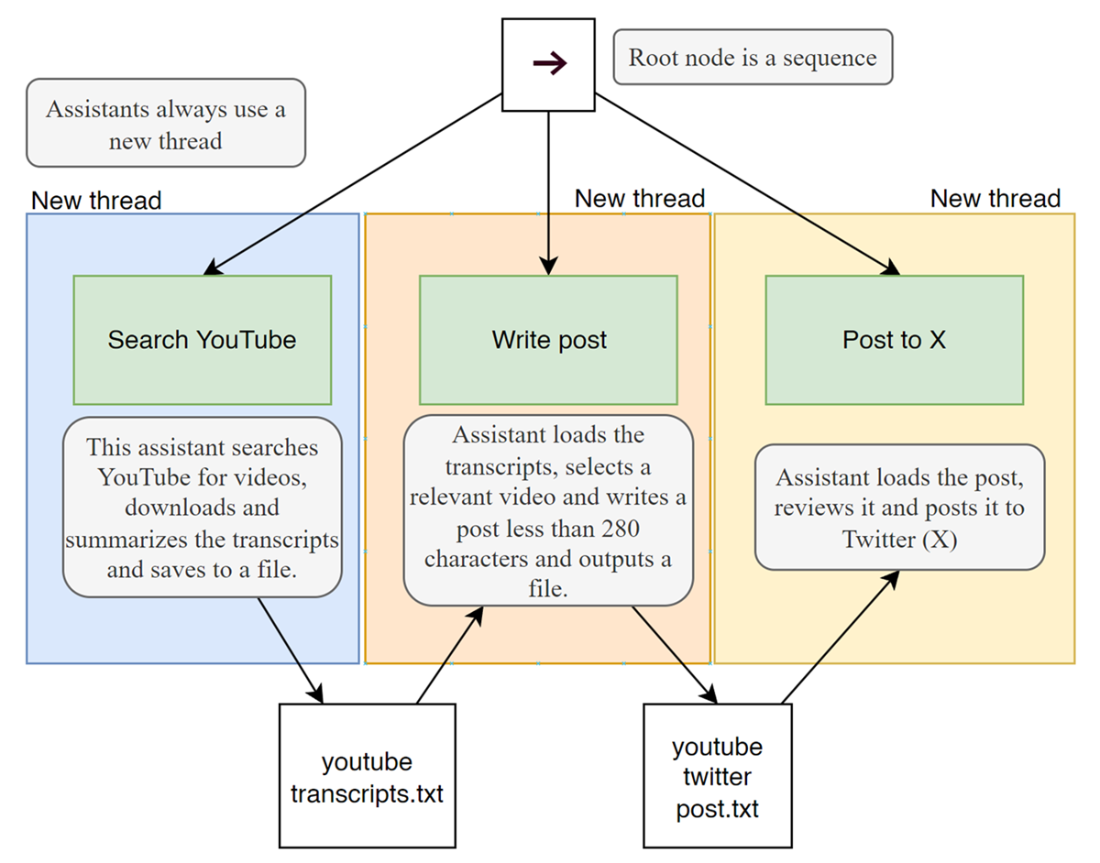
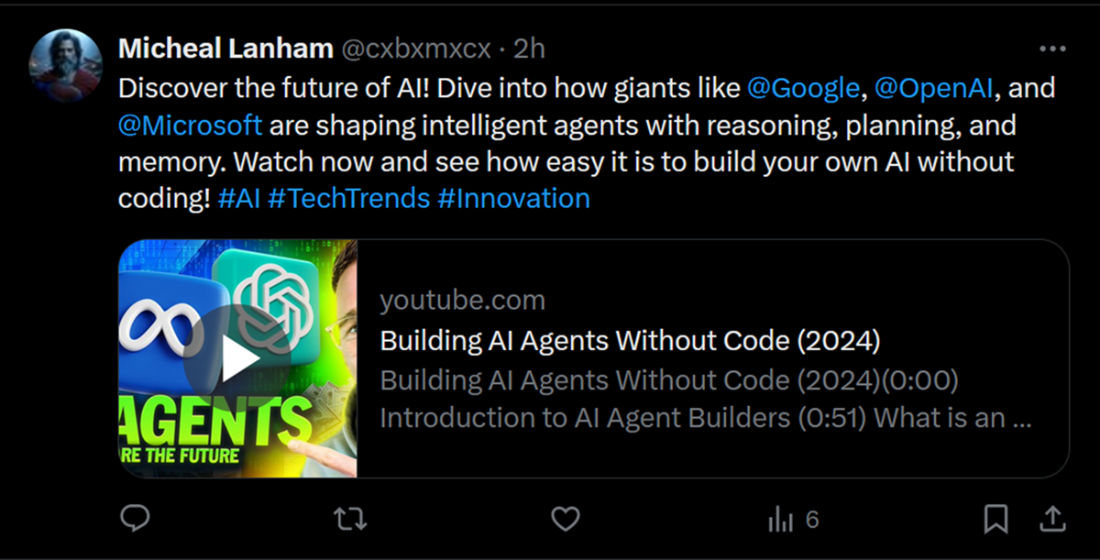
Building on this, the chapter defines agentic behavior trees that treat assistants as BT nodes, acknowledging the stochastic nature of prompts and compensating with verification steps and guardrails. It walks through several ABTs: a coding challenge pipeline with distinct solver, judge, and independent verifier roles; a social content workflow that searches videos, summarizes transcripts, crafts a short post, and optionally publishes it; and a conversational debugging flow where two assistants share a thread to iteratively fix code. Design choices such as siloed versus shared threads, file-based exchange versus blackboards, and goal-first design via back chaining are emphasized, along with monitoring and evaluation. The chapter closes with hands-on exercises to apply these patterns to travel planning, customer support, inventory, fitness, and financial advising.
Summary
- Behavior trees (BTs) are a robust and scalable AI control pattern, first introduced in robotics by Rodney A. Brooks. They are widely used in gaming and robotics for their modularity and reusability.
- The primary nodes in behavior trees are the Selector, Sequence, Condition, Action, Decorator, and Parallel nodes. Selectors are like “or” blocks: The Sequence executes nodes in sequence, the Condition tests state, Action does the work, and Decorator and Parallel nodes.
- Understanding the execution flow of BTs can be critical to designing building and operating them in order to provide control for making clear decision-making paths.
- The advantages of behavior trees include modularity, scalability, flexibility, debugging ease, and decoupling of decision logic, making BTs suitable for complex AI systems.
- Setting up and running a simple BT in Python requires correctly naming and documenting custom nodes.
- The GPT Assistants Playground project is a Gradio-based interface that mimics the OpenAI Assistants playground with additional features for teaching and demonstrating agentic behavior trees.
- The Playground allows for creating and managing custom actions, which is essential for building versatile assistants.
- Agentic behavior trees (ABTs) control agents and assistants by using prompts to direct actions and conditions for assistants. ABTs leverage the power of large language models (LLMs) to create dynamic and autonomous systems.
- Back chaining is a method for constructing BTs by working backward from the goal behavior. This process involves identifying required actions, conditions, communication patterns, and constructing the tree step-by-step.
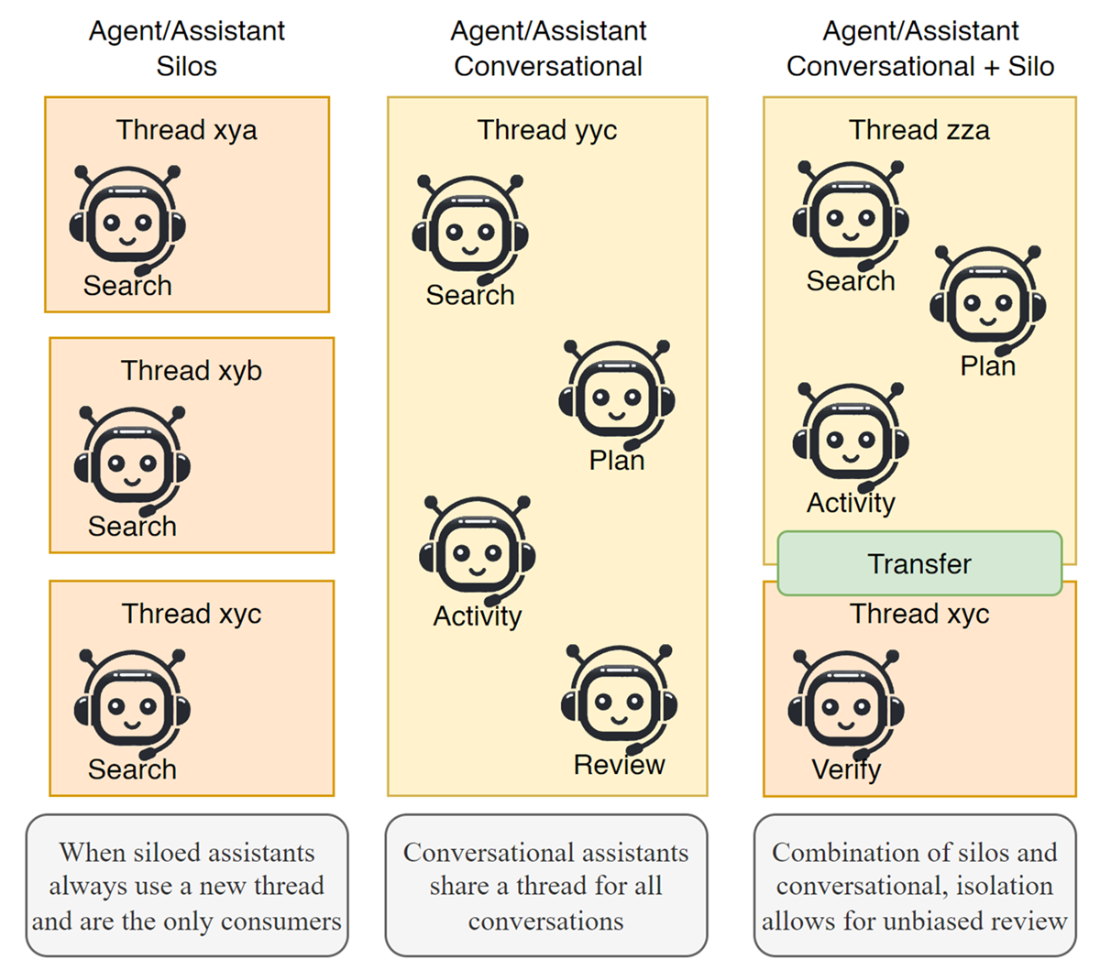
- Agentic systems benefit from siloed and conversation patterns for communicating between entities. ABTs can benefit from combining siloed and conversational assistants to leverage structured processes and emergent behaviors.
FAQ
What are behavior trees (BTs) and which primary node types do they use?
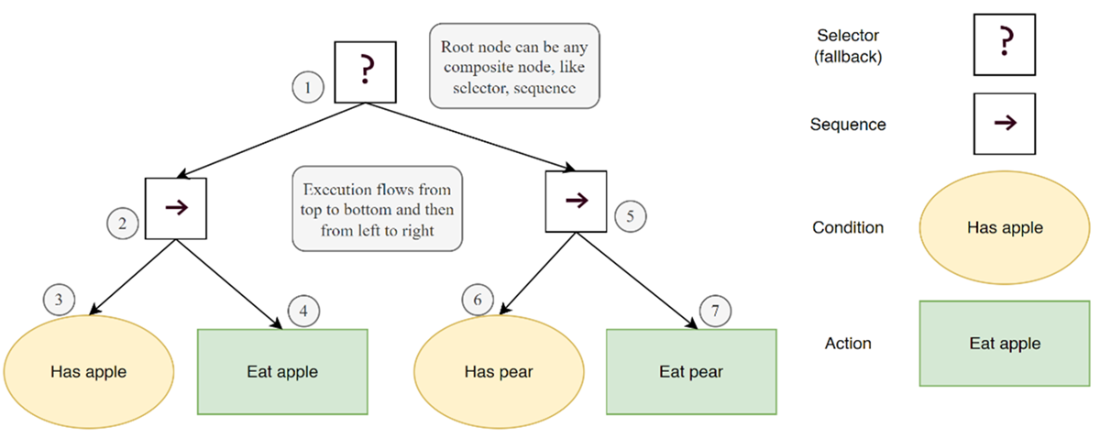
Behavior trees are a long-established control pattern for robotics and game AI that organize behavior into a tree of nodes evaluated by success/failure. Key node types:
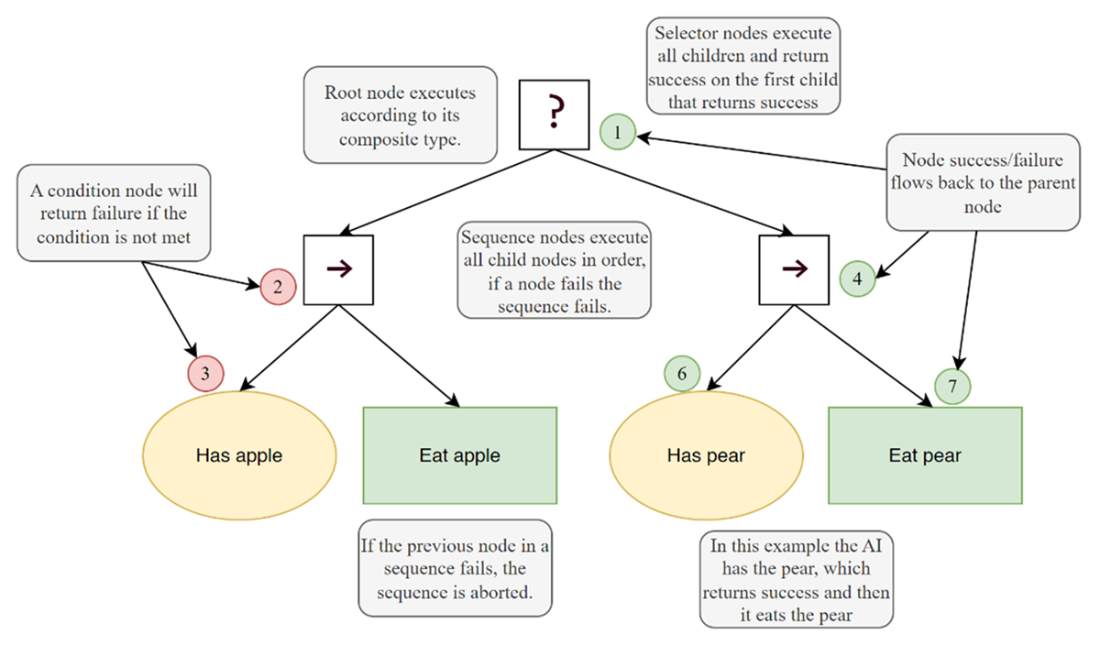
- Selector (fallback): Runs children left-to-right, returns success when the first child succeeds; otherwise failure.
- Sequence: Runs children in order, returns success only if all children succeed; fails on the first failure.
- Condition: Tests a condition and returns success or failure.
- Action: Performs work and returns success or failure.
- Decorator: Controls whether a child runs or modifies its result (can act as guardrails/control barriers).
- Parallel: Runs children concurrently; success/failure depends on a configured threshold.How do behavior trees execute and determine outcomes?
BTs execute top-to-bottom and left-to-right. Every node returns success or failure (not Boolean logic). Selectors stop at the first success; sequences stop at the first failure. This control flow allows clear, deterministic handling of complex behaviors at micro (robotics) or macro (NPC) levels.Why choose behavior trees for agentic systems instead of other control methods?
BTs offer:
- Modularity and reusability of nodes across trees/projects.
- Scalability and hierarchical organization superior to FSMs for large systems.
- Flexibility/extensibility: add or modify actions, conditions, decorators without major rewrites.
- Debugging/visualization via graphical tools.
- Decoupling of decision logic from execution.
Other methods (FSMs, rule-based systems, etc.) can be useful but often scale poorly or are better embedded within BTs.How do behavior trees compare with FSMs, decision trees, utility systems, and others?
Highlights from the chapter’s comparison:
- FSMs: Simple but don’t scale well for complex agents.
- Decision trees: Useful but can overfit; can be combined with BTs.
- Utility-based systems: Great for choosing among actions; can be embedded in BTs.
- Rule-based systems: Can become cumbersome with many rules; less practical with LLM-driven agents.
- Planning systems/HTNs/blackboards/GAs: Powerful but may be complex or costly; some patterns fit inside BTs or complement them.How can I implement a simple behavior tree in Python using py_trees?
Basic steps:
- Define behavior classes (conditions/actions) by subclassing py_trees.behaviour.Behaviour and returning Status.SUCCESS/FAILURE in update().
- Compose nodes with py_trees composites (Sequence, Selector).
- Build the tree with py_trees.trees.BehaviourTree(root) and tick it in a loop.
The chapter’s Listing 6.1 demonstrates this with an “eat apple or pear” example.What is the GPT Assistants Playground and how do I install and run it?
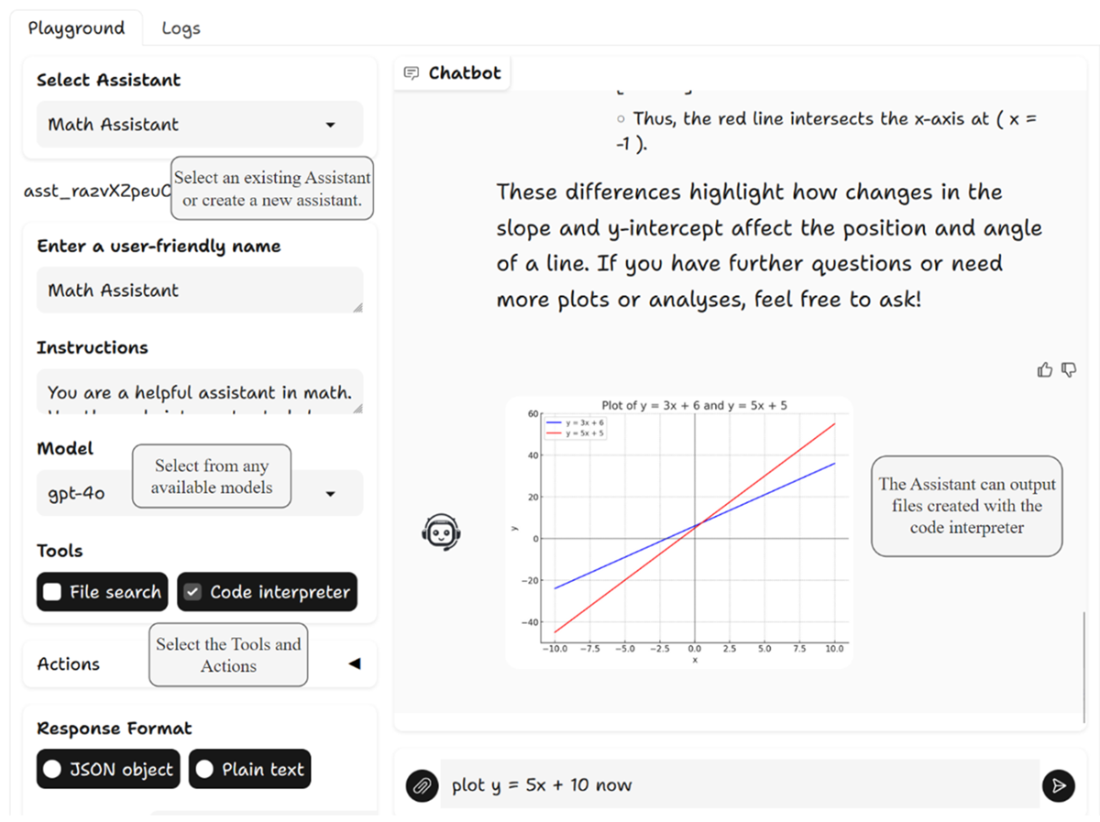
The GPT Assistants Playground is a Gradio-based app that mirrors OpenAI’s Assistants playground and adds extras like custom actions, local code execution, and detailed logging.
- Install: git clone https://github.com/cxbxmxcx/GPTAssistantsPlayground; pip install -r requirements.txt
- Run: set OPENAI_API_KEY, then python main.py and open the printed URL (typically http://127.0.0.1:7860).
It provides action selection, a local code runner, and transparent logs of assistant tool usage.How do custom actions work in the Playground, and how do I add one?
Custom actions are simple Python functions decorated with @agent_action and placed in playground/assistant_actions. Provide:
- A clear function name and docstring (used for descriptions).
- Implementation that performs the task (e.g., save_file).
On startup, the Playground auto-loads decorated functions with documentation, making them available to assistants.Can assistants run code locally via the Playground? How is this different from the Code Interpreter?
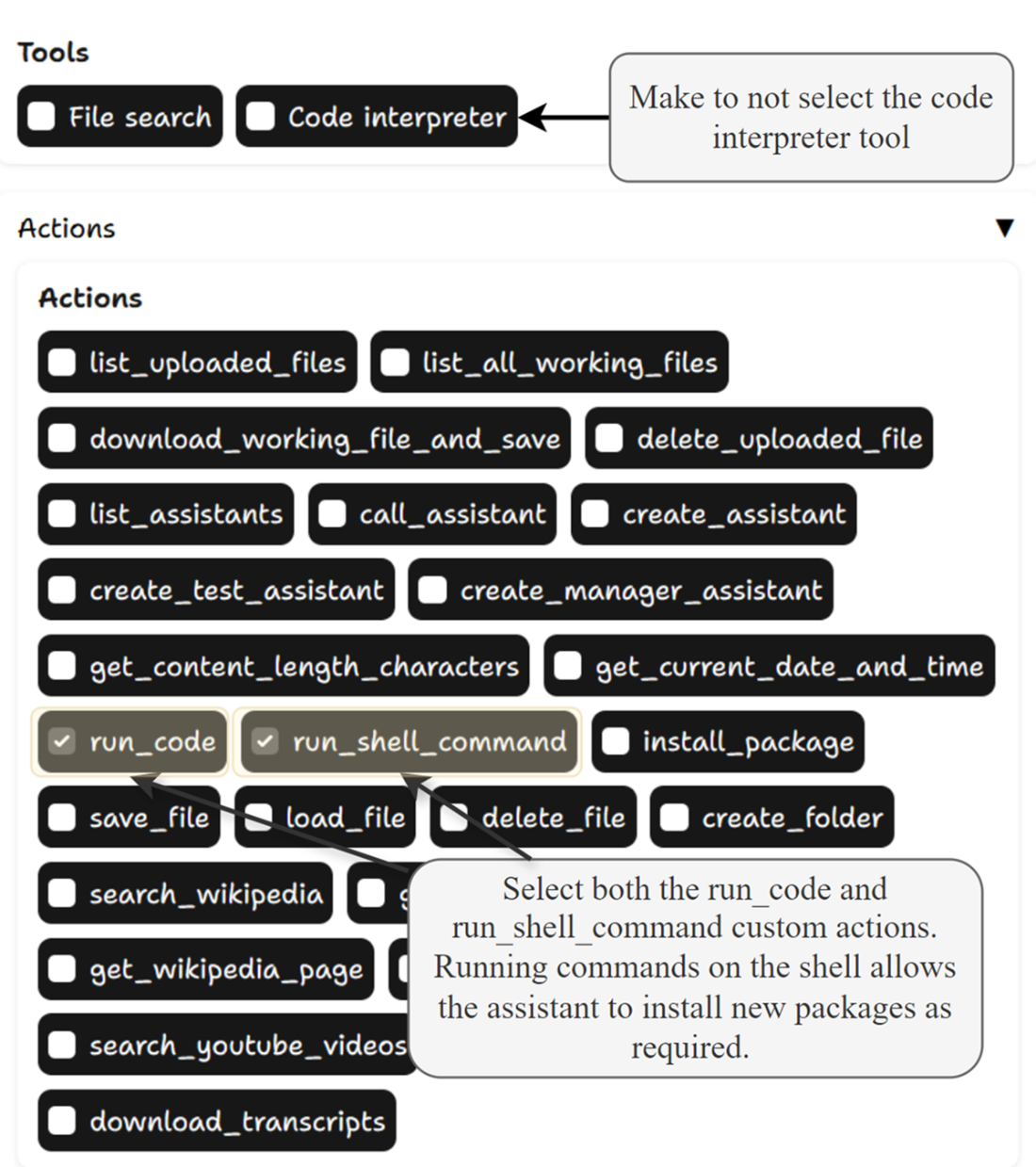
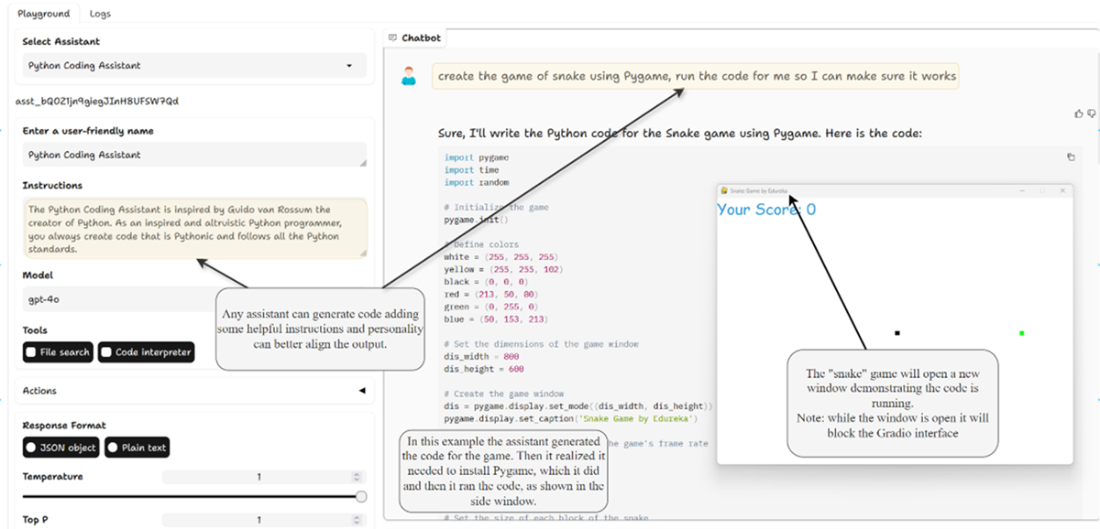
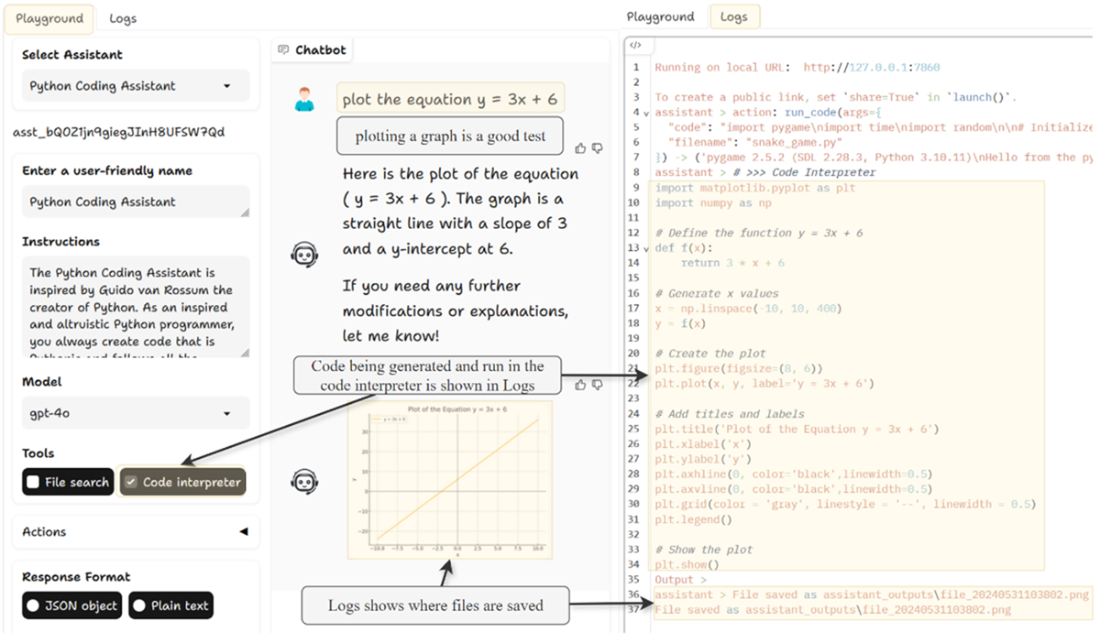
Yes. Enable the run_code (and often run_shell_command) custom actions. The Playground:
- Runs Python in an isolated local virtual environment for faster iteration and flexibility (e.g., pip installing modules).
- Is generally cheaper and more interactive than the cloud Code Interpreter.
- Is less isolated than containerized approaches (e.g., AutoGen with Docker), so use caution for untrusted code.What are agentic behavior trees (ABTs) and how do they coordinate multiple assistants?
ABTs apply BTs to assistants/agents, using prompts as actions/conditions. Because LLM outputs are stochastic, ABTs behave like stochastic BTs. The chapter’s examples include:
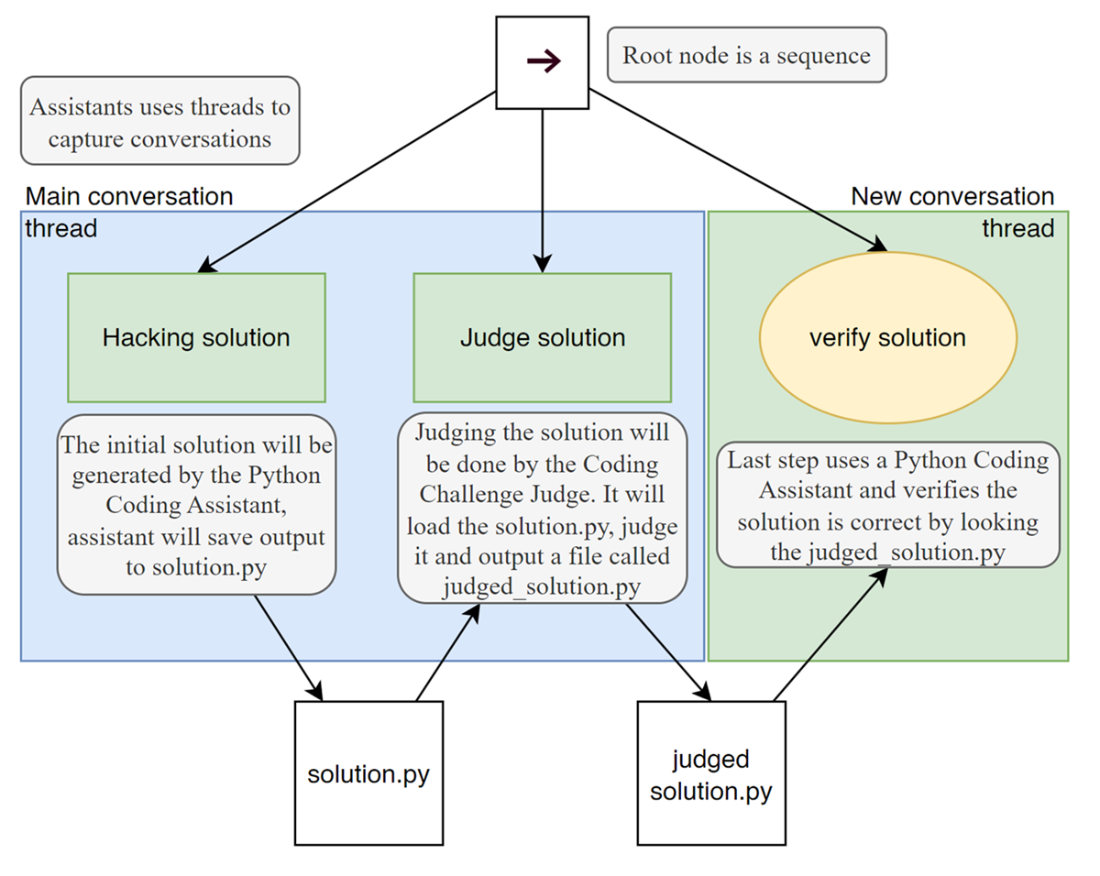
- A coding challenge ABT with three assistants: a “Hacker” generates a solution, a “Judge” assesses/refines it, and a “Verifier” independently validates on a separate thread to reduce noise.
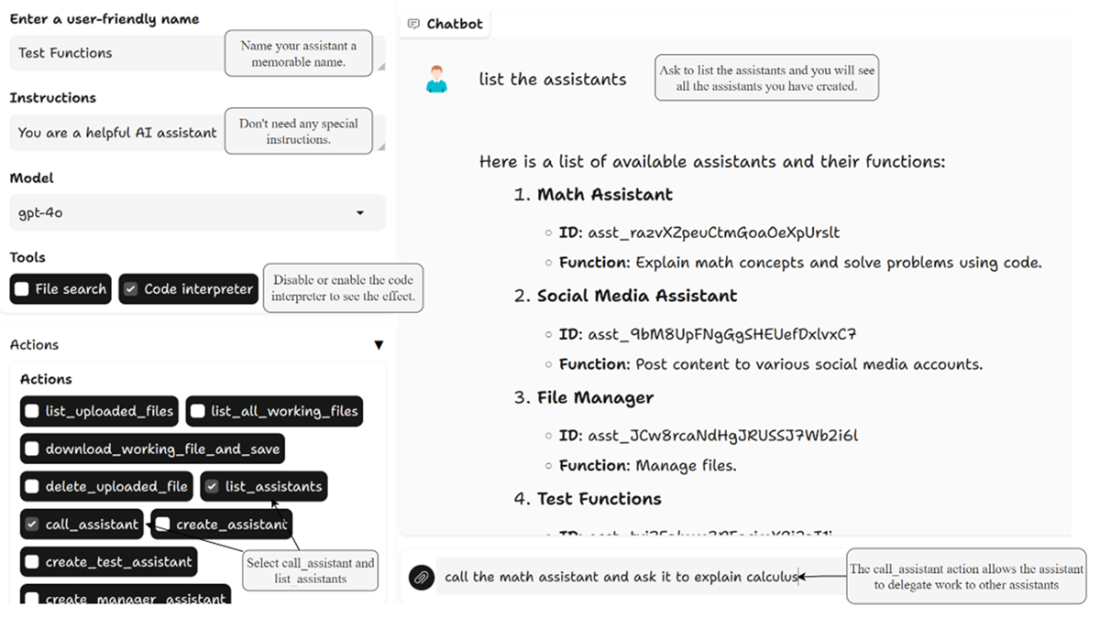
- ABTs can silo assistants into separate threads or let them converse over the same thread, balancing structure and emergent collaboration.How do I create and manage assistants with assistants (Manager Assistant), and what about predefined assistants?
Use the Manager Assistant to automate setup:
- Create any assistant, give it the create_manager_assistant action, then ask it to “please create the manager assistant.”
- Select the Manager Assistant and ask it to list/install predefined assistants from the included assistants.db, or to save all assistant definitions to a JSON file.
This speeds up building ABTs that rely on a set of specialized assistants.How can I design ABTs using back chaining, and should I use blackboards or files for communication?
Back chaining steps:
- Identify the goal behavior.
- Determine required actions.
- Identify conditions for each action.
- Decide communication patterns (siloed threads vs shared threads, or a mix).
- Construct the tree from the goal backward, adding actions/conditions until linked to known states.
For sharing data between nodes, BTs commonly use a blackboard (key/value store). In the chapter’s ABTs, simple files were used for transparency and ease. As systems grow, blackboards may need to integrate with richer storage solutions.