Overview

5 Empowering agents with actions

This chapter explains how agents move beyond static prompts to act in the world through well-defined actions. It clarifies the terminology across frameworks—treating actions as anything an agent can do via functions, skills, or tools—and positions plugins as the proxy that bundles these abilities. Building on OpenAI’s function-calling specification as a common interface, the chapter introduces Microsoft’s Semantic Kernel (SK) as a flexible orchestrator that can both publish and consume plugins, culminating in hosting an agent system that coordinates multiple actions reliably.

The chapter first demonstrates OpenAI function calling: providing tool schemas alongside prompts so the model selects a function and returns its name and arguments (not execution), after which the application runs the function and feeds results back to the model for a natural-language reply. It shows single and parallel tool calls, highlights that simpler models can handle tool delegation, and emphasizes clean separation between choosing and executing tools. With SK, the text then shows how to install/connect services, create semantic functions (prompt-based capabilities), add context variables, and register them as plugins/skills. This establishes a consistent pattern for composing agent abilities with clearer structure and less boilerplate than hand-rolled function-calling loops.

Next, the chapter blends semantic and native functions: crafting a semantic recommender plugin, augmenting it with a native function (e.g., loading a user’s seen-movie list), and even embedding native calls inside semantic prompts. It then builds a GPT Interface around a movie database by wrapping REST endpoints as native SK plugin methods, tests them directly, and integrates the plugins into an interactive chat that automatically selects tools. A key best practice emerges: “think semantically” by returning rich, structured outputs (such as JSON) so the LLM can filter, sort, and transform results on its own. Altogether, the chapter provides a pragmatic blueprint for exposing, registering, and orchestrating actions with SK to create interactive service agents—setting up the transition to memory in the next chapter.

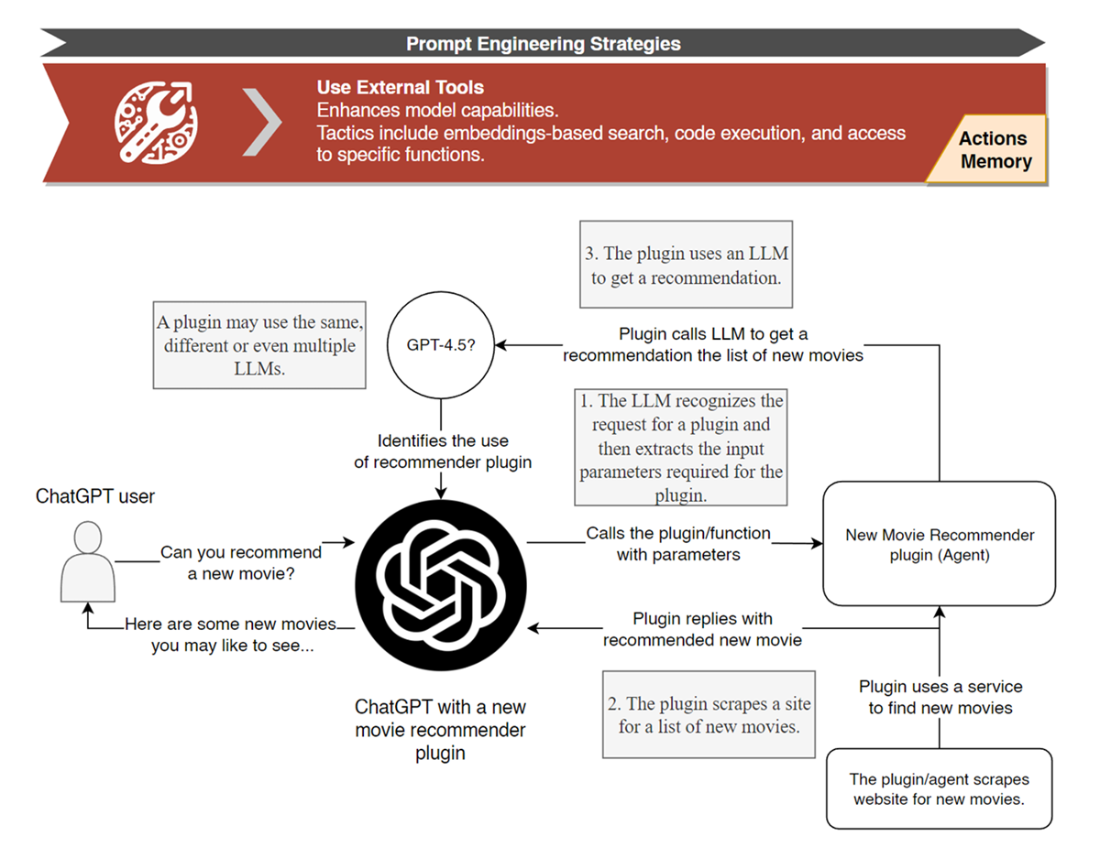
How a ChatGPT plugin operates and how plugins and other external tools like APIs align with the prompt engineering strategy Use External Tools
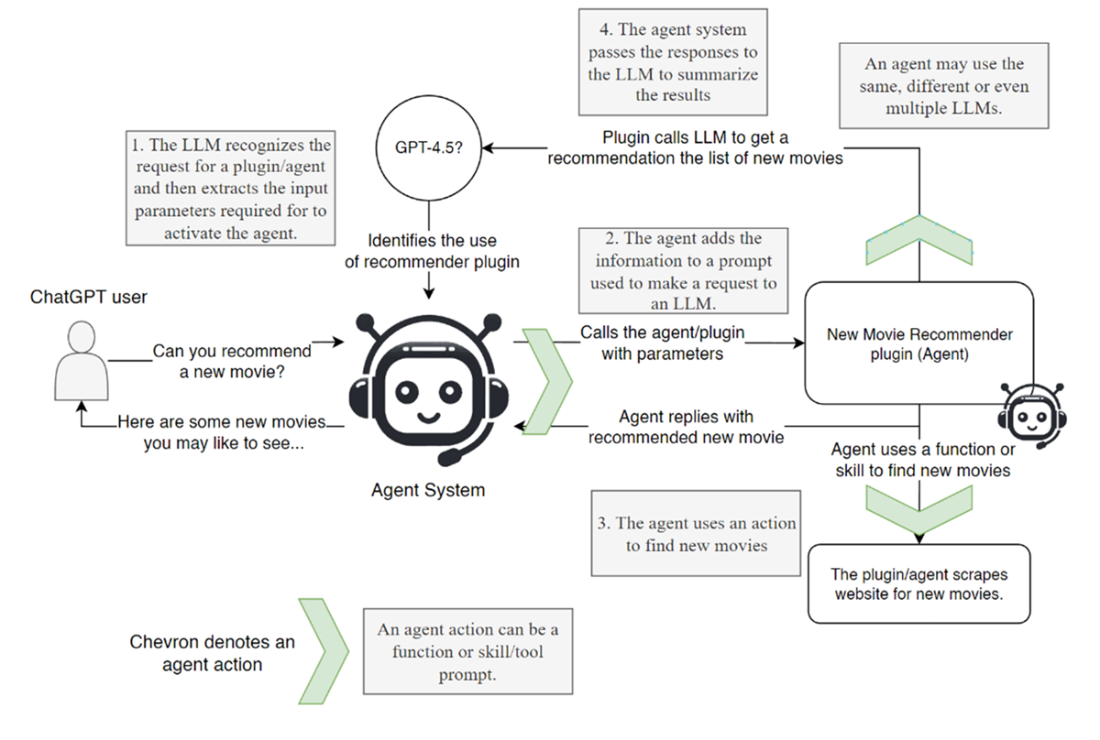
How an agent uses actions to perform external tasks
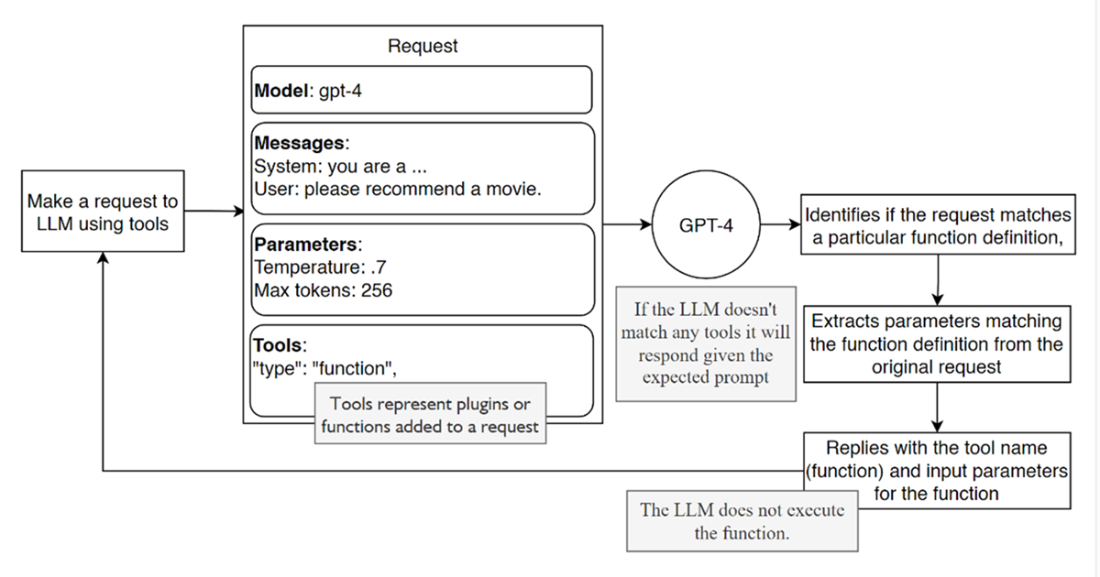
How a single LLM request, including tools, gets interpreted by an LLM
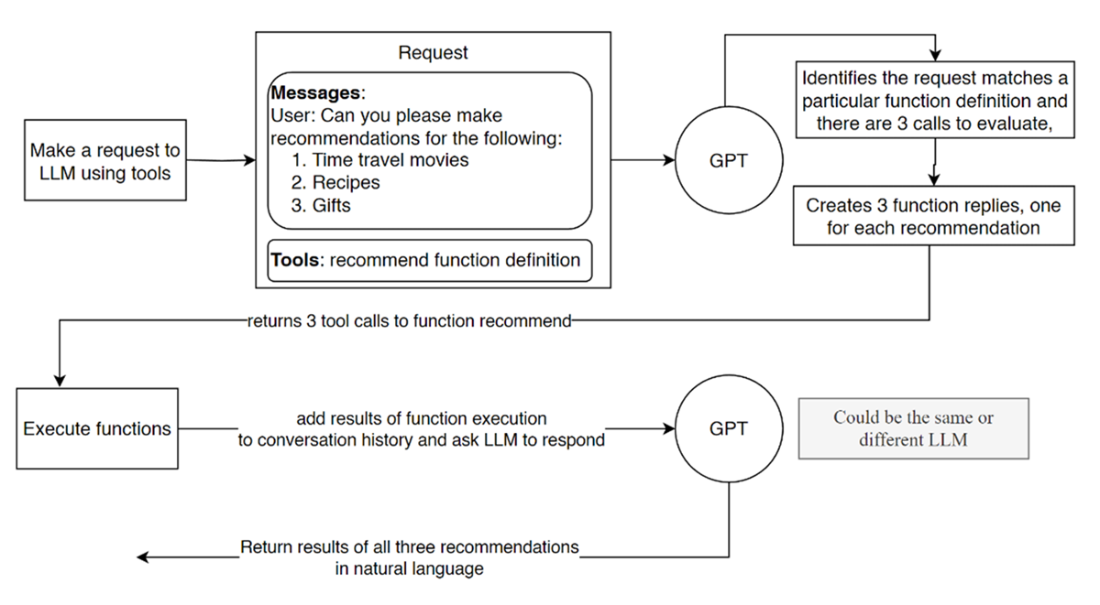
How a sample request returns 3 tool function calls and then submits the results back to the LLM to return a natural language response
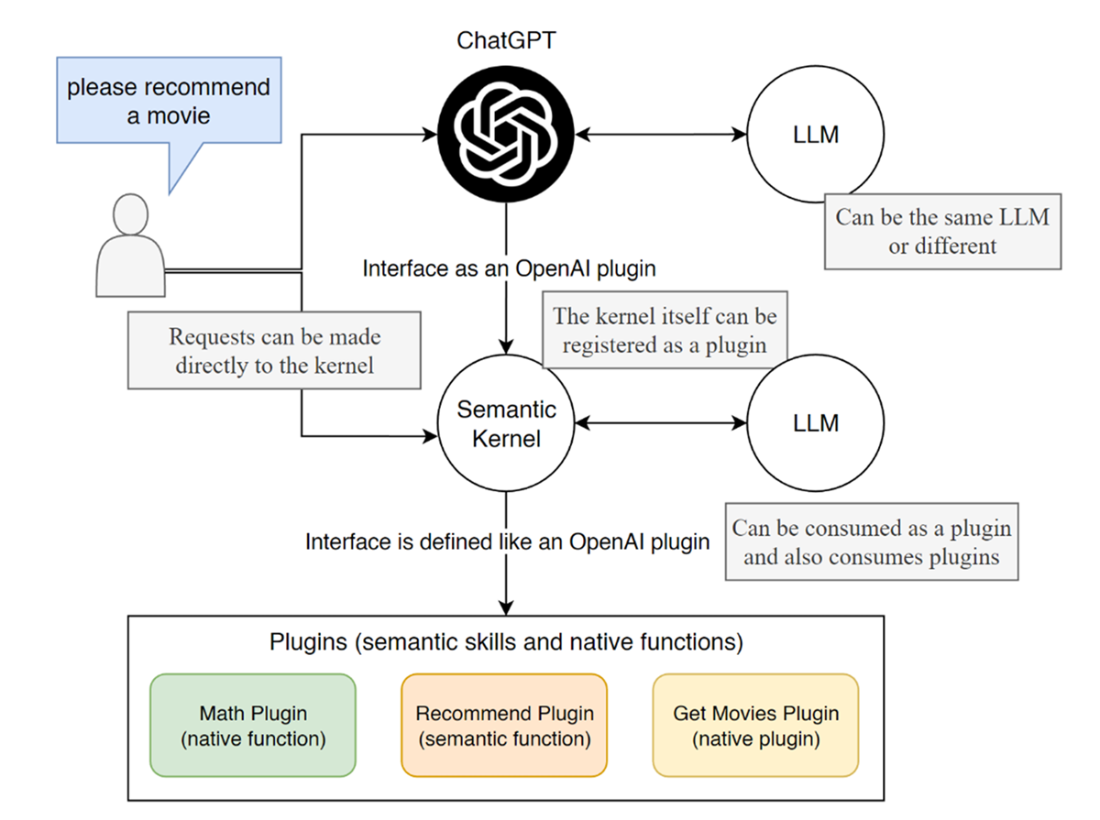
How the Semantic Kernel integrates as a plugin and can also consume plugins
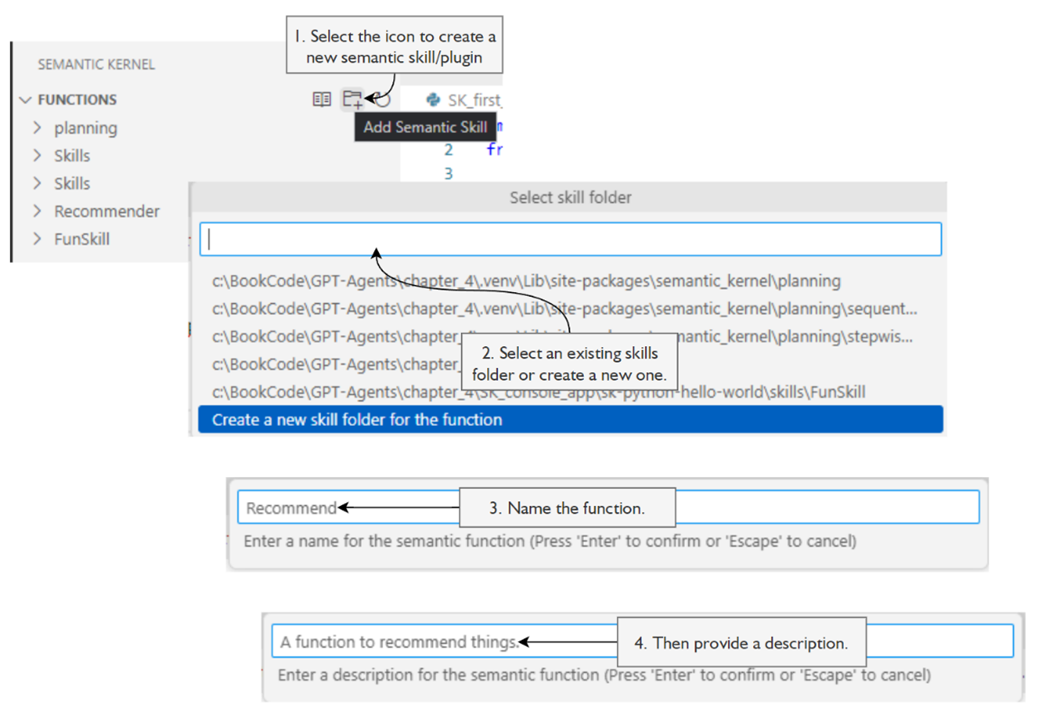
The process of creating a new skill/plugin
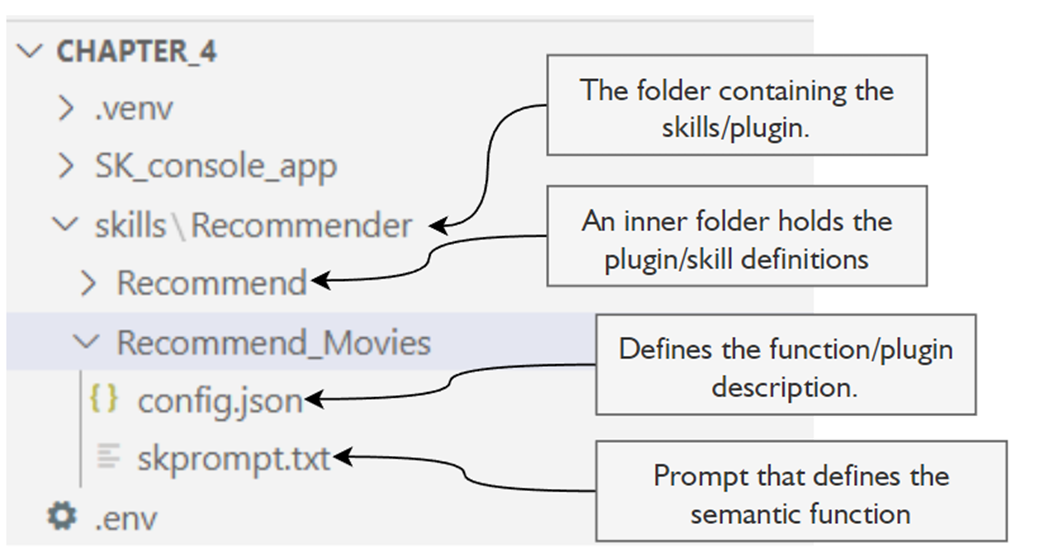
The file-and-folder structure of a semantic function skill/plugin
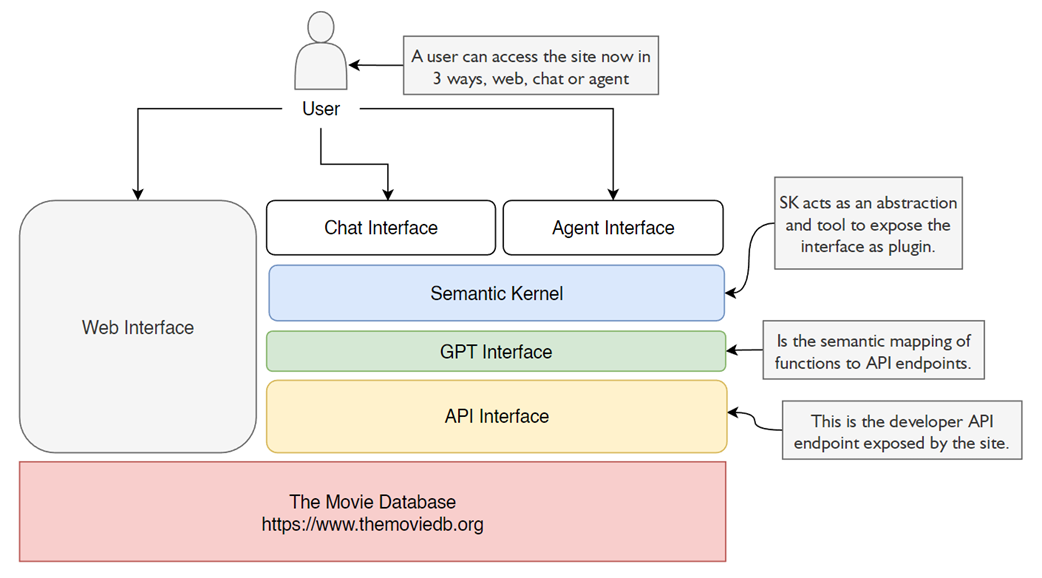
This layer architecture diagram shows the role of a GPT interface and the Semantic Kernel being exposed to chat or agent interfaces.
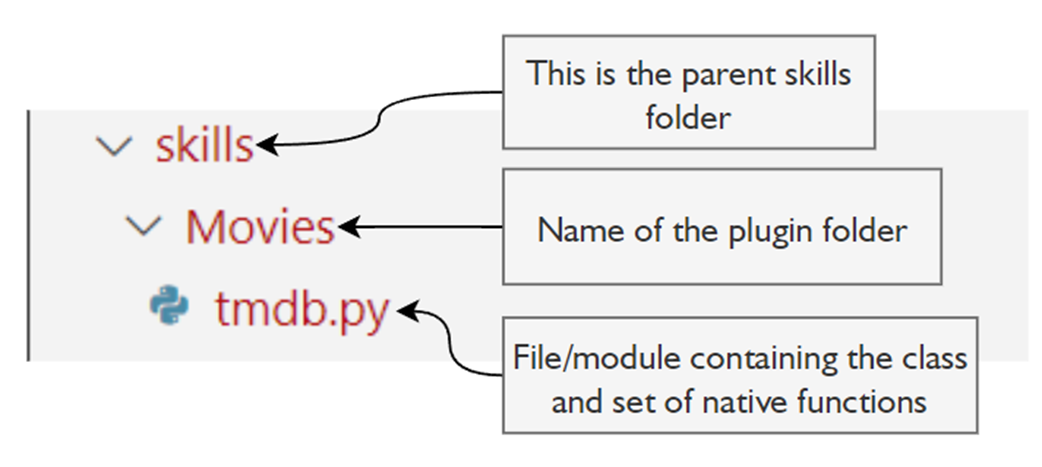
The folder-and-file structure of the tmdb plugin
Summary

  • Agent actions extend the capabilities of an agent system, such as ChatGPT. This includes the ability to add plugins to ChatGPT and LLMs to function as proxies for actions.
  • OpenAI supports function definitions and plugins within an OpenAI API session. This includes adding function definitions to LLM API calls and understanding how these functions allow the LLM to perform additional actions.
  • The Semantic Kernel (SK) is an open-source project from Microsoft that can be used to build AI applications and agent systems. Which includes the role of semantic plugins in defining native and semantic functions.
  • Semantic functions encapsulate the prompt/profile template used to engage an LLM.
  • Native functions encapsulate code that performs or executes an action using an API or other interface.
  • Semantic functions can be combined with other semantic or native functions and layered within one another as execution stages.
  • SK can be used to create a GPT Interface over top of API calls in a semantic service layer and expose them as chat or agent interface plugins.
  • Semantic services represent the interaction between LLMs and plugins, and the practical implementation of these concepts in creating efficient AI agents.

FAQ

What are agent actions, and how do they relate to plugins, tools, and skills?Agent actions are any capabilities an agent can perform outside of pure text generation. In different frameworks they may be called plugins, tools, or skills. A plugin typically bundles one or more actions (for example, calling an API or scraping a website). An agent uses these actions to interact with external systems, retrieve data, and perform tasks beyond the LLM’s internal knowledge.
How does OpenAI function calling work in practice?You provide the LLM with function definitions (name, description, and JSON schema for parameters) as “tools.” When the model detects a function is appropriate, it returns: - The function name to call - A JSON string of arguments extracted from the user’s request Important: the LLM does not execute the function. Your application must read the returned tool call, run the corresponding function, and handle the result.
How do I “action” function calls and return a natural-language answer?Typical flow: - Send a request with function/tool definitions. - The LLM responds with one or more tool_calls (function name + args). - Map tool_calls to real functions in your code and execute them. - Append each function’s results back to the conversation as tool messages. - Send a follow-up LLM call with this augmented history so the model can summarize the tool outputs into a natural-language reply.
Can I use cheaper models for tool delegation?Yes. Parameter extraction and function routing are often simple enough for smaller, less expensive models. The chapter demonstrates using gpt-3.5-turbo for tool delegation, reserving larger models for tasks that truly need stronger reasoning or generation quality.
What is Semantic Kernel (SK) and why use it?Semantic Kernel is a Microsoft OSS framework that orchestrates actions (plugins/skills) for LLM apps. It: - Wraps both prompt-based “semantic functions” and code-based “native functions” - Imports/exports plugins using OpenAI-compatible definitions - Manages multiple tools, enables chaining, and supports chat-style interactions - Works across Python, C#, and Java (plugins can be consumed cross-language; native code itself is not cross-language).
What’s the difference between semantic and native functions in SK?- Semantic functions: Prompt-based capabilities executed by an LLM (like a reusable prompt template). - Native functions: Regular code (e.g., Python) decorated for SK so they become callable plugins (e.g., file I/O, API calls). They can be combined so semantic functions call native functions for data or side effects, and then the LLM produces the final output.
How do I add context variables to semantic functions?Create a semantic function (prompt template) with placeholders and pass variables via KernelArguments. This lets you parameterize prompts (e.g., subject, genre, format, custom notes) and reuse them across calls. It mirrors classic prompt templating but within SK’s function model, making the function easy to invoke and share.
How do I create and register a semantic skill/plugin in SK?Two paths: - From a prompt directory: Provide skprompt.txt (the prompt) and config.json (metadata/inputs). Import it with kernel.import_plugin_from_prompt_directory. - From code: Create a function from a prompt template, then register/import it as a plugin so it’s accessible to the chat/agent runtime. Once imported into the kernel, it’s a registered plugin available to tool-calling flows.
How do I embed native functions inside semantic functions?Register the native function class (as a plugin) with the kernel. Inside a semantic prompt you can reference it (e.g., {{ClassName.FunctionName}}). At run time, SK resolves the native call and injects its output into the prompt, allowing LLM prompts to dynamically include live data or side effects.
How do I wrap an external API as a GPT Interface with SK, and what are best practices?Approach: - Write a native plugin class whose methods map to API endpoints and decorate them so SK exposes them semantically. - Import the class as a plugin, then use SK’s chat + tools to let the LLM decide when to call each method. Best practices: - Return rich, structured data (e.g., JSON) rather than just titles/strings so the LLM can filter, sort, and combine results. - Provide clear function descriptions and parameter schemas. - Keep side effects in native functions; use semantic functions to interpret and present results.