Overview

2 Harnessing the power of LLMs

This chapter introduces Large Language Models (LLMs) as generative systems—most notably transformer-based GPT models—explaining how data, architecture, use-case specialization, and fine-tuning (including RLHF) shape their behavior. It highlights why chat-completion models are preferred for agents due to their iterative reasoning and planning strengths. The chapter sets the stage for practical work: how to connect to models, experiment with settings that affect variability and consistency, and understand the basics needed to start building capable AI agents.

Readers learn a hands-on pattern for using the OpenAI API: constructing chat requests with system, user, and assistant roles; tuning temperature to balance creativity and determinism; and tracking token usage for cost, speed, and reliability. The chapter then shows how to run open-source models locally with LM Studio, from downloading and loading models to serving them behind an OpenAI-compatible endpoint, making it easy to swap between commercial and local LLMs without major code changes.

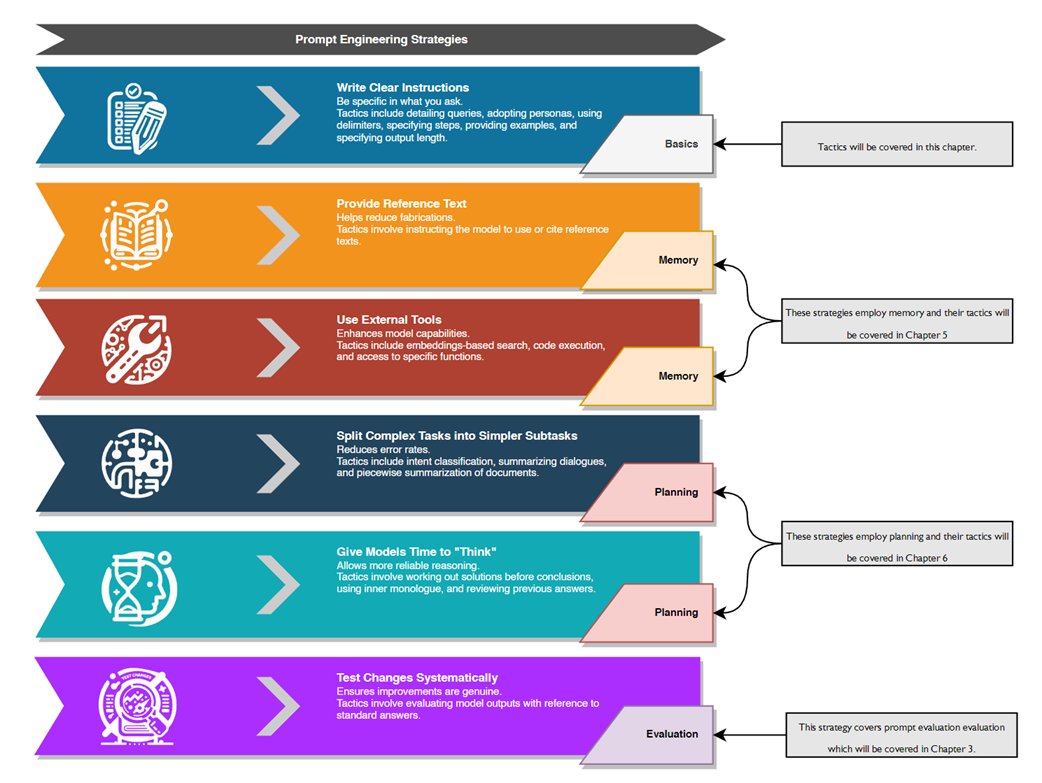
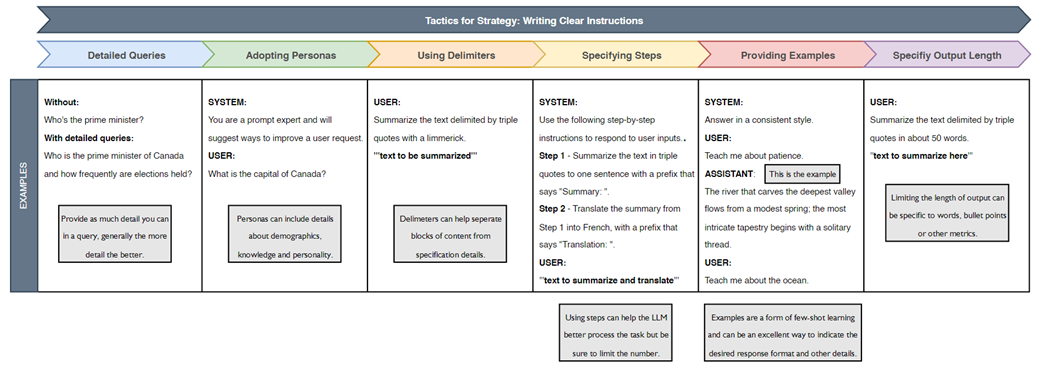
To improve results, the chapter focuses on core prompt-engineering tactics under “writing clear instructions”: crafting detailed queries, adopting personas, using delimiters, specifying multi-step procedures, providing examples, and constraining output length. It closes with guidance on selecting the right model for an agent, weighing performance, parameter size, use case, training data and methods, context window, speed, and cost. The practical takeaway is to start with a strong default (e.g., a modern chat model), iterate with structured prompts, experiment with local alternatives, and be ready to evaluate and upgrade models as needs evolve.

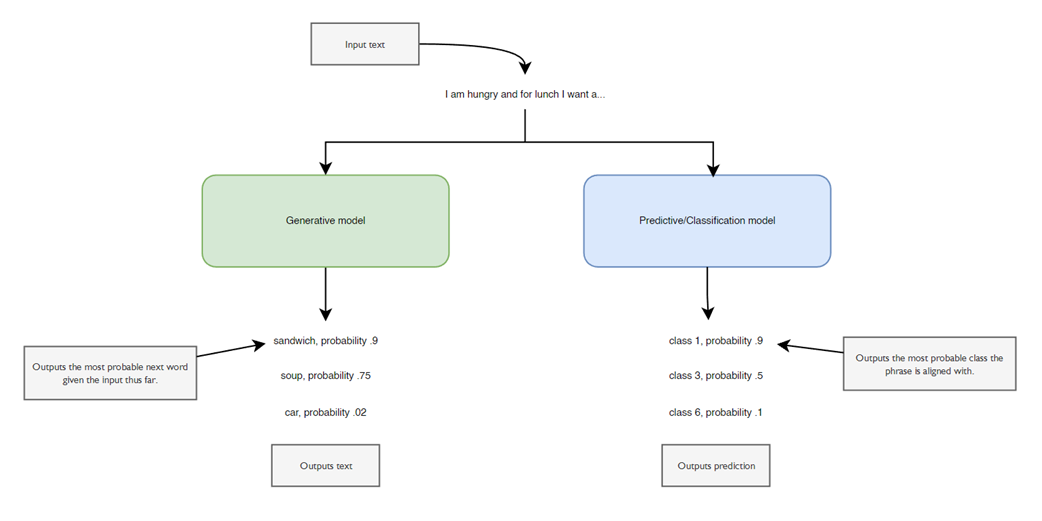
The difference between generative and predictive models
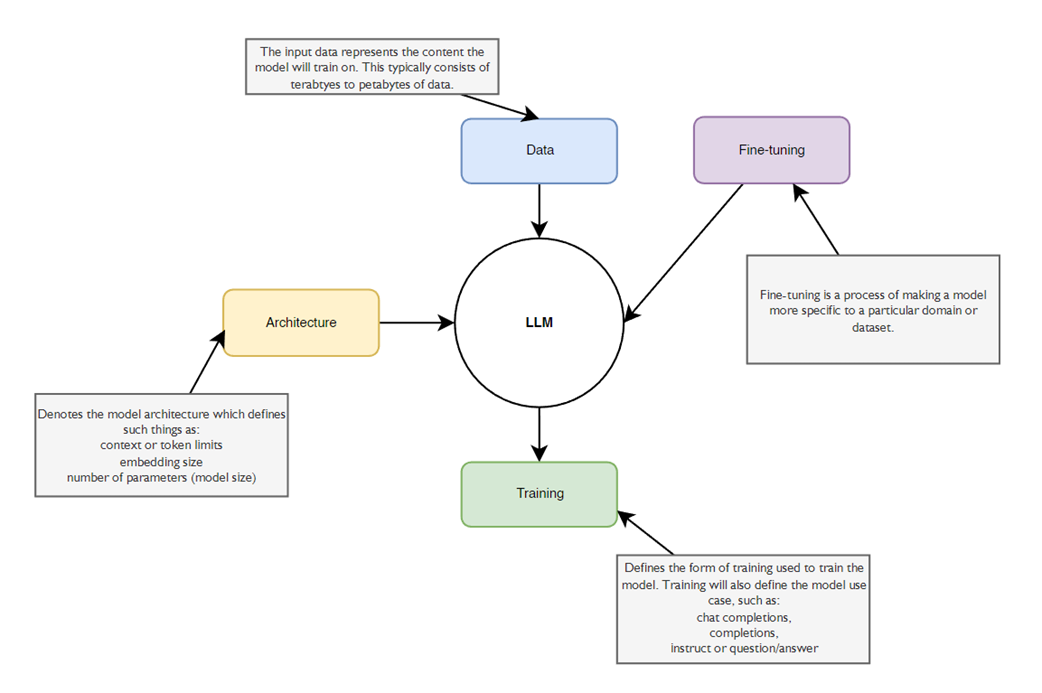
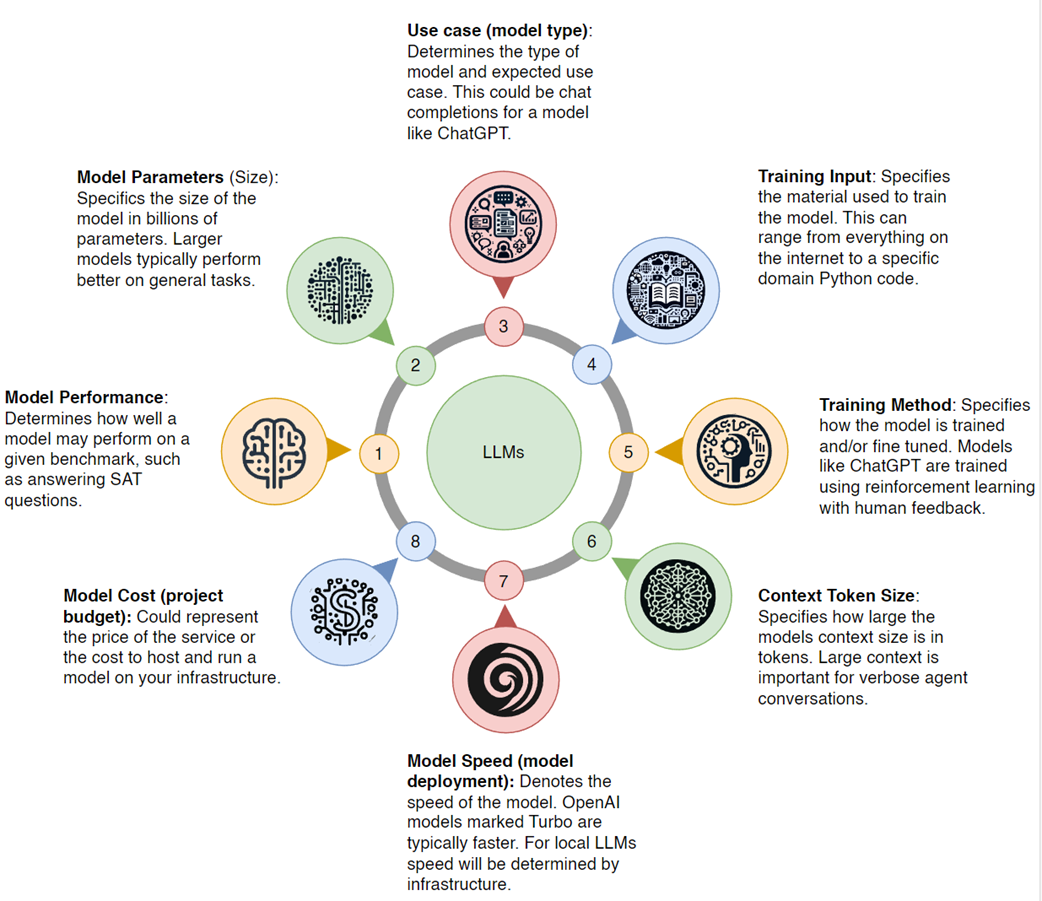
The main elements that describe an LLM
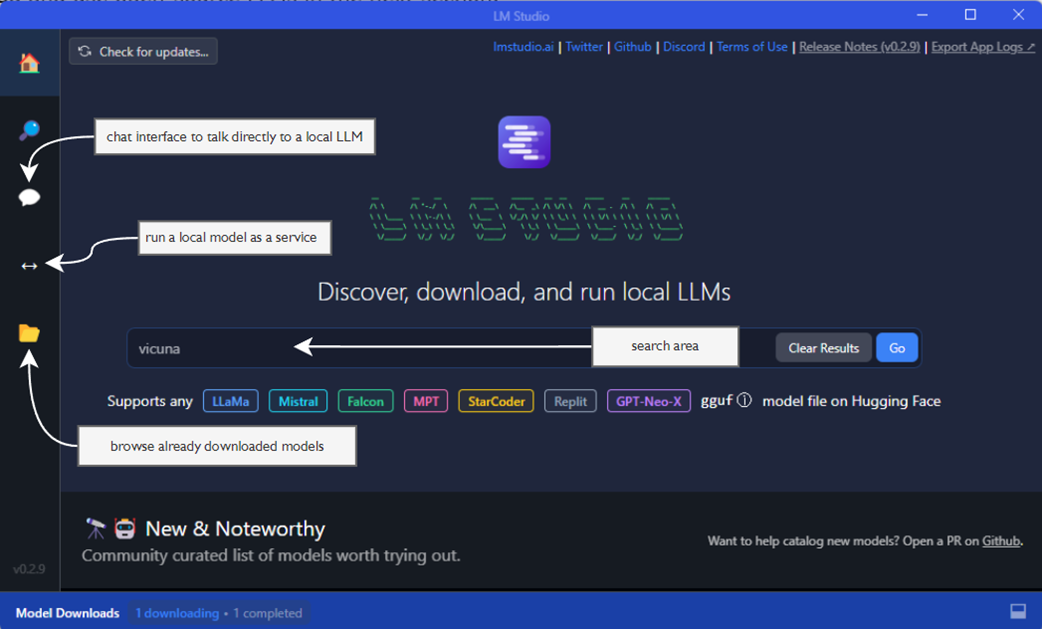
LM Studio software showing the main home page
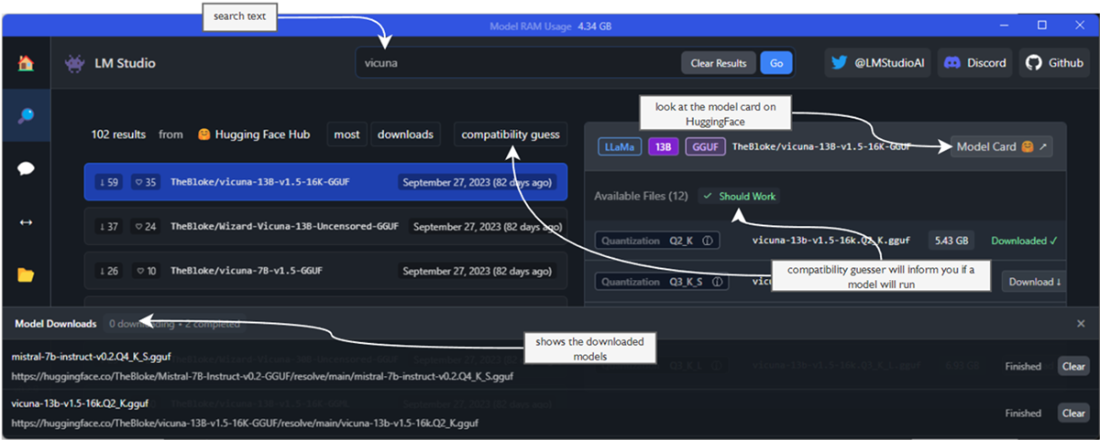
The LM Studio Search page
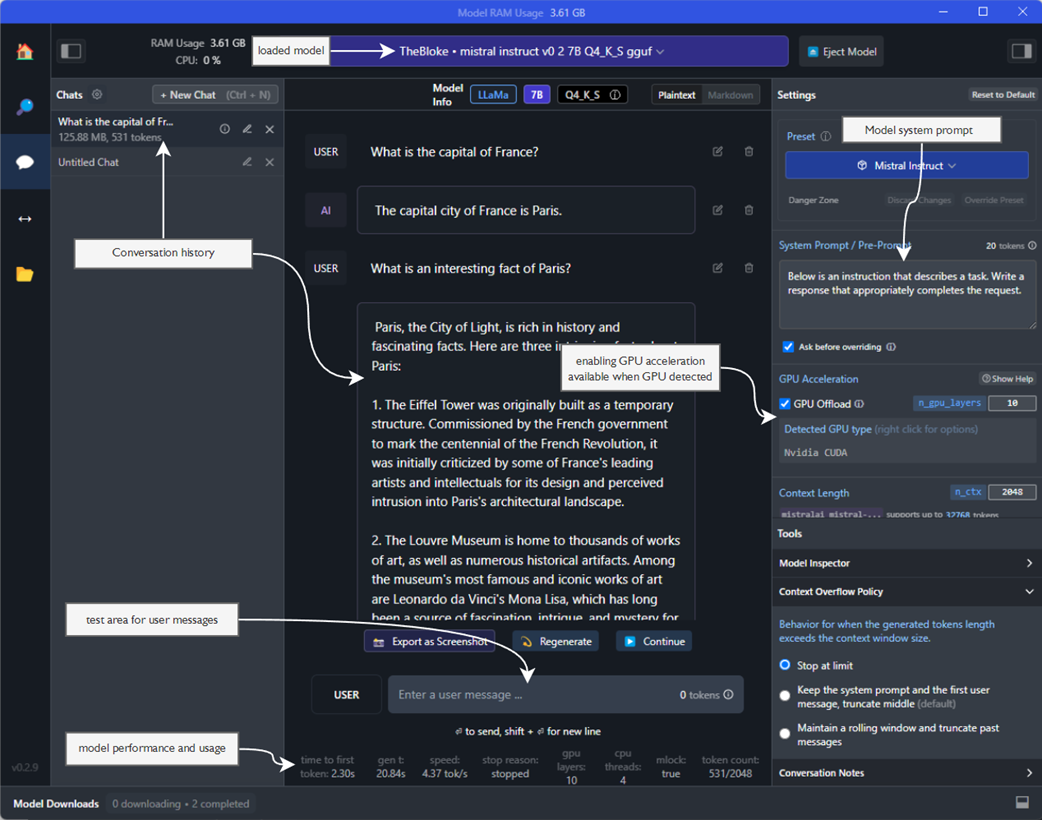
The LM Studio Chat page with a loaded, locally running LLM
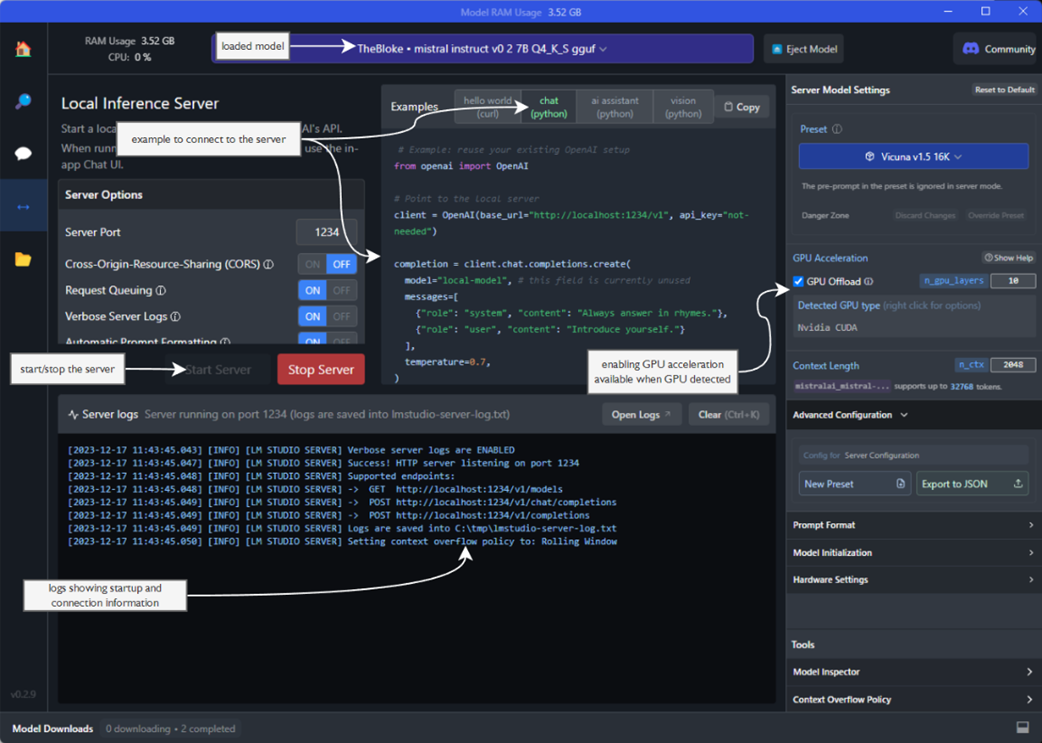
The LM Studio Server page and a server running an LLM
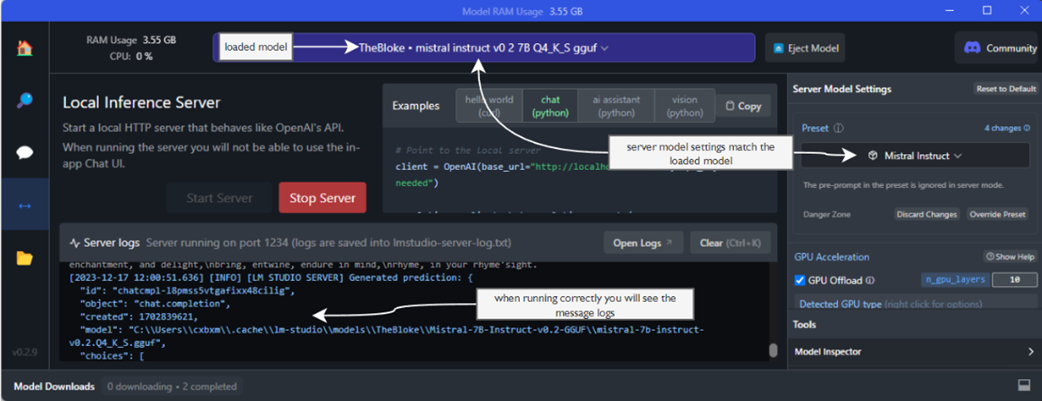
Choosing the correct Server Model Settings for the loaded model
OpenAI prompt engineering strategies reviewed in this book, by chapter location
The tactics for the strategy of Writing Clear Instructions
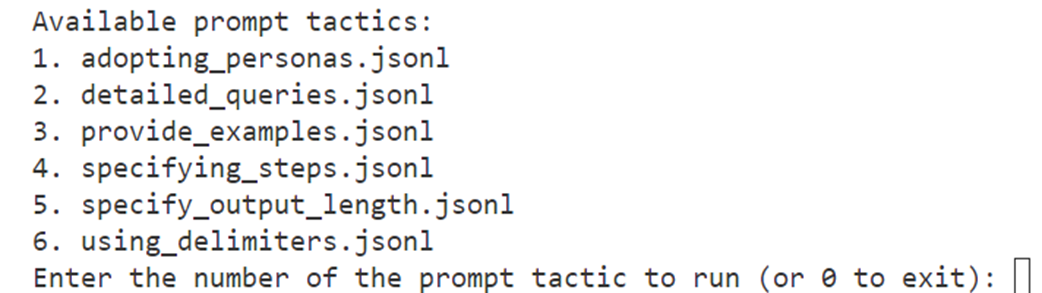
The output of the prompt engineering tactics tester
The important criteria to consider when consuming an LLM
Summary

  • Large Language Models use a type of architecture called generative pre-trained transformers (GPTs).
  • Generative models (like LLMs and GPTs) differ from predictive/classification models by learning how to represent data over classification.
  • LLMs are a collection of data, architecture, and training for specific use cases, called fine-tuning.
  • The OpenAI API SDK can be used to connect to an LLM, from models like GPT-4 and also consuming open-source LLMs
  • Python environments can be quickly set up and the necessary packages for LLM integration installed.
  • LLMs can handle various requests and generate various responses that can be used to enhance programming skills related to LLM integration.
  • Open-source LLMs are an alternative to commercial models and can be hosted locally using tools like LM Studio.
  • Prompt engineering is a collection of techniques that help craft more effective prompts to improve LLM responses.
  • LLMs can be used to power agents and assistants, from simple chatbots to fully capable autonomous workers.
  • Selecting the most suitable LLM for specific needs depends on the performance, parameters, use case, training input, and other criteria.
  • Running LLMs locally requires a variety of skills, from setting up GPUs to understanding various configuration options.

FAQ

What is a Large Language Model (LLM), and how do GPTs fit into the picture?LLMs are AI models trained on vast text corpora to generate human-like language. GPTs are a family of LLMs based on the transformer architecture. They are generative models: given input, they create new text (as opposed to purely predicting labels or classes). Modern GPT-scale models are trained on terabytes of data and then refined for specific uses.
What are the core elements that describe an LLM?The chapter highlights four main elements: - Data: the corpus used to pretrain the model. - Architecture: model structure and size (e.g., number of parameters). - Use case: variants oriented to chat, completion, or instruction. - Fine-tuning: additional training (e.g., RLHF) to better match a domain or behavior.
How do chat completion models differ from plain completion models?Chat completion models are optimized for iterative conversations (multi-turn), reasoning, and planning—ideal for agents and assistants. Completion models tend to be single-shot generators that don’t benefit from iterative context as much. This book focuses on chat completion models for agent building.
How do I connect to OpenAI’s chat completions API in Python?Steps covered in the chapter: - Create a Python virtual environment and install packages: openai and python-dotenv. - Store your API key in a .env file (OPENAI_API_KEY=...). - Load the key with dotenv, instantiate an OpenAI client, and call client.chat.completions.create with: - model (e.g., gpt-4-1106-preview at the time of writing), - messages (system/user/assistant roles), - temperature (controls randomness). - Print response.choices[0].message.content.
What are the system, user, and assistant message roles, and why keep history? - System: sets rules, tone, or a persona for the model. - User: the end-user’s prompt or question. - Assistant: prior model replies. Bundling a conversation’s history into messages gives the model context so it can respond coherently across turns.
What does temperature do, and how should I set it?Temperature controls output variability. Lower values (e.g., 0.0) make replies more consistent and deterministic; higher values (e.g., 0.7–1.0) encourage diverse, creative outputs. Choose based on your use case: lower for reliability, higher for ideation.
How do I interpret the response and track token usage?The response includes: - choices: one or more candidate replies (with finish_reason, index). - message: the assistant’s content. - model: which model generated the reply. - usage: prompt_tokens, completion_tokens, total_tokens. Minimizing tokens can reduce cost, latency, and sometimes improve consistency.
How can I run and serve an open-source LLM locally with LM Studio?Process from the chapter: - Install LM Studio, search and download a compatible chat model. - Load it on the Chat page; optionally enable GPU for faster inference. - Start the Server in LM Studio; ensure Server Model Settings match the loaded model. - Connect via OpenAI SDK by pointing base_url to http://localhost:1234/v1 (an API key isn’t required) and using a local model name (e.g., "local-model").
Which prompt engineering tactics are introduced here?The chapter demonstrates “Writing Clear Instructions” via these tactics: - Detailed queries: add relevant context and ask for examples. - Adopting personas: set a role or viewpoint in the system prompt. - Using delimiters: isolate key text (e.g., triple quotes, XML tags). - Specifying steps: provide step-by-step instructions the model follows. - Providing examples: show target style/format with exemplars. - Specifying output length: constrain replies (e.g., ≤10 words or 3 bullets).
How should I choose the optimal LLM for my agent?Evaluate: - Model performance (on your task). - Model parameters (size vs. hardware needs). - Use case (chat vs. completion/instruct). - Training input (domain relevance). - Training method (generalization, reasoning). - Context size (window needed for your conversations). - Speed (inference latency; infra-dependent). - Cost (API vs. self-hosting trade-offs). For learning, the book suggests starting with a capable commercial model like GPT-4-Turbo and iterating.