7 Q&A chatbots with LangChain and LangSmith
This chapter shows how to build a retrieval‑augmented generation (RAG) Q&A chatbot with LangChain and how to observe and debug it with LangSmith. It explains how LangChain’s abstractions orchestrate data loaders, text splitting, embeddings, vector stores, and language models so you can swap providers without redesigning your app. By the end, you can stand up a search‑enabled chatbot that answers questions grounded in private or multi‑document sources, and you’ll know how to trace its behavior end‑to‑end.
The implementation is organized around two stages. In content ingestion, you load raw sources into Document objects with loaders (for web, DOCX, PDF, and TXT), split them into chunks, create embeddings, and store both text and vectors in a vector database such as Chroma; utilities and folder‑level loaders help remove duplication and scale ingestion. In retrieval and generation, a Retriever fetches relevant chunks for a user query, a prompt (via PromptTemplate or chat‑style prompts) assembles question plus context, and a chat model produces grounded answers. With LangChain’s composable “runnables,” you wire these pieces into a compact RAG chain that supports querying across multiple documents.
To sustain coherent conversations, the chapter adds message history using ChatMessageHistory and a chat‑message prompt, letting the bot resolve pronouns and follow‑ups that a stateless pipeline would miss. It then introduces LangSmith for tracing, evaluation, and monitoring: enable tracing with a few settings, run your notebook, and inspect structured traces that break down each chain run (retriever calls, LLM calls, inputs, outputs, and timings). Together, memory and tracing turn the basic RAG pipeline into a robust, debuggable chatbot suitable for iterative improvement and production readiness, with optional specialized Q&A helpers available when you want a faster path to a standard setup.
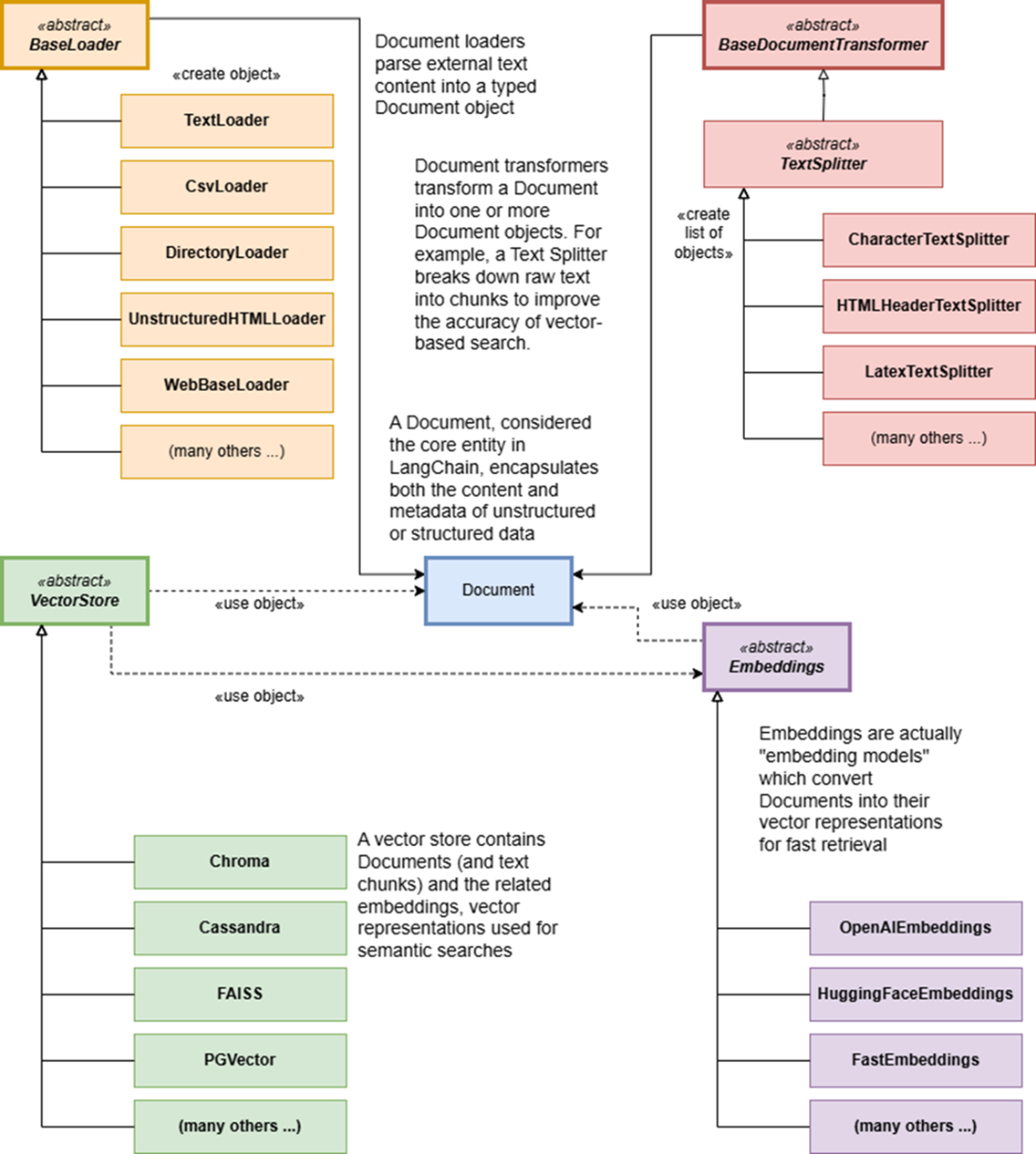
Object model associated with the content ingestion stage.
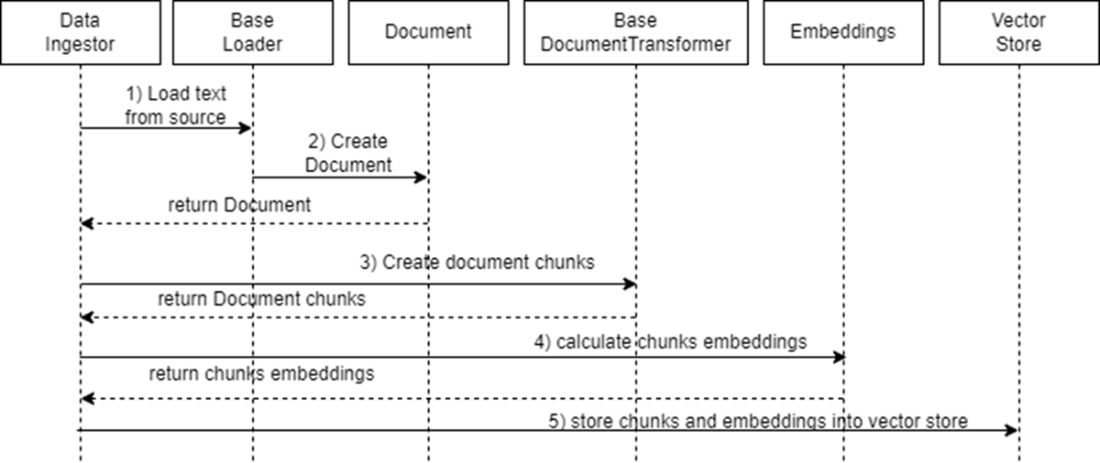
Content Ingestion Sequence Diagram: the data ingestion orchestrator initializes a Loader to import text, which is parsed into a Document. The Document is transformed into smaller chunks by a Text Splitter. An Embedding model generates embeddings for the chunks, and both the chunks and embeddings are stored in the vector store.
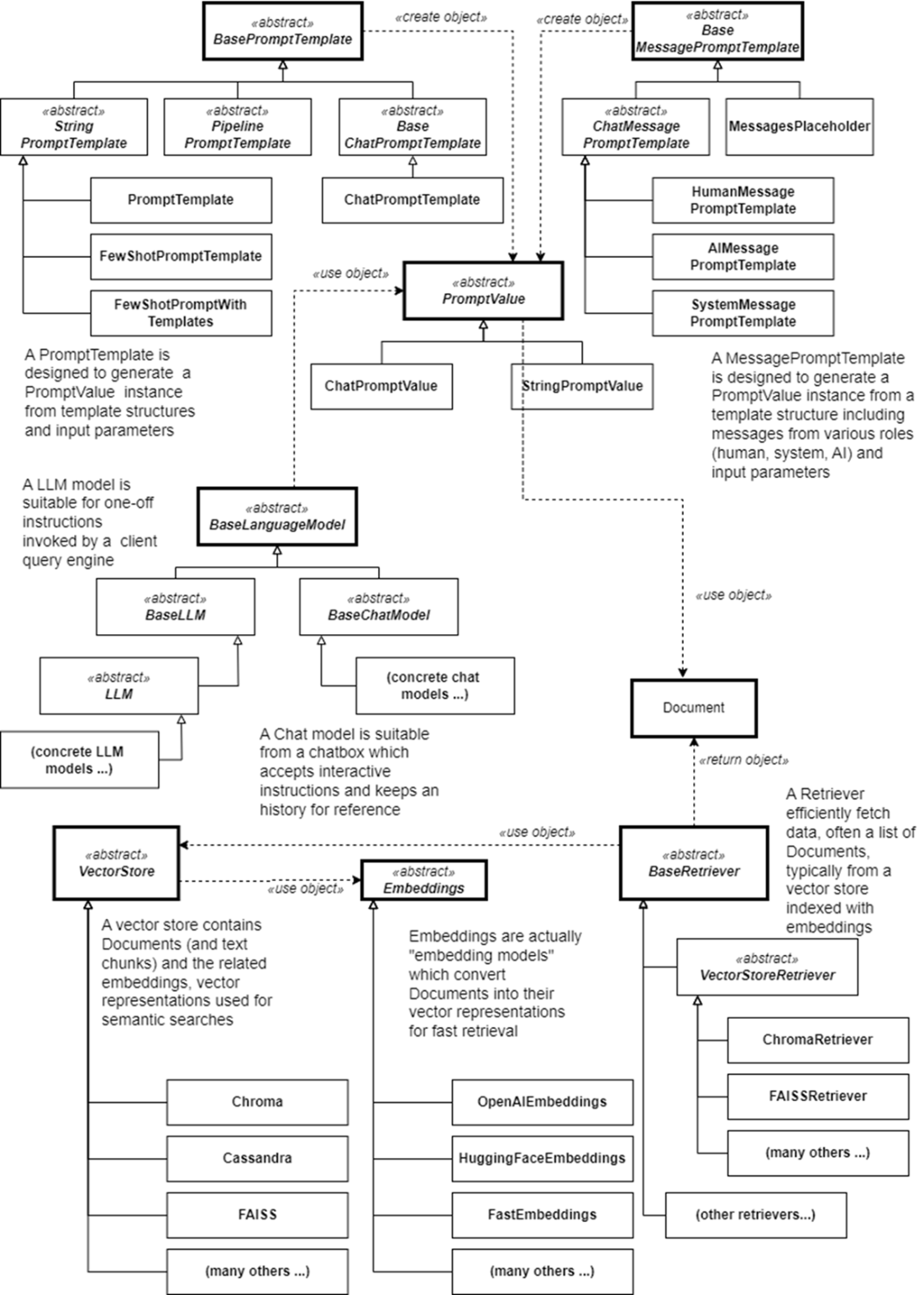
Object model associated with the retrieval and generation stage.
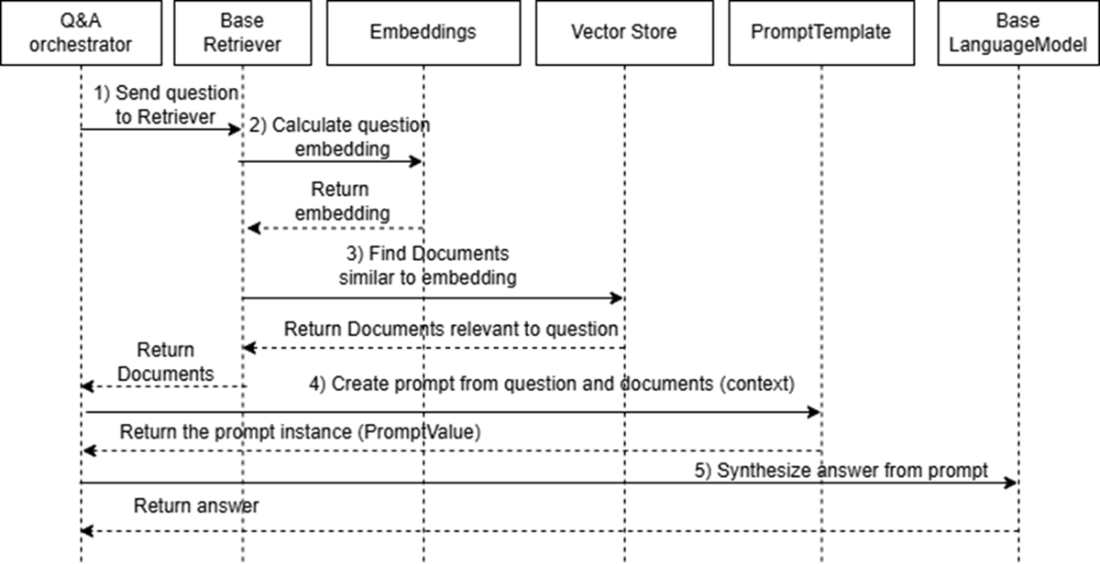
Q&A Sequence Diagram: the Q&A orchestrator sends the user’s question to the vector store Retriever, which generates an embedding using an Embeddings model. The Retriever searches for similar embeddings in the vector store and returns relevant documents. The Q&A orchestrator combines the documents and the question into a prompt with a PromptTemplate, then sends it to the Language Model, which provides the answer.
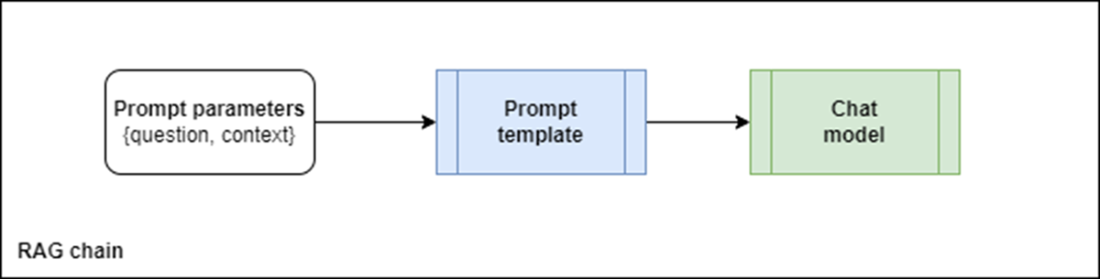
LangChain RAG chain, LangChain RAG chain, packaging the prompt parameters into a prompt instance, which is then sent to the chat or LLM model.
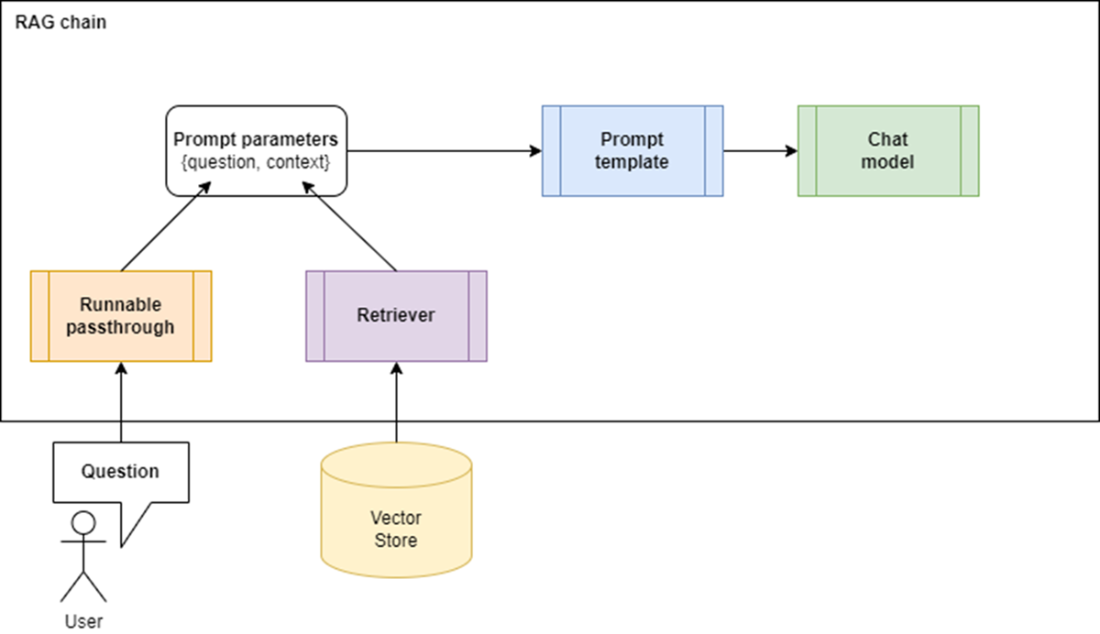
Amended RAG chain, including runnable passthrough and retriever
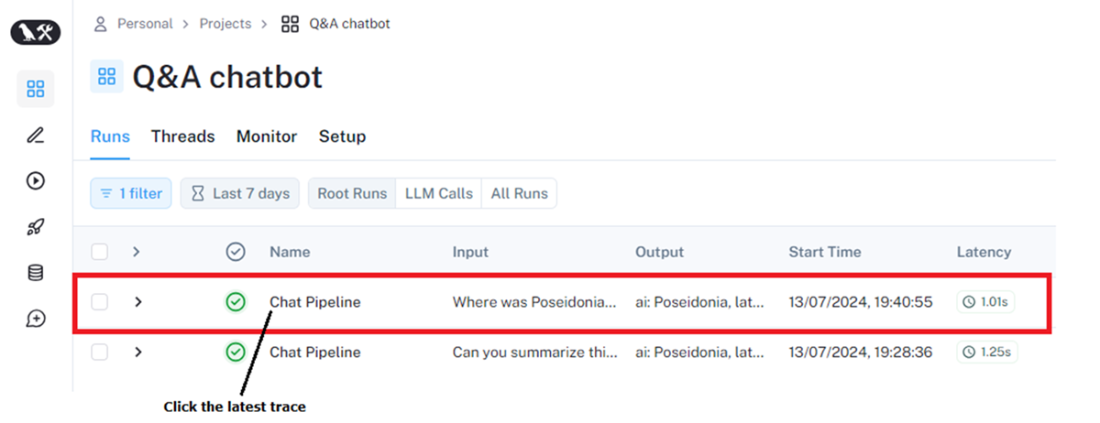
LangSmith high-level trace: click the latest trace to get high-level details of the chain execution.
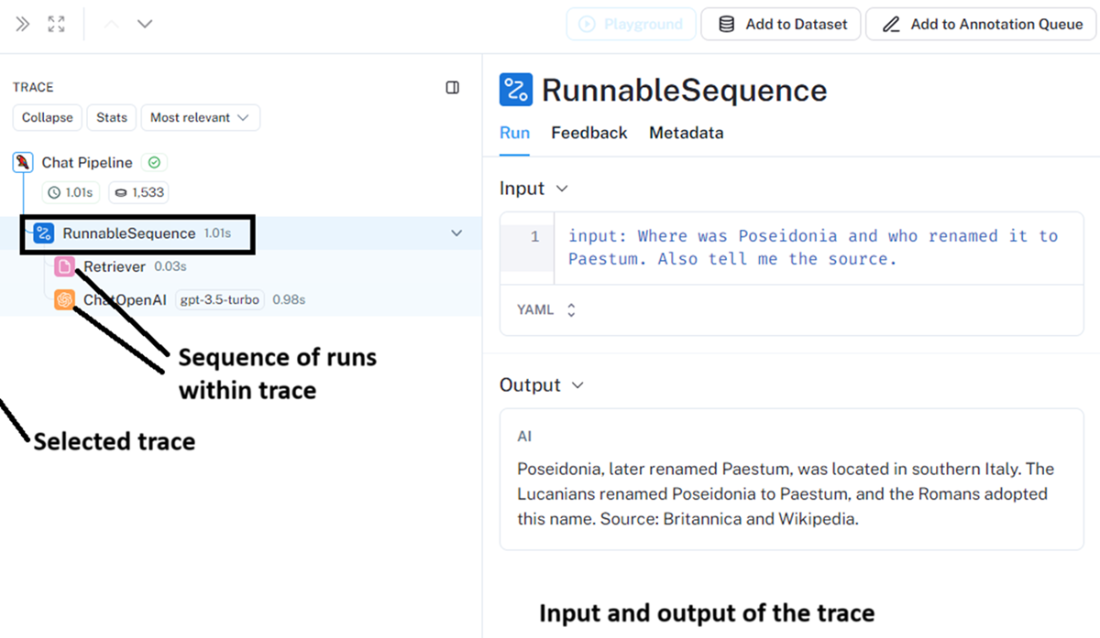
LangSmith trace details obtained by clicking one of the traces, for example, the latest one at the top. You will see three panels: 1) The left panel shows all traces of the Chatbot Q&A project; 2) the middle panel shows the runs of the selected trace.
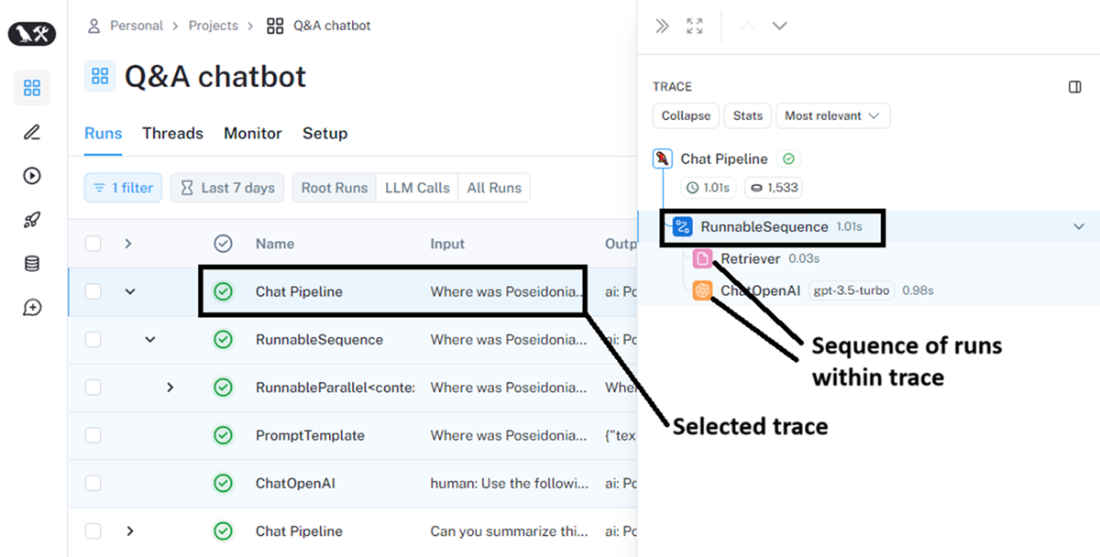
Middle and right-hand panels you get when clicking the latest trace; 1) the middle panel shows the runs of the selected trace; 2) the right panel shows the input to the selected trace and its output.
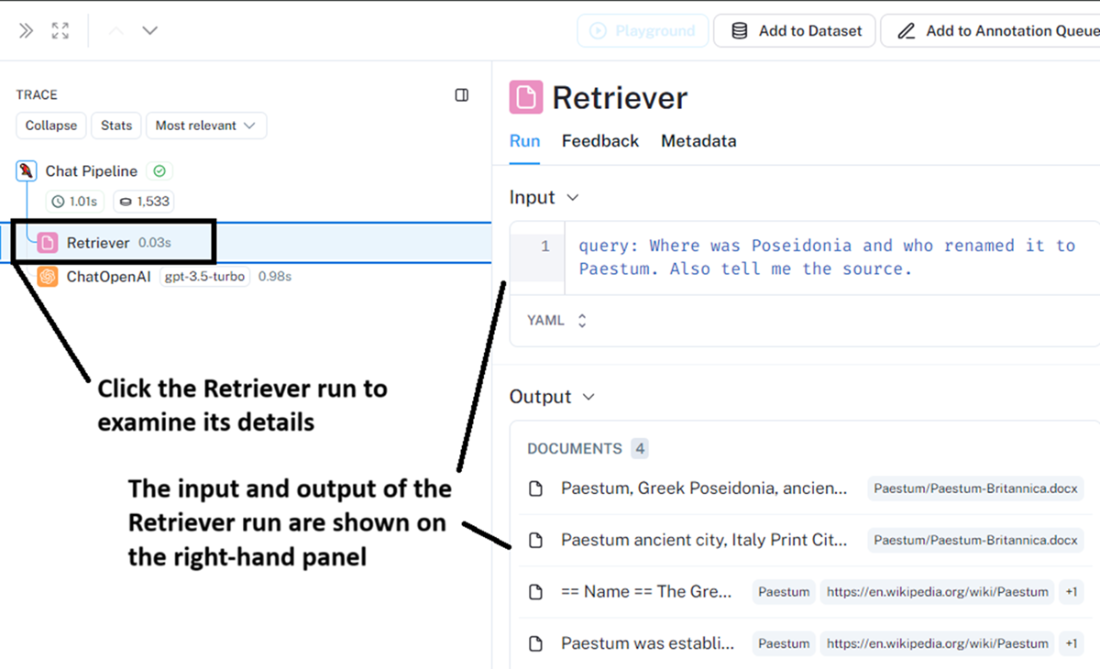
Run details; when you click the Retriever run, its details appear in the right-hand panel, showing its input (the user question) and its output (the documents retrieved from the vector store).
Summary
- LangChain abstracts core components of RAG, making the design modular and flexible.
- LangChain's object model includes classes that simplify and abstract the RAG content ingestion phase, such as:
- BaseLoader: Imports a text source into one or more Document objects.
- BaseDocumentTransformer: Transforms a loaded Document, for example, by splitting it into smaller Document chunks.
- VectorStore: Efficiently stores Document objects optimized for semantic searching.
- Embedding Models: Index Document objects with their embeddings (vector representations) when storing them in the vector store.
- The Q&A or retrieval stage of the RAG solution is supported by LangChain abstractions, including:
- BasePromptTemplate: Models a generic prompt and produces a specific PromptValue instance after parameters are fed to it.
- BaseRetriever: Abstracts the retrieval process from the vector store.
- BaseLanguageModel: Abstracts clients to LLMs.
- A typical RAG chain includes a passthrough component, a vector store with a retriever, a prompt template, and an LLM or chat client.
- LLM-based chatbots retain memory of previous questions and responses, preserving context for ongoing queries until a satisfactory answer is achieved.
- Use LangChain's ChatPromptTemplate.from_messages to create prompts and ChatMessageHistory to manage chat history, feeding it into the RAG chain for each interaction between user and LLM.
- LangSmith allows you to analyze execution runs and traces, drilling down into each step to examine the input and output of each component.
FAQ
What are the two main stages of a LangChain Q&A (RAG) application?
The workflow has two stages: 1) Content Ingestion (Indexing), where you load sources intoDocuments, split with a TextSplitter, embed with an embeddings model, and store in a VectorStore; and 2) Q&A (Retrieval and Generation), where a Retriever fetches relevant chunks, a prompt is constructed (often via a template), and a LanguageModel generates the answer.Which LangChain components are used in the content ingestion stage?
Typical components are:BaseLoader (e.g., WikipediaLoader, Docx2txtLoader, PyPDFLoader, TextLoader) to read sources into Documents; a TextSplitter (e.g., RecursiveCharacterTextSplitter) to create chunks; an embeddings model (e.g., OpenAIEmbeddings); and a VectorStore (e.g., Chroma) to persist chunks and vectors.How do I ingest many files at once (PDF, DOCX, TXT) without repeating code?
You can use a helper likesplit_and_import(loader) to centralize splitting and writing to the vector store, and then instantiate the appropriate loader per file. For folder-wide ingestion, use DirectoryLoader with a glob pattern such as **/*.{docx,pdf,txt}, or implement a small factory that maps file extensions to loaders and iterate over files. Note that installing Unstructured/its LangChain wrapper may be required for DirectoryLoader.What chunk size and overlap should I start with?
A practical starting point from the chapter is ~500 characters with 0 overlap. Overlap (often ~10%) can help preserve context across boundaries, but it increases storage and retrieval cost. The ideal values depend on your data and model; you can iterate and refine with advanced techniques (covered later) and by evaluating retrieval quality.Can some vector stores compute embeddings for me?
Yes. Certain vector stores can compute embeddings automatically if you provide an embedding model when instantiating the client, effectively merging “embed then add” into a single “add” step. If your store supports this, you don’t need to precompute embeddings explicitly.What’s the difference between querying the vector store directly and using a RAG chain?
Direct queries likesimilarity_search() return raw Document chunks with metadata so you can inspect sources. A RAG chain adds orchestration: it retrieves context, formats a prompt (via PromptTemplate or ChatPromptTemplate), and invokes the LLM to produce a concise, grounded answer.How do I build a minimal RAG chain with LangChain?
Create aRetriever from your vector store (vector_db.as_retriever()), a question passthrough (RunnablePassthrough), a prompt (from LangChain Hub or a PromptTemplate), and a chat model (e.g., ChatOpenAI). Compose them with LCEL: {"context": retriever, "question": passthrough} | prompt | model, then call chain.invoke(question). This pipeline retrieves, formats, and answers in one step.Why did the bot misunderstand a vague follow‑up like “What did they do next?” and how do I fix it?
Without memory, the chain is stateless and lacks prior turns, so pronouns like “they” lose referents. Add conversation memory usingChatMessageHistory (store user/AI messages) and switch to a message-based prompt via ChatPromptTemplate.from_messages with placeholders for {chat_history_messages}, {retrieved_context}, and {question}. Feed the accumulated history into the chain each turn to resolve references coherently.What is LangSmith and why should I use it with my chatbot?
LangSmith is a developer platform for tracing, evaluating, and monitoring LLM apps (with or without LangChain). Tracing shows each chain/run, inputs/outputs, durations, and retrieved documents, making debugging and iteration much easier. It also supports evaluation datasets and production monitoring with feedback loops.How do I enable and inspect LangSmith traces?
Set environment variables before running your notebook/app:LANGSMITH_TRACING=true, LANGSMITH_ENDPOINT=https://api.smith.langchain.com, LANGSMITH_PROJECT=<your project>, and LANGSMITH_API_KEY. Re-run your code, then open smith.langchain.com → Projects → your project to view traces, drill into runs (e.g., Retriever, LLM), and inspect inputs, outputs, and timing.
 AI Agents and Applications ebook for free
