6 RAG fundamentals with Chroma DB
This chapter introduces semantic search and the Retrieval Augmented Generation (RAG) pattern as a practical way to build Q&A systems over documents. It contrasts semantic search with keyword matching, showing how LLMs retrieve meaningfully related passages even when words differ, and highlights the risks of hallucination when models answer beyond the provided context. Through a simple single-document chatbot example, it illustrates why constraining answers to supplied text and using conversational state can improve accuracy and user experience.
The core RAG architecture is presented in two stages: ingestion and question-answering. Ingestion prepares content by extracting text, splitting it into concise chunks, and converting each chunk into embeddings stored in a vector database for efficient semantic lookup. The Q&A stage embeds the user question, performs a similarity search to retrieve the most relevant chunks, and then augments the LLM prompt with this context so the model can synthesize an answer. The chapter explains vector stores, similarity measures, and the evolution from lightweight vector libraries (e.g., FAISS) to full-featured vector databases (e.g., Chroma, Milvus, Pinecone, Weaviate) and extensions in general-purpose databases, emphasizing CRUD support, metadata handling, and scalability.
Building on these concepts, the chapter walks through implementing RAG with Chroma DB and an OpenAI model. It shows how to stand up Chroma, create a collection, add chunked documents with metadata, and run semantic queries that return ranked passages and distances. It then composes a prompt that combines the original question with retrieved context and applies a safer Q&A template to reduce hallucinations, culminating in a minimal chatbot function that orchestrates retrieval and generation. By the end, you understand the moving parts of RAG—chunking, embeddings, retrieval, prompting, and synthesis—and are prepared to re-implement the pattern with higher-level frameworks in subsequent chapters.
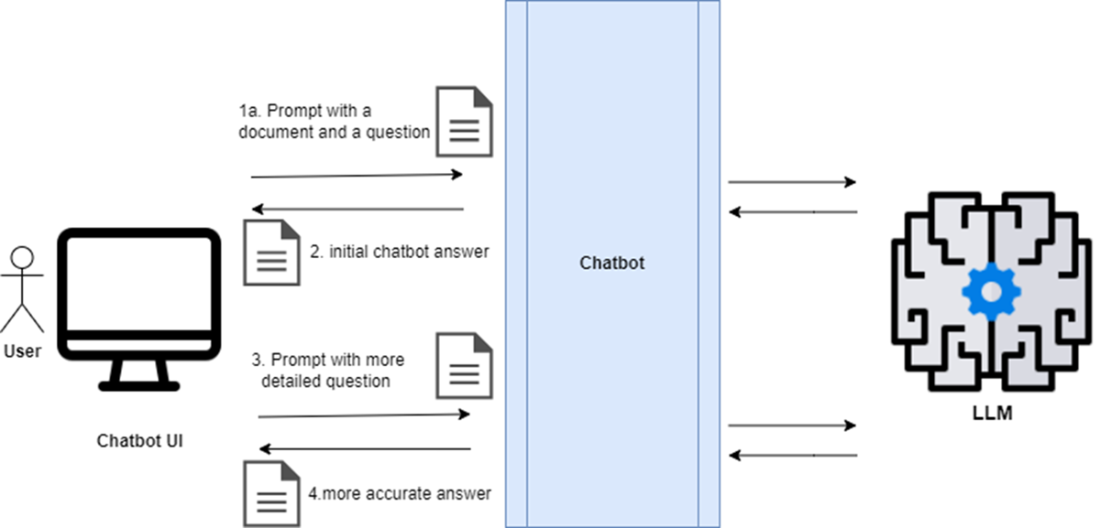
A simple Q&A chatbot process: 1) The user sends a prompt containing a document (context) and a question to the chatbot; 2) The chatbot returns an initial answer; 3) The user follows up with a more detailed question; 4) The chatbot provides a more accurate answer.
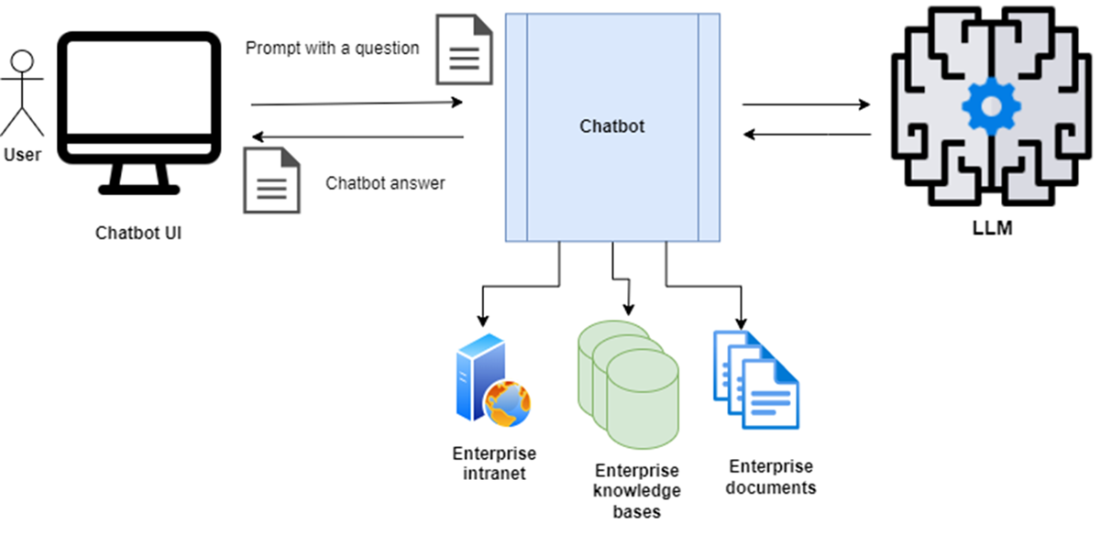
Hypothetical design for an enterprise Q&A chatbot: the knowledge of the chatbot is expanded with various data sources: the enterprise intranet, knowledge bases and documents
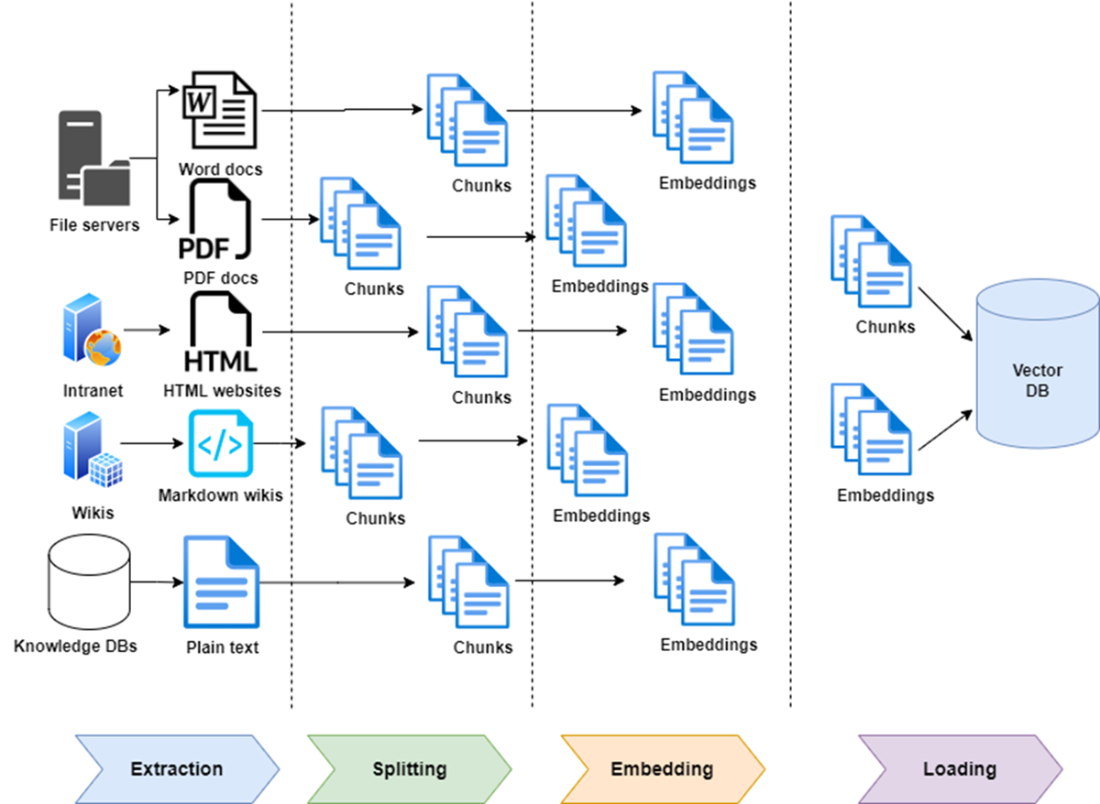
RAG Ingestion Stage: Documents are extracted from sources, split into chunks, and converted into embeddings while being stored in a vector database, which stores a copy of the original chunks and their embeddings (vector form).
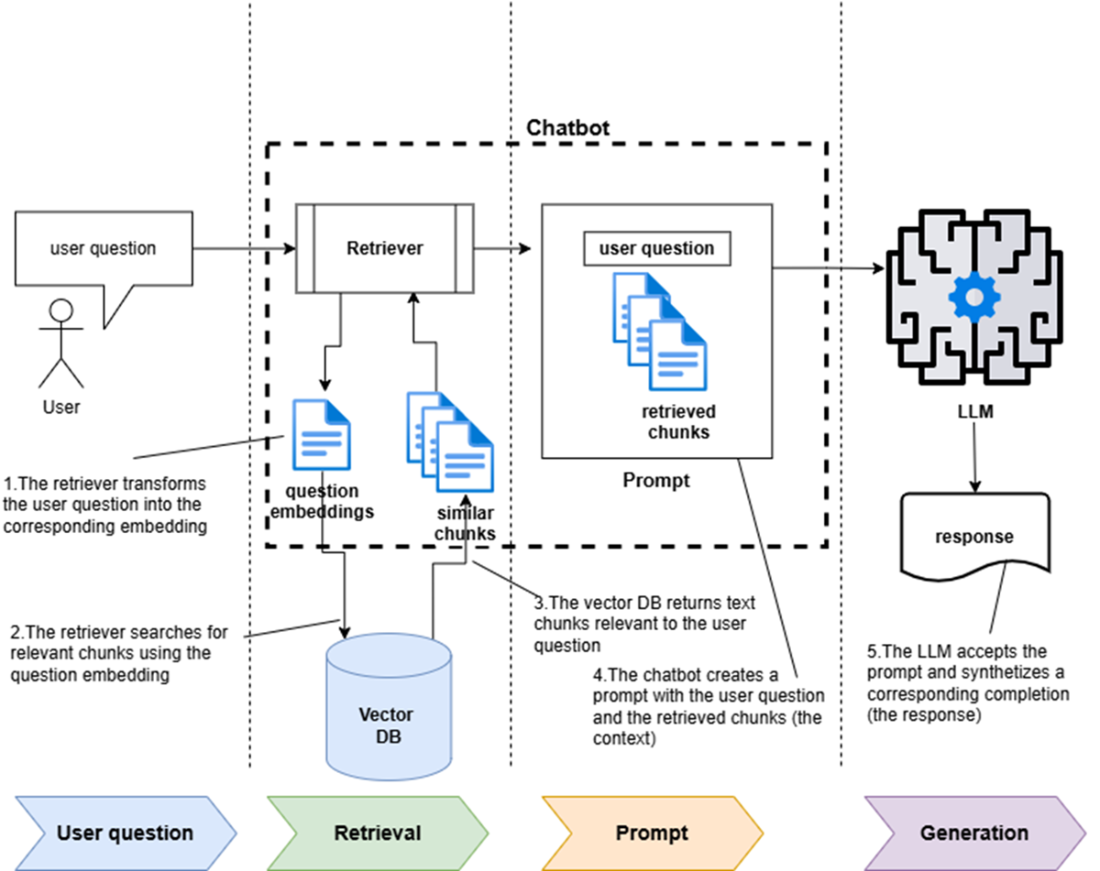
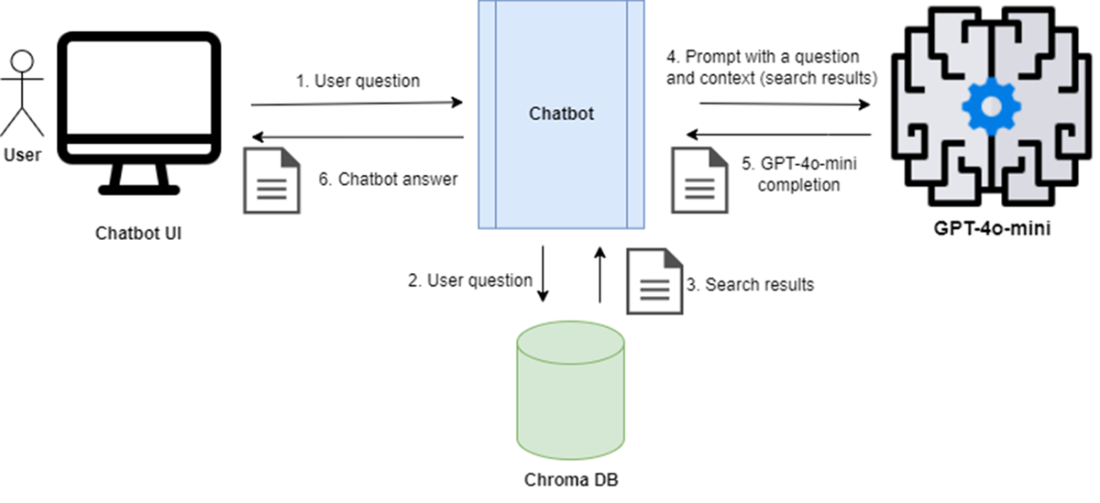
RAG Question & Answer Stage: 1) The chatbot uses a retriever to transform the user question into embeddings; 2) then the retriever uses the embedding to perform a similarity search in the vector store. 3) The vector store returns several relevant text chunks; 4) The retrieved content is fed into a prompt as a "context" along with the original user question. 5) The chatbot sends the prompt to the LLM which synthesizes a response and returns it to the user.
RAG Architecture including Chroma DB and GPT-5-nano model
Summary
- Implement a minimalistic Q&A chatbot by feeding a question and supporting document to an LLM like ChatGPT or Claude.
- For answering questions over a knowledge base, use RAG, which includes a vector store, a retriever, and an LLM to synthesize responses.
- The RAG design pattern has two stages: ingestion (populating the vector store with text and embeddings) and Q&A (retrieving relevant documents and generating responses).
- A vector store is a specialized database optimized for storing and retrieving text through related embeddings.
- Many vector stores evolved from in-memory libraries to full-fledged persistent databases.
- You can implement a simple RAG system by directly using the APIs of the LLM (such as the OpenAI API) and the vector store (such as the Chroma DB API).
FAQ
What is semantic search and how is it different from keyword-based search?
Semantic search finds information based on meaning, not exact word matches. It interprets the user’s intent, retrieves relevant document fragments whose meaning is closest to the query, and can optionally generate a natural-language answer. Unlike keyword search, it can return relevant results even when the query and the answer share no exact words.What does RAG (Retrieval Augmented Generation) mean?
RAG combines two steps: 1) Retrieval: fetch relevant context from a prepared data source (typically a vector store optimized for semantic search); 2) Generation: use an LLM to synthesize an answer augmented by the retrieved context. This lets you ask natural questions while grounding answers in your own content.What are the two stages of a RAG system?
- Content Ingestion (Indexing): Extract text from sources, split it into chunks, create embeddings for each chunk, and store both chunks and embeddings in a vector store for fast semantic lookup.- Question-Answering (Retrieval & Generation): Convert the user question to an embedding, retrieve the closest chunks from the vector store, insert them as context into a prompt, and have the LLM synthesize the final answer.
Why do we split documents into chunks during ingestion?
Chunking enables accurate semantic search and efficient embedding creation. Embedding models have size limits, and smaller, focused chunks improve retrieval quality by avoiding mixed or loosely related content. It also keeps prompts concise, reducing cost and improving LLM accuracy.What is a vector store and why is it important?
A vector store is a system for storing and querying high-dimensional vectors (embeddings) alongside their source text and metadata. It powers semantic similarity search by finding the closest embeddings to a query. In RAG, it’s the context store that makes retrieval efficient and relevant.How do embeddings and similarity search work?
Embeddings convert text into numerical vectors capturing meaning. At query time, the question is embedded with the same model used at ingestion. The vector store finds the most similar stored embeddings (e.g., using cosine or Euclidean distance, often via ANN algorithms), returning the top matching text chunks for the LLM to use as context.What’s the difference between vector libraries and vector databases?
- Vector libraries (e.g., FAISS) focus on in-memory similarity search over embeddings and typically don’t store source text, limit updates, and complicate synchronization with original data.- Vector databases (e.g., Chroma, Pinecone, Weaviate, Qdrant) store text, embeddings, and metadata together, support CRUD operations, querying during ingestion, and operational features like sharding and persistence.
How do I get started with Chroma DB for semantic search?
Basic steps: 1) Install Chroma; 2) Create a client (in-memory or persistent/HTTP); 3) Create a collection; 4) Add documents with IDs and metadata (Chroma can generate embeddings by default); 5) Query with query_texts and n_results to retrieve the closest chunks. The vector store returns the matching chunks, their IDs, distances, and metadata.How do I reduce hallucinations in a RAG chatbot?
- Prompt the LLM to use only retrieved context and to say “I don’t know” if the answer isn’t in that context.- Keep context focused and relevant; avoid overloading the prompt.
- Use well-tested RAG prompts (e.g., concise instructions that emphasize grounded answers).
- Evaluate systematically; iterate on chunking, retrieval parameters, and prompts.

 AI Agents and Applications ebook for free
