2 Executing prompts programmatically
Large language models are driven by prompts—clear, structured instructions that shape behavior and quality of output. This chapter positions prompt engineering as a core development skill, showing how clarity, specificity, and structure translate into more reliable applications. It progresses from foundational prompt design to advanced reasoning techniques, and introduces practical tooling that helps developers compose, test, and reuse prompts effectively in production workflows.
The chapter first demonstrates running prompts programmatically with the OpenAI API in a Jupyter environment, emphasizing secure key handling and the chat-style message format. It then mirrors the same flow with LangChain, using its ChatOpenAI wrapper and prompt utilities to simplify composition. Reusable templates and parameterized prompts (via PromptTemplate and FewShotPromptTemplate) enable dynamic inputs and consistent outputs, while examples span common tasks—classification, sentiment analysis, summarization, content generation, and question answering—highlighting how output instructions (for example, “only the category” or a structured table/JSON) make results easier to parse and integrate.
To improve reasoning, the chapter contrasts zero-shot prompting with one-shot, two-shot, and few-shot learning, and shows how adding explicit steps and Chain of Thought guidance can correct errors and raise accuracy. It also proposes a robust prompt checklist—Persona, Context, Instruction, Input, Steps, Tone, Output Format, and Examples—and suggests marking sections with tags to reinforce structure. Together, these practices provide a systematic approach to designing prompts that are cost-aware, reproducible, and dependable for real-world applications.
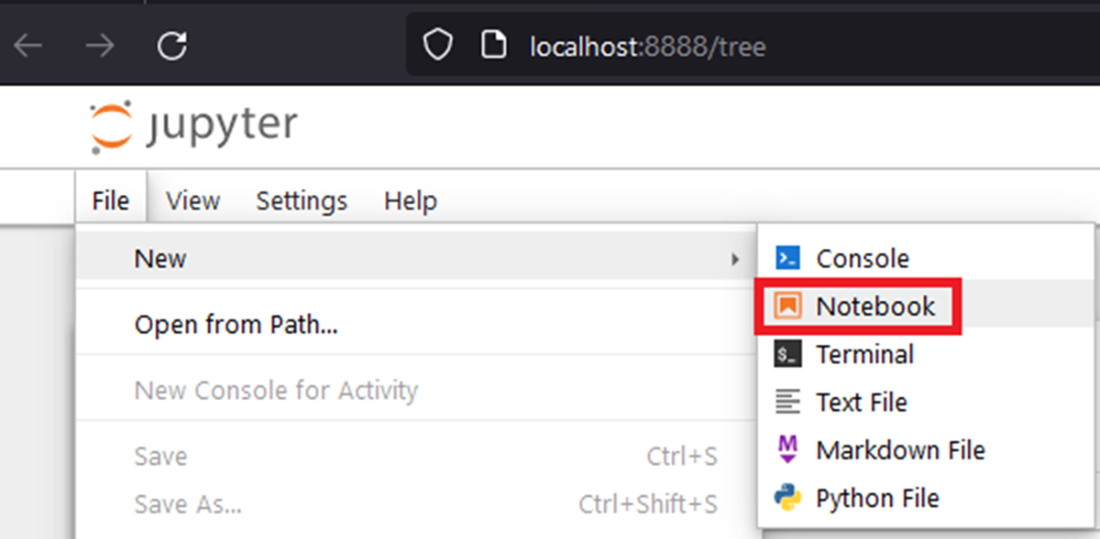
Creating a new Jupyter notebook: create the notebook with the menu File > New > Notebook and then rename the file to prompt_examples.ipynb
Summary
- A prompt is a specific request that guides the LLM, giving it instructions based on provided background information.
- Different types of prompts are tailored for specific tasks, such as text classification, sentiment analysis, text summarization, text generation, or question and answering.
- If a prompt doesn't produce the expected result, it means the underlying LLM isn't familiar with the requested task and needs training.
- Training involves enhancing the prompt with examples, categorized as one-shot, two-shot, or few-shot learning based on the number of examples given.
- As you create various prompts, you might notice a common prompt structure with sections like persona, context, instruction, input, steps, examples, etc.
- You should adapt the prompt structure to your use case by choosing relevant sections or adding custom ones. You can also drop some explicit section names
- While users often create and execute prompts directly through a chat LLM UI like ChatGPT, software developers typically automate prompt generation programmatically using directly the LLM API or LangChain.
- In LLM application development, it's crucial to design parameterized prompts, also known as prompt templates.
- LangChain supports prompt engineering with a range of classes, from PromptTemplate to the more advanced FewShotPromptTemplate
FAQ
What are the prerequisites to run prompts programmatically for this chapter?
You need an OpenAI API key and a Python Jupyter Notebook environment. The chapter recommends creating a project folder (for example, ch02), setting up a Python virtual environment with venv, activating it, installing packages from requirements.txt, and launching Jupyter (jupyter notebook). If you’re new to either step, see the book’s appendices for creating an API key and setting up Jupyter.How should I securely provide my OpenAI API key in a notebook?
Do not hardcode the key. Use an input prompt so the key isn’t stored in the notebook:import getpass
OPENAI_API_KEY = getpass.getpass('Enter your OPENAI_API_KEY')How do I send a minimal prompt using the OpenAI Python SDK?
Create a client with your key and call chat.completions.create with system and user messages:from openai import OpenAI
client = OpenAI(api_key=OPENAI_API_KEY)
prompt = """Write a concise message to remind users about phishing."""
resp = client.chat.completions.create(
model="gpt-5-nano",
messages=[
{"role": "system", "content": "You are a helpful assistant."},
{"role": "user", "content": prompt}
]
)How do I extract just the assistant’s text from the response?
Access the first choice’s message content:print(resp.choices[0].message.content)Which model should I choose (gpt-5, gpt-5-mini, gpt-5-nano)?
- gpt-5: highest accuracy, slower and most expensive. - gpt-5-mini: balanced speed, cost, and accuracy. - gpt-5-nano: fastest and cheapest; great for demos and low-cost runs. The chapter defaults to gpt-5-nano to keep costs low; you can switch to mini or gpt-5 for higher accuracy.Why does the chapter use the Completions API, and how is it different from the Responses API?
The Responses API is OpenAI’s newer, agent-oriented interface. The book primarily uses the Completions (chat.completions) API because it’s widely supported by OpenAI and many open-source LLMs, making examples portable. The book revisits the Responses API in later chapters on agents.How do I run the same prompt using LangChain?
Instantiate ChatOpenAI and invoke it with your prompt:from langchain_openai import ChatOpenAI
llm = ChatOpenAI(openai_api_key=OPENAI_API_KEY, model_name="gpt-5-nano")
resp = llm.invoke("""Write a concise message to remind users about phishing.""")
print(resp.content)What is PromptTemplate and how do I use it for parameterized prompts?
PromptTemplate lets you define reusable prompts with variables:from langchain_core.prompts import PromptTemplate
tmpl = PromptTemplate.from_template(
"Write a {num_words}-word summary in a {tone} tone: {text}"
)
prompt = tmpl.format(text=some_text, num_words=20, tone="engaging")
resp = llm.invoke(prompt)How do I add examples (few-shot learning) with LangChain?
Use FewShotPromptTemplate to keep examples separate from the suffix that holds your task input:from langchain_core.prompts.few_shot import FewShotPromptTemplate
from langchain_core.prompts import PromptTemplate
examples = [
{"number": 15, "reasoning": "divisible by 5 not 7", "result": "Abra"},
{"number": 21, "reasoning": "divisible by 7 not 5", "result": "Kadabra"},
]
ex_tmpl = PromptTemplate(
input_variables=["number","reasoning","result"],
template="{number} \\ {reasoning} \\ {result}"
)
fewshot = FewShotPromptTemplate(
examples=examples,
example_prompt=ex_tmpl,
suffix="Classify: {numbers}",
input_variables=["numbers"]
)
prompt = fewshot.format(numbers="3, 4, 5, 7, 35")
print(llm.invoke(prompt).content)
 AI Agents and Applications ebook for free
