Appendix E. Open-source LLMs
This appendix motivates the shift from relying solely on hosted APIs to embracing open-source large language models as a way to reduce costs, improve privacy, and gain control. It explains how openness—of code, training methods, and often data—enables inspection, customization, and compliance, while community contributions accelerate innovation and narrow the gap with proprietary offerings. Cost is framed in terms of total cost of ownership: although on-premises or private cloud deployments introduce setup and maintenance effort, they can be more economical at scale and allow fine-tuning when domain specificity is required. The chapter’s goal is practical: understand the model landscape, learn how to run LLMs locally, and confidently migrate earlier summarization and QA projects to open-source alternatives when appropriate.
A tour of popular open-source LLM families emphasizes that models come in distinct variants—foundation, instruction, chat, code, and domain-specific—and should be chosen by task and constraints rather than size alone. Benchmark guidance highlights that “best” is use-case dependent: instruction-following models excel for chatbots, while math- or code-specialized models are better for technical reasoning. The appendix then details how to host models locally by obtaining weights and running inference, noting consumer hardware limits and how quantization shrinks memory needs and speeds up generation with acceptable accuracy trade-offs. A recurring theme is OpenAI REST API compatibility across engines, which lets teams prototype with hosted services and later switch to local models by changing only base URLs, ports, and model names.
Several inference engines are compared to match different needs. Low-friction options like llamafile and Ollama make experimentation easy; user-friendly GUIs such as LM Studio and GPT4All streamline model discovery, chat, and basic RAG; llama.cpp offers maximum control on CPUs and modest GPUs; and vLLM targets high-throughput, production deployments on powerful GPUs with advanced batching and memory optimizations. For deeper architectural control and fine-tuning, the Hugging Face Transformers route is also covered. The chapter concludes with a worked migration of the earlier summarization system to a local model via OpenAI-compatible endpoints, showing minimal code changes, similar output quality for the task, and the expected performance trade-offs on consumer hardware—along with guidance on when to step up to GPU-backed or production-grade engines.
Figure E.1 Lineage and functionality of local inference engines
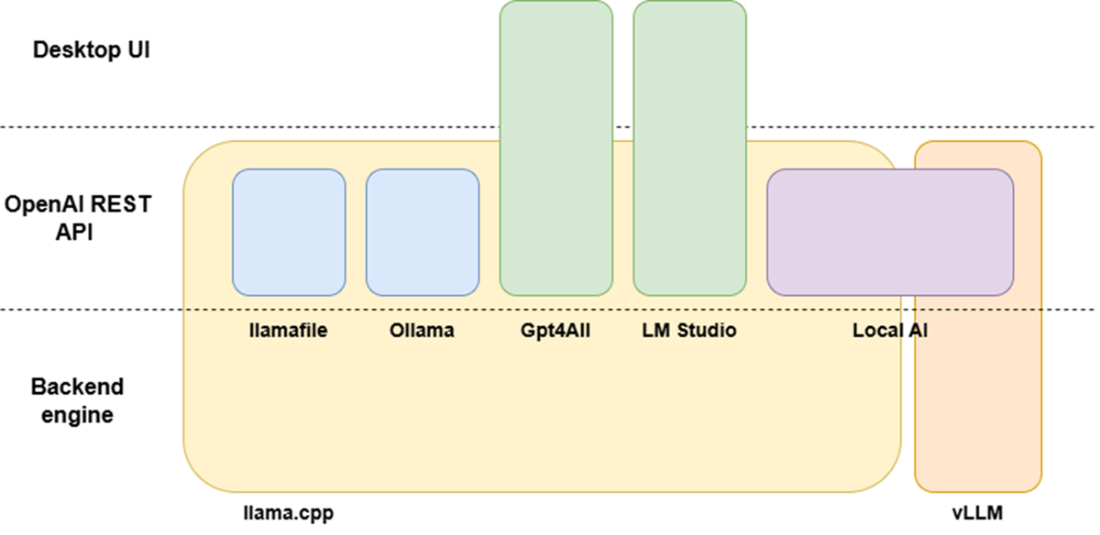
Figure E.2 Screenshot of ollama terminal while installing the Mistral LLM
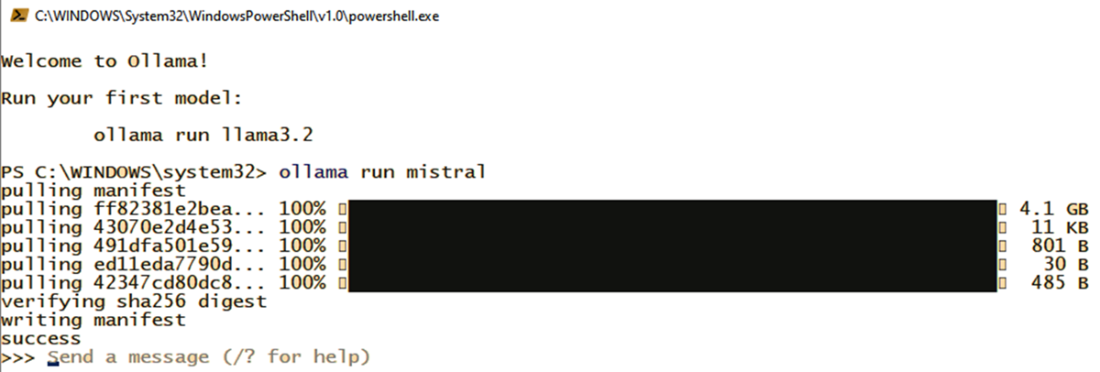
Figure E.3 llamafile chat web UI pointing to the local web server communicating with the local open-source LLM
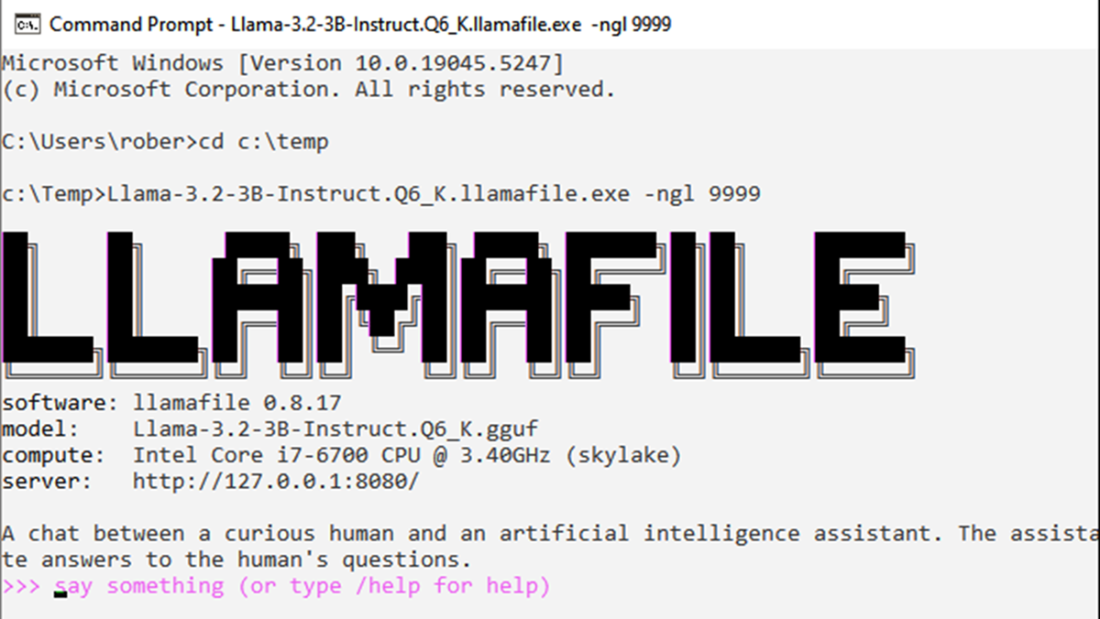
Figure E.4 GGUF Search Screen: 1) search for a model using the search box (in our case, Mistral), 2) select a model variant from the left panel, and download a specific quantized version from the right panel by clicking the "Download" button (not shown in the screenshot). After downloading a model, you can either chat directly through the chat screen or activate the backend server for programmatic interaction.
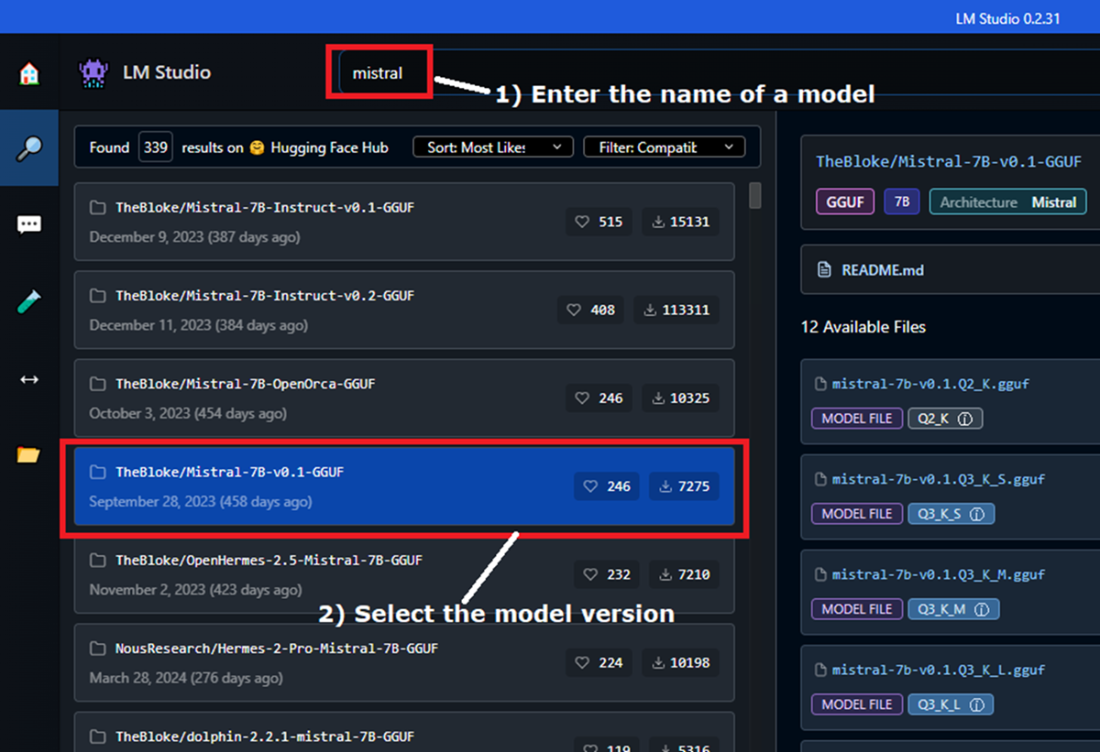
Figure E.5 Chat Screen: Select the chat menu on the left, choose the model from the dropdown at the top, and type a prompt in the text box at the bottom.
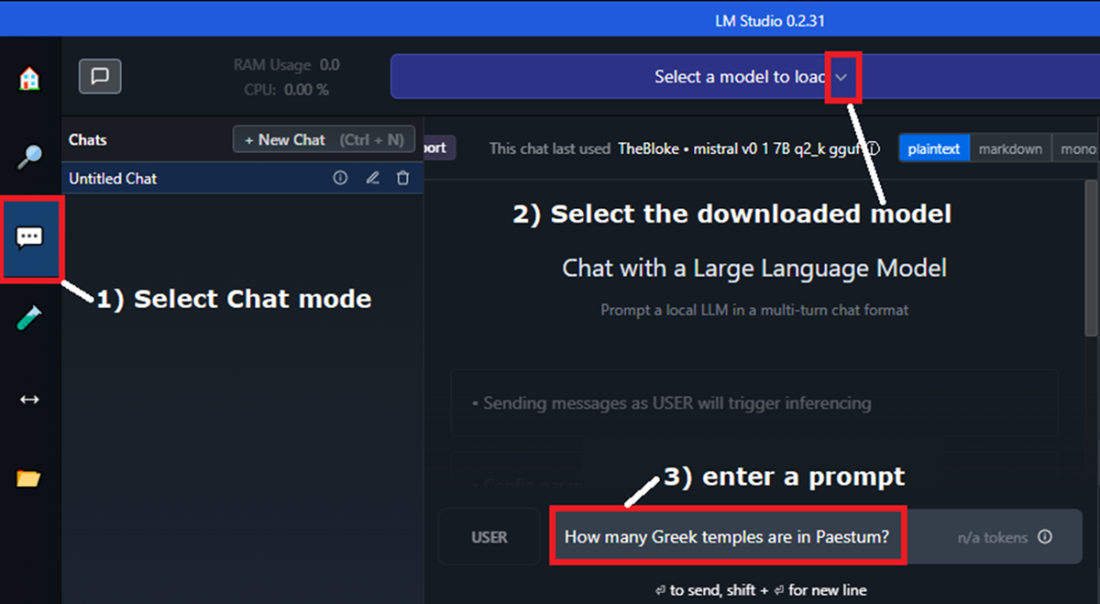
Figure E.6 Prompt Response: The time to receive an answer depends on the model, its quantization, and your computer’s hardware.
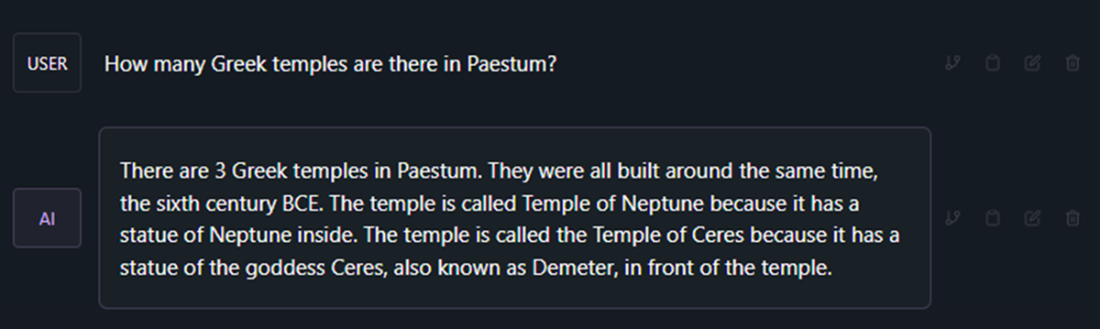
Figure E.7 Activating the Local HTTP Server: click the Server menu on the left, enter (or accept) the port number and click the Start Server button.
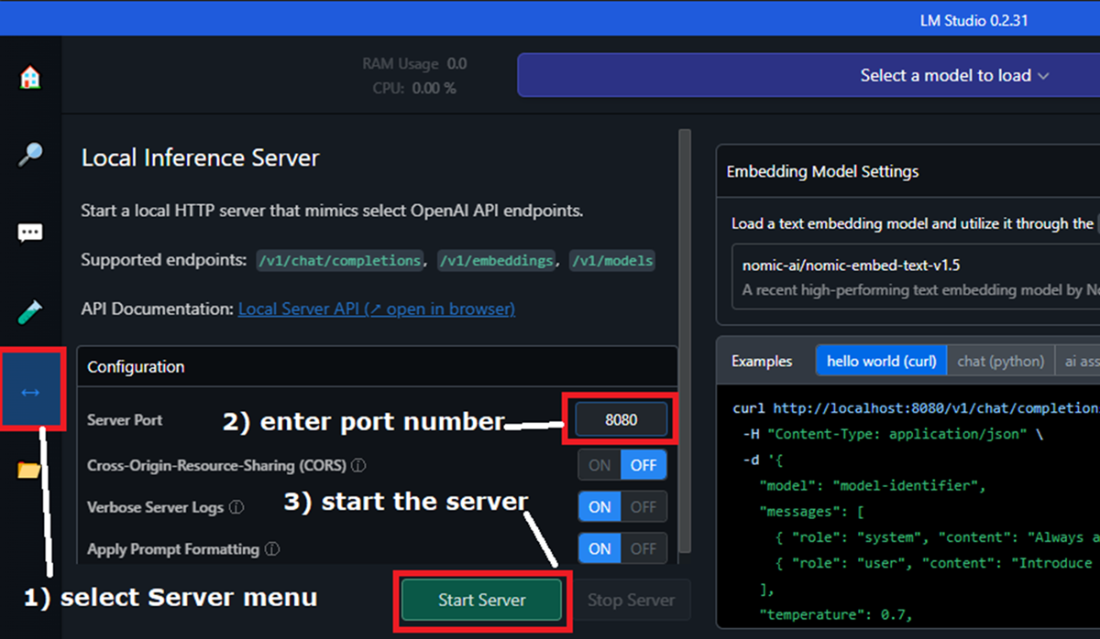
Figure E.8 LocalAI Architecture: LocalAI routes OpenAI-like REST API calls to inference engines like llama.cpp, vLLM, or other custom backends.
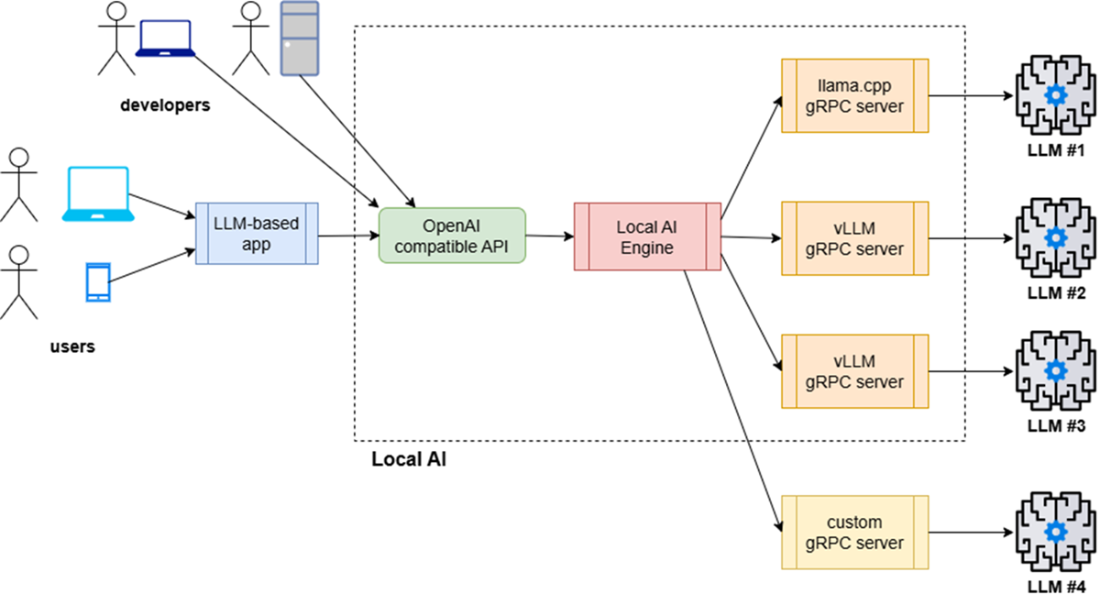
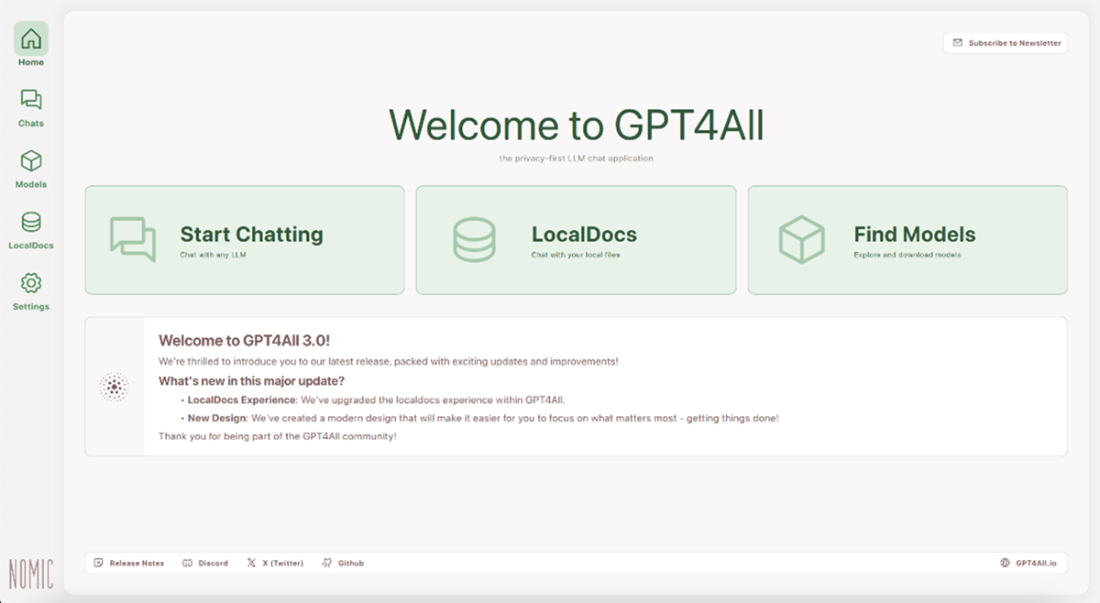
Figure E.9 GPT4All desktop application home screen
E.7 Summary
- Open-source LLMs provide potential cost savings, privacy control, and flexibility, with community-driven innovation ensuring competitive performance and customization compared to proprietary models. These features make open-source LLMs an appealing option for both experimentation and production.
- Transparency in architecture, training data, and methods allows open-source LLMs to be validated, modified, and tailored for compliance and trust. This clarity ensures businesses can meet regulatory requirements while customizing models for specific needs.
- Open-source LLMs empower organizations with lower total cost of ownership and fine-tuning capabilities, enabling tailored solutions while maintaining long-term affordability. This combination helps businesses achieve both financial efficiency and functional scalability.
- Comparative tables simplify the evaluation of open-source LLMs, showcasing their unique features and optimal use scenarios. By comparing models side-by-side, you can quickly identify the best fit for your project goals.
- Open-source LLM weights enable local inference with accessible tools and modern techniques like quantization, supporting seamless OpenAI-compatible API integration for cost-effective and private deployments. These methods make running powerful models on consumer hardware more practical and affordable.
- Start with a simple inference engine like llamafile for lightweight models, progress to tools like Ollama or LM Studio for ease of use, and choose llama.cpp or vLLM for advanced, production-grade customization. This progression helps you build confidence though simple user interfaces and scale capabilities as your project grows.
- Applications built for OpenAI can be adapted to open-source LLMs using compatible REST APIs, offering insights into hardware impacts on inference speed and feasibility. This adaptation enables cost-effective experimentation and highlights areas for optimization.
FAQ
Why choose an open-source LLM over a proprietary service?
Open-source LLMs offer transparency (inspectable code and methods), stronger privacy (on-prem or private-cloud deployment keeps data internal), flexibility and customization, community-driven innovation, and medium/long-term cost savings. Trade-offs include taking responsibility for security, uptime, and potential hidden costs (staff time, infrastructure, maintenance).When might a proprietary LLM still be the better choice?
- Early/low-usage projects where pay-as-you-go is cheaper than standing up infrastructure- Situations requiring strict SLAs or turnkey reliability
- RAG-heavy apps with minimal token processing (proprietary token billing may be economical in this case)
How should I select an open-source model for my task?
Match model type and benchmarks to your use case. Examples:- Instruction/chat: prioritize high IFEval (e.g., Qwen2.5-72B-Instruct scored 86.38)
- Math problem solving: prioritize MATH scores (e.g., Qwen2.5-Math-7B scored 30.51 and is smaller)
- Code, domain-specific, or general research: pick the corresponding model family (Code, Domain-Specific, Foundation).
What hardware do I need to run LLMs locally?
Production-grade large models need high-end GPUs (e.g., Llama-70B ~140 GB in float16; A100/H100 class GPUs recommended). For learning and prototypes, quantized models can run on consumer machines with 16–32 GB RAM and even without a dedicated GPU—at lower speed.What is quantization and which techniques are common?
Quantization reduces weight precision (e.g., from float16 to 4-bit) to cut memory and speed up inference, with some accuracy trade-off. Common methods/tools:- PTQ (post-training quantization)
- QAT (quantization-aware training)
- GPTQ, NF4
- GGML/GGUF formats for CPU-friendly inference
- bitsandbytes for easy installs and 4/8-bit loading
Quantized models are widely available on Hugging Face and via engines like Ollama or LM Studio.
Why use an inference engine to host local models?
Inference engines load models and expose APIs (often OpenAI-compatible) so your existing client code can work with minimal changes. Benefits include easier deployment, language bindings, local HTTP servers, and simple engine/model swapping without rewriting app logic.How do popular local inference engines differ?
- llama.cpp: foundational, fast on CPUs/Apple silicon; OpenAI-compatible endpoints; build from source; GGUF support- Ollama: installers for Win/macOS/Linux, great UX; proprietary REST API (not OpenAI-compatible); simple model management
- vLLM: Linux + high-grade GPUs; OpenAI-compatible; high throughput (PagedAttention, continuous batching); production-grade
- llamafile: single self-contained executable (model+runtime); runs cross-OS; OpenAI-compatible endpoints; dead-simple start
- LM Studio: desktop UI, integrated model search/download; OpenAI-compatible local server (e.g., port 8080)
- LocalAI: containerized; routes OpenAI-like calls to llama.cpp or vLLM; OpenAI-compatible (e.g., port 8080)
- GPT4All: desktop UI + LocalDocs (RAG); OpenAI-compatible server (port 4891); GGUF on consumer hardware
How do I migrate an OpenAI-based app to a local open-source LLM?
- Run an engine that exposes OpenAI-compatible endpoints (e.g., vLLM, LM Studio, llamafile, LocalAI, GPT4All)- Point your client to base_url http://localhost:{port}/v1 and set the model name expected by the engine
- Omit API keys if not required by the local server
- Keep ports and model naming conventions aligned with each engine’s docs
What are common pitfalls when hosting LLMs locally?
- Insufficient RAM/VRAM for chosen model size or precision- Using the wrong model name or port for your engine
- Expecting OpenAI compatibility where it isn’t provided (e.g., Ollama API is proprietary)
- Slow CPU-only inference; consider quantization or a GPU
- Context window mismatches and token limits
What’s a practical path to get started and then scale?
- New to local LLMs: start with llamafile (simplest), or Ollama (easy installs)- Prefer a GUI: try LM Studio or GPT4All
- Need maximum control: llama.cpp (more setup)
- Production/high throughput on GPUs: vLLM (OpenAI-compatible, batching, streaming)

 AI Agents and Applications ebook for free
