This chapter broadens ActiveMQ beyond its Java and JMS roots by showing that it can serve as a general messaging platform for many environments. It introduces a stock portfolio example that is adapted to send XML payloads in text messages, making it easier for non-Java clients to consume the data asynchronously. From there, the discussion shifts to the idea that choosing a network protocol is only part of messaging design; the wire protocol matters too, and different client types benefit from different options.
A major focus is STOMP, a simple text-based protocol that is easy to implement in scripting languages and even usable from a telnet session. The chapter explains the structure of STOMP frames, how to connect, subscribe, send, acknowledge, and disconnect, and how ActiveMQ maps queue and topic names in STOMP destinations. It then demonstrates consumers in Ruby, Python, PHP, and Perl, including practical details such as message listeners, acknowledgment modes, prefetch tuning, transactions, and durable topic subscribers.
The chapter also covers compiled-language support through NMS for C# and CMS for C++, showing JMS-like APIs that make ActiveMQ accessible to .NET and native C++ developers. Finally, it turns to web messaging with ActiveMQ’s REST and Ajax APIs, illustrating how messages can be sent and consumed through HTTP requests or directly from JavaScript in a browser. Overall, the chapter emphasizes ActiveMQ’s versatility and its role in integrating applications across scripting, compiled, and web-based platforms.
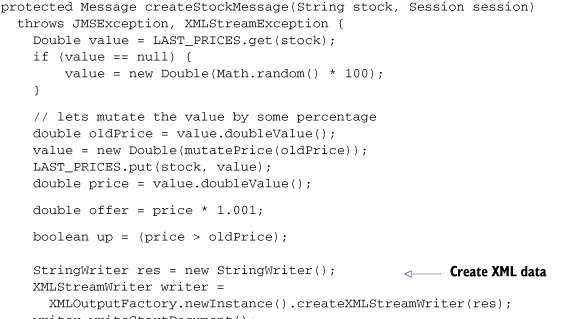
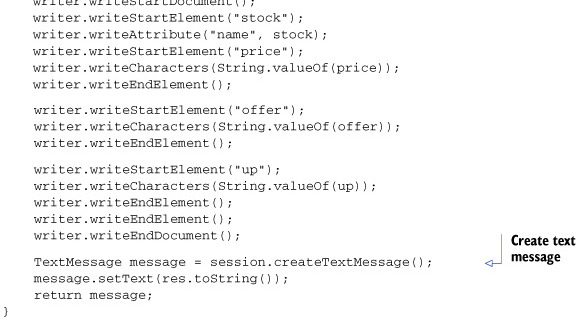
Listing 9.1. Modified stock portfolio publisher that sends messages as XML payloads
Producer sends messages using OpenWire protocol; consumers receive messages using STOMP protocol.
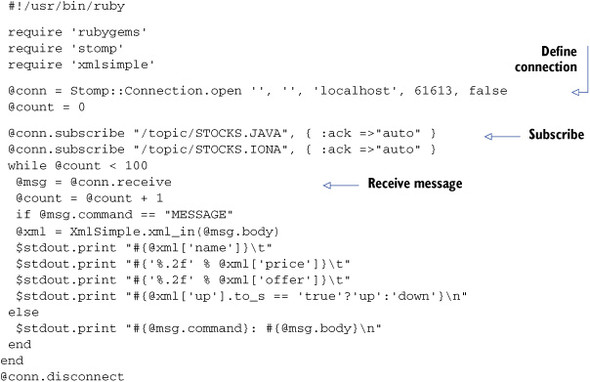
Listing 9.4. Stock portfolio consumer written in Ruby
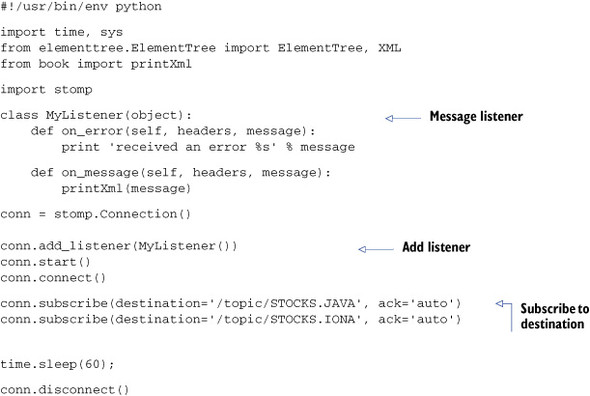
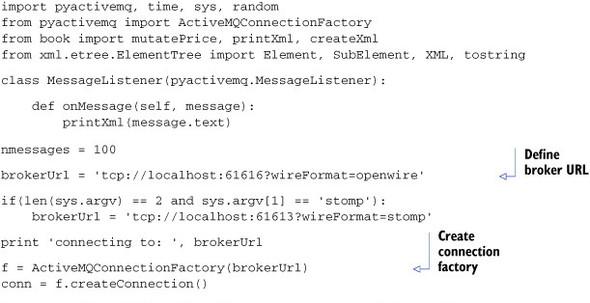
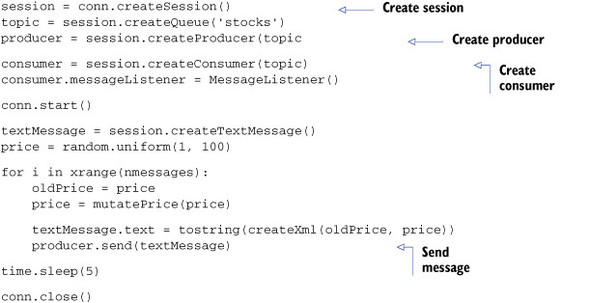
Listing 9.6. Stock portfolio consumer written in Python
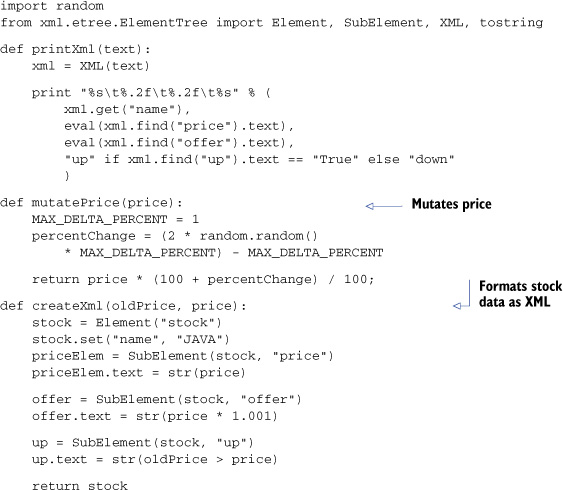
Listing 9.7. Extending helper script for pyactivemq usage
Listing 9.8. Stock portfolio producer written with pyactivemq
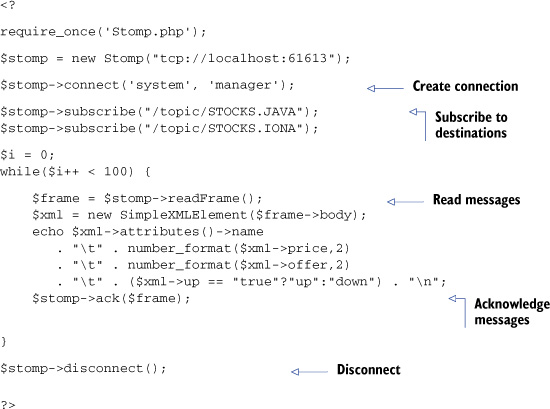
Listing 9.9. Stock portfolio consumer written in PHP
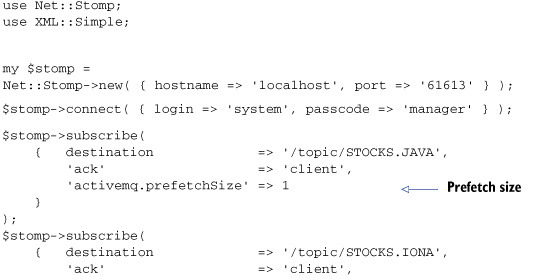
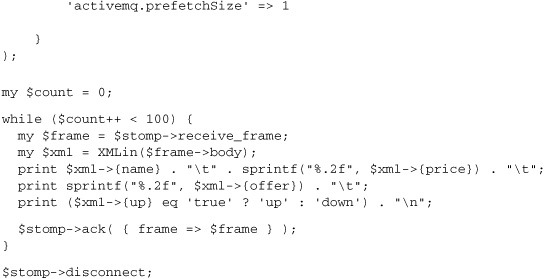
Listing 9.10. Stock portfolio consumer written in Perl
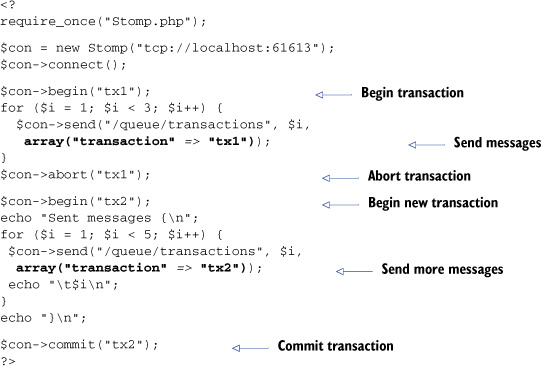
Listing 9.11. Example of sending messages in a transaction
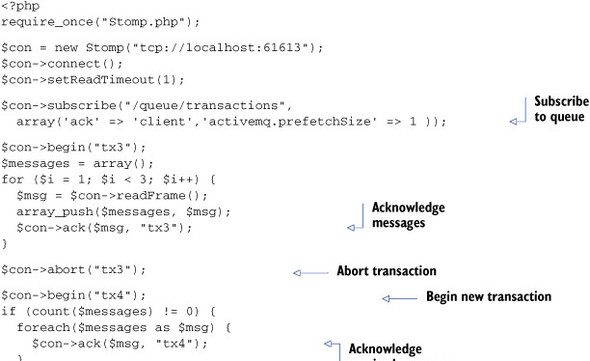
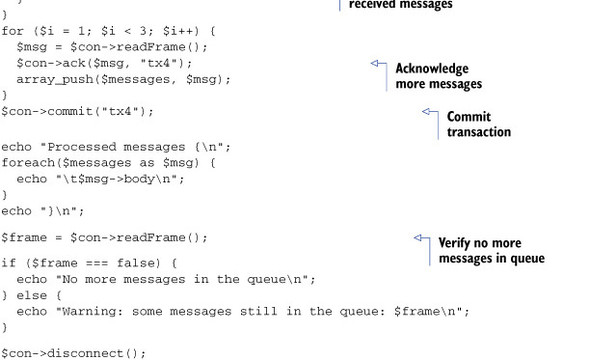
Listing 9.12. Example of consuming (and acknowledging) messages in transactions
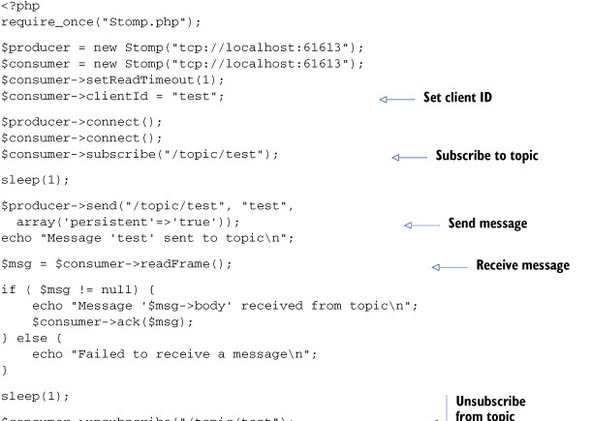
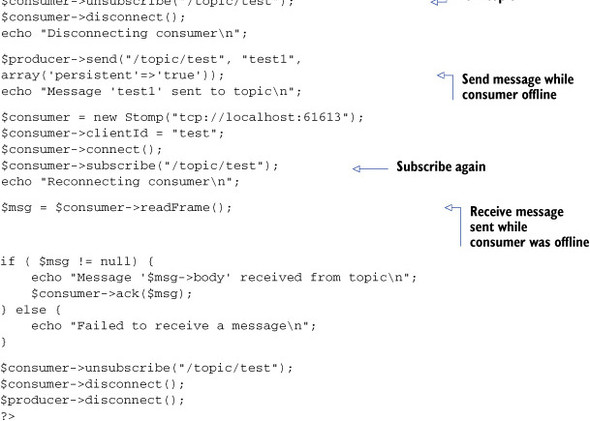
Listing 9.13. Example of using durable topic subscriber with STOMP
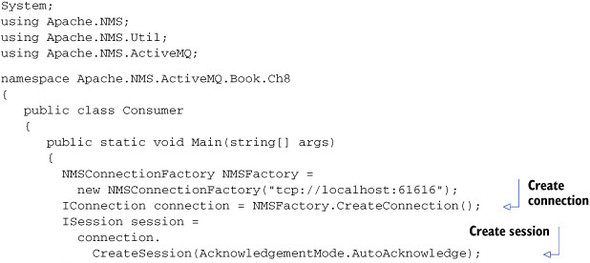
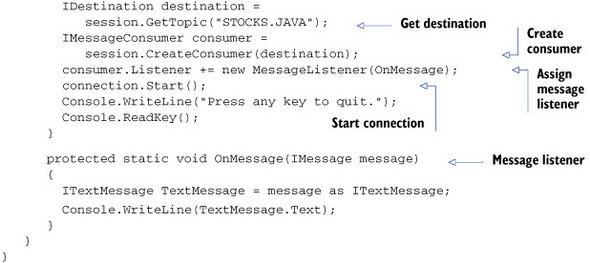
Listing 9.14. Stock portfolio consumer written in C#
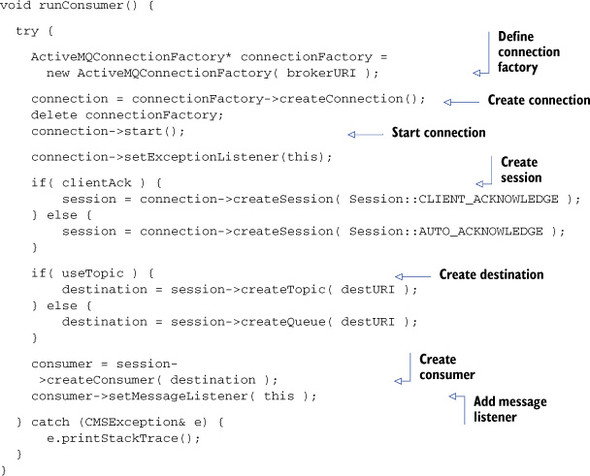
Listing 9.16. Creating message consumer in C++
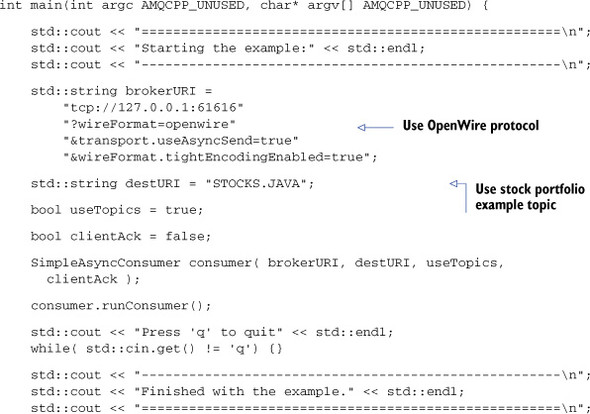
Listing 9.17. Implementation of C++ example’s main method
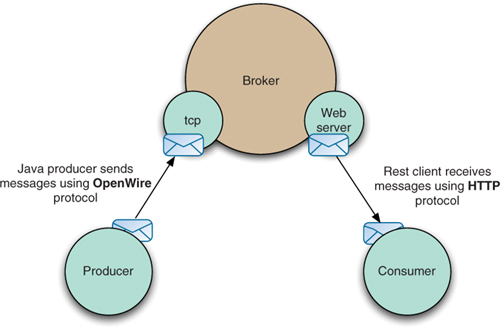
Send messages from Java and consume them using REST API
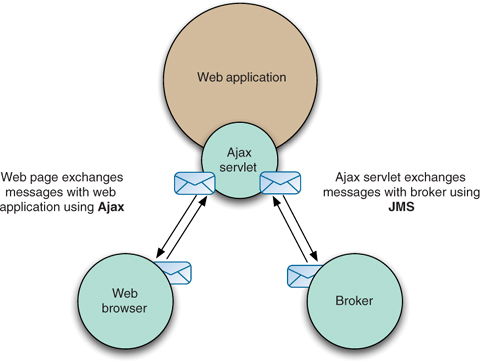
Ajax servlet serves as a proxy between the browser and broker
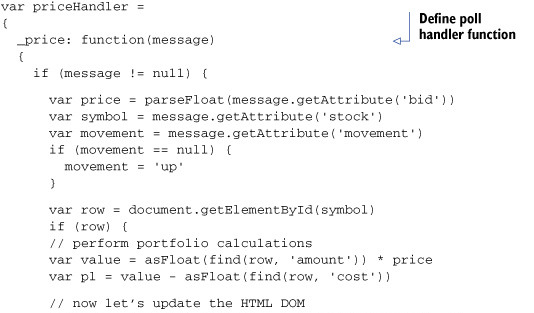
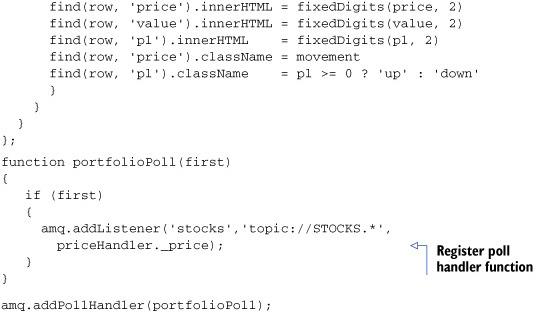
Listing 9.18. Consume messages from JavaScript using Ajax API
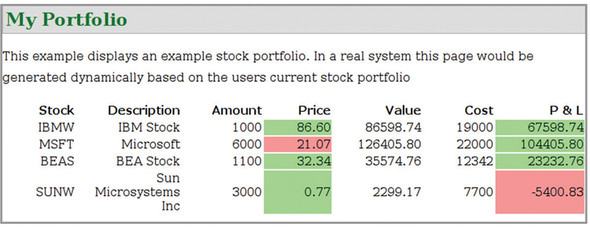
Sample output of the Ajax API demo: the look of the web page after a while. Different colors indicate stock movement.
FAQ
What is the main purpose of Chapter 9 in ActiveMQ in Action?Chapter 9 shows that ActiveMQ is more than a JMS broker for Java. It explains how to use ActiveMQ with other programming languages and environments, including scripting languages through STOMP, C# with NMS, C++ with CMS, and web clients through REST and Ajax APIs.Why does the chapter switch the stock portfolio example from map messages to XML text messages?The chapter changes the example to XML inside text messages because XML is a more natural format for many non-Java environments, especially scripting languages. This makes it easier to show how other platforms can consume ActiveMQ messages.What is STOMP and why is it useful with ActiveMQ?STOMP stands for Streaming Text Oriented Messaging Protocol. It is a simple text-based protocol, similar in spirit to HTTP, which makes it easy to implement clients in many languages. ActiveMQ supports STOMP so that scripting languages and lightweight clients can communicate with the broker easily.What are the basic parts of a STOMP frame?A STOMP frame has three basic parts: a command, headers, and an optional body. The frame is terminated by an ASCII null character. For example, a SEND frame includes a destination header and the message body.How do STOMP clients connect to and communicate with an ActiveMQ broker?STOMP clients send a CONNECT frame to open a session, then use frames like SEND to publish messages and SUBSCRIBE to receive them. The broker responds with CONNECTED after a successful connection, and clients can later UNSUBSCRIBE and DISCONNECT when finished.What is the difference between auto acknowledgment and client acknowledgment in STOMP?In auto mode, the broker treats a message as delivered as soon as the client consumes it. In client mode, the message is not considered delivered until the client explicitly sends an ACK frame. Auto is the default, while client mode gives the application more control.What is the purpose of setting activemq.prefetchSize to 1 for some STOMP consumers?STOMP clients are often simple scripts and may not buffer messages like richer clients do. Setting activemq.prefetchSize to 1 makes the broker send one message at a time, which helps avoid message delivery problems and makes acknowledgment easier to manage.What are NMS and CMS in the context of ActiveMQ?NMS is the .NET Message Service API for C# and other .NET languages, while CMS is the C++ Messaging Service API for C++. Both provide JMS-like interfaces so developers can build messaging applications outside Java, using ActiveMQ as the broker.How does ActiveMQ support messaging on the web through REST?ActiveMQ provides a REST API through the MessageServlet. Destinations are exposed as HTTP resources, and clients can use GET to receive messages and POST to send them. This allows command-line tools like wget and curl to interact with the broker over HTTP.How does the ActiveMQ Ajax API help browser-based applications?The Ajax API lets JavaScript applications communicate asynchronously with ActiveMQ through the AjaxServlet. Browser code can send messages and register listeners for destinations, allowing web pages to update dynamically as new messages arrive.
pro $24.99 per month
access to all Manning books, MEAPs, liveVideos, liveProjects, and audiobooks!


 ActiveMQ in Action ebook for free
