Chapter 12. Advanced client options
This chapter explores several advanced client-side capabilities in ActiveMQ that go beyond basic JMS usage. It explains how these features help applications preserve message order, improve resilience, move large data efficiently, and control when messages are delivered. The discussion emphasizes practical client configuration choices and shows how the broker and client work together to manage delivery behavior.
One major theme is controlling which consumer receives messages. Exclusive consumers let the broker choose a single active consumer for a queue, which is useful for ordered processing and can also be adapted into a distributed locking pattern so that only one producer-like process is active at a time. Message groups extend this idea by routing all messages with the same group identifier to the same consumer, while still allowing failover if that consumer disappears. The chapter also notes how consumers can be balanced more evenly, how grouped messages are tracked, and how a group can be explicitly closed and later reassigned.
The chapter then turns to large payload transport, failover behavior, and scheduling. ActiveMQ streams split data into chunks and reassemble them on the receiving side, which is convenient for file-like transfers but less robust if a consumer fails midstream. Blob messages instead keep the payload outside the broker and send only a reference, offering stronger atomicity at the cost of relying on external storage. The failover transport is examined in depth, including broker lists, randomization, reconnect delays, keepalive settings, message caching, backup connections, and cluster-aware client updates. Finally, the chapter shows how to schedule delayed, repeated, or cron-based message delivery, with messages stored persistently so they can survive broker restarts.
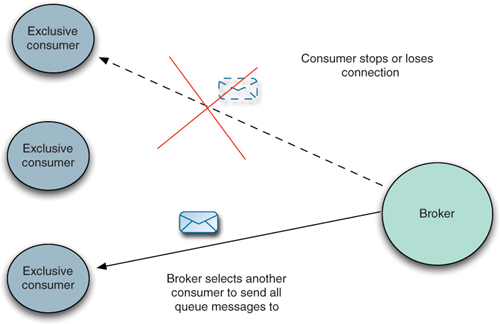
How exclusive consumers behave on failure
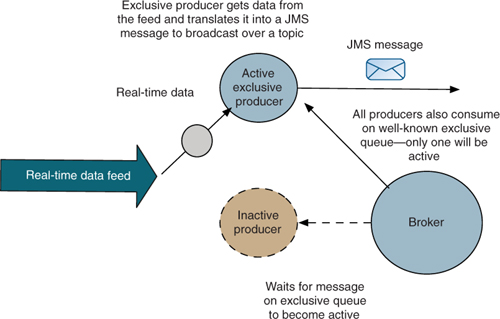
Using exclusive consumers as a distributed lock to create an exclusive producer application
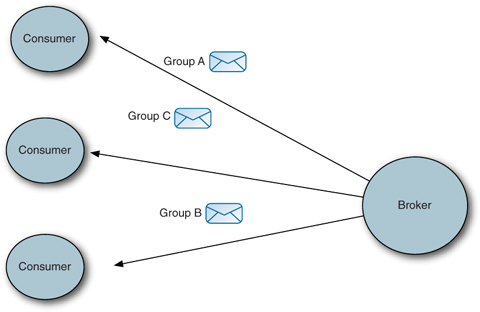
Message groups: messages with the same JMSXGroupID will be sent to the same consumer
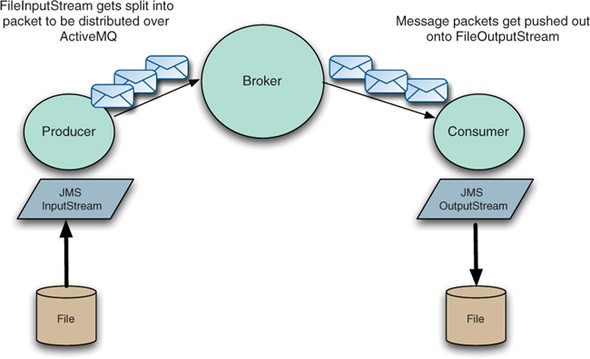
Using IOStreams to transfer a large file through ActiveMQ
FAQ
What is an exclusive consumer in ActiveMQ?
ActiveMQ exclusive consumers ensure that only one consumer on a queue receives messages at a time, even if multiple consumers are subscribed. This is useful when message order must be preserved or when only one active processor should handle the queue.How do you create an exclusive consumer on a queue?
You can create one by adding the destination option?consumer.exclusive=true to the queue name, for example: new ActiveMQQueue("TEST.QUEUE?consumer.exclusive=true").Why would you use exclusive consumers as a distributed lock?
Exclusive consumers can act like a distributed lock by allowing only one application instance to become active and process work. If that instance fails, another exclusive consumer can take over, providing failover without relying on database or file locks.What are message groups in ActiveMQ?
Message groups let you route all messages with the sameJMSXGroupID to the same consumer. This keeps related messages together and preserves processing affinity for a given group.How do you assign a message to a message group?
Set the string propertyJMSXGroupID on the message before sending it, such as message.setStringProperty("JMSXGroupID", "TEST_GROUP_A").How does ActiveMQ know when a message group has been closed?
You can close a group by sending a message with the sameJMSXGroupID and setting JMSXGroupSeq to -1. After that, the broker may assign future messages in that group to a different consumer.What is the difference between ActiveMQ streams and blob messages?
Streams break large data into chunks and send them through JMS, then reassemble them on the consumer side. Blob messages keep the data out of band and send only a URL in the JMS message, which points to the actual large payload stored externally.What is the failover transport used for in ActiveMQ?
The failover transport helps a client survive broker or network failure by reconnecting to another broker from a configured list. It can also detect transport interruptions and resume communication when possible.How can you schedule a message to be delivered later in ActiveMQ?
Set theAMQ_SCHEDULED_DELAY property on the message. You can also use AMQ_SCHEDULED_PERIOD, AMQ_SCHEDULED_REPEAT, or AMQ_SCHEDULED_CRON for repeated or cron-based delivery.
 ActiveMQ in Action ebook for free
