9 Routing Fundamentals
This chapter introduces routing as both the method routers use to build a routing table and the process of forwarding packets between networks. It explains how end hosts decide whether a destination is local or remote, the role of the default gateway, and the high-level logic a router uses to make forwarding decisions. You learn how to read routing tables, interpret route types, and apply longest-prefix-match logic, as well as how to configure static and default routes to provide reachability within an enterprise and toward the Internet.
The chapter begins at the host level: every IP packet is carried inside a Layer 2 frame whose destination MAC depends on the packet’s destination IP. If the destination is on the same network, the frame is addressed to the peer host’s MAC; otherwise it is sent to the default gateway’s MAC, with ARP used to discover the appropriate address. On receipt of a frame addressed to it, a router de-encapsulates and either processes the packet (if it targets the router’s own IP) or consults the routing table to forward it. Routers automatically install connected network routes and /32 local (host) routes for up/up interfaces, and they select the most specific matching route when forwarding. Unlike switches, routers never flood unknown traffic; they forward, receive, or drop based on the routing table.
Static routing is presented in three forms: recursive (destination and next-hop IP), directly connected (destination and exit interface), and fully specified (both exit interface and next hop). Recursive routes require an additional lookup to resolve the next hop’s outgoing interface; exit-interface–only routes can misrepresent remote networks as directly connected and may rely on proxy ARP and create excessive ARP entries; fully specified routes avoid both recursion and proxy ARP. The chapter shows how to stitch multi-router paths by pointing only at the next hop for the destination networks that matter, and how to configure a default route (0.0.0.0/0) as the gateway of last resort so all non-matching traffic is sent toward the ISP. Throughout, you verify behavior with routing-table inspection and reinforce the precedence of specific routes over the default.
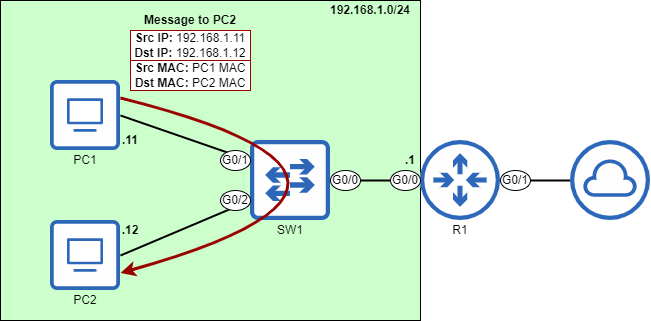
PC1 (192.168.1.11) sends a packet to PC2 (192.168.1.12). Because PC1 and PC2 are both in the same network (192.168.1.0/24), PC1 encapsulates the packet in a frame addressed to PC2’s MAC address. PC1 does not need to send the packet to R1 for routing. This diagram assumes PC1 already knows PC2’s MAC address; if not, PC1 will first send an ARP request to learn PC2’s MAC address.
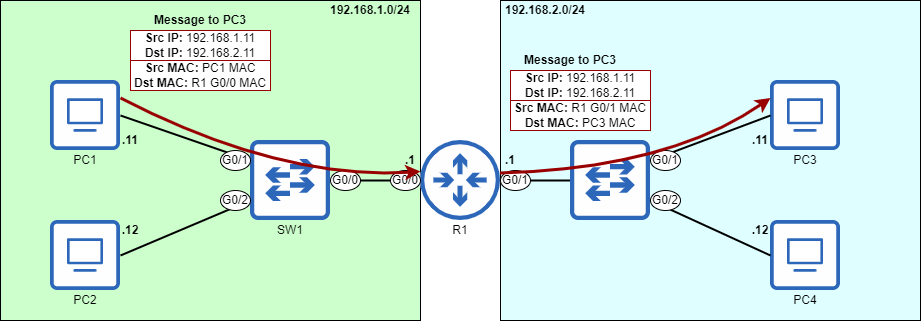
PC1 (192.168.1.11) sends a packet to PC3 (192.168.2.11). Because PC1 and PC3 are in separate networks, PC1 sends the packet in a frame addressed to its default gateway’s MAC address - that of R1’s G0/0 interface. R1 then forwards the packet out of its G0/1 interface, encapsulated in a new frame addressed to PC3’s MAC address. This diagram assumes PC1 already knows R1 G0/0’s MAC address; if not, PC1 will send an ARP request to learn it. Likewise, R1 must also learn PC3’s MAC address.
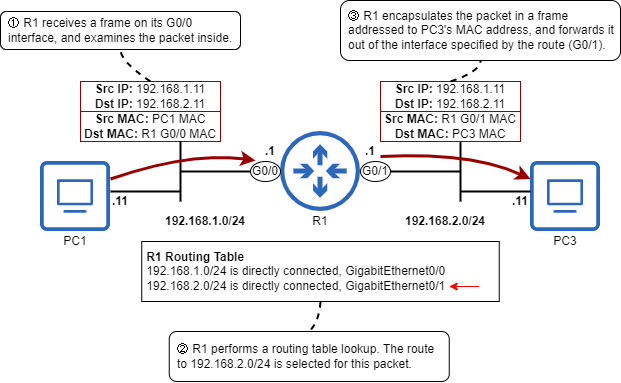
R1 receives a packet from PC1 and forwards it to PC3. 1) R1 receives a frame on its G0/0 interface. The frame is addressed to R1’s own MAC address, so it examines the packet inside. 2) R1 looks up the packet’s destination IP address in its routing table. 192.168.2.11 is in the 192.168.2.0/24 network, so it selects that route to forward the packet. 3) R1 encapsulates the packet in a new frame destined for PC3’s MAC address, and forwards it out of the interface specified by the route (G0/1).
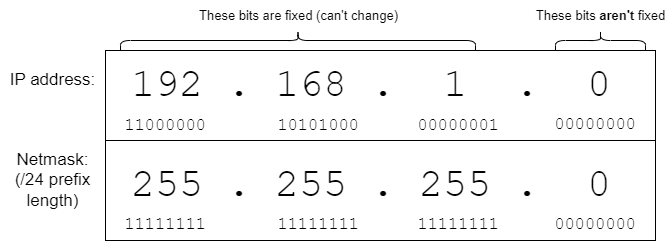
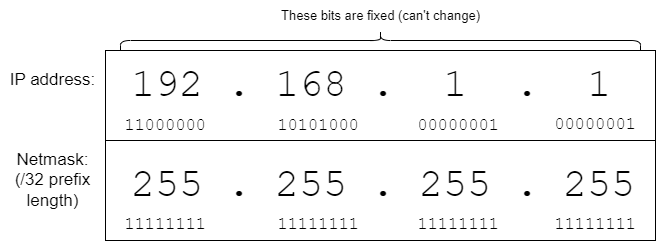
The IP address and prefix length (written as a netmask) of the route to 192.168.1.0/24. Due to the /24 prefix length, the first three octets are fixed (the bits can’t change). However, the last octet can be any eight-bit number: .1, .11, .100, .179, etc. This means that any packet with a destination IP address beginning with “192.168.1” can be forwarded using this route.
The IP address of R1’s G0/0 interface, and a /32 prefix length written as a netmask in dotted decimal and binary. With a prefix length of /32, the route only includes a single IP address (192.168.1.1 in this case). A packet destined for 192.168.1.2, for example, cannot use this route.
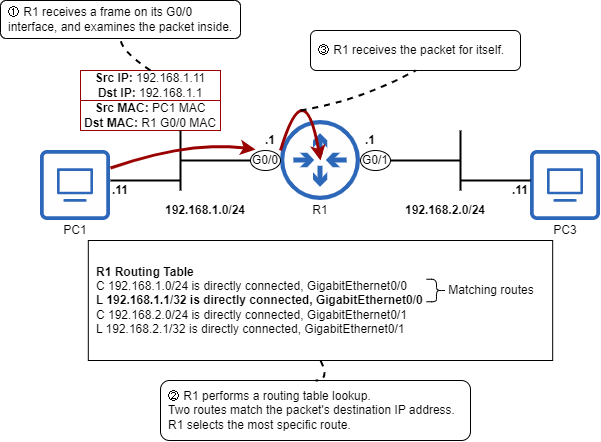
R1 receives a packet and selects the best route for that packet. 1) R1 receives a frame on its G0/0 interface. The destination MAC is its own, so it de-encapsulates it and examines the packet inside. 2) The packet’s destination IP address is 192.168.1.1. R1 performs a routing table lookup, and finds that two routes match the packet’s destination IP address: the connected route to 192.168.1.0/24, and the local route to 192.168.1.1/32. R1 selects the most specific route: 192.168.1.1/32. 3) Because R1 selects a local route, it receives the packet for itself; it does not forward the packet.
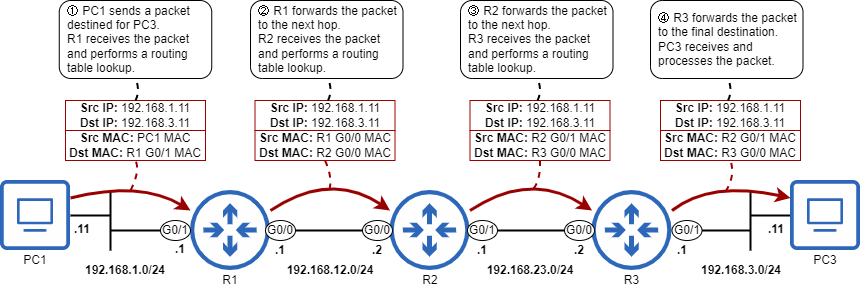
PC1 sends a packet to PC3 via R1, R2, and R3. 1) PC1 sends the packet in a frame to R1 G0/1. R1 receives it and performs a routing table lookup. 2) R1 forwards the packet in a frame to R2 G0/0. R2 receives it and performs a routing table lookup. 3) R2 forwards the packet in a frame to R3 G0/0’s MAC. R3 receives the packet and performs a routing table lookup. 4) R3 forwards the packet in a frame to PC3, which receives and processes it.
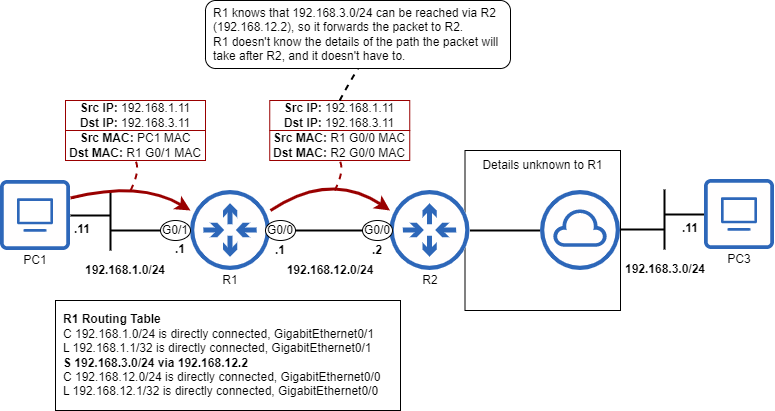
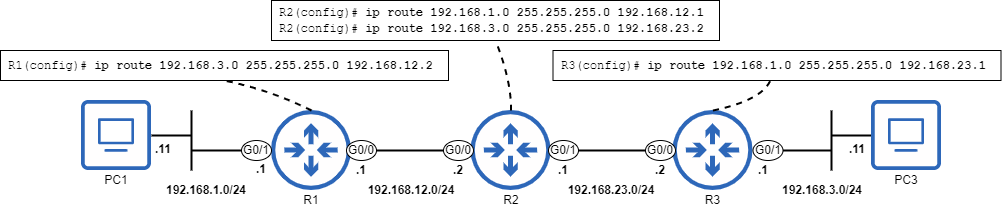
R1 forwards a packet destined for 192.168.3.11 (PC3). R1 has a static route to 192.168.3.0/24 via 192.168.12.2 (R2). R1 knows that, to forward a packet toward the 192.168.3.0/24 network, it should forward the packet to R2. R1 doesn’t know the details of the path the packet will take after R2, and it doesn’t have to.
Configuring static routes on R1, R2, and R3 to enable two-way communication between PC1 and PC3. The routes specify the next hop IP address. R1 requires a route to 192.168.3.0/24, R2 requires routes to 192.168.1.0/24 and 192.168.3.0/24, and R3 requires a route to 192.168.1.0/24.
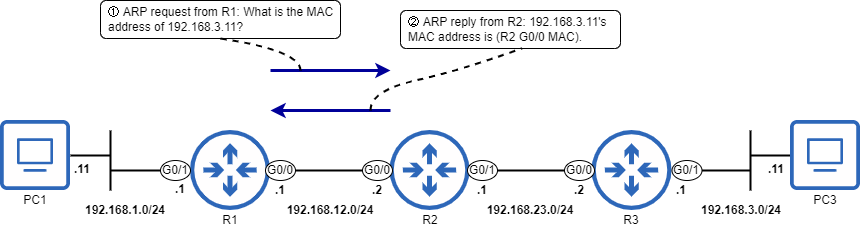
A proxy ARP exchange between R1 and R2. 1) R1 sends an ARP request to learn PC3’s MAC address. 2) 192.168.3.11 isn’t R2’s IP address, but R2 has a route to 192.168.3.0/24 in its routing table, so R2 uses proxy ARP to reply on behalf of PC3.
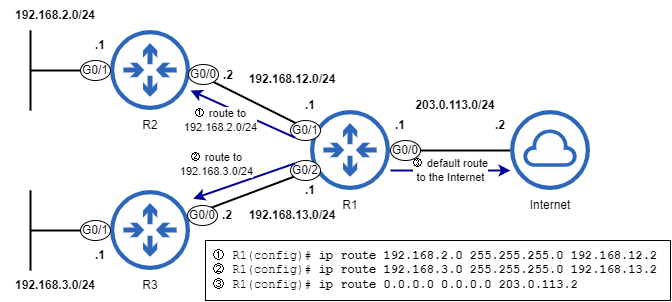
R1 has two routes to specific destination networks and one default route to the Internet. 1) A route to 192.168.2.0/24, with R2 G0/0 as the next hop. 2) A route to 192.168.3.0/24, with R3 G0/0 as the next hop. 3) A default route, with the ISP’s IP address (203.0.113.2) as the next hop.
Summary
- The term routing can refer to the process of forwarding packets between networks, and the process of building a routing table.
- Hosts in the same network can send packets to each other without the use of a router. However, to send packets to destinations outside of the local network, a router is required.
- The router a host will send packets destined for external networks to is called the default gateway. The host will send the packets in frames addressed to the default gateway’s MAC address.
- A host’s default gateway can be manually configured or automatically learned via DHCP.
- You can use the
ipconfigcommand in the Windows Command Prompt to see information such as the PC’s IP address, netmask, and default gateway. - The routing table is the router’s database of known destinations. It is a set of instructions about what action to take on packets. The routing table can be viewed with
show ip route. - For each interface that has an IP address and is in an up/up state, the router will automatically add two routes to its routing table: a connected route and a local route.
- A connected route is a route to the network an interface is connected to. Connected routes are indicated by code
Cin the routing table. If a router receives a packet destined for a host in a directly-connected network, it will forward the packet directly to the destination host (in a frame addressed to the host’s MAC address). - A local route is a route to the exact IP address configured on the interface. Local routes use a /32 prefix length to specify a single IP address. If a router receives a packet destined for the IP address of a local route, it means the packet is destined for the router itself; the router will receive the packet for itself, it will not forward it.
- A route to more than one destination IP address (any route with a prefix length shorter than /32) is called a network route. A connected route is an example of a network route.
- A route to a single destination IP address (a route with a /32 prefix length) is called a host route. A local route is an example of a host route.
- The process of deciding which route is appropriate to forward a packet is called route selection. To determine how to forward a particular packet, the router will select the most specific matching route - the matching route with the longest prefix length.
- A /32 route is the most specific route possible; it specifies only one IP address. A /0 route (default route) is the least specific route possible; it specifies every possible IP address.
- Whereas layer 3 forwarding involves looking in the routing table for the most specific matching route, layer 2 forwarding involves looking for an exact match in the MAC address table; partial matches don’t count.
- If there aren’t any routes that match a packet’s destination IP address, the router will drop the packet.
- To route packets to destinations that aren’t directly connected to the router, the router needs to learn routes to those destinations either via dynamic routing (using a protocol such as OSPF) or static routing (in which routes are manually configured on the router).
- To forward a packet toward a remote destination, the router will encapsulate the packet in a frame destined for the MAC address of the next hop - the next router in the path to the destination.
- For a router to forward packets between two hosts, the router needs routes to each host’s network; it doesn’t need routes to every network in the path between each destination.
- The command to configure a static route is
ip routedestination-network netmask{next-hop|exit-interface|exit-interface next-hop}. - A static route that specifies only the next hop is called a recursive static route; it requires multiple lookups in the routing table to forward a packet: one to find the next hop IP address, and one to find which interface the next hop is connected to.
- A static route that specifies only the exit interface is called a directly-connected static route, because it causes the router to treat the network as a directly connected network.
- Directly-connected static routes require proxy ARP to function. Proxy ARP allows a router to reply to ARP requests on behalf of other hosts. Proxy ARP is enabled on Cisco routers by default, but might not be enabled on other vendors’ routers.
- A static route that specifies both the exit interface and the next hop is called a fully-specified static route.
- A default route is a route to 0.0.0.0/0. Because it is the least-specific route possible, it will only be used to forward packets that don’t match any other routes in the routing table.
- If a router has a default route, it won’t drop packets that don’t match other routes; instead, it will forward those packets using the default route.
- The default route is often used to provide a route to the Internet; it is not feasible for a router to learn specific routes to each possible destination over the Internet.
FAQ
How does a host decide whether to send a packet directly to the destination or to its default gateway?
It compares the destination IP to its own subnet. If the destination is in the same network, it encapsulates the packet in a frame to the destination host’s MAC. If the destination is in a different network, it sends the frame to the default gateway’s MAC. In either case, ARP is used to learn the needed MAC address.What is a default gateway and how do hosts typically learn it?
The default gateway is the router interface that provides access to other networks. Hosts usually learn it via DHCP (option for default gateway), though it can be set manually. The host stores the gateway’s IP and uses ARP to learn its MAC when needed.What does a router do when it receives a frame?
- If the frame isn’t addressed to the router’s MAC, it drops it at Layer 2.- If it is, the router de-encapsulates to the IP packet and checks the destination IP:
— If the destination is one of the router’s own IPs (matches a local/host route), it processes the packet locally.
— If there’s a matching route, it forwards the packet according to the most specific (longest prefix) route.
— If there’s no matching route and no default route, it drops the packet.
What’s the difference between connected routes and local routes?
- Connected route (code C): Added automatically for each up/up interface with an IP; it’s a network route (for example, 192.168.1.0/24) and tells the router the network is directly reachable via a specific interface.- Local route (code L): Added automatically for the exact IP on each up/up interface; it’s a host route (/32), e.g., 192.168.1.1/32, and ensures packets to the router’s own IP are received and processed locally.
How does a router choose the best route for a packet?
It uses the most specific matching route, also called longest prefix match. Among all routes that include the destination IP, the route with the longest prefix length (for example, /32 over /24) is selected. This differs from switches, which seek an exact MAC match, not a “more specific” one.In show ip route, what does “is variably subnetted, X subnets, Y masks” mean?
It’s not a route. It summarizes that multiple subnets of that classful network are present in the table and that more than one mask length is in use (for example, both /24 and /32 entries). It’s simply informational.How do I configure IPv4 static routes, and what are the three forms?
- Next-hop only (recursive): ip route DEST_NET NETMASK NEXT_HOP_IP- Exit interface only (directly connected static): ip route DEST_NET NETMASK EXIT_IF
- Fully specified: ip route DEST_NET NETMASK EXIT_IF NEXT_HOP_IP
Recursive routes require a second lookup to resolve the next hop to an egress interface. Fully specified routes avoid recursion. Exit-interface-only routes make the destination appear directly connected.

 Acing the CCNA Exam, Volume 1 ebook for free
