8 Router and Switch Interfaces
This chapter deepens the treatment of router and switch interfaces by shifting from layer-3 addressing to layer-1 operation. It clarifies the practical use of the terms port and interface, contrasts router and switch defaults (router interfaces are shutdown by default; switch interfaces are enabled for plug-and-play), and distinguishes unmanaged from managed switches. The text explains why modern switched Ethernet provides dedicated, point-to-point connections and full-duplex operation, while legacy hubs created shared media, collision domains, and reliance on CSMA/CD—concepts that remain core exam knowledge despite hubs being largely obsolete.
Configuration coverage centers on setting interface descriptions, efficiently applying changes with interface range, and verifying state with show interfaces description and show interfaces status. You learn how to configure and verify speed and duplex, when to rely on defaults (auto) versus manual settings, and how defaults are often hidden from the running configuration. Practical guidance includes disabling unused switch ports as a security best practice and recognizing that, in modern wired networks, full duplex is the norm; half duplex persists primarily in wireless contexts.
The chapter details autonegotiation: devices advertise capabilities and select the highest common mode, prioritizing higher speeds and full duplex. It explains edge cases when one side is hard-set and the other negotiates—how speed is sensed and why 10/100 often falls back to half duplex—leading to classic faults. A speed mismatch leaves both sides down/down and unable to communicate, while a duplex mismatch stays up/up but suffers poor performance, reflected in counters such as collisions and late collisions; other key errors include runts, giants, and CRC. Recommended practice is to keep autonegotiation for end hosts, consider consistent manual settings on infrastructure links when warranted, and use IOS show commands to quickly isolate cabling, speed/duplex, and error conditions.
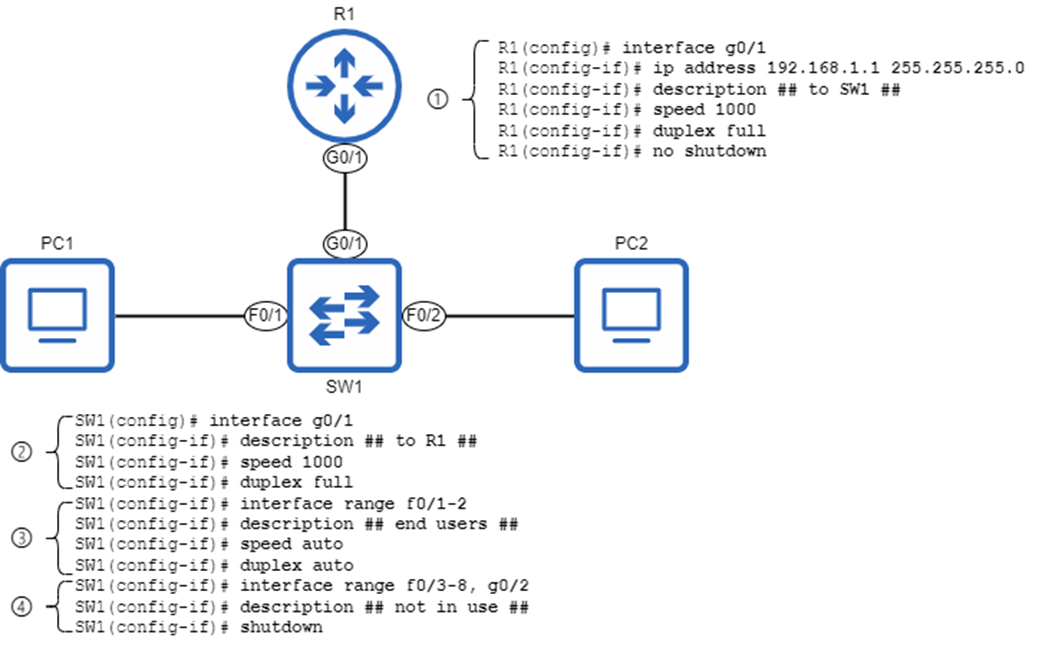
Interface configurations on R1 and SW1. 1) Configuring R1’s G0/1 interface with an IP address, description, and manual speed and duplex settings. 2) Configuring SW1’s G0/1 interface with a description, and manual speed and duplex settings. 3) Configuring SW1’s connections to end user devices (PCs) using autonegotiation. 4) Disabling SW1’s unused interfaces.
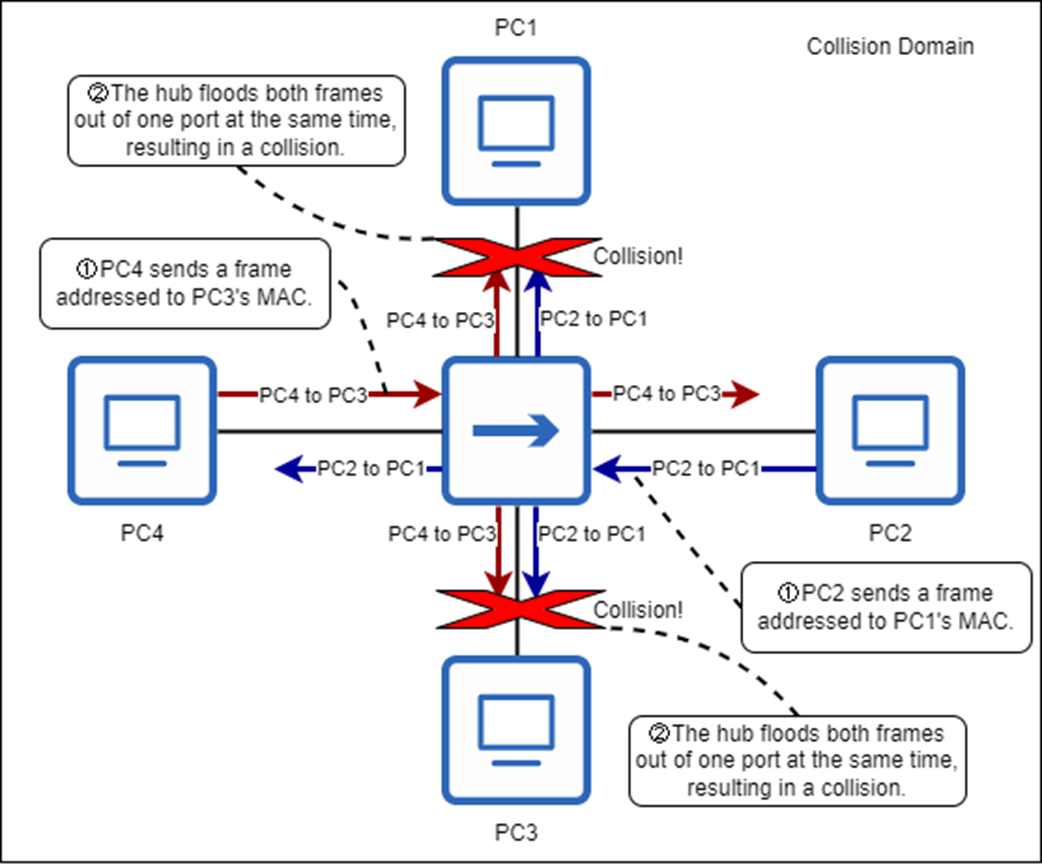
Four PCs are connected to a hub, and two attempt to transmit at the same time, resulting in collisions. All four PCs are in the same collision domain. 1) PC2 sends a frame addressed to PC1’s MAC address, and PC4 sends a frame addressed to PC3’s MAC address. 2) The hub attempts to flood both frames at the same time, resulting in collisions. Neither PC1 nor PC3 receive their respective frames intact.
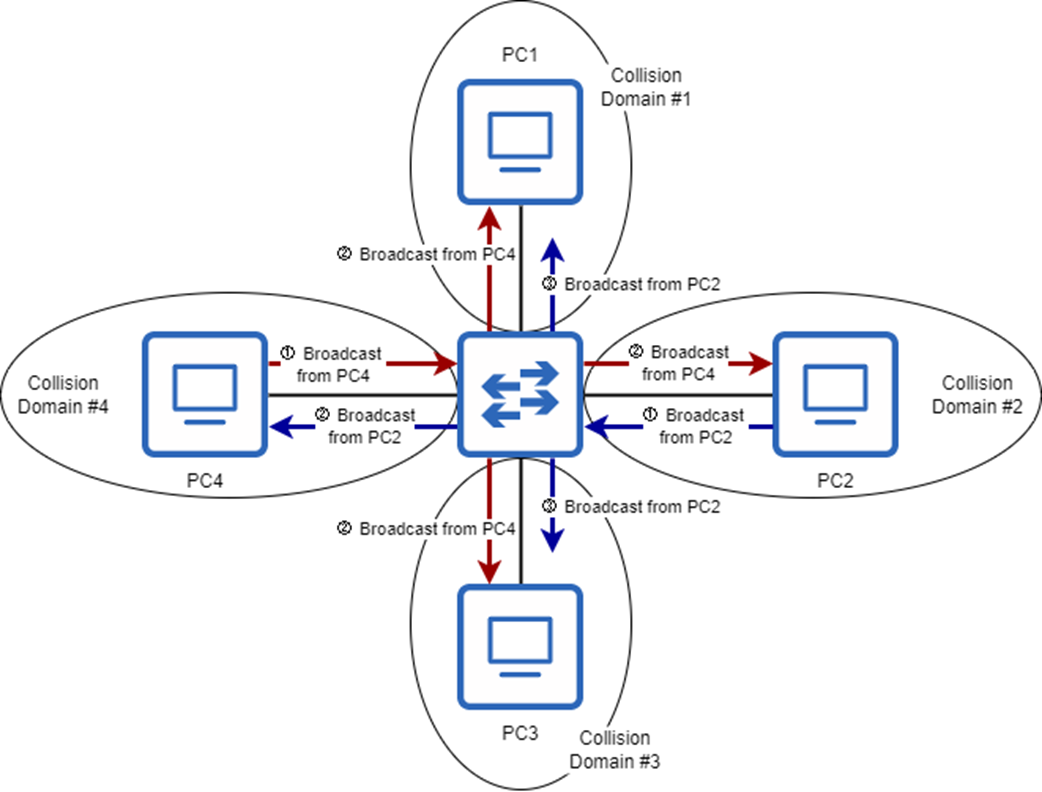
Four PCs are connected to a switch, each in its own collision domain. 1) PC2 and PC4 each send a broadcast frame at the same time. 2) The switch floods the frames, but it does not flood PC2’s frame to PC1 or PC3; it buffers the frame in memory. 3) The switch floods PC2’s frame to PC1 and PC3 after it has finished flooding PC4’s frame.
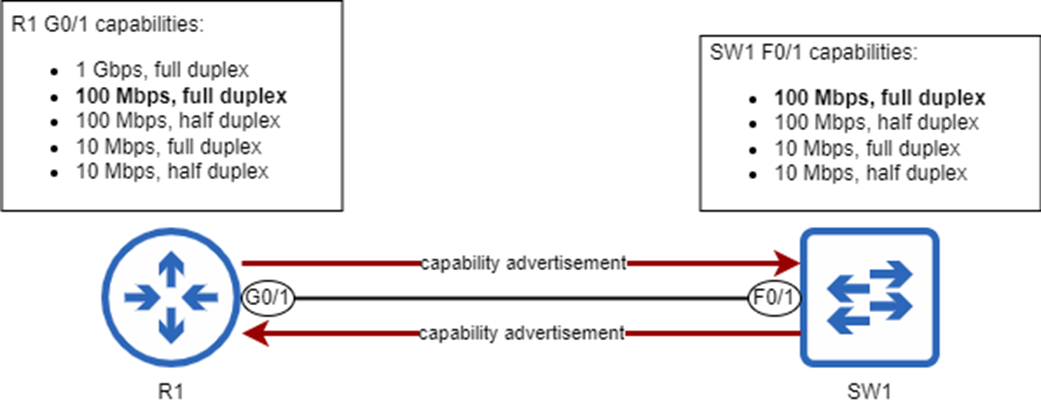
A router and a switch advertise their speed and duplex capabilities to each other. The best option supported by both R1 and SW1 is 100 Mbps/full duplex, as highlighted in bold. Although R1 G0/1 is capable of 1 Gbps/full duplex, it will operate at 100 Mbps/full duplex to match SW1 F0/1.
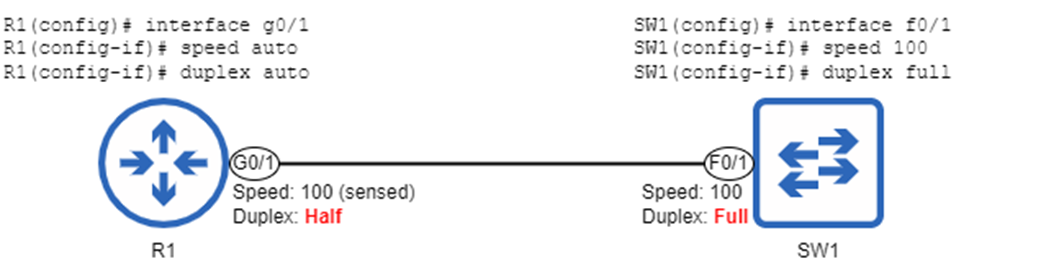
A router and switch connected together, but only the router is using autonegotiation. R1 senses SW1’s speed (100 Mbps) and matches its speed to SW1. However, because R1 G0/1 is operating at 100 Mbps, it operates in half duplex. This creates a duplex mismatch between R1 G0/1 (half duplex) and SW1 F0/1 (full duplex).
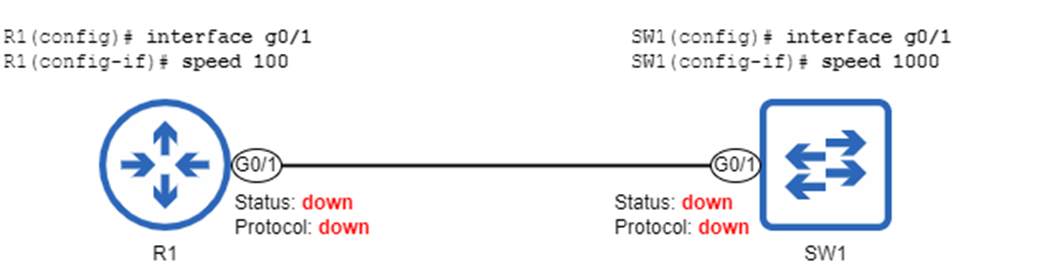
A speed mismatch between a router and a switch. Because of the speed mismatch, their interfaces are in a down/down state; R1 and SW1 cannot communicate.
Summary
- Router interfaces are disabled by default (they have the shutdown command applied), but switch interfaces are enabled by default.
- It is considered best practice to disable unused switch ports with shutdown.
- An interface description is a string of text used to describe an interface. It is optional (but recommended), and can be configured with the description description command in interface configuration mode.
- You can use the interface range command to configure multiple interfaces at once.
- You can use show interfaces description to view a list of interfaces, their status, and their descriptions.
- You can use show interfaces status (on switches only) to view a list of interfaces and other information like their description, status, duplex, and speed.
- An interface’s speed is the maximum rate at which it can send and receive traffic. Most interfaces support multiple speeds, such as 10/100 or 10/100/1000.
- An interface’s speed can be configured with speed {speed | auto}, where speed is specified in Mbps. The default setting is speed auto, which uses autonegotiation to determine the interface’s operating speed.
- You can use show running-config interface interface-name to view the active configurations for a specific interface, or show running-config | section interface to view the active configurations for all interfaces.
- To avoid clutter, default configurations often do not appear in the running-config (or startup-config). For example, the speed auto command is not shown.
- An interface’s duplex setting determines whether it is able to send and receive data at the same time or not. An interface operating in half duplex can send and receive data, but not at the same time. An interface operating in full duplex can send and receive data at the same time.
- The opposite of duplex is simplex, which is one-way communication.
- Wireless LANs operate in half duplex. Wired LANs using switches operate in full duplex, but wired LANs using hubs operate in half duplex.
- Hubs are layer-1 devices that simply repeat signals received on an interface out of all other interfaces; all devices in the LAN receive every frame sent in the LAN. They are legacy hardware, rarely (if ever) used in modern networks.
- Hubs do not have memory to store frames before flooding them. If a hub receives two frames at once, it will attempt to flood both at once, resulting in a collision.
- A collision domain is a network segment in which simultaneous transmissions will result in collisions. Only one host in a collision domain can transmit at a time.
- All hosts connected to a hub are in the same collision domain, but all hosts connected to a switch are in their own collision domain (and therefore don’t have to worry about collisions).
- Devices operating in half duplex use Carrier-Sense Multiple Access with Collision Detection (CSMA/CD) to detect and deal with collisions.
- An interface’s duplex can be configured with duplex {auto | full | half}. The default is duplex auto.
- Autonegotiation allows devices to automatically determine what speed and duplex settings an interface should use. The two devices advertise their capabilities to each other and select the best mode supported by both devices.
- If only one device is using autonegotiation, it will try to sense the speed of the other device. If that fails, it will use the slowest supported speed. If the speed is 10 Mbps or 100 Mbps, it will use half duplex. If the speed is 1000 Mbps or greater, it will use full duplex.
- Cisco IOS uses various counters to keep track of errors encountered when sending and receiving messages. They can be viewed in the output of show interfaces. Some examples are runts, giants, CRC, collisions, and late collisions.
- A speed mismatch occurs when two connected interfaces attempt to communicate at different speeds. This will result in both interfaces being down/down; the interfaces will not be operational.
- Speed mismatches are usually caused by a misconfiguration.
- A duplex mismatch occurs when two connected interfaces operate at different duplex settings: half and full. The interfaces will be operational, but performance will be greatly reduced.
- Duplex mismatches can be caused by one side being configured as full duplex and the other as half duplex. They can also be caused by one side using autonegotiation and the other not.
FAQ
What’s the difference between a port and an interface on Cisco devices?
A “port” usually refers to the physical connector you plug a cable into. An “interface” is the software representation used for configuration and monitoring. In practice, the terms are often used interchangeably, and Cisco IOS commands use “interface.”How do I enable or disable router and switch interfaces, and what’s the best practice for unused switch ports?
Router interfaces are shutdown by default and must be enabled withno shutdown. Switch interfaces are enabled by default. It’s a security best practice to disable unused switch interfaces with shutdown.How do I add, bulk-edit, and view interface descriptions?
- Configure a description: in interface config mode usedescription TEXT.- Configure multiple at once:
interface range type slot/port-port[, type slot/port] then apply the command.- View on routers and switches:
show interfaces description.- View on switches (also shows speed/duplex):
show interfaces status (descriptions appear in the “Name” column).How do I configure interface speed and duplex, and what are the defaults?
- Speed:speed {10 | 100 | 1000 | auto}- Duplex:
duplex {auto | full | half}Autonegotiation is the default for both. Defaults are often hidden in the running config; you’ll see explicit lines only when you set non-default values.
What do “a-full” and “a-100” mean in show interfaces status?
“a-full” and “a-100” indicate the device used autonegotiation to select full duplex and 100 Mbps, respectively. If the output shows just “full” or “1000,” those were manually configured.When should I use autonegotiation vs. manual settings?
- Use autonegotiation for end devices (PCs, etc.) to adapt to varying capabilities.- Some engineers manually set link speed/duplex between infrastructure devices (switch-to-switch, router-to-switch) to remove autoneg as a variable. However, autonegotiation failures are rare, and manual configs risk human error—be consistent on both ends.
What is duplex, and how do hubs, switches, collisions, and CSMA/CD relate?
- Duplex: Half duplex = cannot send/receive simultaneously; Full duplex = can send/receive simultaneously.- Hubs create a shared medium (one collision domain), require half duplex, and use CSMA/CD to handle collisions.
- Switches give each link its own collision domain and support full duplex; collisions should not occur on properly functioning switched links.
What happens if one side is manually configured and the other uses autonegotiation?
The autonegotiating side will try to sense the speed; if sensing fails, it uses the slowest supported speed. Duplex selection: 10/100 Mbps defaults to half duplex; 1000 Mbps or higher defaults to full duplex. This can cause duplex or speed mismatches if the other side is hard-set.How do I recognize and fix speed and duplex mismatches?
- Speed mismatch: Both interfaces go down/down and cannot pass traffic. Fix by matching speeds (or setting both sides to auto when appropriate).- Duplex mismatch: Links remain up/up but perform poorly; you’ll often see incrementing collisions and late collisions on the half-duplex side. Fix by matching duplex on both ends (ideally both auto or both full at the same speed).
What do common interface error counters mean (runts, giants, CRC, collisions, late collisions)?
- Runts: Frames smaller than 64 bytes, often from collisions.- Giants: Frames larger than the MTU (e.g., >1500 bytes), usually a misconfiguration.
- CRC: Frames failing FCS; can indicate physical/EMI issues.
- Collisions: Transmit-time collisions; expected with hubs, not with switches.
- Late collisions: Collisions after the first 64 bytes; often due to duplex mismatch. View with
show interfaces.
 Acing the CCNA Exam, Volume 1 ebook for free
