7 IPv4 Addressing
This chapter moves from Ethernet at layer 2 to IPv4 at layer 3, framing IPv4 addressing as a core skill for CCNA topic 1.6 and a foundation for nearly all networking tasks. It explains how routers make forwarding decisions based on the IPv4 header and introduces the header’s key fields and purposes, including versioning, header length, DSCP/ECN for QoS, total length, fragmentation (Identification, Flags, Fragment Offset), TTL for loop prevention, Protocol for payload identification, header checksum, source/destination addresses, and the rarely used Options field. The discussion sets IPv4 in context with IPv6 while emphasizing the continued necessity of IPv4 knowledge.
To interpret and work with IPv4 addresses, the chapter teaches the binary system and fast conversion to and from decimal, highlighting eight-bit ranges (0–255) and the practical need for mental arithmetic on the exam. It then defines the 32-bit IPv4 structure in dotted decimal, split into four octets, and distinguishes the network and host portions using prefix length (/X) or equivalent netmasks. Practical configuration on Cisco routers is demonstrated: entering interface configuration mode, assigning IP addresses with netmasks, enabling interfaces with no shutdown, and verifying with show ip interface brief and show ip interface, along with notes on broadcast use (255.255.255.255) and the default 1500-byte MTU’s impact on fragmentation.
The chapter closes with essential network attributes: identifying the network address (all host bits 0), broadcast address (all host bits 1), first and last usable addresses, and calculating maximum hosts with 2^host-bits − 2. It reviews legacy IPv4 address classes (A, B, C for unicast; D multicast; E experimental), their bit patterns and typical sizes, and explains tradeoffs between network and host portions. While classful addressing is historically important, the text points forward to classless addressing and subnetting for flexible design, reinforcing that fluency with binary and address boundaries is critical for configuration, routing decisions, ACLs, and success on the exam.
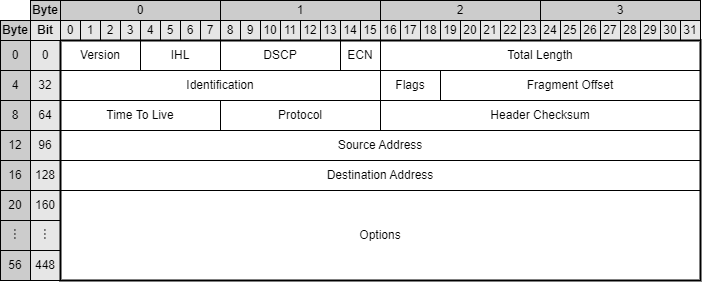
The format of the IPv4 header. The fields are Version, IHL, DSCP, ECN, Total length, Identification, Flags, Fragment Offset, Time To Live, Protocol, Header Checksum, Source Address, Destination Address, and Options (optional). The header is typically 20 bytes in size (the minimum size), but can be up to 60 bytes if the Options field is used.
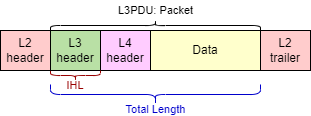
The difference between the IHL and Total Length fields. The IHL field indicates the length of the IPv4 header (L3 header), whereas the Total Length field indicates the length of the entire packet. The layer 2 header and trailer are shown to emphasize that a packet will always be encapsulated in a frame before being sent; a packet alone is not ready to be sent over the physical medium.
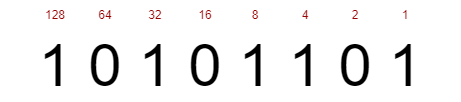
An eight-bit (one-byte) number with the value of each bit written above. The decimal equivalent of 0b10101101 is 0d173. This can be calculated by adding the value of each bit that is set to “1”.
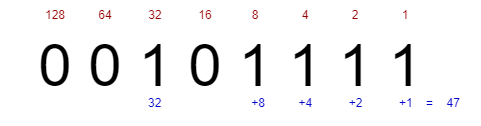
The binary number 00101111 is equal to 47 in decimal. To calculate this, add the value of each bit that is set to “1”: 32 + 8 + 4 + 2 + 1 = 47.
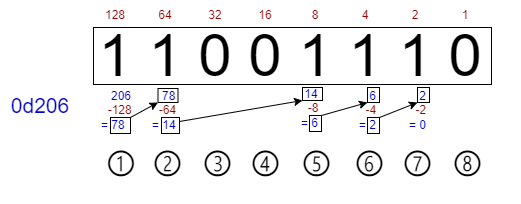
The process of converting a decimal number (206) to a binary number. ①Subtracting 128 from 206 gives a remainder of 78. Write a “1” in the 128 position. ②Subtracting 64 from 78 gives a remainder of 14. Write a “1” in the 64 position. ③32 cannot be subtracted from 14. Write a “0” in the 32 position. ④16 cannot be subtracted from 14. Write a “0” in the 16 position. ⑤Subtracting 8 from 14 gives a remainder of 6. Write a “1” in the 8 position. ⑥Subtracting 4 from 6 gives a remainder of 2. Write a “1” in the 4 position. ⑦Subtracting 2 from 2 gives a remainder of 0. Write a “1” in the 2 position. ⑧1 cannot be subtracted from 0. Write a “0” in the 1 position. We now have the answer: 0d206 is equivalent to 0b11001110.
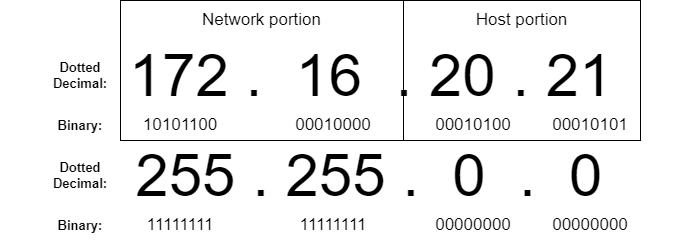
An IPv4 address written in both dotted decimal and binary. The 32-bit address is split into four octets consisting of eight bits each. The address is divided into two parts: the network portion and the host portion. The prefix length indicates the size of the network portion, in bits and the remainder is the host portion.

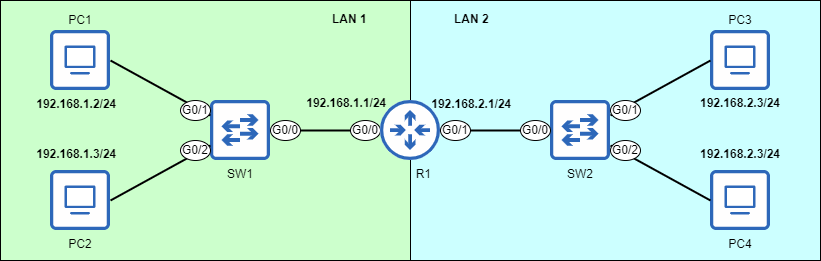
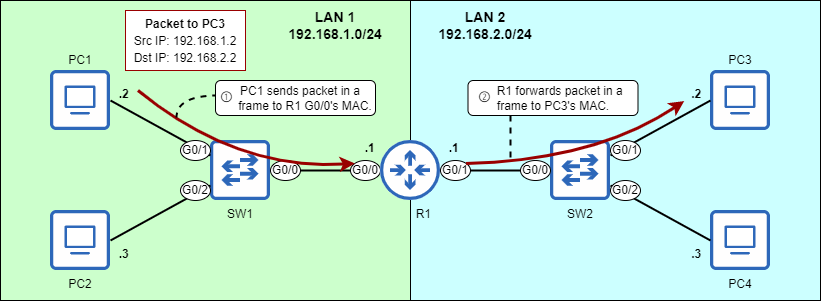
Two networks (LAN 1 and LAN 2) connected via a router (R1). IP addresses of hosts in each LAN share the same network portion: 192.168.1 in LAN 1 and 192.168.2 in LAN 2.
An IPv4 address (top) and its netmask (bottom). The first 16 bits of the netmask are set to “1”, indicating that the first 16 bits of the IPv4 address are the network portion. This is equivalent to a /16 prefix length.
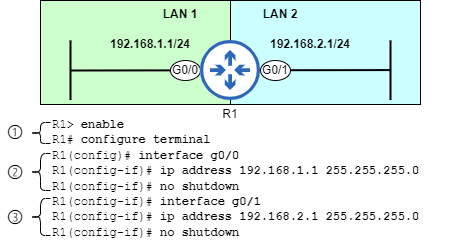
How to configure IP addresses and enable router interfaces. 1) From user EXEC mode, move to privileged EXEC mode and then global configuration mode. 2) Access interface configuration mode for the G0/0 interface, configure an IP address and netmask, and enable the interface. 3) Access interface configuration mode for the G0/1 interface, configure an IP address and netmask, and enable the interface.
PC1 sends a packet to PC3 via R1. The packet is addressed to PC3’s IP address. 1) PC1 sends the packet in a frame addressed to the MAC address of R1’s G0/0 interface. 2) R1 forwards the packet in a frame addressed to the MAC address of PC3. In order for R1 to serve its purpose of connecting the two networks together, it must have an appropriate IP address on each of its interfaces, which we configured in this section.
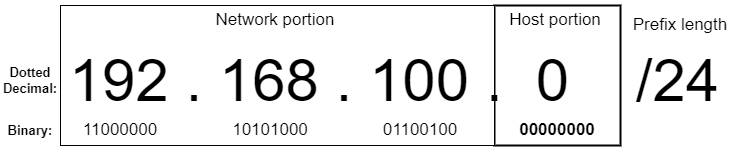
192.168.100.0 is a network address, as indicated by the host portion of 00000000. This address is used to identify the 192.168.100.0/24 network as a whole and cannot be assigned to a host. 192.168.100.100 (used in figure 7.6) is a host address in the 192.168.100.0/24 network.
192.168.100.255 is a broadcast address, as indicated by the host portion of 11111111. This address can be used to address a message to all hosts in the 192.168.100.0/24 network.

192.168.100.1 is the first usable address of the 192.168.100.0/24 network. It is the first address after the network address.

192.168.100.254 is the last usable address of the 192.168.100.0/24 network. It is the last address before the broadcast address.

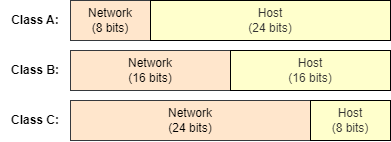
The network portion and host portion sizes of class A, class B, and class C IPv4 addresses.
Summary
- The IPv4 header is 20 to 60 bytes in length and contains 14 fields.
- The Version field indicates the version of IP (IPv4 or IPv6).
- The Internet Header Length (IHL) field indicates the length of the header in four-byte increments.
- The Differentiated Services Code Point (DSCP) and Explicit Congestion Notification (ECN) fields are used to prioritize certain kinds of traffic. This is called Quality of Service (QoS).
- The Total Length field indicates the length of the entire packet in bytes.
- The Identification, Flags, and Fragment Offset fields support packet fragmentation. If a packet is larger than an interface’s Maximum Transmission Unit (MTU), the router will divide the packet into multiple smaller packets called fragments. The standard MTU is 1500 bytes.
- The Time To Live (TTL) field is used to prevent packets from looping indefinitely around the network. Each time a router forwards a packet its TTL is decremented by 1, and if it reaches 0 the packet is dropped.
- The Protocol field indicates the type of message encapsulated inside of the packet, such as ICMP, TCP, UDP, or OSPF.
- The Header Checksum field is used to check for errors in the IPv4 header.
- The Source Address field contains the IPv4 address of the host that sent the packet.
- The Destination Address field contains the IPv4 address of the packet’s intended recipient.
- The Options field is optional and variable in length - from 0 bytes (if not used) to a maximum of 40 bytes in length. This field is rarely used.
- The decimal number system uses ten digits: 0, 1, 2, 3, 4, 5, 6, 7, 8, and 9. It is also called base 10. The value of each digit position increases tenfold: 1, 10, 100, 1000, etc.
- The binary number system uses two digits: 0 and 1. It is also called base 2. The value of each digit position increases twofold: 1, 2, 4, 8, 16, 32, 64, 128, etc.
- An eight-bit binary number provides 256 possible values: from 0d0 (00000000) to 0d255 (11111111).
- For the CCNA exam, you must be able to convert between binary and decimal for numbers of up to eight bits in length. You can practice at https://learningnetwork.cisco.com/s/binary-game.
- An IPv4 address is a 32-bit number that identifies a host at layer 3. They are divided into four groups of eight bits called octets and written in dotted decimal notation.
- IPv4 addresses are divided into two parts: the network portion and the host portion. All hosts within a LAN will have the same network portion, but a unique host portion.
- The size of the network portion can be indicated with a prefix length in the format /X, where X is the number of bits in the network portion. Any bits that are not part of the network portion are part of the host portion.
- The size of the network portion can also be indicated with a netmask (also called a subnet mask). A netmask is a string of 32 bits that is paired with an IP address to indicate which bits of the IP address are the network portion and which are the host portion.
- A “1” in the netmask means the bit in the same position of the IP address is part of the network portion. A “0” in the netmask means the bit in the same position of the IP address is part of the host portion.
- The
show ip interface briefcommand lists a router’s interface and information about their IP addresses and status. - The
show ip interface[interface-name]command shows more detail about each interface. - Router interfaces are disabled by default and must be enabled with the
no shutdowncommand. - Interface configuration mode can be accessed with the
interfaceinterface-name command from global configuration mode. - An interface’s IPv4 address can be configured with the
ip addressip-address netmask command in interface configuration mode. - The network address of a network is the first address of the network, with a host portion of all 0s. It is used to identify the network and cannot be assigned to a host.
- The broadcast address of a network is the last address of the network, with a host portion of all 1s. It can be used to send a message to all hosts in the network. However, to send a message to all hosts on the local network, the address 255.255.255.255 is usually used.
- The maximum number of hosts of a network is the number of IP addresses that can be assigned to hosts. The formula is 2y-2, where y is the number of bits in the host portion. Two is subtracted for the network and broadcast addresses.
- The first usable address of a network is the first address that can be assigned to a host. The last usable address is the last address that can be assigned to a host.
- IPv4 addresses can be organized into five classes: A, B, C, D, and E. Class D is reserved for multicast addresses, and Class E is reserved for experimental purposes. Addresses from classes A, B, and C are assigned to network hosts.
- Class A addresses have a first octet of 0-127 and use a /8 prefix length. Class B addresses have a first octet of 128-191 and use a /16 prefix length. Class C addresses have a first octet of 192-223 and use a /24 prefix length.
- Networks that follow class A, B, and C rules are called classful networks. This system is now obsolete and has been replaced with classless networking, which is more flexible.
FAQ
What fields are in the IPv4 header and how big is it?
The IPv4 header contains (among others) Version, IHL, DSCP, ECN, Total Length, Identification, Flags, Fragment Offset, TTL, Protocol, Header Checksum, Source Address, Destination Address, and an optional Options field. The header is typically 20 bytes (no Options) and can grow to 60 bytes if Options are used.What’s the difference between IHL and Total Length?
IHL (Internet Header Length) is a 4‑bit field that specifies the header size in 4‑byte words (5 means 20 bytes). Total Length is a 16‑bit field that specifies the entire packet size (header + payload) in bytes.What are DSCP and ECN used for?
DSCP (6 bits) and ECN (2 bits) form the Type of Service byte and are used for Quality of Service and congestion signaling. DSCP lets networks prioritize traffic (for example, voice/video), and ECN can indicate congestion without dropping packets.How does IPv4 fragmentation work and what do Identification, Flags, and Fragment Offset do?
Packets exceeding an interface’s MTU (typically 1500 bytes) may be fragmented. Identification (16 bits) tags all fragments of the original packet. Flags (3 bits) include DF (Don’t Fragment) and MF (More Fragments). Fragment Offset (13 bits) marks each fragment’s position so the destination can reassemble the original packet, even if fragments arrive out of order.Why do packets have a TTL, and what happens when it reaches 0?
TTL (Time To Live, 8 bits) prevents endless routing loops. Senders set an initial value (commonly 64). Each router decrements it by 1; when it reaches 0, the packet is dropped.What does the Protocol field indicate?
The Protocol field (8 bits) identifies the payload type encapsulated by IP. Examples: 1 = ICMP, 6 = TCP, 17 = UDP, 89 = OSPF.How are IPv4 addresses written, and what’s the difference between prefix length and netmask?
An IPv4 address is 32 bits, shown as four decimal octets (dotted decimal), e.g., 192.168.100.100. A prefix length (/X) states how many leftmost bits are the network portion. A netmask is a 32‑bit mask (1s for network bits, 0s for host bits) written in dotted decimal. Common pairs: /8 = 255.0.0.0, /16 = 255.255.0.0, /24 = 255.255.255.0. Valid netmasks are always contiguous 1s followed by 0s.How do I configure and enable IPv4 addresses on a Cisco router?
From global config: enter the interface, set the address and mask, then enable it. Example:interface g0/0 → ip address 192.168.1.1 255.255.255.0 → no shutdown. Verify with show ip interface brief (IP, Status/Protocol) and show ip interface g0/0 (prefix length, MTU, etc.). Router interfaces are administratively down by default.
 Acing the CCNA Exam, Volume 1 ebook for free
