5 The Cisco IOS CLI
This chapter shifts from networking theory to hands-on skills by introducing how to work with Cisco devices through their operating system interface. It contrasts graphical and command-line shells, noting that while the wireless LAN controller has a GUI, the CCNA largely relies on Cisco IOS’s CLI. You learn how to reach the CLI primarily via a local console connection (USB Mini-B or RJ45 using a rollover cable) with a terminal emulator and typical serial settings (9600 baud, 8 data bits, 1 stop bit, no parity, no flow control), while remote access methods like Telnet and SSH are deferred to later study. The console is for local configuration only and supports a single active session.
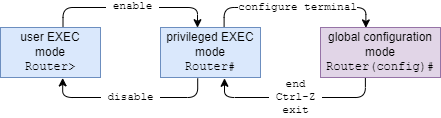
The chapter then explains the IOS command hierarchy and how to move through it: user EXEC mode (limited, hostname>), privileged EXEC mode (full operational access, hostname# via the enable command), and global configuration mode (hostname(config)# via configure terminal) for making changes. It covers returning between modes (exit, end, Ctrl-Z), using do to run EXEC commands from configuration modes, and productivity helpers such as cursor-movement and history shortcuts, plus context-sensitive help. The question mark lists available commands and keywords or completes partial entries, while Tab and unique prefixes speed up typing and reduce errors.
Finally, it details IOS configuration files and security basics. The running-config in RAM controls current operation and is lost on reload, while the startup-config in NVRAM is loaded at boot; you view them with show commands, save changes with write/write memory/copy running-config startup-config, and restore factory defaults by erasing the startup-config and reloading. To protect privileged EXEC mode, you can set an enable password (stored in plaintext unless weak type 7 encryption is enabled) but should prefer the enable secret, which stores a hash (type 9 scrypt on newer systems or type 5 MD5 on older ones) and overrides the legacy password. Mastering these fundamentals prepares you to configure and verify the protocols covered throughout the CCNA.
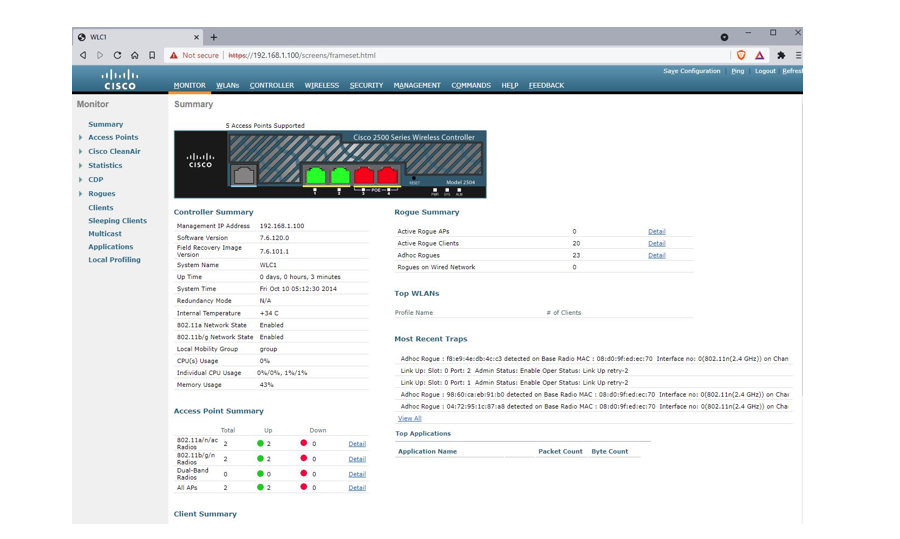
The GUI of a Cisco wireless LAN controller, accessed via a web browser.
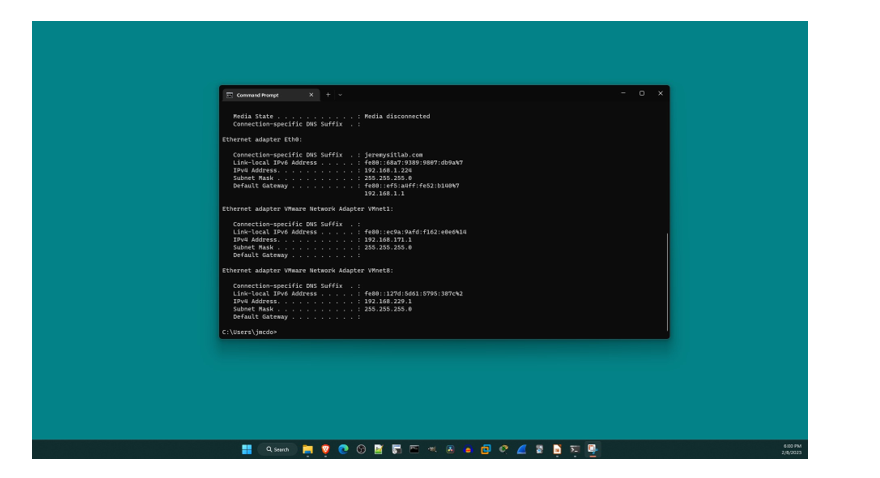
The Command Prompt CLI of a Windows PC, accessed from within the Windows shell GUI.
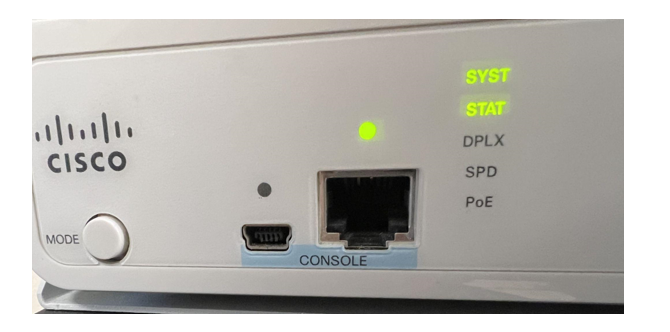
Two console ports on a Cisco switch: USB Mini-B (left) and RJ45 (right).
The wiring of a rollover cable, used to connect a PC to the RJ45 console port of a network device. Pin 1 on one end connects to pin 8 on the other end, pin 2 to pin 7, pin 3 to pin 6, pin 4 to pin 5, pin 5 to pin 4, pin 6 to pin 3, pin 7 to pin 2, pin 8 to pin 1.

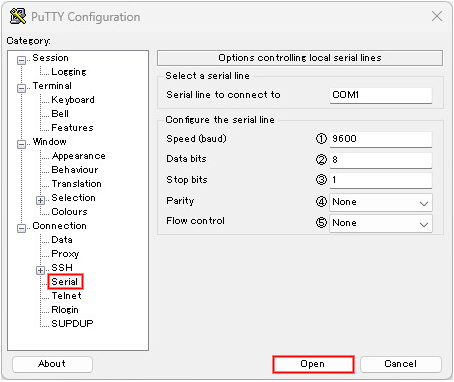
How to use PuTTy to access a Cisco device’s CLI via the console port. From the Serial tab, configure the following settings and then click Open: 1) Speed (baud): 9600 bits per second, 2) Data bits: 8, 3) Stop bits: 1, 4) Parity: None, 5) Flow control: None
How to navigate between user EXEC mode, privileged EXEC mode, and global configuration mode in the Cisco IOS command hierarchy
Summary
- A shell is a computer program that allows a user to interact with the computer. A graphical user interface (GUI) is a shell with a graphical interface, and a command-line interface (CLI) is a shell with a text-based interface.
- For the CCNA exam, you must be able to use the Cisco IOS CLI to configure the protocols and features listed in the exam topics list.
- The CLI of a network device can be accessed by connecting a PC to the device’s console port with a console, or crossover, cable or by connecting over the network infrastructure using Telnet or Secure Shell (SSH).
- After physically connecting a PC to the device’s console port, a terminal emulator application (such as PuTTy) is required to access the CLI.
- To give commands to a network device, you type commands in the CLI and press Enter.
- After connecting to a device’s CLI, you will be in user EXEC mode, which only allows you to view basic information about the device, but not perform anything intrusive. The format of the prompt is
hostname>. - To access more powerful commands, use the
enablecommand to access privileged EXEC mode, which provides unlimited access to EXEC mode commands. For example, you can view information about the device, restart it, save the configuration, move and delete files, etc. The format of the prompt ishostname#. - Use the
disablecommand to return to user EXEC mode from privileged EXEC mode. - Use the
reloadcommand in privileged EXEC mode to restart the device. - To make configuration changes to the device, use the
configure terminalcommand in privileged EXEC mode to access global configuration mode. The prompt ishostname(config)#. - Global configuration mode allows you to make configuration changes to the device. It also allows you to access other configuration modes for specific features.
- To change the hostname of the device, use the
hostnamecommand in global configuration mode. - To undo a command, use
noin front of the command. For example,no hostname R1. - Use the
endcommand, theexitcommand, or the Ctrl-Z shortcut to return to privileged EXEC mode from global configuration mode. - When in a configuration mode, you can use
doin front of a command to execute EXEC mode commands. - Keyboard shortcuts can be used to move the cursor and scroll through previously executed commands.
- Context-sensitive help can be used for guidance within the CLI. It can list available commands and possible completions for partially-written words.
- Cisco IOS devices use two configuration files: the running-config and the startup-config.
- The running-config is stored in RAM and determines the current operations of the device. Configuration commands change the running-config and immediately take effect. The running-config file is lost when the device is powered off or restarted.
- The startup-config is stored in nonvolatile RAM (NVRAM) and does not determine the current operations of the device. The contents of the startup-config are copied to the running-config when the device boots up.
- To save the running-config file to the startup-config file, use
write,write memory, orcopy running-config startup-configin privileged EXEC mode. - To return the device to the factory-default configuration, delete the startup-config with
write erase,erase nvram:, orerase startup-configand restart the device withreload. - Privileged EXEC mode can be password-protected with an enable password or enable secret. If both the
enable passwordandenable secretcommands are configured, only the enable secret can be used to access privileged EXEC mode. - The enable password can be configured with the
enable passwordcommand in global configuration mode. It is stored in the configuration as plaintext by default, but can be encrypted with theservice password-encryptioncommand (type 7). - The enable password remains in Cisco IOS as a legacy feature, but on modern devices the enable secret should be used instead.
- The enable secret can be configured with the
enable secretcommand in global configuration mode. It is stored in the configuration as a hash, using one of multiple hashing algorithms. The hashing algorithms available vary depending on the IOS version. - Media Digest 5 (MD5) is type 5 encryption, and script is type 9. script is more secure and should be used instead of MD5 if supported by the device.

 Acing the CCNA Exam, Volume 1 ebook for free
