3 Cables, Connectors, and Ports
This chapter explains how open, vendor‑neutral standards enable diverse devices and networks to interoperate, with Ethernet (IEEE 802.3) as the dominant wired LAN technology. It grounds the discussion in how computers communicate using binary, clarifying bits, bytes, and common throughput units (kbps, Mbps, Gbps). With that foundation, the chapter orients you to CCNA fundamentals by contrasting physical media options and the rules that govern signaling, framing, and compatibility at the physical interface.
The copper focus centers on unshielded twisted pair (UTP) cabling and RJ45 (8P8C) connectors/ports. You learn how twisted pairs mitigate interference, how EIA/TIA cable categories map to Ethernet speeds (10/100/1000 Mbps and 10 Gbps), and why copper runs top out at 100 meters. The text distinguishes straight‑through from crossover wiring based on transmit/receive pin usage (notably pairs 1‑2 and 3‑6 for 10/100), shows how device roles affect pinouts, and then notes that Auto MDI‑X on modern gear removes most cabling‑type concerns. For 1000BASE‑T and 10GBASE‑T, all four wire pairs are used, with simultaneous bidirectional signaling.
Fiber‑optic cabling is presented as the long‑distance, interference‑resistant alternative that carries light through a glass core, typically using two strands to separate transmit and receive and terminating in modular SFP transceivers. The cable’s construction (core, cladding, buffer, jacket) and handling considerations are outlined, followed by a comparison of multimode (wider core, LED sources, hundreds of meters) and single‑mode (narrow core, laser sources, tens of kilometers, higher cost). The chapter wraps with practical guidance: use UTP for cost‑effective access‑layer host connections where 100 meters suffices, and prefer fiber for inter‑floor, inter‑building, and backbone links, while also noting fiber’s advantages in environments with electromagnetic interference and its reduced risk of signal leakage.
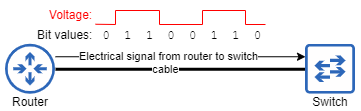
A router sends one byte of data to a switch. Changes in the voltage of the electric signal indicate values of 0 or 1.
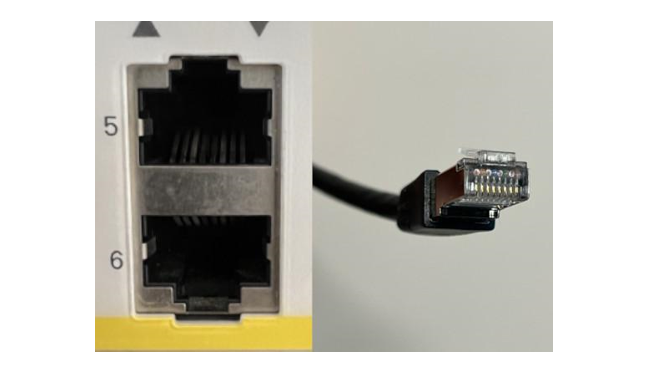
Two RJ45 ports on a Cisco switch (left), and an RJ45 connector on a copper UTP network cable (right)
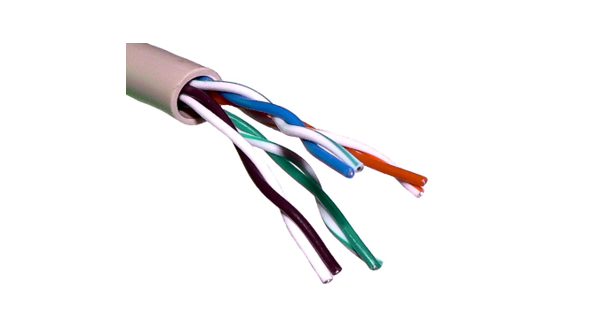
Four twisted wire pairs (eight wires) inside of a UTP cable. Each pair of wires consists of a solid-colored wire (green, orange, blue, brown) and a striped wire (white/green, white/orange, white/blue, white/brown).
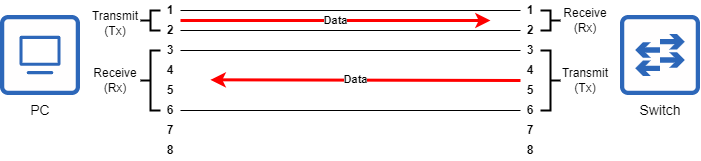
A PC and a switch connected via a straight-through cable.
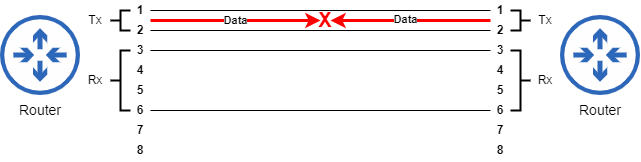
Two routers connected via a straight-through cable. Because both routers transmit data using the same pin pair, communication fails.
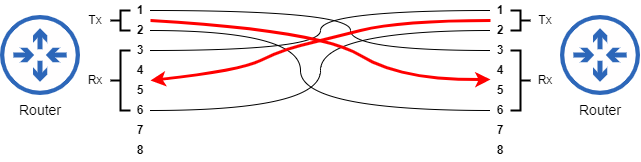
Two routers connected via a crossover cable. The Tx pin pair of one router connects to the Rx pin pair of the other router.
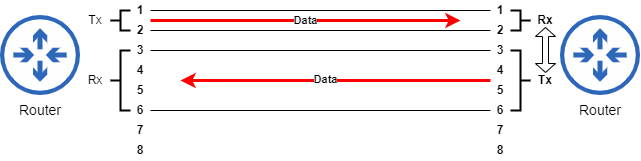
Two routers connected via a straight-through cable. The router on the right uses Auto MDI-X to adjust which pins it uses to transmit and receive data.
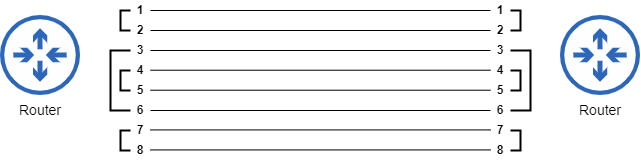
Pin and wire pairs used on 1000BASE-T and 10GBASE-T connections. All eight wires of the cable are used.
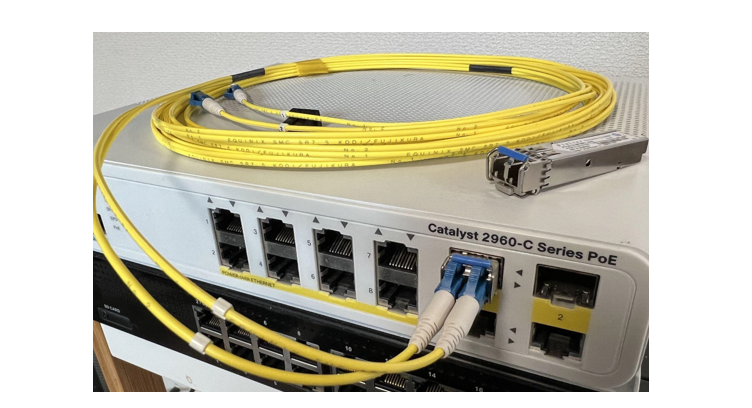
A Cisco switch with an SFP transceiver inserted into one of its SFP ports. An additional SFP is placed on top of the switch.
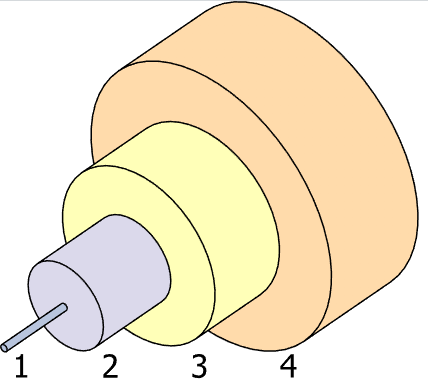
The typical structure of a fiber-optic cable. An outer jacket (4) and buffer (3) serve to protect and contain the inner components. A layer of reflective cladding (2) helps carry the light signal along the glass core (1)
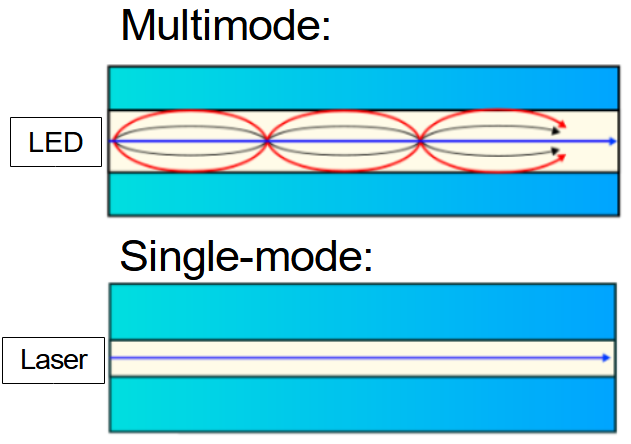
Light travels down a multimode fiber cable at multiple angles (modes), whereas light travels down single-mode fiber cables at a single angle.
Summary
- Standards provide agreed-upon sets of rules for communication over networks.
- Ethernet is a family of standards defined by the Institute of Electrical and Electronics Engineers (IEEE) 802.3 working group. It defines standards for communication over physical wired connections.
- Computers compute and communicate using binary:
0s and1s. Each binary digit is called a bit, and a group of 8 bits is called a byte. - Network speeds are measured in bits per second using units like kilobit (1000 bits), megabit (1000 kilobits), gigabit (1000 megabits) and terabit (1000 gigabits).
- The most common connection type in Ethernet LANs uses copper unshielded twisted pair (UTP) cables. Unshielded means the wires in the cable do not have a metallic shield around them to protect against electromagnetic interference (EMI). Twisted pair means the eight wires in the cable are twisted together to form four pairs of two wires. The twisting of the wires reduces EMI between the wires of each pair.
- UTP cables use Registered Jack-45 (RJ45) connectors.
- 10BASE-T and 100BASE-T connections use two of the four wire/pin pairs in a UTP cable, and 1000BASE-T and 10GBASE-T connections use all four pairs. All connection types support a maximum cable length of 100 meters.
- In 10BASE-T and 100BASE-T connections, different device types send and receive data using different pins of the connector, however Auto MDI-X allows devices to automatically adjust which pins to use for which purpose.
- Fiber-optic cables send light signals down a glass fiber core and support much greater maximum distances than UTP cables.
- Single-mode fiber supports greater maximum distances (tens of kilometers) than multimode fiber (hundreds of meters), but the laser-based small form factor pluggable (SFP) transceivers used by single-mode fiber connections are more expensive than the LED-based transceivers used by multimode fiber connections.
- Fiber-optic connections are more expensive than copper UTP connections, largely due to the cost of the SFP transceivers.
- UTP connections are more common between end hosts and switches because of their lower cost and because the 100 meter maximum cable length is usually sufficient. Additionally, most client devices (such as PCs) only support UTP connections.
- Fiber-optic connections are more common between network infrastructure devices because of the increased maximum cable length. Network devices often connect to other network devices on different floors and in different buildings.

 Acing the CCNA Exam, Volume 1 ebook for free
