23 Standard ACLs
Routers forward packets by default whenever a route exists, but organizations often need to restrict access to protect sensitive resources. Access control lists (ACLs) give network engineers a precise, rule-based way to meet those security requirements by explicitly permitting or denying traffic. This chapter focuses on standard ACLs—an exam topic for the CCNA—which filter packets solely by source IPv4 address. It frames ACLs as a practical tool for implementing policy, such as preventing certain departments or users from reaching specific servers or from communicating with each other.
ACLs are ordered sets of access control entries (ACEs) evaluated top to bottom; the first match decides the action (permit or deny), and unmatched traffic is dropped by an implicit deny at the end. Rule order is critical to avoid shadowed entries, so more specific matches should come first. ACLs take effect only when applied to an interface in a direction (inbound/ingress or outbound/egress). For standard ACLs, best practice is to apply them as close to the destination as possible to limit scope and side effects, and each interface supports at most one ACL per direction.
Configuration involves creating the ACL and then applying it. Standard ACLs can be numbered or named: numbered ACLs use reserved ranges (standard: 1–99, 1300–1999; extended: 100–199, 2000–2699), while named ACLs provide a dedicated configuration mode that supports sequence numbers and easier edits. ACEs use wildcard masks (inverse masks) to define address ranges, with convenient options like host and any for single IPs and all IPs, respectively. Verification is done with show access-lists and related interface commands. Through examples, the chapter demonstrates blocking entire subnets, isolating departments, and denying specific hosts, emphasizing careful ACE ordering, clear remarks, targeted placement, and hands-on lab practice; IPv4 IP ACLs are the focus for the CCNA.
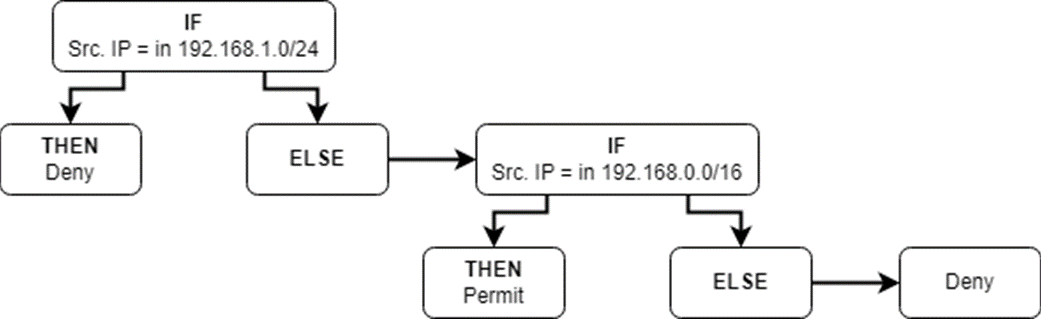
How a router evaluates a packet against an ACL. If the source IP matches 192.168.1.0/24, then deny the packet. Else (otherwise), if the source IP matches 192.168.0.0/16, then permit the packet. Else, deny the packet.
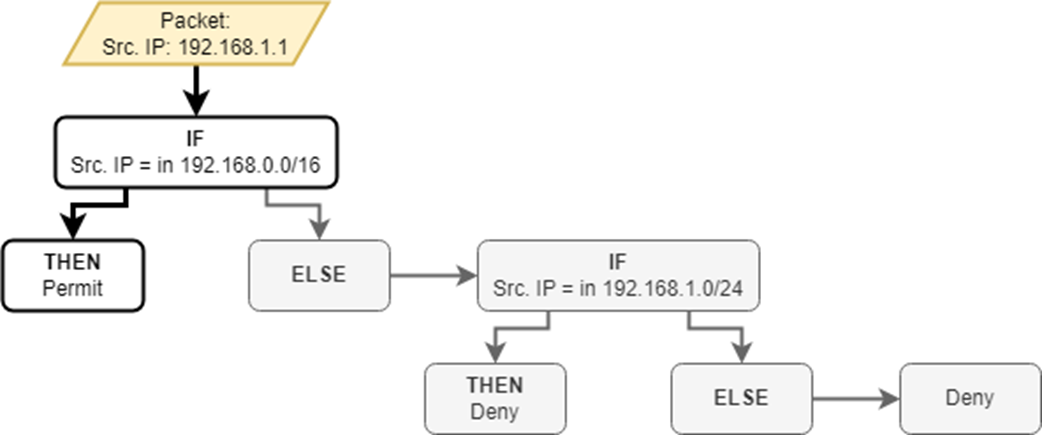
A router evaluates a packet from 192.168.1.1 against the ACL. The packet is permitted by the first ACE. It is never evaluated against the second ACE, which would deny the packet.
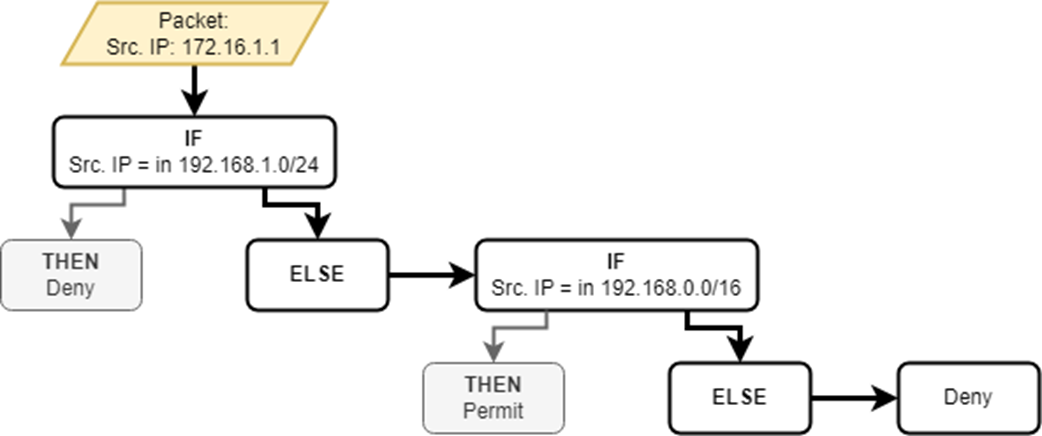
A packet is denied by the implicit deny. The packet’s source IP (172.16.1.1) doesn’t match the first ACE (192.168.1.0/24) or the second ACE (192.168.0.0/16), so it is denied by the implicit deny; the router will discard it.
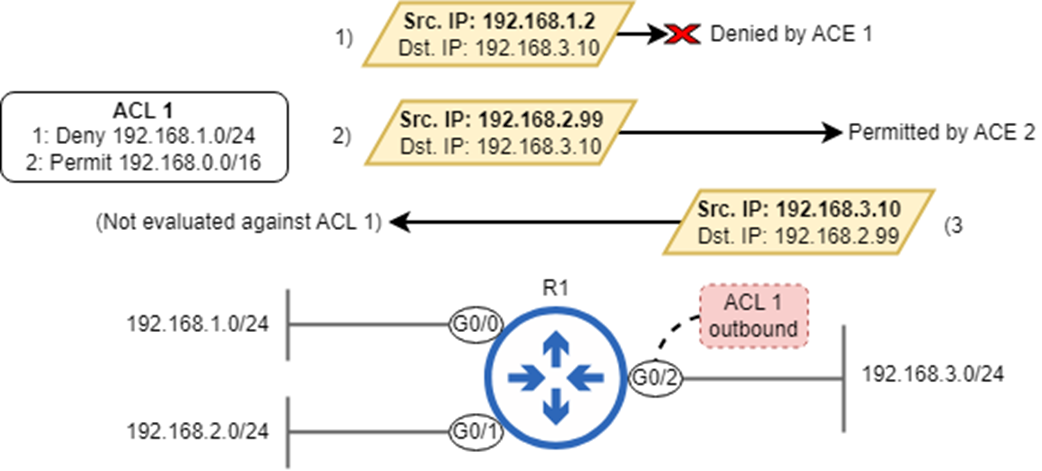
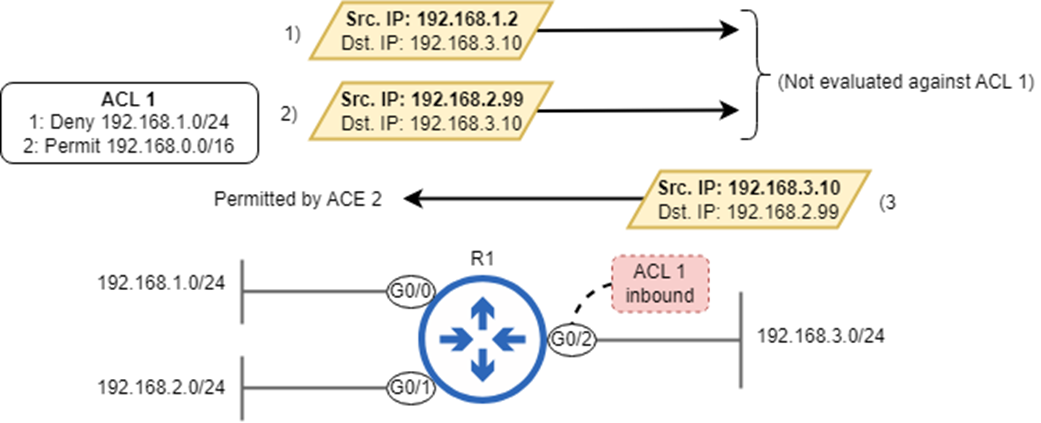
An outbound ACL on G0/2 filters packets as they exit the interface. Packet 1) from 192.168.1.2 is denied by ACE 1. Packet 2) from 192.168.2.99 is permitted by ACE 2. Packet 4) from 192.168.3.10 isn’t evaluated against the ACL because the packet enters G0/2; the ACL is applied outbound, not inbound.
An inbound ACL on G0/2 filters packets as they enter the interface. Packets 1) and 2) are forwarded out of G0/2 without being evaluated against ACL 1. Packet 3) is evaluated as it enters G0/2 and is permitted by ACE 2.
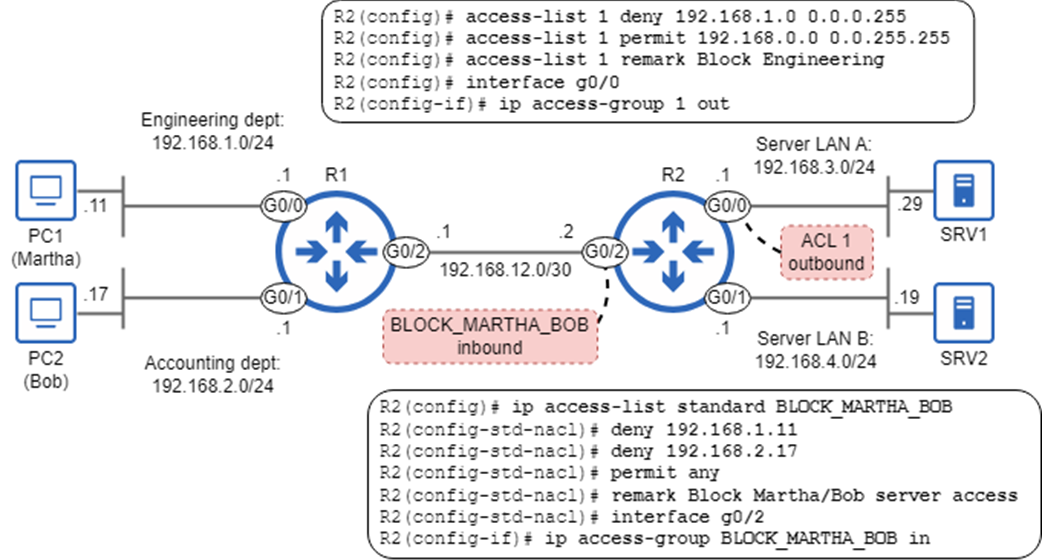
Configuring and applying standard numbered and named ACLs to control traffic in the network.
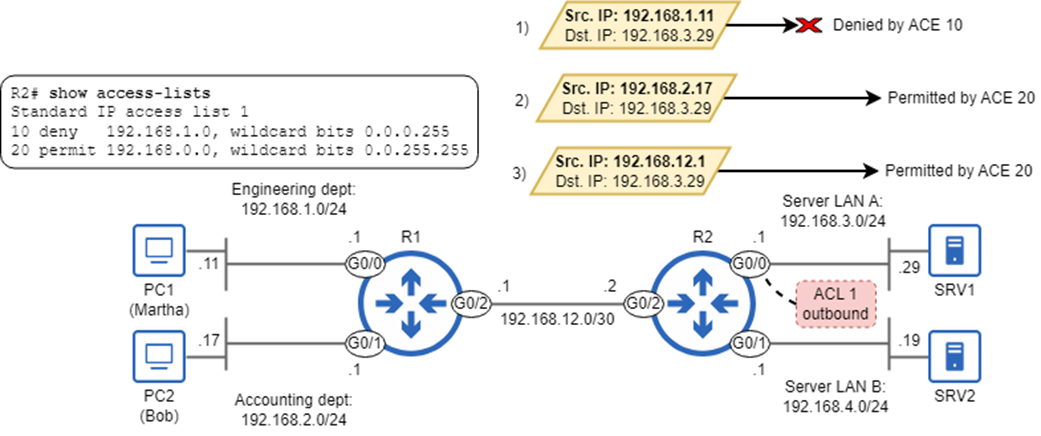
Packets filtered by R2’s ACL 1, applied outbound on G0/0. Packet 1) is permitted by ACE 10. Packet 2) is permitted by ACE 20. Packet 3), sourced from an IP address that doesn’t match either ACE, is denied by the implicit deny.
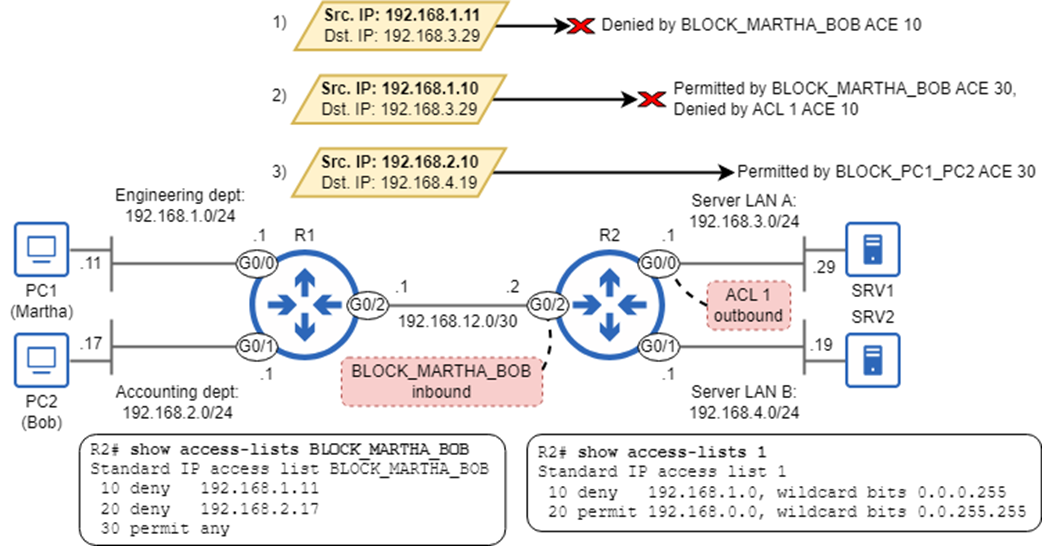
Packets filtered by R2’s ACLs. Packet 1) is denied by BLOCK_MARTHA_BOB’s ACE 10 as it enters R2 G0/2. Packet 2) is permitted by BLOCK_MARTHA_BOB’s ACE 30 as it enters R2 G0/2, but denied by ACL 1’s ACE 10 as it exits R2 G0/0. Packet 3) is permitted by BLOCK_PC1_PC2’s ACE 30 as it enters R2 G0/2, and not evaluated against an ACL as it exits R2 G0/1—no ACL is applied to that interface.
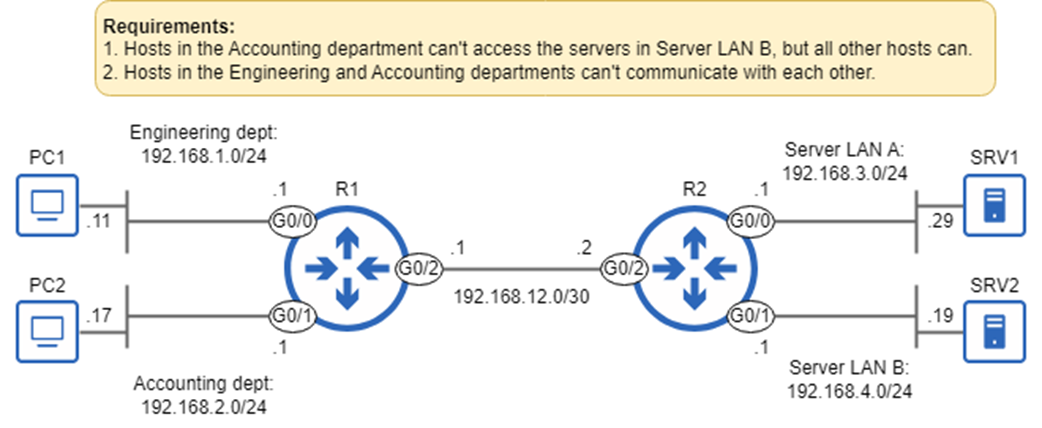
Requirements to be fulfilled by configuring standard ACLs.
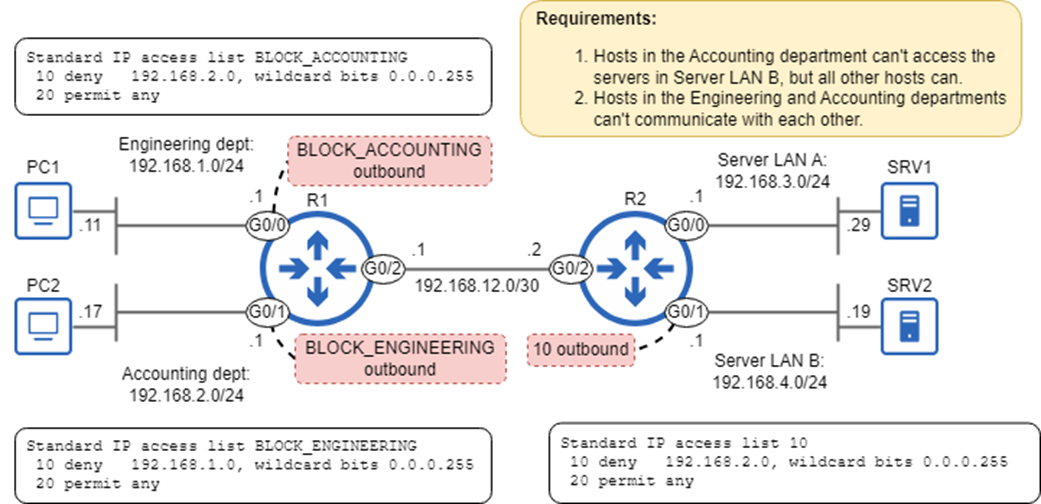
Three ACLs configured on R1 and R2 fulfill the requirements. ACL 10, configured on R2, prevents hosts in 192.168.2.0/24 from accessing 192.168.4.0/24. The two named ACLs on R1 prevent the Engineering and Accounting departments from communicating with each other.
Summary
- An access control list (ACL) is an ordered list of rules that filters packets as they are received by or forwarded out of an interface.
- ACLs function like “if-then-else” conditionals in programming, evaluating conditions and taking actions based on the results.
- Each ACL consists of a series of rules called access control entries (ACEs). Each ACE specifies a matching condition and an action (permit or deny).
- Packets that are permitted are forwarded, and packets that are denied are discarded.
- A router evaluating a packet against an ACL will process the ACEs sequentially from top to bottom. Once a matching ACE is found, the appropriate action is taken and the router doesn’t process any remaining ACEs.
- An ACE that will never be acted upon because it is preceded by a less-specific rule covering its matching condition is an example of a shadowed rule.
- If a packet doesn’t match any of an ACL’s explicitly defined conditions, it will be denied by a hidden rule called the implicit deny.
- The act of creating an ACL doesn’t affect the router’s behavior on its own; the ACL must be applied to one (or more) interfaces to take effect.
- ACLs can be applied to an interface inbound and/or outbound. An inbound ACL filters packets as they are received by the interface. An outbound ACL filters packets as they are forwarded out of the interface.
- Each interface can have a maximum of one ACL applied in each direction: one inbound, and one outbound.
- ACLs can be categorized based on their matching parameters: standard ACLs match packets based only on their source IP address. Extended ACLs can match packets based on source/destination IP addresses, source/destination ports, and others.
- ACLs can also be categorized on how they are identified. Numbered ACLs are identified by a number. Named ACLs are identified by a name.
- You should know four ACL types for the CCNA: standard numbered, standard named, extended numbered, and extended named.
- Numbered ACLs are identified by a number that indicates whether the ACL is standard or extended. Standard ACLs use ranges 1–99 and 1300–1999, and extended ACLs use ranges 100–199 and 2000–2699.
- Standard numbered ACLs are configured one ACE at a time in global config mode with the access-list number {permit | deny} source-ip wildcard-mask command.
- The order you configure ACEs is important. The ACEs will be processed in the order you configure them.
- You can configure an optional descriptive remark with access-list number remark remark. This is useful to clarify the purpose of the ACL.
- You can view all ACLs with show access-lists, and all IP ACLs with show ip access-lists.
- Each ACE is automatically assigned a sequence number, starting from 10 and incrementing by 10 for each ACE.
- You can apply an ACL to an interface with ip access-group {number | name} {in | out}.
- Named ACLs are created in global config mode, but ACEs are configured in a separate config mode.
- You can create a standard named ACL with ip access-group standard name.
- You can configure ACEs in standard named ACL config mode with [seq-num] {permit | deny} source-ip wildcard-mask.
- You can match a single IP address in three ways:
- {permit | deny} 8.8.8.8
- {permit | deny} 8.8.8.8 0.0.0.0
- {permit | deny} host 8.8.8.8
- The any keyword can be used to match all IP addresses, such as permit any.
- Numbered ACLs can also be configured in named ACL config mode.
- Named ACL config mode provides some benefits, such as the ability to specify sequence numbers and easier ACL editing. However, both types function identically once they have been configured.

 Acing the CCNA Exam, Volume 1 ebook for free
