22 IPv6 Routing
This chapter builds on IPv6 addressing to explain how IPv6 forwarding and routing work on Cisco routers, with a strong focus on exam-relevant static routing. It emphasizes that core routing concepts mirror IPv4—routing tables, longest-prefix match, connected and local routes—while highlighting IPv6 specifics such as the absence of broadcast and ARP. Instead, IPv6 relies on Neighbor Discovery Protocol (NDP) for next-hop resolution and other control-plane functions, and the CCNA scope here centers on interpreting the IPv6 routing table, default forwarding behavior, and configuring and verifying IPv6 static routes.
NDP replaces ARP in IPv6 and performs three key roles covered here: address resolution, router discovery, and Duplicate Address Detection (DAD). Address resolution uses ICMPv6 Neighbor Solicitation (NS, type 135) sent to a target’s solicited-node multicast address and Neighbor Advertisement (NA, type 136) in reply; neighbors are tracked in the IPv6 neighbor table. Router discovery uses Router Solicitation (RS, type 133) and Router Advertisement (RA, type 134), enabling Stateless Address Autoconfiguration (SLAAC) to learn prefixes and default gateways (with IOS able to autoconfigure addresses and optionally install a default route). DAD ensures uniqueness by probing a candidate address via NS and marking it unusable if a conflicting NA is received, making address uniqueness mandatory in IPv6 deployments.
From the routing perspective, routers install connected and local routes for global addresses (not for link-local), drop multicast via an automatic ff00::/8 route to Null0, and forward using the most specific matching route. IPv6 static routes are configured with ipv6 route in three forms: recursive (next hop only), directly connected (exit interface only), and fully specified (both). Practical guidance includes avoiding directly connected static routes on Ethernet (no proxy NDP), using fully specified or recursive routes instead, and noting that link-local next hops are valid only when paired with an explicit exit interface. The chapter closes with default routes (::/0) commonly used for Internet access and floating static routes that use a higher administrative distance to serve as resilient backups should a primary route fail.
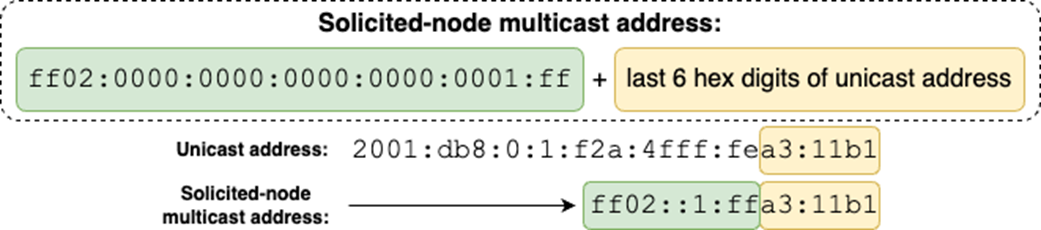
How to generate a solicited-node multicast address. Append ff02:0000:0000:0000:0000:0001:ff (abbreviated to ff02::1:ff) to the last 6 hexadecimal digits of the unicast address.
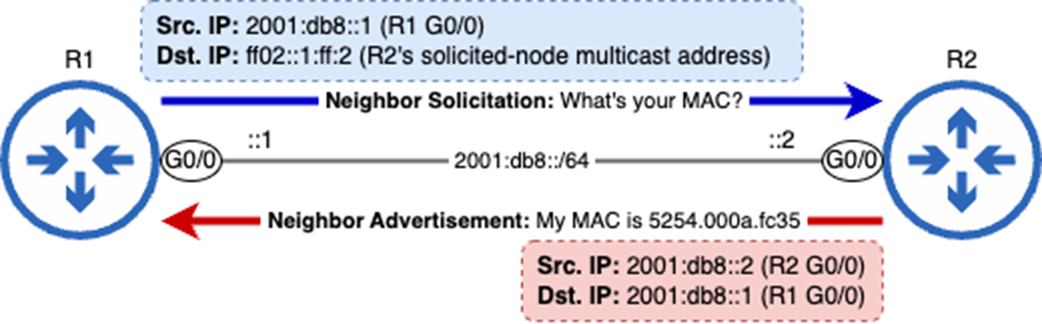
An NDP exchange between two routers. R1 sends an NS message to learn R2 G0/0’s MAC address, and R2 sends an NA message in response.
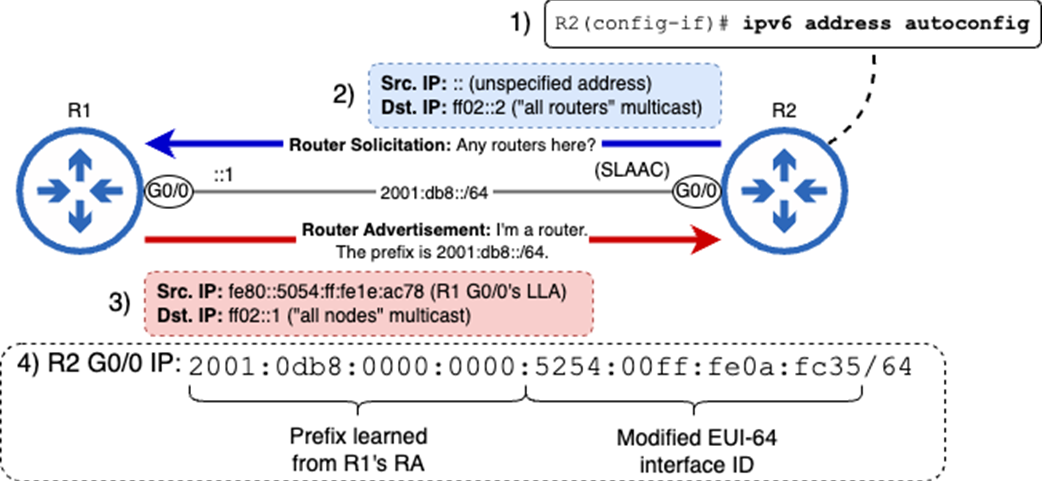
R2 uses SLAAC to generate an IPv6 address. 1) Issue the ipv6 address autoconfig command. 2) R2 sends an RS message. 3) R1 responds with an RA message. 4) R2 combines the learned prefix with a Modified EUI-64 interface ID to make its IPv6 address.
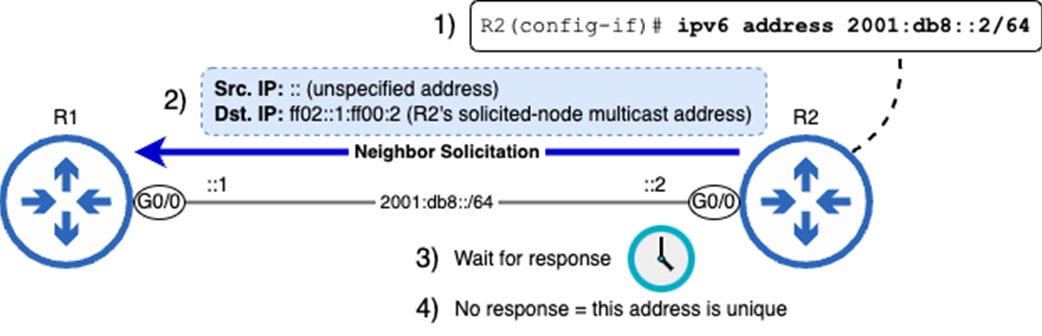
R2 uses DAD to verify that its IPv6 address is unique. 1) Configure R2’s address. 2) R2 sends an NS message to its own solicited-node multicast address. 3) R2 waits for a response. 4) R2 doesn’t receive a response, so the address is unique.
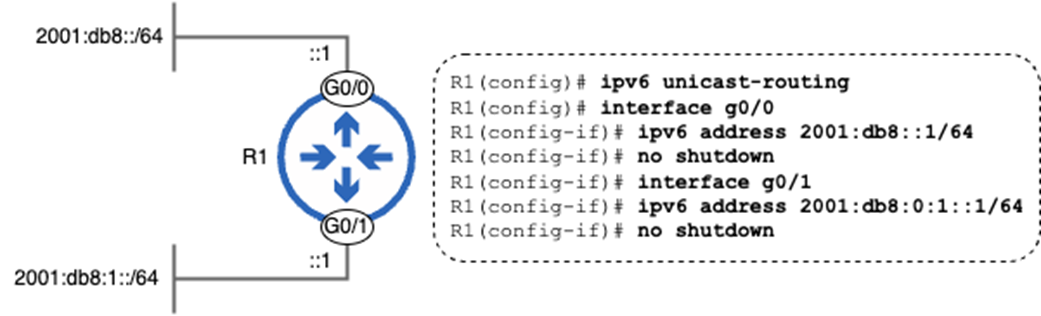
A router with two connected IPv6 networks.
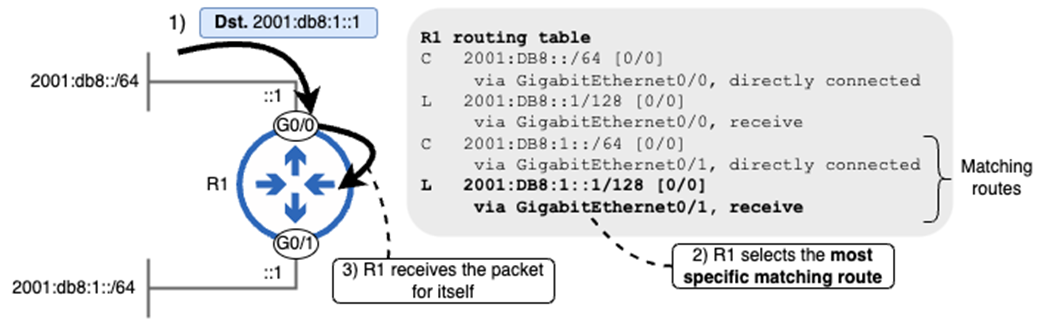
R1 makes a route selection decision. 1) R1 receives a packet destined for 2001:db8:1::1. 2) R1 performs a routing table lookup and selects the most specific matching route—the local route to 2001:db8:1::1/128. 3) R1 receives the packet for itself.
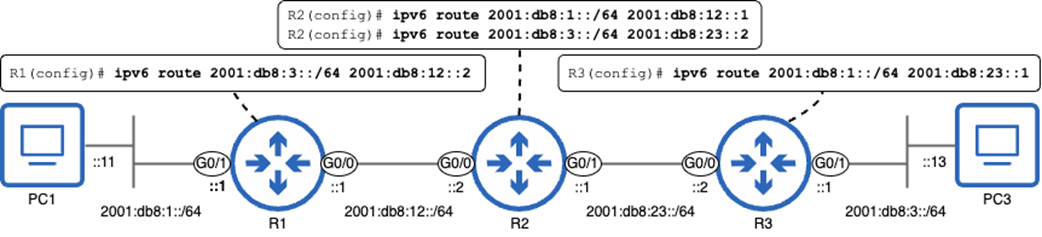
An IPv6 network consisting of three routers. Which static routes must be configured to enable communication between PC1 and PC3?

Configuring recursive static routes on R1, R2, and R3 to enable PC1–PC3 communication. Each route’s next hop IP address is specified.
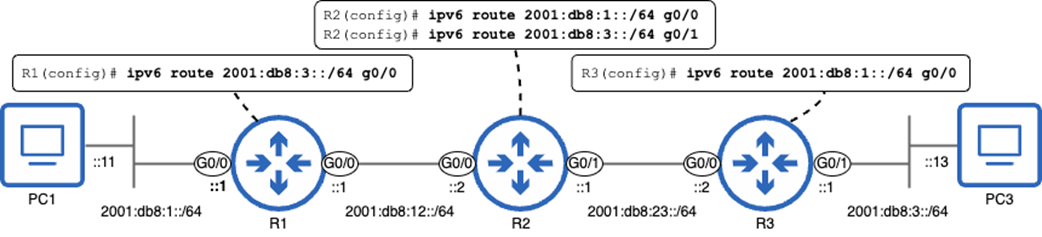
Configuring fully specified static routes on R1, R2, and R3. Each route’s exit interface is specified.
Configuring fully specified static routes on R1, R2, and R3 to enable PC1–PC3 communication. Each route’s exit interface and next hop IP address are specified.
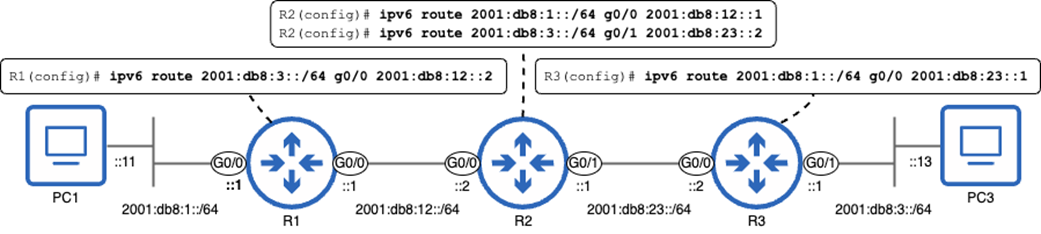
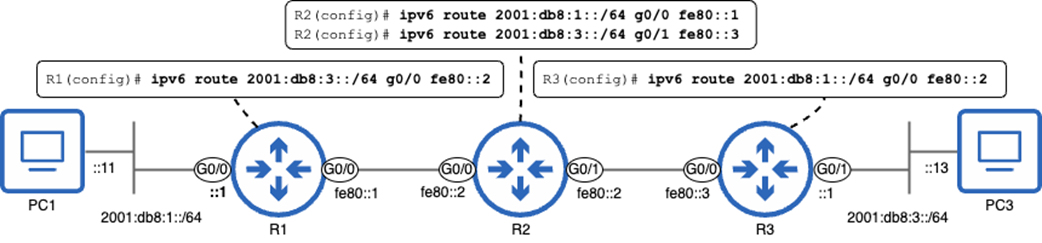
Configuring static routes using link-local next hops on R1, R2, and R3 to enable PC1–PC3 communication.
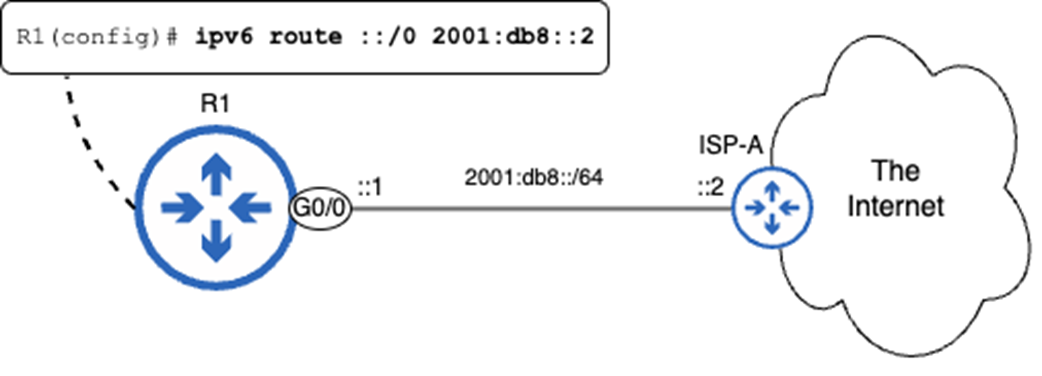
Configuring a default route to the Internet.
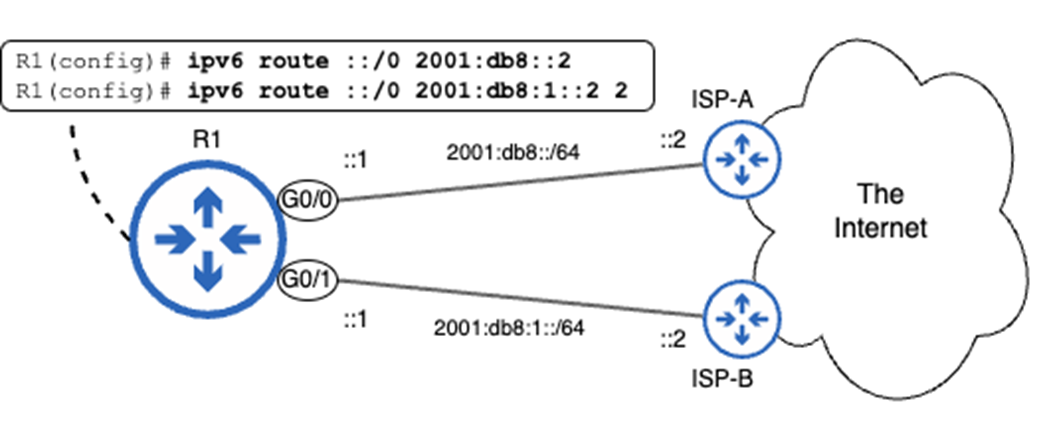
Configuring default routes to the Internet. The route via ISP-A serves as the primary route, and the floating route via ISP-B serves as a backup.
Summary
- IPv6 uses Neighbor Discovery Protocol for various essential functions like ARP-esque layer-2 address resolution, router discovery, and duplicate address detection.
- Some NDP functions, such as address resolution and duplicate address detection, use a solicited-node multicast address, which is generated from a unicast address.
- To generate a solicited-node multicast address, append ff02:0000:0000:0000:0000:0001:ff (ff02::1:ff) to the last six hexadecimal digits of the unicast address. For example, 2001:db8::12:3456 results in ff02::1:ff12:3456.
- NDP address resolution uses two ICMPv6 messages: Neighbor Solicitation (NS) and Neighbor Advertisement (NA). These are equivalent to ARP request and ARP reply.
- To learn a neighbor’s MAC address, a host will send an NS message to the neighbor’s solicited-node multicast address. The neighbor will reply with a unicast NA message, informing the sender of its MAC address.
- An IPv6 host stores its L3–L2 address mappings in the IPv6 neighbor table, which can be viewed with show ipv6 neighbors.
- NDP’s router discovery function allows hosts to automatically discover routers connected to the local network, as well as other characteristics of the local network (such as the prefix).
- Router discovery uses two message types: Router Solicitation (RS) and Router Advertisement (RA).
- RS messages are sent to the “all routers” multicast address (ff02::2) to ask all routers on the local link to identify themselves. Routers send RA messages to the “all nodes” multicast address (ff02::1) in reply.
- NDP router discovery facilitates Stateless Address Autoconfiguration (SLAAC), which allows a host to automatically generate its own IPv6 address.
- A SLAAC-enabled host will send an RS message to discover routers on the local link, and routers will reply with RA messages.
- The host will combine the prefix information learned from the RA with an EUI-64 interface identifier to automatically generate its IPv6 address.
- You can configure a Cisco router to learn its IPv6 address via SLAAC with ipv6 address autoconfig.
- NDP’s Duplicate Address Detection (DAD) is a feature that checks if an IPv6 address is unique on the network before a host uses it.
- Whenever an interface is configured with an IPv6 address, the host uses DAD. Likewise, when an IPv6-enabled interface initializes, it uses DAD.
- To perform DAD, a host sends an NS message to its own solicited-node multicast address. If there is no response, the address is determined to be unique. If the host receives an NA message in response, the address is a duplicate.
- If DAD detects a duplicate IPv6 address, the address cannot be used.
- IPv6-enabled routers build a routing table, in which they store the best route(s) to each known destination. You can view the IPv6 routing table with show ipv6 route.
- A router will insert a connected route to each network its interfaces are connected to, and a local route to the exact IP address of each of its interfaces.
- A local route is an example of a host route—a route to a single destination IP address. IPv6 host routes use a /128 prefix length.
- A connected route is an example of a network route—a route to more than one destination IP address, with a /127 or shorter prefix length.
- Routers forward IPv6 packets according to the most specific matching route in the routing table—same as IPv4 packets.
- A static route that specifies only the next hop IP address is called a recursive static route, because it requires recursive (repeated) routing table lookups to forward a packet. The command syntax is ipv6 route destination-prefix next-hop.
- A static route that specifies only the exit interface is called a directly connected static route, because it makes the router believe that it is directly connected to the destination network. Syntax: ipv6 route destination-prefix exit-interface.
- Directly connected IPv6 static routes don’t work on Ethernet interfaces. Directly connected IPv4 static routes rely on proxy ARP to work, but Cisco routers don’t support an equivalent “proxy NDP”.
- A static route that specifies both the exit interface and the next hop IP address is called a fully specified static route. Syntax: ipv6 route destination-prefix exit-interface next-hop.
- Although packets sourced from and destined for link-local addresses are not routable, link-local addresses can be used as next hop addresses of routes.
- Transit links—links that only serve to carry traffic between different parts of a network—often have no need for global unicast/unique local addresses. Link-local addresses are often sufficient.
- Link-local addresses must be unique only within the context of a single link, so multiple interfaces on the same router can share the same link-local address.
- Static routes with link-local next hops must be fully specified; IOS will reject the command otherwise.
- An IPv6 default route is a route to ::/0, which matches every possible IPv6 address. This is equivalent to 0.0.0.0/0 in IPv4.
- Default routes are most commonly used to provide a route to the Internet. Packets that don’t match any internal destinations are forwarded to the Internet.
- An administrative distance (AD) value can be specified at the end of the ipv6 route command to configure a floating static route—a route that is made less preferable by configuring it with a non-default AD.
- Floating static routes act as backup routes, only entering the routing table if a more desirable route (i.e. another static route with the default AD value) is removed.

 Acing the CCNA Exam, Volume 1 ebook for free
