20 TCP and UDP
This chapter introduces the Transport layer’s role above Layers 1–3: delivering data to the correct application on a host and enabling multiple simultaneous conversations. It explains layer-4 addressing with port numbers (0–65535) and how servers “listen” on well-known ports while clients use ephemeral ports, enabling session multiplexing. By identifying sessions with a combination of source/destination IPs, ports, and the protocol (the five-tuple/socket), hosts can keep concurrent exchanges separate and deliver responses to the right application process.
TCP is presented as a connection-oriented protocol that establishes a session with a three-way handshake, exchanges data, and then terminates the session. It ensures reliability through sequence numbers, acknowledgments, retransmissions on timeout or error, and error detection via checksums. TCP also implements flow control with a dynamically adjusted window (sliding window) so a sender does not overwhelm a receiver, and it supports orderly, bidirectional data exchange. These benefits add data, processing, and time overhead compared to UDP.
UDP offers the same port-based addressing and multiplexing with a lightweight 8-byte header, but it is not connection-oriented and lacks sequencing, acknowledgments, retransmissions, and flow control. The chapter contrasts TCP’s reliable stream model with UDP’s datagram model, then maps each to common use cases: TCP for integrity-critical tasks like web browsing and file/email transfer; UDP for speed-sensitive scenarios such as real-time voice/video, streaming, and gaming, for simple request/response exchanges like DNS, and when the application provides its own reliability (for example, TFTP). The key takeaway is choosing TCP or UDP based on the trade-off between reliability and overhead versus speed and efficiency.
A web browser on PC1 uses a layer-7 protocol (HTTPS) to request a web page from the web server on SRV1. Layers 2, 3, and 4 work together to deliver the message to the appropriate application on SRV1. Layer 1 provides the medium over which the communication occurs.

PC1 sends a TCP segment to SRV1. The segment is sourced from port 50000 on PC1, and destined for port 443 on SRV1. SRV1’s reply reverses the ports: it is sourced from port 443 on SRV1 and destined for port 50000 on PC1.
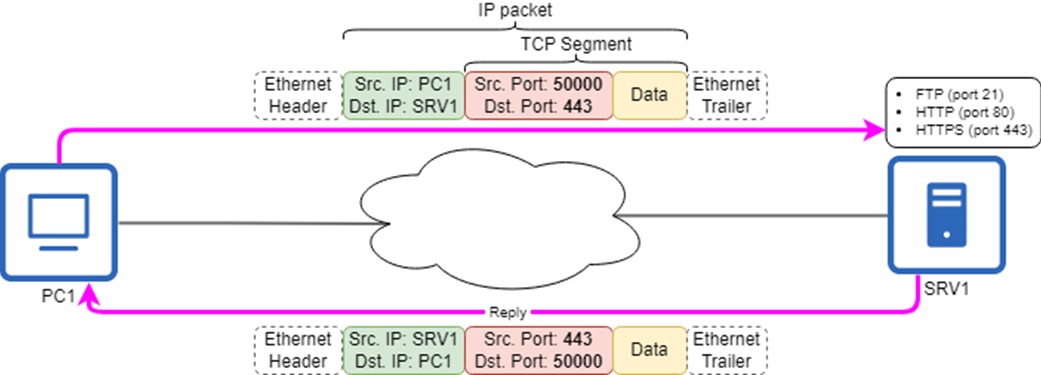
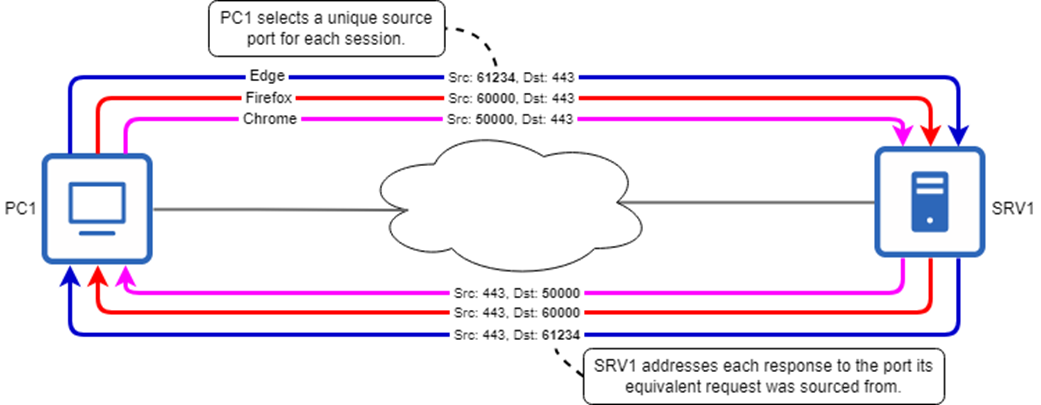
Session multiplexing is achieved through port numbers. PC1 selects a unique source port for each communication session with SRV1, which addresses each response to the port the equivalent request was sourced from.
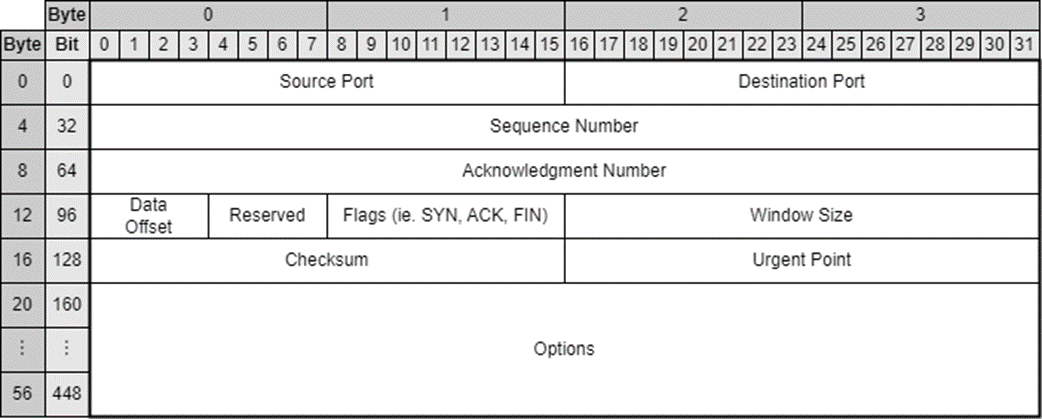
The format of the TCP header. Like the IPv4 header, it is a minimum of 20 bytes in size, but can be up to 60 bytes if Options are included.
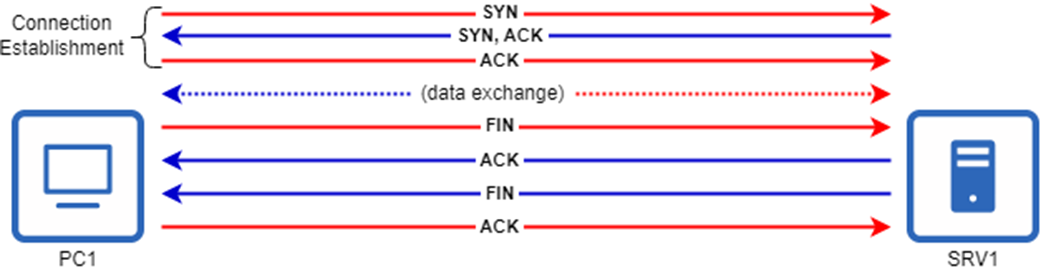
The TCP three-way handshake. PC1 initiates the connection by sending a TCP segment with the SYN flag, SRV1 responds with a segment with the SYN and ACK flags, and finally PC1 sends a segment with the ACK flag.

TCP connection termination. After the connection establishment and data exchange, PC1 sends a segment with the FIN flag to terminate the connection. SRV1 replies with an ACK segment, and then sends its own FIN segment, to which PC1 replies with an ACK segment.
TCP data sequencing and acknowledgment. During connection establishment, each host sets a random initial sequence number. Each segment is acknowledged by the receiver by indicating the sequence number of the next segment it expects to receive.
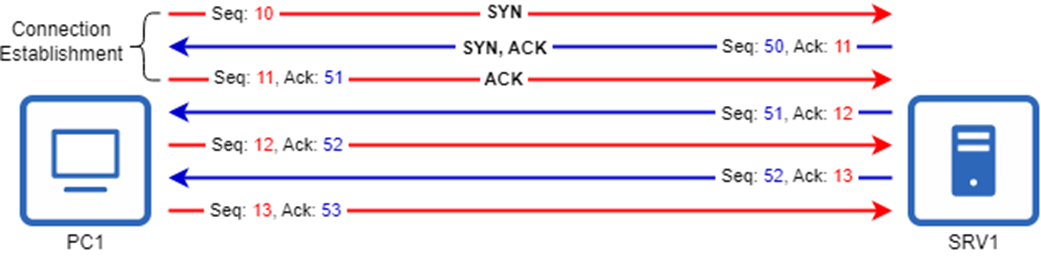
PC1 and SRV1 send each other two segments at a time, before waiting for acknowledgment. Segments sent consecutively without receiving a new segment from the other host have identical acknowledgment numbers.

TCP retransmission. PC1’s first segment with sequence number 26 does not reach SRV1. Because PC1 doesn’t receive an acknowledgment for the segment, it retransmits the segment, which is then received and acknowledged by SRV1.

TCP flow control is achieved through the Window Size field of the TCP header. In its segments to SRV1, PC1 specifies how much data SRV1 should send before waiting for the next acknowledgment. This can be adjusted dynamically to find an appropriate rate.

The UDP header. Compared to the TCP header, the UDP header is very lightweight, being only 8 bytes in size.

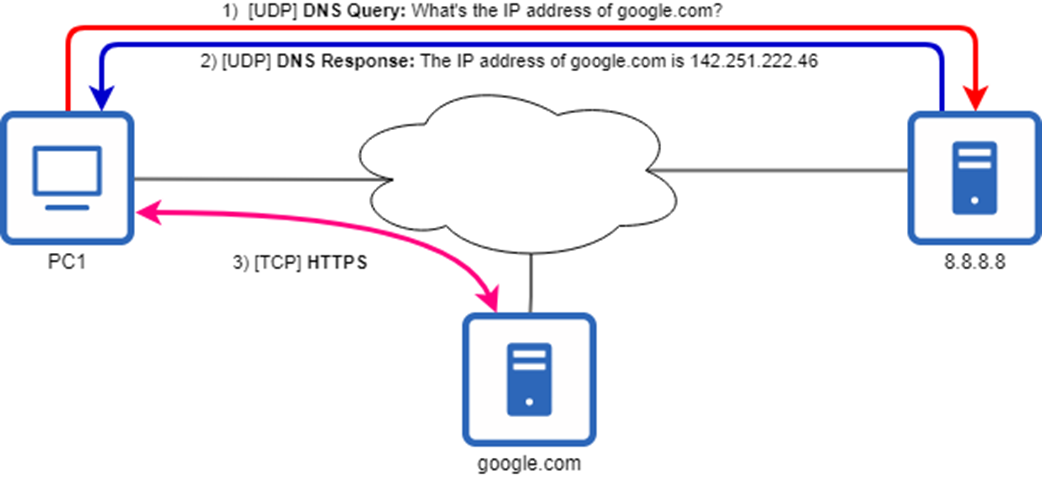
Simple DNS exchanges like the one in steps 1) and 2) use UDP. Having learned google.com’s IP address, in step 3) PC1 uses HTTPS to access the website.
Summary
- Layer 4 (Transport) operates on top of layers 1, 2, and 3, which are responsible for delivering layer-4 segments between communicating hosts. Likewise, layer 4 provides services to the Application-layer protocols that run above it.
- The most common layer-4 protocols are Transmission Control Protocol (TCP) and User Datagram Protocol (UDP).
- TCP and UDP use their own system of addressing called ports. A port is a number ranging from 0–65535 that is used to address a message to a specific application process on the destination host.
- Application-layer protocols run on top of either TCP or UDP (or both in some cases). Each also listens on a specific port number. For example, HTTPS listens on TCP port 443.
- Port numbers are assigned by the Internet Assigned Numbers Authority (IANA). IANA divides port numbers into three ranges: well-known, registered, and ephemeral.
- Well-known ports (0–1023) are reserved for the most common protocols, and are strictly controlled and assigned by IANA.
- Registered ports (1024–49151) are not as strictly controlled as well-known ports, but can be registered for use with a specific protocol.
- Ephemeral ports (49152–65535) are not controlled by IANA, and registration is not required to use them. They are most commonly used by client devices as the source ports for connections.
- Port numbers also allow for session multiplexing, which allows hosts to keep track of communication sessions by associating them with their unique source and destination IP addresses and port numbers.
- In addition to addressing and session multiplexing, TCP provides benefits like connection-oriented communication, data sequencing, reliable communication, and flow control.
- Exchanging data via TCP is a three-step process: 1) connection establishment, 2) data exchange, 3) connection termination.
- TCP connection establishment uses two flags in the TCP header: SYN and ACK. It involves three messages (SYN, SYN-ACK, ACK) and is often called the three-way handshake.
- TCP connection termination uses the FIN and ACK flags, usually in a four-message exchange that is sometimes called the four-way handshake: FIN, ACK, FIN, ACK.
- TCP provides data sequencing and reliable communication using sequence and acknowledgment numbers. Each TCP segment that a host sends must be acknowledged by the receiver.
- Each host randomly selects an initial sequence number in the three-way handshake.
- A host acknowledges receipt of one or more segments by sending a segment with the acknowledgment number set to the sequence number of the next segment it expects to receive.
- If the sender of a segment does not receive an acknowledgment within a certain period of time (the retransmission timeout), it will retransmit the segment. This provides reliable delivery of segments.
- Flow control is a mechanism that prevents a sender from overwhelming a receiver by sending too much data too fast. It is implemented in TCP through the Window Size field, which specifies how many bytes the sender should send before waiting for an acknowledgment.
- Each host in a TCP exchange specifies its own window size, which it adjusts throughout the exchange. For this reason it is said that TCP uses a sliding window.
- Like TCP, UDP provides layer-4 addressing and session multiplexing via port numbers. However, UDP is not connection-oriented, and does not provide reliable communication, data sequencing, or flow control.
- Although TCP provides more features than UDP, they come at the cost of additional overhead—the additional data and processing required to manage and ensure the transmission of the actual user data in each segment.
- TCP is preferred in situations where data integrity is critical and the delivery of all segments is required, such as file transfers, web browsing, and email.
- For example, in file transfers, minor latency due to connection establishment, retransmissions, and other TCP features is acceptable. It’s more important that the entire file arrives intact, with all of its bytes in the correct order.
- UDP is preferred for real-time applications, simple query/response protocols, and when reliability is provided by other means.
- Real-time applications use UDP because the most recent data is the most valuable, and lost data quickly becomes irrelevant. If packet loss occurs in a voice/video call, it’s better to have minor temporary visual or audio degradation than a delay while waiting for missing packets.
- Simple query/response protocols (ie. DNS, which usually uses UDP) prefer UDP because the overhead of setting up a TCP connection isn’t worth it for a single, small query and response.
- UDP is also preferred when reliability is provided by other means, such as the Application-layer protocol. For example, Trivial File Transfer Protocol (TFTP) provides basic reliability by requiring acknowledgment of each message.

 Acing the CCNA Exam, Volume 1 ebook for free
