Overview

2 Network Devices

This chapter introduces computer networks as systems that connect devices to share resources. It clarifies key terms: nodes are any devices on the network (including end hosts and infrastructure), and resources are the data and services exchanged between them. It also distinguishes Local Area Networks (LANs), which cover limited geographic areas like offices, from Wide Area Networks (WANs), which connect locations over large distances. The overall aim is to recognize common network devices and understand, at a high level, the roles they play in enabling communication.

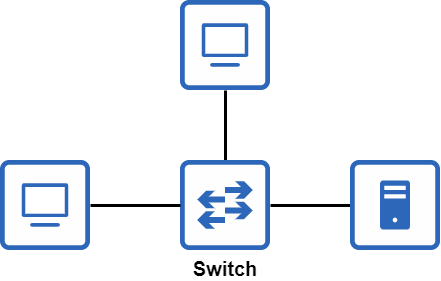
The client–server model is presented as the foundation of how resources are shared: clients request services, and servers provide them. These are roles, not specific hardware types, and a single device can act as both depending on context. To scale beyond simple point-to-point connections, networks rely on infrastructure devices. Switches are highlighted as the core of a LAN, providing many physical ports to interconnect end hosts so they can communicate with one another within the same local network, without themselves being the destination of user traffic and without providing connectivity to external networks.

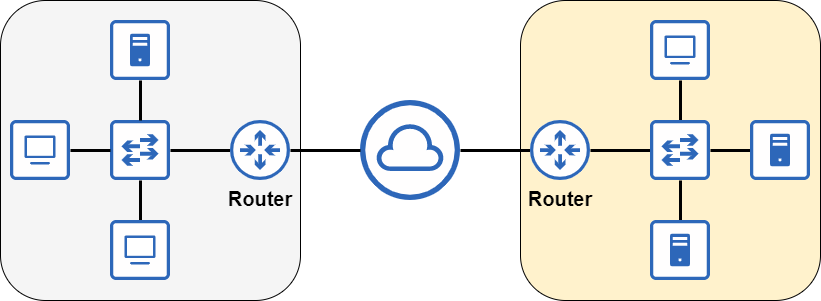
Routers sit at the edge of LANs to connect them to other networks, including the Internet and WANs, enabling communication between distinct networks. The chapter explains that consumer “wireless routers” commonly bundle multiple functions—router, switch, wireless access point, and firewall—suiting small office/home office environments, whereas enterprises typically separate these roles across dedicated devices. Firewalls add a layer of protection by inspecting inbound and outbound traffic and enforcing rules to allow or block it; the focus here is on network firewalls (hardware appliances), with a brief contrast to host-based firewalls on individual PCs. While firewalls are covered at a basic level, the primary emphasis for exam preparation remains on switches and routers.

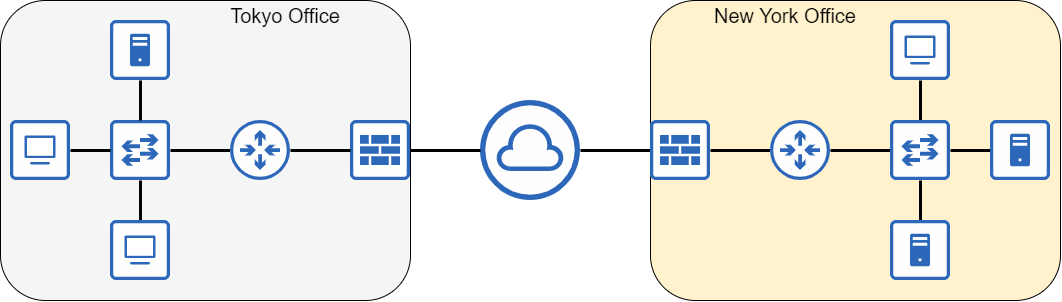
An enterprise network connecting multiple offices together over the Internet
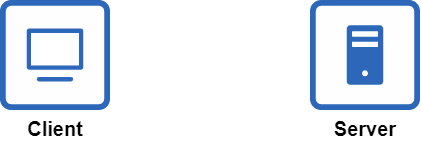
Icons representing a desktop computer and a file server. Icons like these are commonly used in network diagrams to represent clients and servers
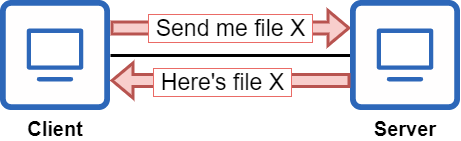
Two desktop PCs sharing a file. The PC on the left is functioning as a client, and the PC on the right is functioning as a server
Three end hosts connected to a switch
Two LANs connected to the Internet via a router at the edge of each LAN.
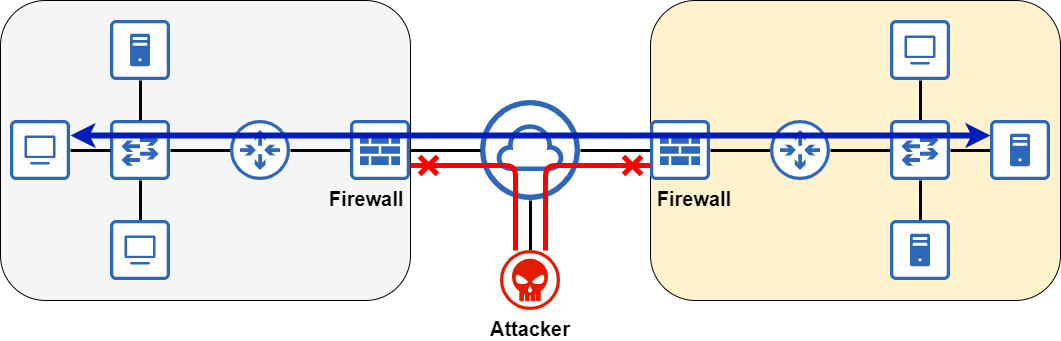
A firewall between each LAN and the Internet secures the network. Network communications between the two LANs are allowed, but malicious traffic from an attacker is denied.
 Summary

  • A Local Area Network (LAN) is a group of interconnected devices in a limited area, such as an office.
  • A Wide Area Network (WAN) is a network that extends over a large geographical area, such as between cities.
  • A computer network is a telecommunications network which allows nodes to share resources.
  • A node is any device that connects to a network: a personal computer, an iPhone, a router, etc.
  • A resource is anything that is being shared over a network, such as a web page.
  • Various types of network devices are used to facilitate network communications.
  • Clients and servers are defined by their functions in relation to each other: clients access services provided by servers, and servers provide services for clients. Most types of devices can be both a client and a server.
  • Switches provide connectivity between devices in a LAN. They typically have many ports (24 to 48) for devices to connect to.
  • Routers provide connectivity between LANs and external networks, such as the Internet.
  • A wireless router (Wi-Fi router/home router) is a multifunctional device that combines the roles of router, switch, wireless access point, and firewall into one.
  • Firewalls secure the network by inspecting traffic that enters or exits the network, and allowing or denying it based on a set of configured rules.

FAQ

What is a computer network?A computer network is a telecommunications system that connects devices (nodes) so they can communicate and share resources.
What is a node in networking?A node is any device connected to the network, including end devices like PCs, phones, and TVs, as well as infrastructure devices such as switches, routers, and firewalls.
What’s the difference between a LAN and a WAN?A LAN (Local Area Network) covers a small area like an office and connects devices locally. A WAN (Wide Area Network) spans large geographic areas to link multiple LANs; the Internet is one option for interconnecting remote sites.
How do clients and servers differ?A client accesses a service, while a server provides a service. These are roles, not specific hardware types—many kinds of devices can act as either.
Can the same device act as both a client and a server?Yes. For example, during home file sharing, the device offering a file is the server and the device retrieving it is the client. If the transfer direction reverses, the roles reverse.
What is the role of a switch?A switch connects multiple devices within a LAN so they can communicate. It typically has many ports for end hosts and does not provide direct connectivity to external networks like the Internet.
What do “ports” or “interfaces” mean on network devices?They are the physical connectors where cables attach. The terms port and interface are often used interchangeably.
What is the role of a router?A router connects a LAN to other networks (for example, the Internet) and forwards traffic between them. It is placed at the edge of the LAN rather than used to connect many end hosts inside the LAN.
What is a wireless (home) router?A wireless or home router is a multifunction SOHO device that typically combines a router, Ethernet switch, wireless access point (Wi‑Fi), and basic firewall in one unit—great for small networks, but not scalable enough for most enterprises.
What is a firewall, and how does a network firewall differ from a host-based firewall?A firewall enforces security by allowing or blocking traffic based on rules. A host-based firewall runs on an individual device and filters that device’s traffic; a network firewall is a dedicated appliance that filters traffic entering and leaving an entire network.

pro $24.99 per month

  • access to all Manning books, MEAPs, liveVideos, liveProjects, and audiobooks!
  • choose one free eBook per month to keep
  • exclusive 50% discount on all purchases
  • renews monthly, pause or cancel renewal anytime

lite $19.99 per month

  • access to all Manning books, including MEAPs!

team

5, 10 or 20 seats+ for your team - learn more


choose your plan

team

monthly
annual
$49.99
$499.99
only $41.67 per month
  • five seats for your team
  • access to all Manning books, MEAPs, liveVideos, liveProjects, and audiobooks!
  • choose another free product every time you renew
  • choose twelve free products per year
  • exclusive 50% discount on all purchases
  • renews monthly, pause or cancel renewal anytime
  • renews annually, pause or cancel renewal anytime
  • Acing the CCNA Exam, Volume 1 ebook for free

choose your plan

team

monthly
annual
$49.99
$499.99
only $41.67 per month
  • five seats for your team
  • access to all Manning books, MEAPs, liveVideos, liveProjects, and audiobooks!
  • choose another free product every time you renew
  • choose twelve free products per year
  • exclusive 50% discount on all purchases
  • renews monthly, pause or cancel renewal anytime
  • renews annually, pause or cancel renewal anytime
  • Acing the CCNA Exam, Volume 1 ebook for free
choose your plan

team

monthly
annual
$49.99
$499.99
only $41.67 per month
  • five seats for your team
  • access to all Manning books, MEAPs, liveVideos, liveProjects, and audiobooks!
  • choose another free product every time you renew
  • choose twelve free products per year
  • exclusive 50% discount on all purchases
  • renews monthly, pause or cancel renewal anytime
  • renews annually, pause or cancel renewal anytime
  • Acing the CCNA Exam, Volume 1 ebook for free