18 OSPF
Open Shortest Path First is presented as a standards-based, link‑state IGP that uses the Shortest Path First (Dijkstra) algorithm. The chapter focuses on OSPFv2 for single-area designs in the CCNA scope, explaining how routers form neighbor relationships, flood link-state advertisements to build an identical link-state database, and compute best paths based on cost. It contrasts single-area simplicity with the scalability advantages of multi-area hierarchy anchored on backbone area 0, and clarifies router and route roles (internal, backbone, ABR, ASBR; intra‑area, inter‑area, external). OSPF cost fundamentals are emphasized, including the need to tune reference bandwidth for modern speeds and the options to influence path selection with interface cost, while highlighting consistency to avoid suboptimal routing or instability.
Configuration guidance covers creating the OSPF process and how the router ID is chosen, with best practices to use loopbacks or manually set and then reset the process for stability. It compares enabling OSPF with the network statement versus explicitly on interfaces, recommends passive interfaces where neighbor formation is unnecessary (commonly loopbacks and stub hosts), and shows how to distribute Internet access by configuring a static default route on the edge router and advertising it with default-information originate. Operational verifications and behavior such as ECMP defaults are noted, along with reminders not to enable OSPF on external-facing links when it is not needed.
Operational mechanics detail the neighbor state machine (from Down to Full), periodic hello/dead timers, and multicast neighbor discovery. The broadcast network type holds DR/BDR elections so DROthers form full adjacencies only with the DR/BDR, reducing LSA exchange overhead; point‑to‑point removes DR/BDR to speed adjacency on two‑router links. The chapter lists key adjacency requirements—matching area, subnet, timers, and authentication; unique RIDs; and compatible MTU and network type—to ensure neighbors can fully synchronize LSDBs. Finally, it summarizes essential LSA types for the exam: type 1 (Router), type 2 (Network) from DRs, and type 5 (AS External) from ASBRs, reinforcing that all routers in an area must share an identical LSDB for correct SPF route calculation.
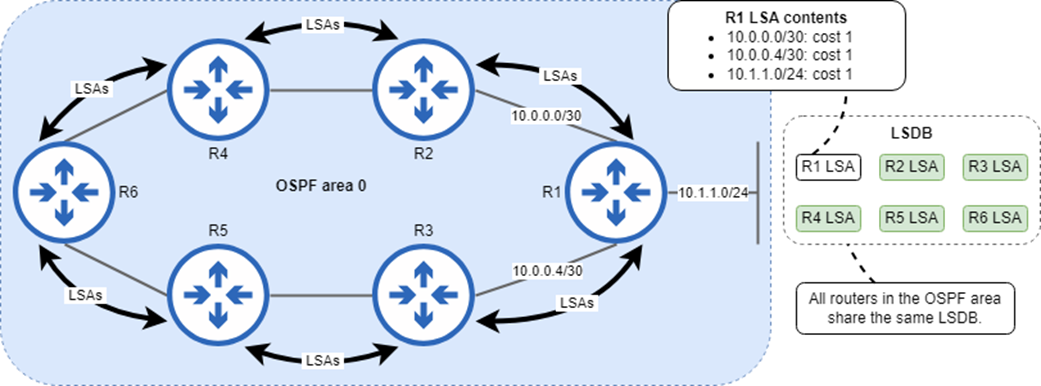
Routers flood LSAs within the OSPF area to ensure that all routers have an identical LSDB. The LSAs that make up the LSDB contain information about each router’s connected networks, such as their cost. R1’s LSA indicates that it is connected to 10.0.0.0/30, 10.0.0.4/30, and 10.1.1.0/24, each with a cost of 1.
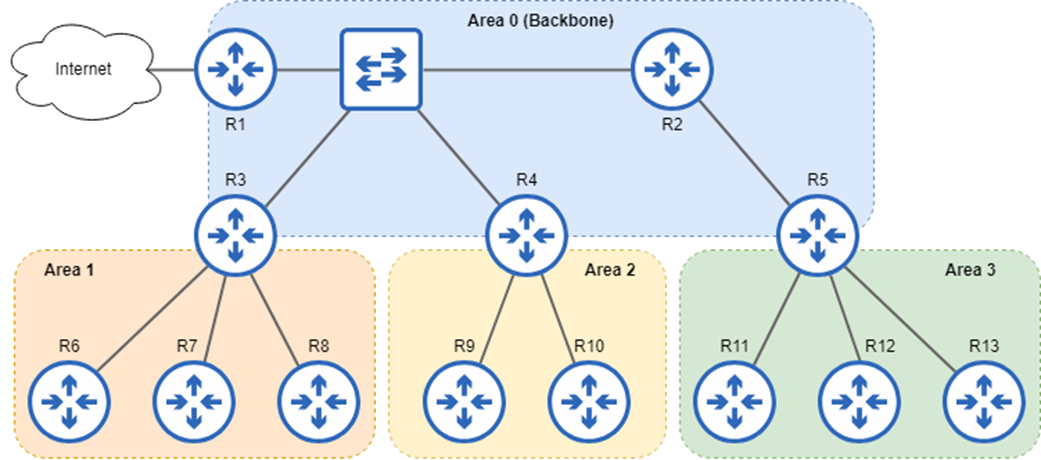
A multi-area OSPF network consisting of four areas. Area 0 is the backbone area to which other areas must connect. Areas 1, 2, and 3 are non-backbone areas, and traffic between them must pass through area 0.
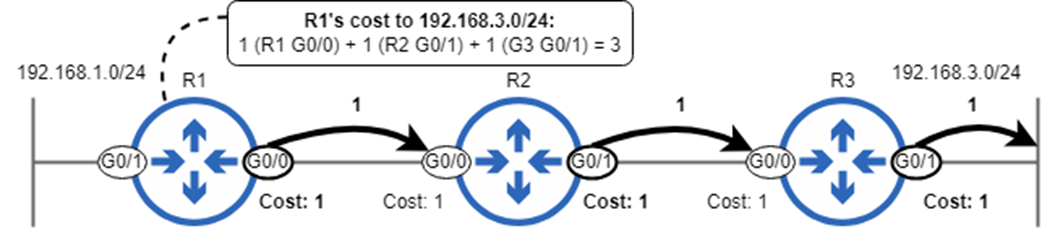
A route cost is the cumulative cost of each interface packets must be sent out of to reach the destination. R1’s cost to reach 192.168.3.0/24 is 3: 1 for R1 G0/0, plus 1 for R2 G0/1, plus 1 for R3 G0/1.
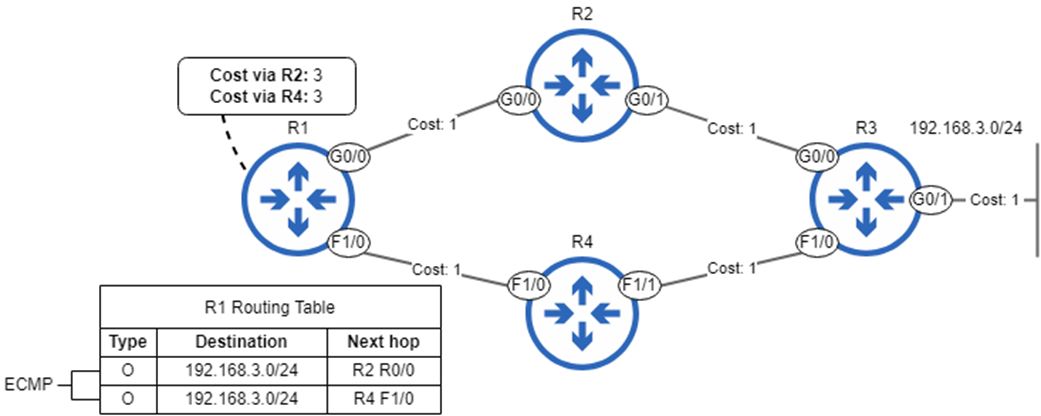
Although the route to 192.168.3.0/24 via R2 is superior to the route via R4, the OSPF cost of both routes is the same. R1 adds both routes to the routing table, and will load-balance over them with ECMP.
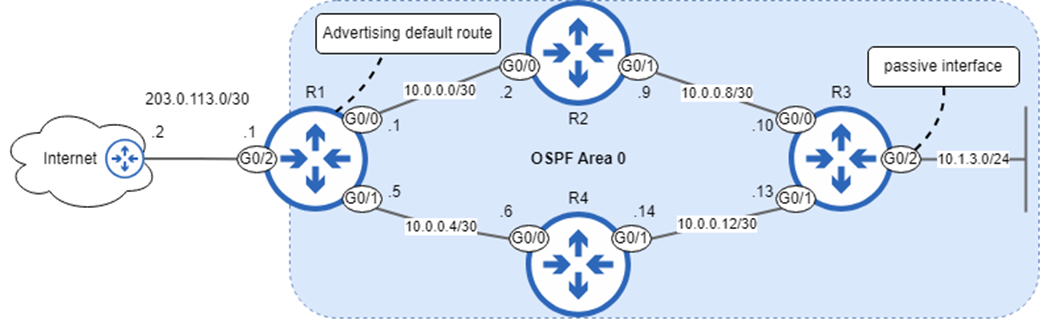
A single-area OSPF network of four routers. R3 connects to the 10.1.3.0/24 subnet on its G0/2 interface, a passive interface. R1 connects to the Internet, and advertises a default route to the other routers.
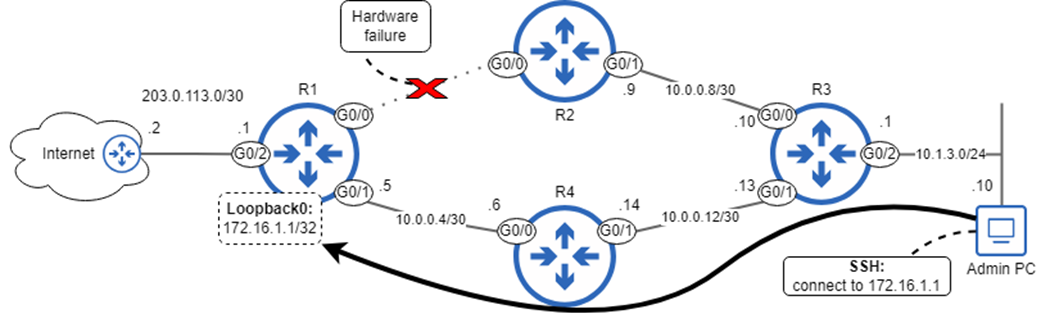
An admin uses SSH to connect to R1’s Loopback0 interface. Loopback0 doesn’t rely on the status of a particular physical interface, such as G0/0, which is down due to a hardware failure.
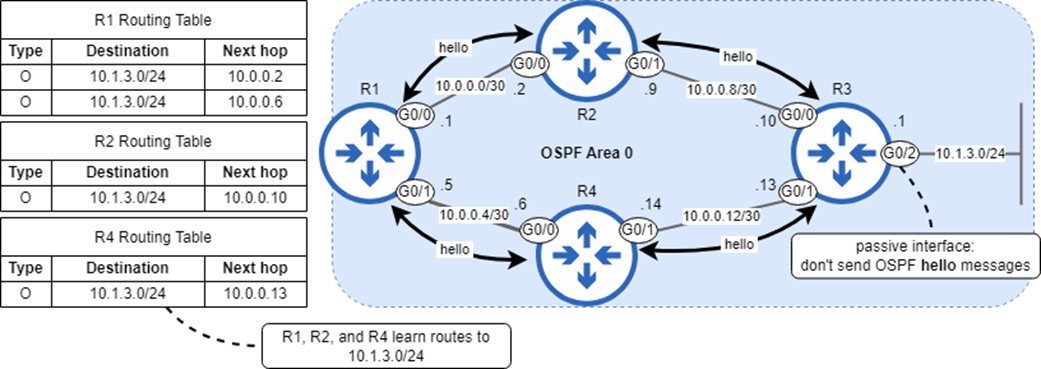
R3 advertises the network prefix of G0/2—a passive interface—but does not send OSPF hello messages out of it.
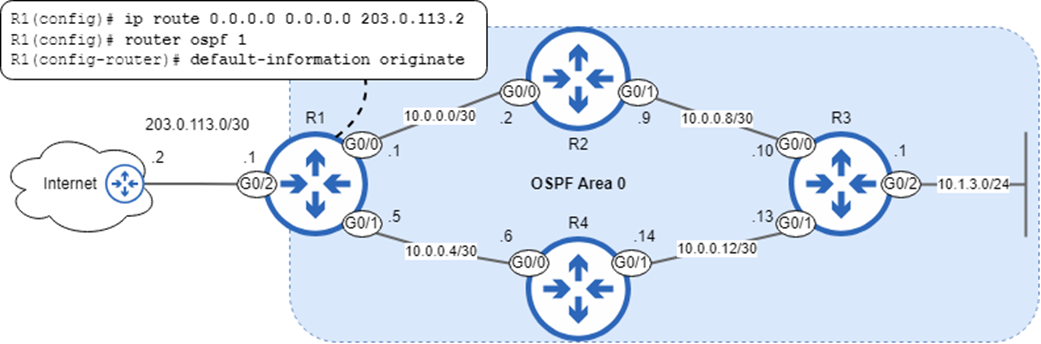
R1 functions as an ASBR, advertising a default route into the OSPF AS. After configuring a default route, use default-information originate to advertise the route to other routers in the OSPF AS.
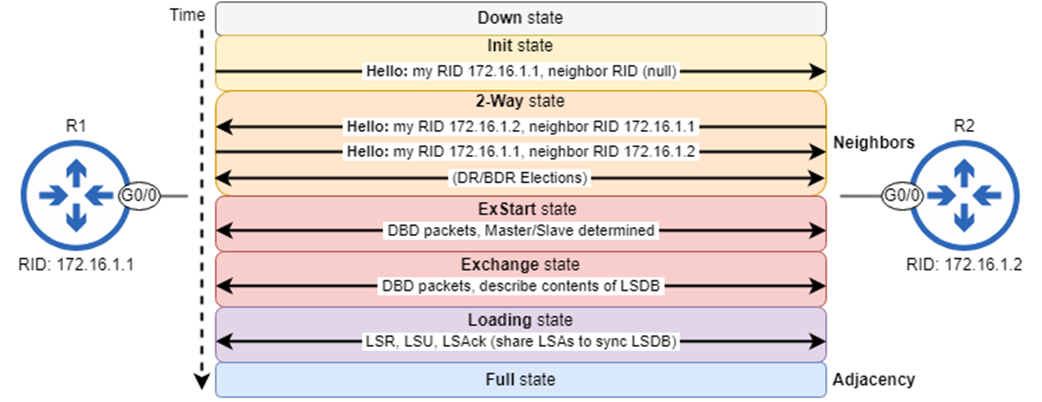
The OSPF neighbor states: Down, Init, 2-Way, ExStart, Exchange, Loading, and Full. Routers that reach the 2-Way state are OSPF neighbors. Some routers remain in this state, and some proceed to establish a full adjacency.
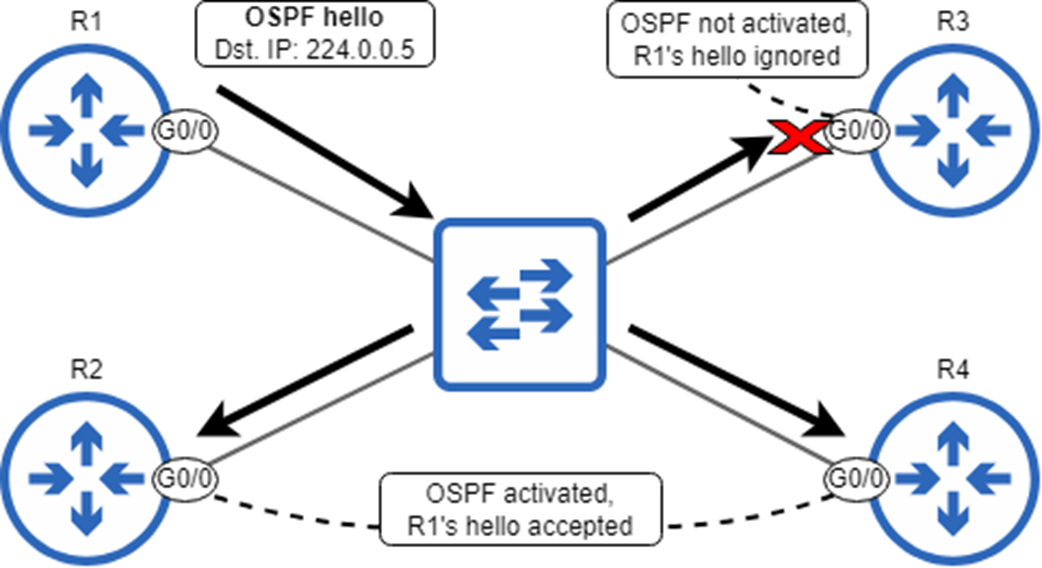
An OSPF hello message from R1 is addressed to multicast address 224.0.0.5. The switch floods the frame, and OSPF-enabled R2 G0/0 and R4 G0/0 accept the hello message. R3 ignores the hello because G0/0 is not OSPF-enabled.
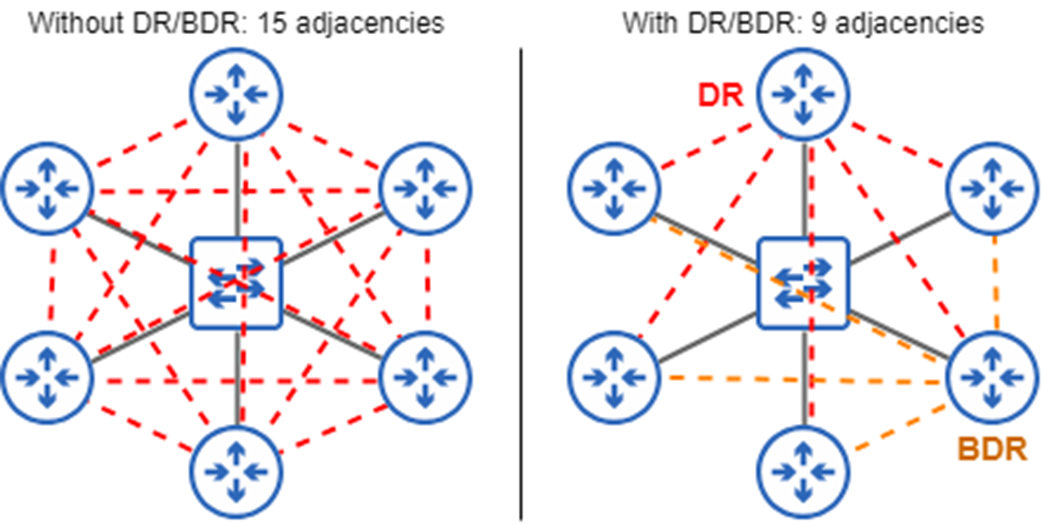
Six routers are connected to the same network segment. Without the DR/BDR, 15 OSPF adjacencies (and 15 LSA exchanges) would be required. With the DR/BDR, only 9 are required, reducing the amount of OSPF traffic.
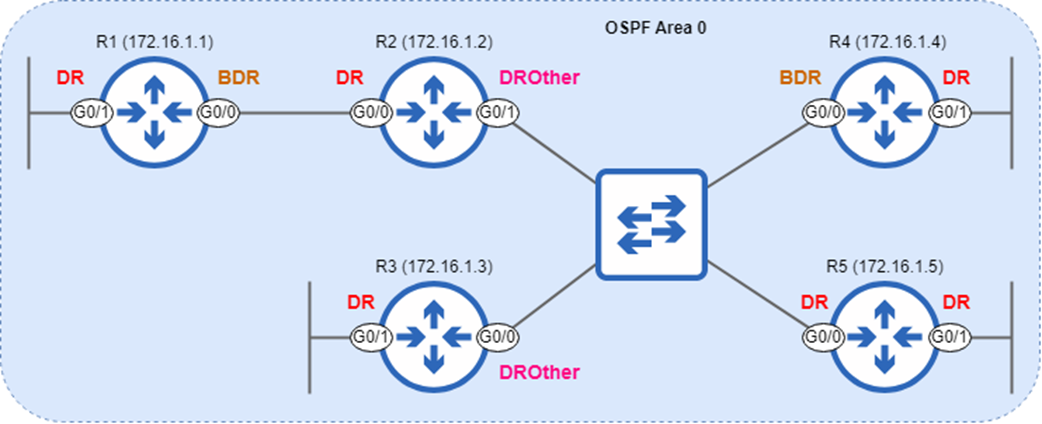
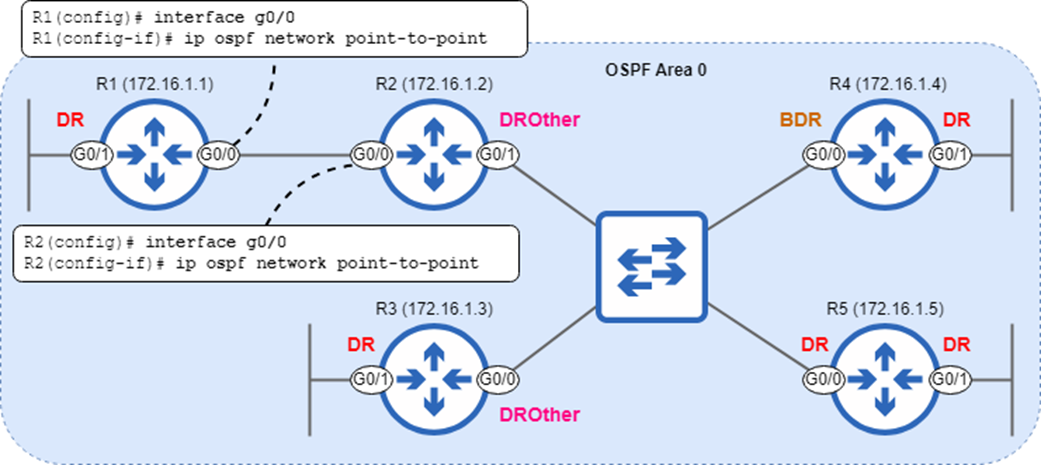
An OSPF AS consisting of six segments. The DR/BDR election is held per segment, not per area. RIDs are in brackets.
Electing a DR and BDR on a connection between two routers is unnecessary, so the R1–R2 link should use the point-to-point network type.
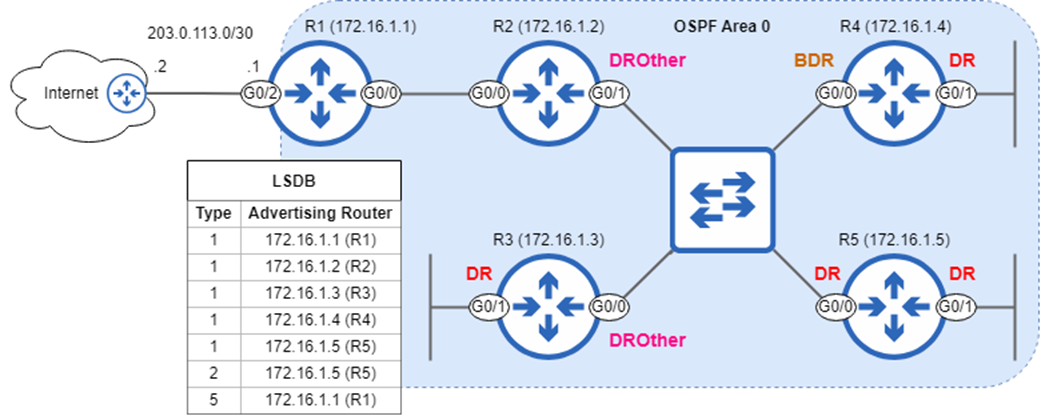
An OSPF AS and the contents of its LSDB. Each router advertises a type 1 (Router) LSA. R5, as the DR of the R2–R3–R4–R5 segment, advertises a type 2 (Network) LSA. R1, as an ASBR, advertises a type 5 LSA.
Summary
- Two versions of OSPF are used: OSPFv2 (for IPv4), and OSPFv3 (mainly for IPv6).
- OSPF uses the Shortest Path First (SPF) algorithm, also called Dijkstra’s algorithm.
- OSPF routers go through three main steps: forming neighbor relationships, exchanging routing information, and calculating routes.
- OSPF routers exchange routing information using link-state advertisements (LSAs), which are organized in the link-state database (LSDB). The process of sending LSAs to all other routers in the same OSPF area is called LSA flooding.
- OSPF network can be logically divided into areas. Routers in an OSPF area all share the same LSDB. Area 0 is the backbone area to which all other areas must connect.
- In large networks, multi-area OSPF provides advantages: smaller LSDBs take up fewer memory resources, the SPF algorithm takes less time and CPU resources to calculate routes, and network changes/instability are isolated to a single area.
- An internal router has all OSPF-enabled interfaces in the same area. A backbone router has at least one interface in area 0. An area border router (ABR) connects one (or more) areas to area 0. An autonomous system border router (ASBR) connects the OSPF AS to external networks.
- Intra-area routes are routes to destinations in an area the router is connected to. Inter Area routes are routes to destinations in an area the router is not connected to. External routes are routes to destinations outside of the OSPF AS.
- OSPF’s metric is called cost, and a route’s cost is the cumulative cost of each interface a packet must be sent out of to reach the destination.
- A link’s cost is calculated by dividing the reference bandwidth (default 100 Mbps) by the link’s bandwidth. Values less than 1 are assigned as 1, meaning links with a bandwidth of 100 Mbps or greater all have a cost of 1 by default
- You can change the reference bandwidth with the auto-cost reference-bandwidth mbps command in router config mode.
- You can modify a link’s cost with ip ospf cost cost on each interface, or by modifying the interfaces’ bandwidth with bandwidth kbps.
- Use show ip ospf interface brief to view OSPF-enabled interfaces.
- The OSPF process ID is specified with the router ospf process-id command, and is locally-significant; it doesn’t have to match between routers.
- Use show ip protocols to view information about routing protocols on the router, such as the OSPF RID, OSPF-enabled interfaces, etc.
- Each router’s OSPF router ID (RID) must be unique. It is determined in the following order: 1) manual configuration with the router-id command, 2) highest IP address on a loopback interface, 3) highest IP address on a physical interface.
- A loopback interface is a virtual interface that is not dependent on the status of a particular physical interface. You can create a loopback interface with the interface loopback number command, and configure an IP address like a physical interface.
- The router-id command doesn’t take effect until you reset the OSPF process with the clear ip ospf process command.
- In addition to the network command, you can activate OSPF on interfaces with the ip ospf process-id area area command in interface config mode.
- A passive interface is OSPF-enabled, but does not send OSPF hello messages.
- To configure a passive interface, use passive-interface interface-name in router config mode, or passive-interface default and then no passive-interface interface-name to make specific interfaces non-passive.
- Use default-information originate in router config mode to make a router advertise its default route to its OSPF neighbors (making it an ASBR).
- OSPF uses five message types: hello, database description (DBD), link-state request (LSR), link-state update (LSU), and link-state acknowledgment (LSAck).
- Hellos are used for neighbor discovery and maintenance. DBDs provide a summary of the router’s LSDB. LSRs request specific LSAs from a neighbor. LSUs send specific LSAs to a neighbor. LSAcks acknowledge receipt of an LSU.
- OSPF hello messages are sent to multicast IPv4 address 224.0.0.5. This multicast address is used to send messages to all OSPF routers on the segment.
- There are seven OSPF neighbor states: Down, Init, 2-Way, ExStart, Exchange, Loading, and Full.
- OSPF routers in the 2-Way state are neighbors, but have not yet exchanged LSAs.
- Routers in the Full state are adjacent/fully adjacent; they have an adjacency/full adjacency. They have exchanged LSAs and synced their LSDBs.
- Use show ip ospf neighbor to view information about OSPF neighbors.
- OSPF uses an interface setting called network type to determine how OSPF behaves over a particular network (a segment—a link between one or more routers).
- Use show ip ospf interface interface to view details about a particular interface.
- Ethernet interfaces use the broadcast network type by default. This network type allows neighbors to dynamically discover each other, and uses these default timers: hello = 10, dead = 40.
- OSPF routers elect a designated router (DR) and backup designated router (BDR) on each broadcast network segment. The remaining routers are DROthers. The DR/BDR election occurs in the 2-Way state.
- All routers on the segment establish a full adjacency with the DR/BDR, but DROthers remain neighbors in the 2-Way state with each other.
- The DR/BDR are determined using 1) highest interface priority, 2) highest RID. The default interface priority is 1. It can be configured with ip ospf priority.
- Increasing a router’s interface priority/RID, or connecting a new router with a higher interface priority/RID will not cause the router to preempt the DR/BDR. To make the DR/BDR give up their roles, use clear ip ospf process.
- If the DR is lost, the BDR immediately takes over its role, and an election is held for the new BDR.
- The point-to-point network type is ideal for connections between two routers. The routers establish a full adjacency without a DR/BDR election. Use ip ospf network point-to-point in interface config mode to configure this network type.
- For routers to become OSPF neighbors, the OSPF process must not be shutdown, the RIDs must be unique, and the following parameters must match: area number, subnet, hello/dead timers, authentication settings, IP MTU settings, network type.
- If the IP MTU settings don’t match, the routers will be stuck in the ExStart/Exchange states. If the network type doesn’t match, the routers will establish a full adjacency, but will not sync their LSDBs.
- There are various kinds of LSAs, including type 1 (Router LSA), type 2 (Network LSA), and type 5 (AS External LSA).
- Type 1 (Router LSA): Generated by all routers, this LSA describes the router’s links.
- Type 2 (Network LSA): Generated by the DR of a broadcast network, this LSA lists all routers on the segment.
- Type 5 (AS External LSA): Generated by ASBRs, this LSA advertises routes to external networks (i.e. a default route to the Internet).
FAQ
What are OSPF LSAs and the Link-State Database (LSDB), and how do routers use them?
OSPF routers describe their local links and networks using link-state advertisements (LSAs). These LSAs are flooded to all routers within the same area so every router builds an identical link-state database (LSDB). Each router then runs the Shortest Path First (Dijkstra) algorithm on the LSDB to compute best paths. Unlike distance-vector protocols, OSPF’s full topology view allows consistent, loop-free route calculation across the area.
Why use OSPF areas, and what are the key OSPF router and route types?
Dividing a large OSPF domain into multiple areas limits LSDB size, reduces SPF CPU time, and confines LSA flooding and instability to smaller scopes. Area 0 is the backbone; all other areas must connect to it, and inter-area traffic must traverse it.
- Router types: Internal (all interfaces in one area), Backbone (at least one interface in area 0), ABR (connects area(s) to area 0; keeps an LSDB per area), ASBR (injects external routes into OSPF).
- Route types: Intra-area (within the router’s area), Inter-area (from another area), External (from outside OSPF via an ASBR).
How does OSPF cost work and how should I tune it?
OSPF’s metric is cost, computed as reference-bandwidth ÷ link bandwidth, with a minimum of 1 (integer only). The default reference bandwidth is 100 Mbps, which makes 100 Mbps, 1 Gbps, and 10 Gbps links all cost 1—often causing suboptimal equal-cost paths and ECMP load-balancing across very different speeds.
- Set a realistic global reference with
router ospf X→auto-cost reference-bandwidth <mbps>. Configure the same value on all routers to keep path selection consistent. - Prefer
ip ospf cost <value>on an interface to explicitly set cost. Avoid changingbandwidthunless you intend to influence other features (QoS, EIGRP, etc.). - Think in terms of link cost (both ends should match); route cost is the sum of outgoing link costs along the path.
How is the OSPF Router ID (RID) chosen, and how do I change it?
RID selection priority: (1) manually configured router-id, else (2) highest IP on an up/up loopback, else (3) highest IP on an up/up physical interface. The RID must be unique within the OSPF domain and is a 32-bit value (dotted decimal) not required to be a routable IP.
- Best practice: create a /32 loopback and/or set a manual
router-id. - To change the RID after the process starts: configure
router-id <A.B.C.D>under OSPF, then reset OSPF withclear ip ospf process.
What are the two ways to activate OSPF on interfaces?
You can enable OSPF by:
- Router mode:
network <ip> <wildcard> area <id>(matches interfaces by address range). - Interface mode:
ip ospf <process-id> area <id>(explicit per-interface control; often simpler and clearer).
The OSPF process ID is locally significant and need not match neighbors. Use show ip protocols to verify active networks or explicitly enabled interfaces.
What is a passive interface in OSPF and when should I use it?
A passive interface does not send OSPF hellos or form neighbor adjacencies but still advertises that interface’s prefix into OSPF. Use it for interfaces that never connect to routers (user/LAN-only links) and for loopbacks.
- Configure per-interface:
passive-interface <if-name>. - Make all passive, then allow a few:
passive-interface defaultplusno passive-interfaceon transit links.
How do I advertise a default route into OSPF?
On the ASBR (often the Internet-facing router):
- Install a default route (e.g.,
ip route 0.0.0.0 0.0.0.0 <next-hop>). - Under OSPF:
default-information originate.
Neighbors learn it as an external route (Type 5 LSA). The variant default-information originate always forces advertisement even without a local default (advanced use).
How do OSPF neighbors form adjacencies, and what are the key states, messages, and timers?
OSPF discovers and maintains neighbors with Hello packets (multicast 224.0.0.5). Neighbors move through states: Down → Init → 2-Way → ExStart → Exchange → Loading → Full. In ExStart/Exchange they swap database description (DBD) summaries; in Loading they request and send specific LSAs with LSR/LSU, acknowledging with LSAck. Default timers on broadcast/point-to-point types are Hello 10s, Dead 40s.
- Common LSA types (CCNA scope): Type 1 Router (every router), Type 2 Network (DR on broadcast segments), Type 5 AS-External (from ASBRs, e.g., default route).
- On broadcast networks, DR/BDR election occurs around the 2-Way state (see next FAQ).
What are OSPF broadcast vs point-to-point network types, and how does DR/BDR election work?
Broadcast (default on Ethernet) elects a Designated Router (DR) and Backup DR to reduce LSA exchanges. DROthers form full adjacencies only with DR/BDR and send DR/BDR-directed traffic to 224.0.0.6. Influence elections with ip ospf priority (0 prevents DR/BDR role). Elections are non-preemptive; once chosen, DR/BDR roles persist until a role-holder goes down.
Point-to-point (default on serial) has no DR/BDR and typically brings routers to Full faster. Configure on Ethernet with ip ospf network point-to-point on both ends; neighbors will show state FULL/- for that link.
What must match for OSPF neighbors to form and operate correctly?
For neighbors to form adjacencies, ensure:
- Same area ID
- Same subnet and mask on the link
- OSPF process is not
shutdown - Unique RIDs (must not match)
- Same hello and dead intervals
- Matching authentication (if enabled)
For proper operation beyond mere neighbor formation: match IP MTU and OSPF network type on both ends. Mismatches can leave neighbors stuck in ExStart/Exchange or even show Full yet fail to exchange routes. Use show ip ospf neighbor, show ip ospf interface, and logs to troubleshoot.
How can link speeds and equal-cost paths affect OSPF load-balancing (ECMP)?
With the default 100 Mbps reference bandwidth, fast links (100 Mbps, 1/10 Gbps) often get the same cost, creating equal-cost paths. OSPF will install up to four equal-cost routes by default and load-balance across them, which can overload slower links. Set an appropriate auto-cost reference-bandwidth and/or explicit ip ospf cost values to prefer higher-capacity paths and avoid suboptimal ECMP. Adjust maximum parallel paths with maximum-paths if needed.

 Acing the CCNA Exam, Volume 1 ebook for free
