16 EtherChannel
EtherChannel solves the classic Spanning Tree Protocol drawback of idle redundant links by bundling multiple physical interfaces into a single logical port channel that STP and frame-forwarding treat as one link. This aggregation keeps all member links active without creating loops, increases total available bandwidth, improves resiliency, and simplifies operations. Broadcast, unknown-unicast, and multicast behavior is preserved without looping within the bundle, and STP calculates cost based on the combined bandwidth, showing the logical port-channel rather than individual member ports. While EtherChannel greatly increases active capacity, STP can still block entire port channels where needed in larger topologies to prevent loops.
Configuring EtherChannel can be dynamic or static. Dynamic options include Cisco’s PAgP (desirable/auto) and the vendor-neutral IEEE LACP (active/passive); compatible mode pairs negotiate and form a bundle, while mismatched protocols or passive-to-passive/auto-to-auto do not. LACP supports up to 16 links per bundle (with up to 8 active at a time), whereas PAgP supports up to 8. Static EtherChannel uses on mode on both sides and foregoes negotiation, so it is generally reserved for specific cases and requires careful coordination. Configuration made on the port-channel interface is inherited by member ports (and vice versa), but best practice is to adjust settings at the port-channel to keep members consistent and avoid flapping. Member interfaces must match on speed, duplex, access/trunk mode, allowed/native VLANs, or they will be suspended; operational status and neighbors are verified with commands such as show etherchannel summary, show pagp neighbor, and show lacp neighbor.
Traffic across a bundle is load-balanced per flow over the physical members using a hashing decision based on configurable parameters (for example, source/destination MAC or IP), and the default choice varies by platform. This balances utilization across links without increasing the per-flow speed; EtherChannel increases aggregate bandwidth but does not exceed the rate of a single member link for any one conversation. The same concepts apply to layer-3 EtherChannel on multilayer switches: convert member ports to routed ports, build the bundle dynamically or statically, and assign the IP address to the port-channel interface. Layer-3 EtherChannel offers straightforward redundancy and load-sharing for routed interconnections while centralizing configuration on a single logical interface.
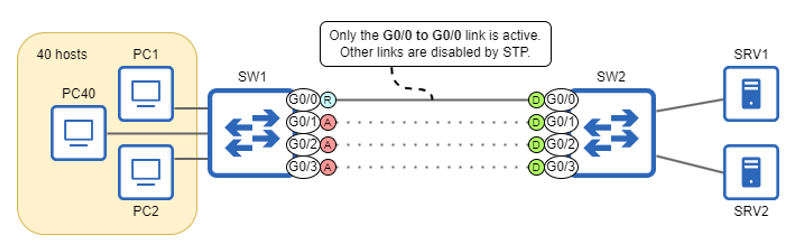
Clients connected to SW1 experience poor network performance when accessing the servers connected to SW2, but adding additional links between the switches doesn’t remedy the issue. This is because STP blocks redundant links, leaving only a single active link.
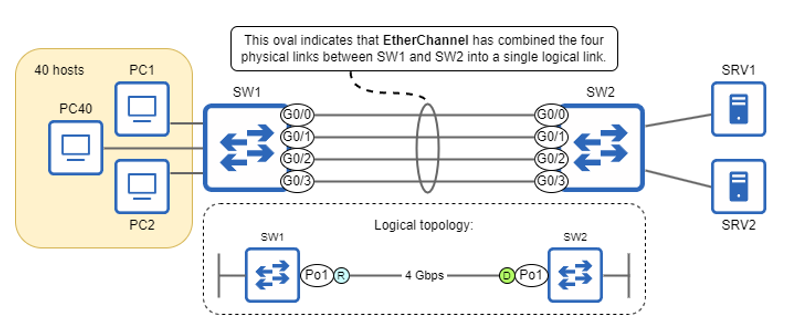
EtherChannel combines the four 1-Gbps links between SW1 and SW2 into a logical 4-Gbps link. Frame-switching and STP logic treat the four links as one; SW1’s logical Po1 (Port-channel1) interface is an STP root port connected to SW2’s logical Po1 interface, which is an STP designated port.
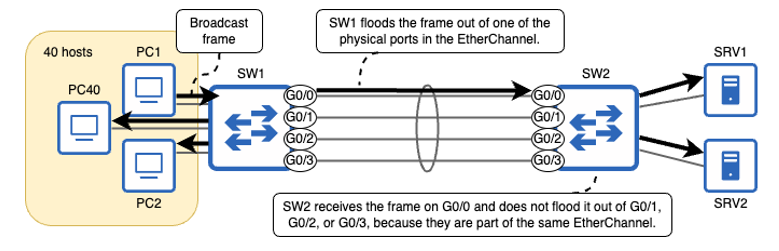
SW1 floods a broadcast frame over the EtherChannel, sending the frame out of one of the EtherChannel’s member ports. SW2 receives the frame on G0/0 and floods it to SRV1 and SRV2, but does not flood the frame back to SW1 because G0/1, G0/2, and G0/3 are part of the same EtherChannel as G0/0.
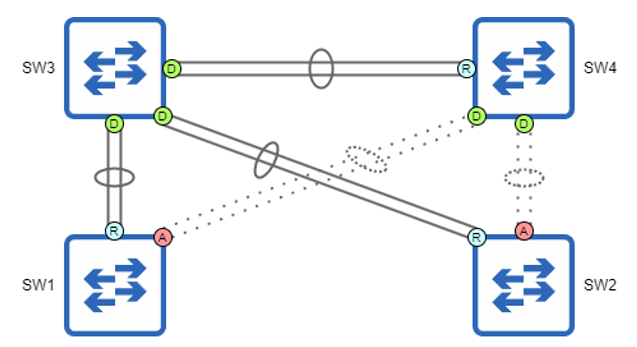
Four switches connected by EtherChannels, some blocked by STP. Without EtherChannel, only three of the ten physical links would be active. With EtherChannel, six of the ten physical links (three two-link EtherChannels) are active.
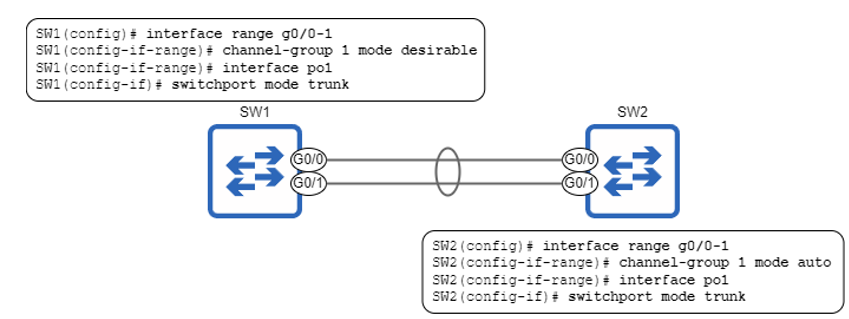
An EtherChannel is formed between SW1 and SW2 using PAgP. SW1’s G0/0 and G0/1 ports are configured in PAgP desirable mode, and SW2’s G0/0 and G0/1 ports are configured in PAgP auto mode. switchport mode trunk is applied to each switch’s port channel interface to make the EtherChannel a trunk.
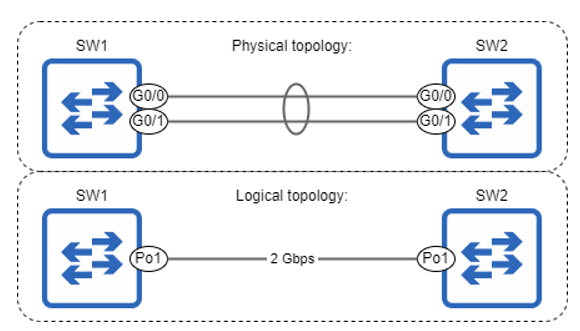
The physical and logical topologies of the SW1–SW2 connection. Physically, SW1 and SW2 are connected by two 1-Gbps links. Logically, they are connected by a single 2-Gbps link via their Po1 interfaces.
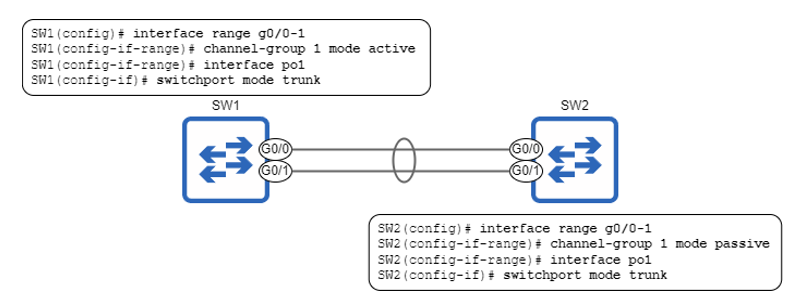
An EtherChannel is formed between SW1 and SW2 using LACP. SW1’s G0/0 and G0/1 ports are configured in PAgP active mode, and SW2’s G0/0 and G0/1 ports are configured in PAgP passive mode. switchport mode trunk is applied to each switch’s port channel interface to make the EtherChannel a trunk.
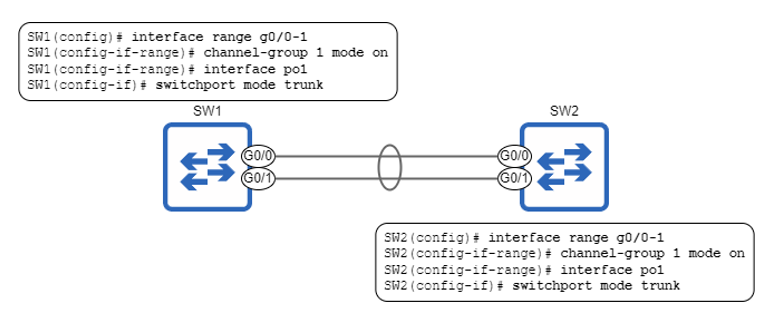
A static EtherChannel is formed between SW1 and SW2. Both switches’ ports are configured in on mode. switchport mode trunk is applied to each switch’s port channel interface to make the EtherChannel a trunk.
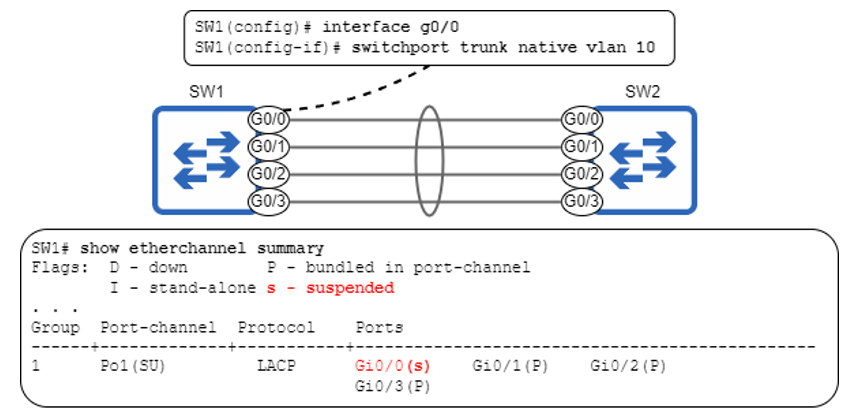
Changing the native VLAN of G0/0 causes it to be placed in a suspended state; it is disabled until its settings match the other ports in the EtherChannel.
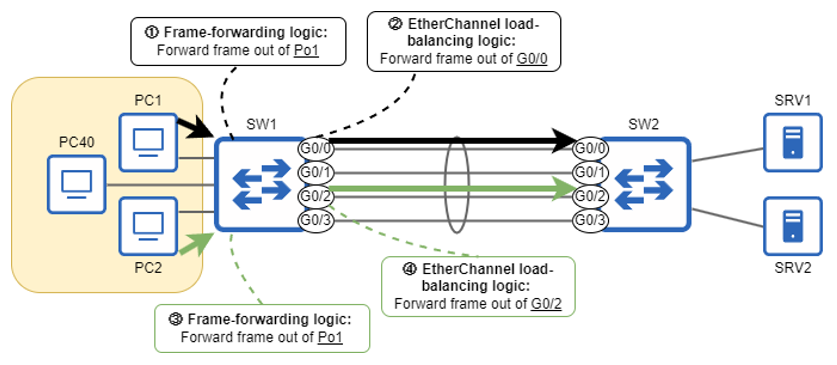
SW1’s frame-forwarding logic determines that both frames will be forwarded out of Po1. However, the EtherChannel load-balancing logic determines that PC1’s frame will be forwarded out of G0/0, and PC2’s frame will be forwarded out of G0/2.
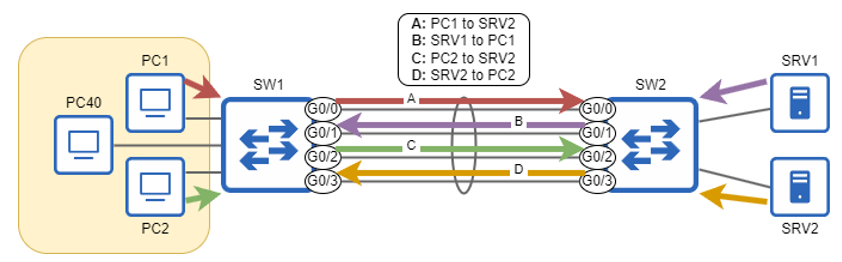
Messages forwarded over an EtherChannel are load-balanced based on flow. In this example, messages from PC1 to SRV1 use the G0/0–G0/0 link, messages from SRV1 to PC1 use the G0/1–G0/1 link, messages from PC2 to SRV2 use the G0/2–G0/2 link, and messages from SRV2 to PC2 use the G0/3–G0/3 link.
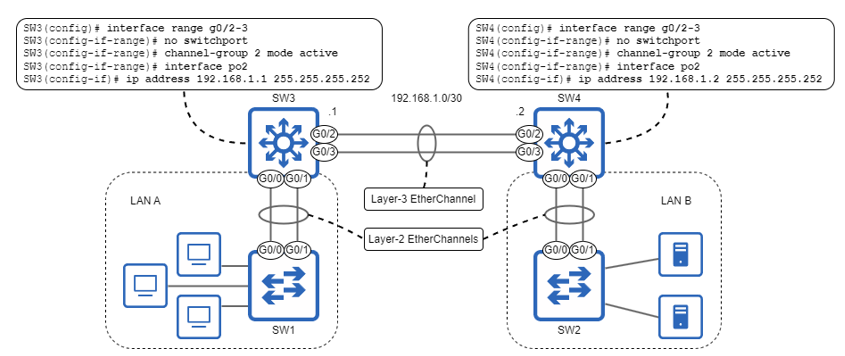
Two LANs connected via multilayer switches using layer-3 EtherChannel. Additionally, the layer-2 switch in each LAN uses layer-2 EtherChannel to connect to the LAN’s multilayer switch. The layer-3 EtherChannel configuration is depicted.
Summary
- EtherChannel combines multiple physical links into a single logical link. This allows multiple links between two switches to all remain in the STP forwarding state without causing layer-2 loops.
- BUM frames received on a port that is a member of an EtherChannel will not be flooded out of other ports in the same EtherChannel.
- EtherChannel does not entirely remove the need for STP. In the context of a larger LAN, some EtherChannels may need to be disabled by STP.
- There are two main ways to configure EtherChannels: dynamic and static.
- Dynamic EtherChannels use one of two protocols — PAgP or LACP — to negotiate an EtherChannel between two neighboring switches.
- Port Aggregation Protocol (PAgP) is a Cisco-proprietary EtherChannel negotiation protocol that uses two modes:
desirableandauto. - Link Aggregation Control Protocol (LACP) is a standard EtherChannel negotiation protocol standardized by IEEE 802.3ad. It uses two modes:
activeandpassive. desirablemode in PAgP actively tries to form an EtherChannel.automode does not actively try to form an EtherChannel, but will form an EtherChannel with a neighbor indesirablemode.- You can configure PAgP on a port with the channel–group group-number mode
{desirable | auto}command in interface config mode. The group-number identifies which EtherChannel the port is a member of, and is locally significant. - After assigning a port to an EtherChannel, a logical port channel interface is automatically created. You should configure the relevant settings on the port channel interface (ie. access or trunk mode).
- Use the
show etherchannel summarycommand to check the status of EtherChannels on the switch. - Commands configured on the port channel interface are inherited by the member ports, and vice versa. However, it is recommended to configure port settings on the port channel interface to ensure consistency.
- Use the
show pagp neighborcommand to view information about the switch’s neighbors using PAgP. - Whereas PAgP supports EtherChannels of up to 8 links, LACP supports up to 16 links. However, only up to 8 links can be used at once; the others will act as standby links, ready to take over if an active link fails.
activemode in LACP is equivalent to PAgP’sdesirablemode, andpassivemode is equivalent to PAgP’sautomode. Otherwise, EtherChannel configuration and verification is identical to PAgP.- You can configure LACP on a port with the channel–group group-number mode
{active | passive}command in interface config mode.’ - Use the
show lacp neighborcommand to view information about the switch’s neighbors using LACP. - Static EtherChannels do not use a protocol to negotiate EtherChannel formation. Ports are configured to statically form an EtherChannel without negotiating with the neighboring switch.
- Use the channel-group group-number mode on command to configure a port as a member of a static EtherChannel.
- An EtherChannel will not form between switch ports using a different negotiation protocol (PAgP or LACP), or between switch ports using a negotiation protocol and switch ports configured with
mode on. - The settings of an EtherChannel’s member ports must match. For example, speed, duplex, operational mode (access or trunk), allow VLANs, native VLAN, and access VLAN settings must match.
- If a switch’s frame-switching logic determines that a frame should be forwarded or flooded out of an EtherChannel, an additional check determines which physical port the frame should be sent out of.
- Frames forwarded over an EtherChannel are load-balanced by flow. A flow is a communication between two nodes.
- The parameters a switch uses to identify flows can be configured with the port-channel load-balance parameters command in global config mode. Example parameters are src-dst-mac and src-dst-ip.
- Use the show etherchannel load-balance command to check which parameters the switch is using to identify flows for EtherChannel load-balancing.
- EtherChannels are like highways; adding more links increases the EtherChannel’s total capacity (bandwidth), but doesn’t increase the maximum speed of any communication over the EtherChannel.
- An EtherChannel consisting of switch ports (that switch frames) is a layer-2 EtherChannel. An EtherChannel consisting of routed ports (the route packets) is a layer-3 EtherChannel.
- To configure a layer-3 EtherChannel, use the
no switchportcommand on the member ports before using thechannel-groupcommand. Then, configure an IP address on the port channel interface (not the individual member ports).
FAQ
What problem does EtherChannel solve in switched networks using STP?
STP blocks redundant parallel links to prevent Layer 2 loops, so only one link forwards while others sit idle. EtherChannel bundles multiple physical links into one logical interface (a port-channel). STP and switching logic treat the bundle as a single port, allowing all member links to forward simultaneously without creating loops. The result is higher aggregate bandwidth, better resilience, and simpler management.How does EtherChannel interact with STP?
- STP sees the entire bundle as one logical port (for example, Po1), not the individual member interfaces.- In larger topologies STP can still block a port-channel to prevent loops; it just blocks or forwards the whole bundle together.
- BUM frames (broadcast, unknown unicast, multicast) received on one member are not flooded back out other members of the same EtherChannel, preventing loops inside the bundle.
- STP cost reflects the combined bandwidth of the member links and can differ from a single link’s default cost.
- Commands like
show spanning-tree display the port-channel interfaces rather than the member ports.What’s the difference between EtherChannel bandwidth and speed?
- Bandwidth is the total capacity of the bundled links (for example, four 1 Gbps links provide 4 Gbps aggregate bandwidth).- Speed is the maximum rate of a single flow on one physical link; a single conversation does not exceed the speed of one member link (for example, 1 Gbps).
- Analogy: adding lanes to a highway increases total throughput, but an individual car’s speed limit doesn’t change.
How does EtherChannel load-balance traffic across member links?
Switches hash specific fields to keep a flow on a single physical link for ordering. You can choose which fields to use withport-channel load-balance <parameters> (options include src-mac, dst-mac, src-dst-mac, src-ip, dst-ip, src-dst-ip). Defaults vary by platform/IOS. Verify with show etherchannel load-balance. If balancing is uneven (for example, everything to the default gateway), adjust the parameter to distribute flows more evenly.What are the dynamic EtherChannel options (PAgP vs LACP) and valid mode combinations?
- Protocols:- PAgP (Cisco proprietary): modes
desirable, auto- LACP (IEEE 802.3ad): modes
active, passive- Valid pairings:
- PAgP:
desirable+desirable or desirable+auto- LACP:
active+active or active+passive- Invalid mixes: You cannot mix protocols or modes across ends (for example,
active with desirable will not form an EtherChannel). Use show pagp neighbor or show lacp neighbor to verify negotiations.When should I use a static (on) EtherChannel, and what are the risks?
Static mode (on) forms a bundle without any negotiation; both ends must be set to on. It can be required with some devices (for example, certain wireless LAN controllers). However, there’s no compatibility check, so misconfigurations can leave links operating independently or cause outages. Static mode does not interoperate with PAgP/LACP.What port settings must match for a healthy EtherChannel?
Ensure all member ports are configured identically, locally and across neighbors. Key items include:- Speed and duplex
- Operational mode (access vs trunk)
- Trunk parameters (allowed VLANs and native VLAN)
- Access VLAN (if access mode)
Mismatches can place a port in a suspended state. Best practice: apply settings on the port-channel interface so IOS propagates them to all members and to avoid flapping during changes.
How do I verify EtherChannel state and interpret common flags?
Useshow etherchannel summary.- Port-channel flags:
S = Layer 2, R = Layer 3, U = in use (up), D = down- Member port flags:
P = bundled in port-channel, I = stand-alone, s = suspendedOther useful commands:
show pagp neighbor, show lacp neighbor, show interfaces trunk (only shows the port-channel for trunks), and show spanning-tree (lists port-channel interfaces).Do channel-group numbers need to match on both sides, and how does configuration inheritance work?
- Channel-group numbers are locally significant; they do not need to match across devices.- Settings applied on the port-channel interface are inherited by all member ports, and vice versa. After a bundle is up, prefer making changes on the port-channel for consistency and to reduce the chance of brief outages (flaps).
How do I configure and verify a Layer 3 EtherChannel?
- Steps on a multilayer switch:1) On member interfaces:
no switchport2) Add them to a channel-group with PAgP, LACP, or
on3) Configure the IP address on the port-channel interface (not on members)
- Verification:
show etherchannel summary shows R for routed bundles (for example, Po2(RU)). Layer 3 EtherChannel simplifies IP/routing config and load-balances packets across multiple links.
 Acing the CCNA Exam, Volume 1 ebook for free
