14 Spanning Tree Protocol
Spanning Tree Protocol (STP) safeguards Ethernet LANs from layer 2 loops that arise in redundant topologies where BUM (broadcast, unknown unicast, multicast) traffic can circulate indefinitely. Because Ethernet lacks a TTL-like limiter, loops can quickly trigger broadcast storms and MAC address flapping, overwhelming switches and hosts. STP solves this by building a loop-free logical topology—a spanning tree—placing some ports into a blocking state so that only one active path exists between any two nodes, while keeping redundant links in reserve to restore connectivity if a primary link fails.
STP forms this topology through a three-step algorithm: root bridge election, root port selection, and designated port selection. Switches elect a root bridge using the lowest Bridge ID (BID), which combines a configurable priority and the Extended System ID (the VLAN ID in Cisco PVST+) with the switch’s MAC address; administrators can influence the outcome by tuning bridge priority to choose primary/secondary roots per VLAN. Each non-root switch then selects one root port (its best path to the root) using, in order, lowest total path cost, lowest neighbor BID, and lowest neighbor port ID. Finally, each link segment selects exactly one designated port (forwarding toward non-root devices) based on the switch with the lowest root cost, then the lowest BID; all other ports on that segment become non-designated (blocking). These decisions are conveyed via BPDUs, which originate at the root and are forwarded only by designated ports.
Ports have roles (root, designated, non-designated) and transition through states—blocking, listening, learning, forwarding—governed by timers: hello (2s), forward delay (15s each for listening and learning), and max age (20s). After a change, convergence can take up to 50 seconds (max age + two forward delays). To accelerate edge access, PortFast allows host-facing ports to bypass listening and learning and move immediately to forwarding; because that shortcut could permit loops if a switch is attached, BPDU Guard should be enabled alongside PortFast to err-disable any port that receives a BPDU. Best practice: enable PortFast only on end-host ports and pair it with BPDU Guard to prevent accidental layer 2 loops.
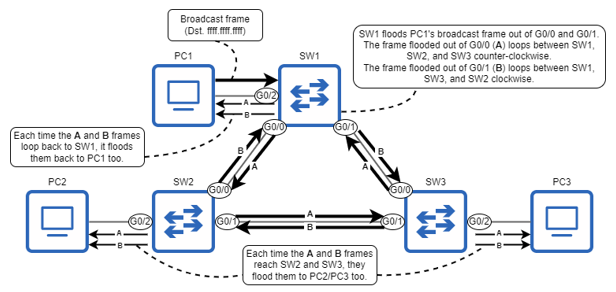
PC1 sends a broadcast frame, and SW1 floods it. When SW2 and SW3 receive their copies of the frame, they flood it too, resulting in two loops: counter-clockwise (A) and clockwise (B). These frames will loop indefinitely between SW1, SW2, and SW3. The PCs also receive the same frame repeatedly.
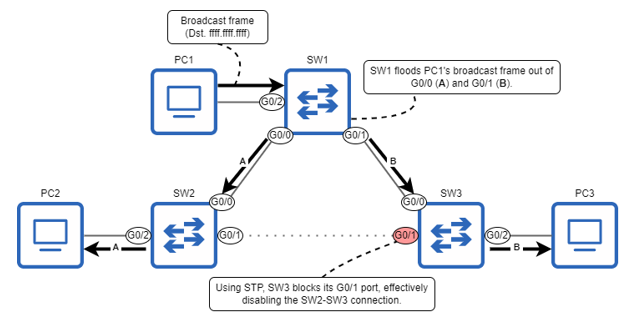
PC1 sends a broadcast frame, and SW1 floods it. Using STP, SW3 blocks its G0/1 port, effectively disabling the SW2-SW3 connection; this prevents a layer 2 loop from occurring.
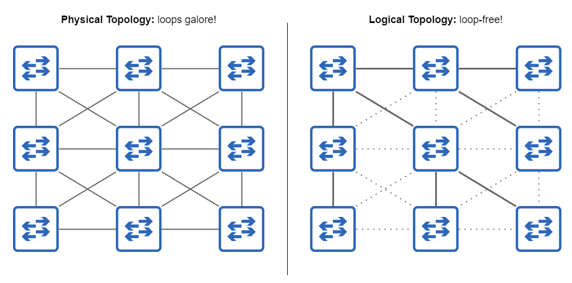
STP creates a loop-free topology in a meshed LAN. In the physical topology (left), there are countless ways that frames could loop around the network. However, STP creates a logical topology (right) that is loop-free.
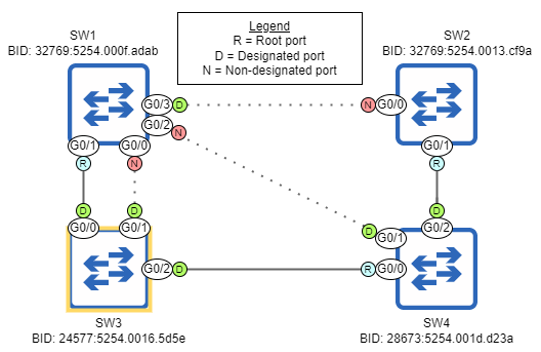
A LAN after STP has created a loop-free topology. SW3 is the root bridge, and each other switch has one root port leading to SW3. The remaining ports are either designated or non-designated ports; non-designated ports are blocked, disabling their connections.
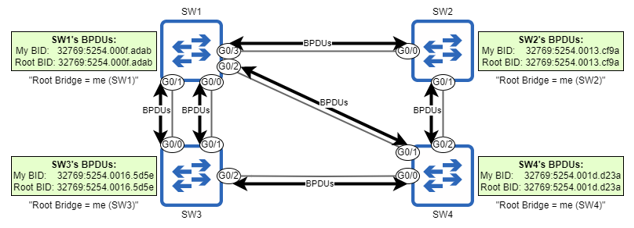
SW1, SW2, SW3, and SW4 boot up simultaneously, each switch declaring itself the root bridge. The switches send BPDUs out of their ports, containing information such as the switch’s own BID and the BID of the switch it believes to be the root bridge (itself, in this case).
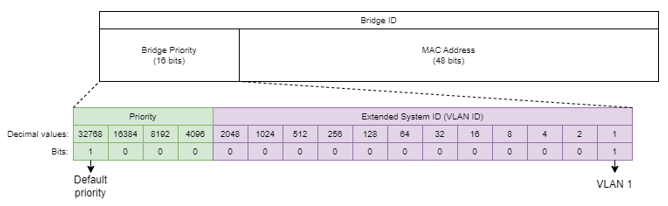
The contents of the STP BID. It is divided into two parts: a 16-bit bridge priority and a 48-bit MAC address. The bridge priority consists of two further parts: a configurable priority value (default 32768) and the Extended System ID, which is equal to the VLAN ID in Cisco’s implementation of STP.
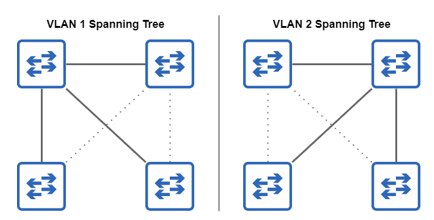
Switches in a LAN create separate spanning trees for VLANs 1 and 2 by disabling different links in each VLAN (as indicated by the dotted lines); traffic in VLAN 1 will use different links than traffic in VLAN 2, avoiding network congestion.
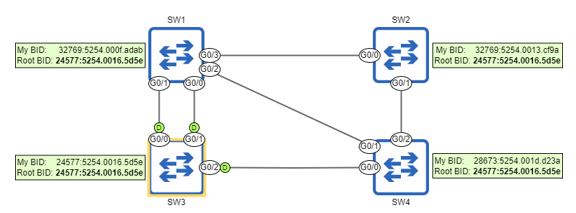
After configuring SW3’s priority to 24576 (+1 for VLAN 1), all four switches agree that SW3 is the root bridge because it has the lowest BID. All ports on the root bridge are designated ports (indicated by “D”). If SW3 malfunctions and a new election is held, SW4 will become the new root bridge because it has the second lowest BID.
Non-root switches each select one root port. SW4 selects G0/0 because it has the lowest root cost of its port. SW2 G0/0 and G0/1 have the same root cost, so SW2 selects G0/1 because it has the lowest neighbor BID. SW1 G0/0 and G0/1 have the same root cost and neighbor BID, so SW1 selects G0/1 because it has the lowest neighbor port ID.
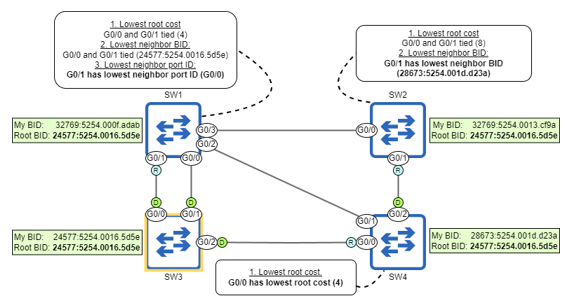
Switches advertise their root cost to each other in BPDUs. SW3 (the root bridge) advertises a root cost of 0, SW1 and SW4 advertise a root cost of 4, and SW2 advertises a root cost of 8. SW4 selects G0/0 as its root port because it has the lowest root cost of its three ports. SW1 and SW2 are unable to select a root port based on root cost alone; a tiebreaker is needed.
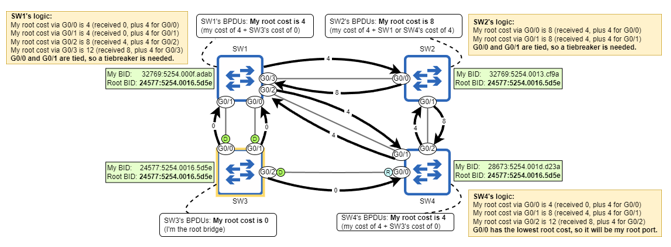
SW1 compares the neighbor BID of its G0/0 and G0/1 ports, and SW2 compares the neighbor BID of its G0/0 and G0/1 ports. SW2 G0/1’s neighbor (SW4) has a lower BID than SW2 G0/0’s neighbor (SW1), so SW2 selects G0/1 as its root port. SW1’s G0/0 and G0/1 ports are both connected to SW3, so they both have the same neighbor BID; SW1 is unable to select a root port at this point.
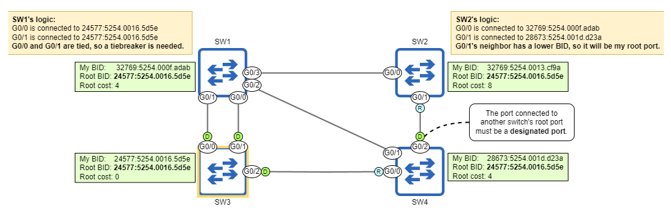
SW1 compares the neighbor port IDs of its G0/0 and G0/1 ports. G0/1 is connected to a lower port ID (SW3 G0/0, port ID 128.1) than G0/0 (SW3 G0/1, port ID 128.2), so G0/1 selects G0/1 as its root port.
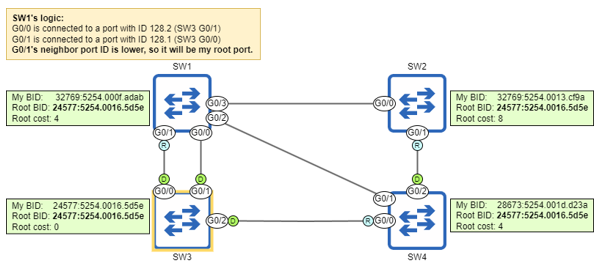
Each segment must have exactly one designated port. All ports on the root bridge are designated, and so are all ports connected to a root port. One designated port is selected on each remaining segment, and the remaining ports are non-designated.
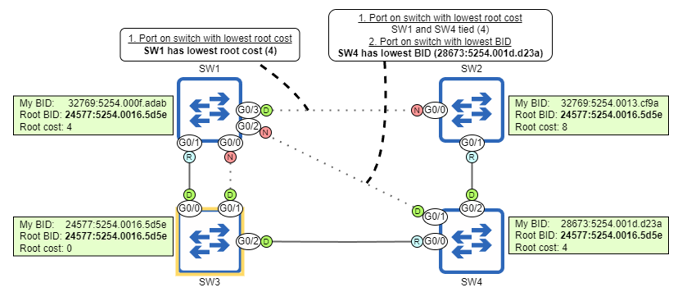
Switches compare their root costs to select designated ports. SW1’s root cost (4) is lower than SW2’s (8), so SW1 G0/3 becomes designated, and SW2 G0/0 becomes non-designated. SW1 and SW4 have the same root cost (4), so a tiebreaker is needed to decide which port becomes designated.
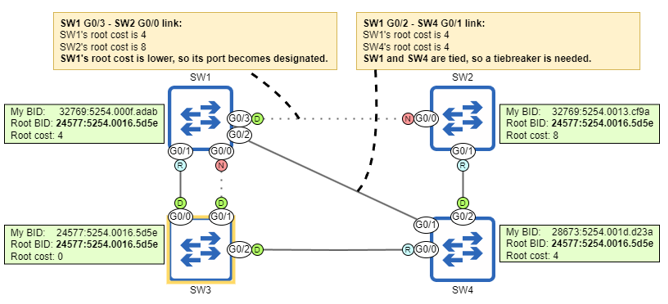
Switches compare their BIDs as a tiebreaker when selecting designated ports. SW4’s BID (28673:5254.001d.d23a) is lower than SW1’s BID (32769:5254.000f.adab), so SW4 G0/1 becomes designated and SW1 G0/2 becomes non-designated.
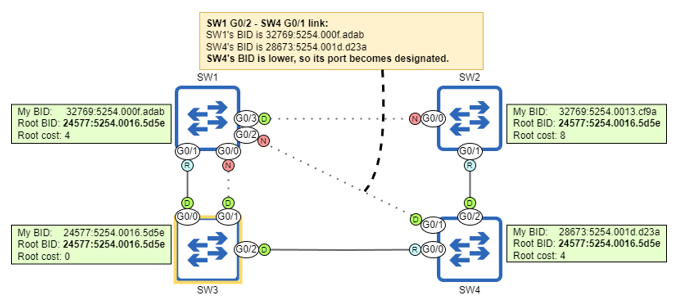
How a switch port transitions through the STP port states. A newly-enabled port begins in the listening state, and then either transitions to the blocking state, or to the learning and then forwarding states. A port in any state can transition immediately to blocking, but for a port to transition to the forwarding state it must transition through the listening and learning states.
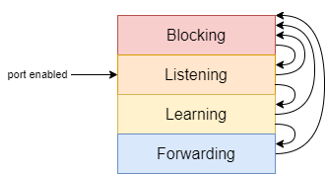
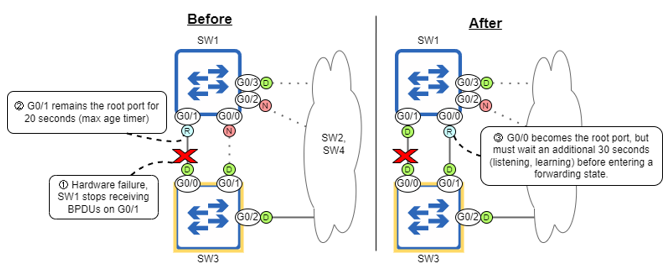
STP’s timers cause SW1 to be unable to forward traffic for 50 seconds. 1) A hardware failure prevents SW1 from receiving BPDUs on G0/1. 2) G0/1 remains the root port for 20 seconds. 3) G0/0 becomes the root port, but must wait an additional 30 seconds before entering a forwarding state. SW1 G0/1 becomes a designated port because it doesn’t detect any connected devices using STP (it doesn’t receive BPDUs from SW3 G0/0).
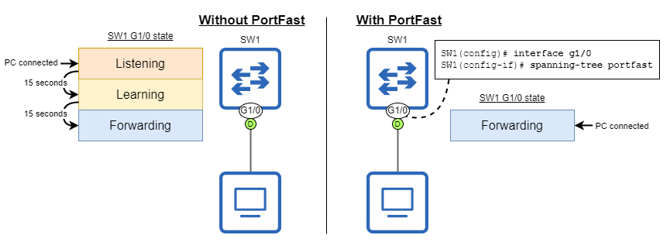
PortFast allows a switch port to immediately move to the forwarding state. Without PortFast, when an end host is connected to a switch port it must wait 30 seconds before it can access the network. With PortFast, the end host can access the network immediately, bypassing the listening and learning states.
Summary
- The Ethernet header does not have a mechanism to drop looping frames, so they will loop indefinitely.
- If enough looping frames accumulate, a broadcast storm can occur, using up so many network resources that the network becomes unusable.
- Redundancy is the practice of having additional network devices and connections beyond the minimum necessary for communication, to eliminate single points of failure.
- Layer 2 loops occur as a result of the flooding of BUM traffic — broadcast, unknown unicast, and multicast frames — in a LAN with redundant connections.
- Spanning Tree Protocol (STP) prevents layer 2 loops in a LAN by blocking redundant connections, leaving only one active path to each destination in the LAN.
- The process STP uses to create a loop-free topology is called the STP algorithm. It consists of three main steps: 1) Root bridge election, 2) Root port selection, 3) Designated port selection.
- All of the decisions in the algorithm are made by switches sharing STP Bridge Protocol Data Unit (BPDU) messages, which are sent every two seconds.
- The root bridge is the central point of reference for the STP topology. All switches in the LAN will ensure they have exactly one active path to the root bridge.
- The switch with the lowest bridge ID (BID) becomes the root bridge. The BID is a 64-bit number that uniquely identifies the switch. It consists of a 16-bit bridge priority and a 48-bit MAC address.
- The bridge priority consists of a configurable priority value (default 32768) and the Extended System ID, which is the VLAN ID.
- Cisco’s implementation of STP is called Per-VLAN Spanning Tree Plus (PVST+), which creates a separate spanning tree for each VLAN.
- When a switch boots up, it announces itself as the root bridge and sends BPDUs out of all ports. If it receives BPDUs from a switch with a lower BID, it will accept that switch as the root bridge.
- Use the
show spanning-treecommand to view information about the root bridge’s BID, the local switch’s BID, and the local switch’s ports. - Use the
spanning-tree vlanvlan-idprioritypriority-valuecommand to configure the switch’s priority for the specified VLAN (in increments of 4096). - You can also use
spanning-tree vlanvlan-idroot{primary | secondary}to configure the priority. Thesecondarykeyword sets the priority to 28672, and theprimarykeyword sets the priority to 24576, or 4096 less than the current root bridge (but it won’t set the priority to 0). - After electing the root bridge, all non-root switches will select exactly one root port, which provides the switch’s single active path to the root bridge.
- The root port is selected using the following parameters, in order of priority: 1) lowest root cost, 2) lowest neighbor BID, 3) lowest neighbor port ID.
- A port’s root cost indicates how efficient the path to the root bridge is via that port.
- When the root bridge sends BPDUs, they have a root cost of 0. When a non-root switch forwards BPDUs, it adds the cost of the port it received the BPDU on.
- The STP port cost values are 10 Mbps = 100, 100 Mbps = 19, 1 Gbps = 4, 10 Gbps = 2.
- If a switch has the same root cost via two or more ports, the port connected to the neighbor with the lowest BID becomes the root port. If two or more of those ports are connected to the same neighbor, the port connected to the neighbor’s port with the lowest port ID becomes the root port.
- The port ID is a unique identifier for each port of the switch. It consists of a priority value (128 by default), and a sequential number.
- Each segment (link) must have exactly one designated port. All ports on the root bridge are designated, and the port connected to a root port must be designated.
- The remaining links then select one designated port, and the rest of the ports will be non-designated (blocking).
- Designated ports are selected with the following parameters, in order of priority: 1) the port on the switch with the lowest root cost, 2) the port on the switch with the lowest BID.
- The four STP port states are blocking, listening, learning, and forwarding. There is also the disabled state, which refers to a non-operational port.
- A newly-enabled port will enter the listening state, where the switch decides its role.
- If the port becomes non-designated, it will immediately move to the blocking state, in which it is effectively disabled (this is how STP prevents loops).
- If the port becomes root or designated, it will move to the learning state, in which it starts to learn MAC addresses to build the MAC address table. Then, it will move to the forwarding state, in which it can finally forward frames.
- The hello timer determines how often BPDUs are sent. It is 2 seconds by default.
- The forward delay timer determines the length of the listening and learning states. It is 15 seconds (per state) by default.
- The max age timer determines how long a switch will wait to change the STP topology after ceasing to receive BPDUs on a port.
- The timers on the root bridge dictate the timers that will be used on all switches in the LAN.
- It can take up to 50 seconds (max age timer + listening state + learning state) for a port to start forwarding after a change in the network.
- It can take 30 seconds for a newly-enabled port to start forwarding frames.
- PortFast is an optional feature that can be configured on ports connected to end hosts to allow them to move directly to the forwarding state (no listening/learning).
- Use the
spanning-tree portfastcommand in interface config mode to enable PortFast on a specific port, or thespanning-tree portfast defaultcommand in global config mode to enable PortFast on all access ports. - BPDU Guard should be configured on PortFast-enabled ports to disable them in case another switch is connected to the port (to avoid layer 2 loops).
- Use the
spanning-tree bpduguard enablecommand in interface config mode to enable BPDU Guard on a specific port, or thespanning-tree portfast bpduguard defaultcommand in global config mode to enable it on all PortFast-enabled ports. - If a BPDU Guard-enabled port receives a BPDU, the port will enter an error-disabled state, rendering it non-operational. To re-enable the port, disconnect the switch that caused the error and use
shutdownandno shutdownon the port.
FAQ
Why are Layer 2 loops harmful in Ethernet, and how does STP help?
Layer 2 loops cause BUM traffic to circulate indefinitely, creating broadcast storms and MAC address flapping. This can overwhelm switches and end hosts. STP prevents loops by logically blocking redundant links so only one active path exists between any two nodes, eliminating the loop while keeping backups available.What are the main steps of the STP algorithm?
- Root bridge election: the switch with the lowest Bridge ID (BID) becomes root.- Root port selection: every non-root switch chooses one port with the best path to the root (lowest root cost, then lowest neighbor BID, then lowest neighbor port ID).
- Designated port selection: one forwarding port per segment (based on lowest root cost on the switch, then lowest BID); the other side blocks.
How is the root bridge elected, and what is inside the Bridge ID (BID)?
Switches exchange BPDUs and elect the root bridge using the lowest BID. The BID is 64 bits: a 16-bit bridge priority (configurable value + Extended System ID) and a 48-bit switch MAC address. The Extended System ID equals the VLAN ID in PVST+. Lowest priority wins; if tied, the lowest MAC wins.How can I control which switch becomes the root bridge on Cisco devices?
- Use: spanning-tree vlan- Shortcuts: spanning-tree vlan
- Exam-safe method: set the intended root to priority 0; only a switch with a lower MAC can beat it.
What is PVST+, and why is the VLAN ID included in the BID?
PVST+ runs a separate STP instance per VLAN, allowing different links to block per VLAN and improving load balancing. The VLAN ID is added to the bridge priority (Extended System ID) so each per-VLAN STP instance has a unique BID on the same switch.How does a switch choose its root port?
- Uses BPDUs to compare paths toward the root bridge.- Criteria (in order): lowest root cost (sum of port costs along the path), lowest neighbor BID, lowest neighbor port ID (the neighbor’s, not the local port).
- Typical port costs: 10 Mbps=100, 100 Mbps=19, 1 Gbps=4, 10 Gbps=2. The root advertises cost 0; others add their incoming port cost when forwarding BPDUs.
How are designated and non-designated ports chosen on each segment?
Exactly one designated port per segment forwards; the other side becomes non-designated (blocking). Selection uses: 1) the port on the switch with the lower root cost (via its root port) becomes designated, 2) if tied, the port on the switch with the lower BID becomes designated. All ports on the root bridge are designated, and any port facing a neighbor’s root port is designated.What are STP port roles and states, and how do ports transition?
- Roles: root (one per non-root switch), designated (forwarding away from root), non-designated/alternate (blocking).- States: blocking, listening, learning, forwarding (disabled is non-operational). A new port goes listening → learning → forwarding (15 s each by default). Any port can immediately transition to blocking if needed. The network is converged when all ports are forwarding or blocking.
What are the default STP timers and their impact on convergence?
- Hello: 2 s (BPDU send interval).- Forward delay: 15 s per listening and learning state (total 30 s to forward).
- Max age: 20 s (time without BPDUs before recalculation).
- Worst case after a silent failure: up to 50 s (20 s max age + 30 s transition). If the link goes physically down, the switch reacts immediately, but still waits 30 s to forward.
What are PortFast and BPDU Guard, when should I use them, and how do I configure them?
- PortFast lets edge/access ports move immediately to forwarding (no 30 s wait). Enable only on ports to end hosts: interface gX/Y; spanning-tree portfast or globally with spanning-tree portfast default (access ports only).- BPDU Guard protects PortFast ports by err-disabling the port if a BPDU is received (prevents accidental loops). Enable with interface gX/Y; spanning-tree bpduguard enable or globally with spanning-tree portfast bpduguard default. If triggered, fix the issue and shut/no shut the port to recover.

 Acing the CCNA Exam, Volume 1 ebook for free
