13 DTP and VTP
This chapter explains two Cisco-proprietary protocols that streamline VLAN deployment and interswitch connectivity: Dynamic Trunking Protocol (DTP) and VLAN Trunking Protocol (VTP). Although no longer called out by name in the CCNA blueprint, both are foundational to configuring and verifying VLANs across multiple switches and to building reliable trunks. The material clarifies where each protocol fits, how they interact with standard switch features, and why understanding their defaults, behaviors, and risks is essential for both the exam and real networks.
DTP negotiates a switchport’s operational role (access or trunk) based on its administrative setting and its neighbor’s configuration. Beyond hard-set access or trunk modes, dynamic auto (default) listens but does not actively try to trunk, while dynamic desirable seeks to form trunks; two auto ports remain access, but desirable paired with trunk/auto/desirable becomes a trunk. Historic encapsulation negotiation (802.1Q vs ISL) is largely moot on modern gear that uses 802.1Q. Because DTP frames can be abused to force unauthorized trunking, best practice is to disable negotiation—either by setting access mode or by using switchport nonegotiate—even on ports later used as trunks. DTP operates only between Cisco switches; links to routers or non-Cisco devices require manual trunk configuration.
VTP distributes VLAN database changes among switches that share a VTP domain, using a configuration revision number to ensure everyone converges to the latest state; messages travel only over trunk links. Switches can run in server, client, transparent, or off mode, and VTP has three versions. Version 3 is preferred: it introduces a primary server that alone can change VLANs (preventing accidental overwrites), supports extended-range VLANs, and adds a true off mode. VTP’s poor reputation stems from older deployments where a newly connected switch with a higher revision could wipe out the enterprise VLAN database; mitigations include resetting the revision before joining and, better yet, using version 3’s primary server model. Used carefully—especially in large environments—VTP reduces manual effort and configuration errors, while transparent or off mode suits networks that choose not to synchronize VLANs.
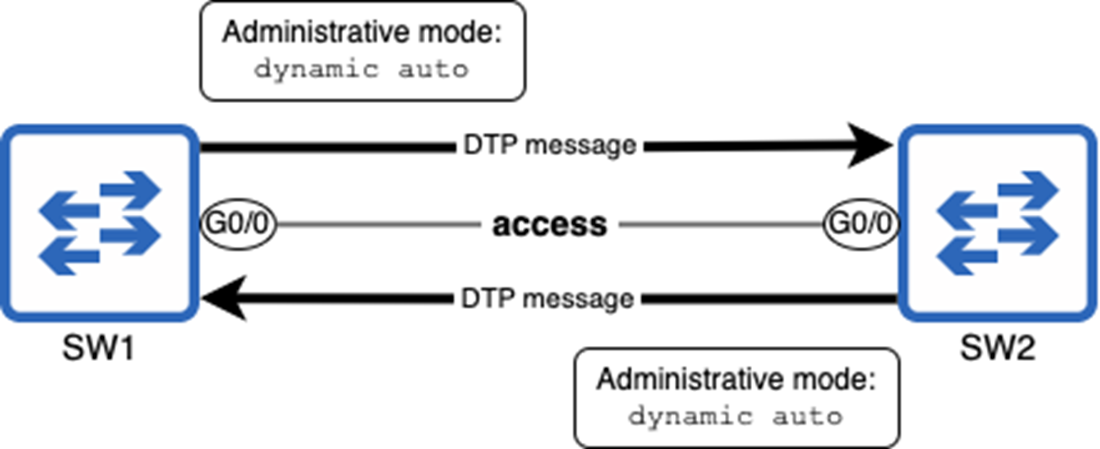
Two connected switches negotiate their ports’ operational mode by sending DTP messages. Both ports use the default administrative mode of dynamic auto, resulting in an access link; SW1 G0/0 and SW2 G0/0 operate as access ports.
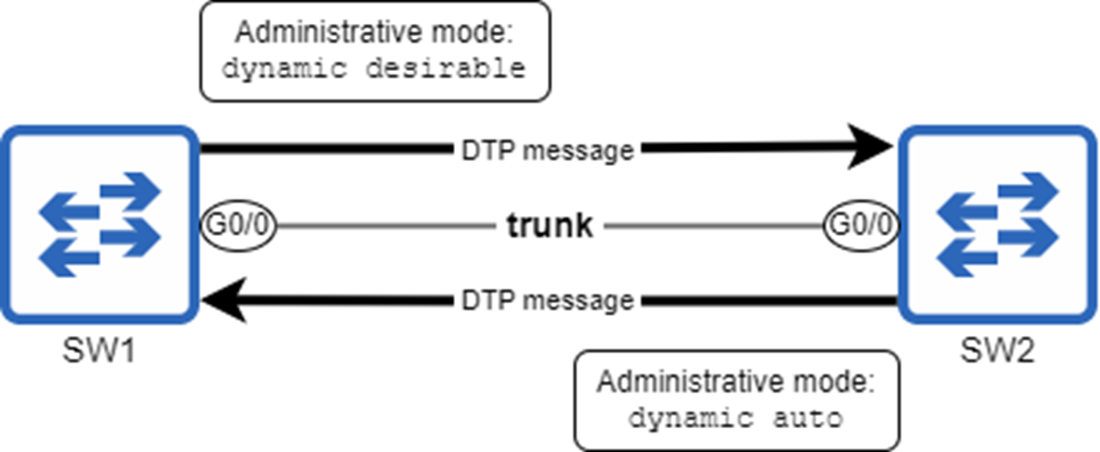
SW1 and SW2 negotiate to form a trunk link. SW1 G0/0’s administrative mode is dynamic desirable and SW2 G0/0’s is dynamic auto. The result is an operational mode of trunk.
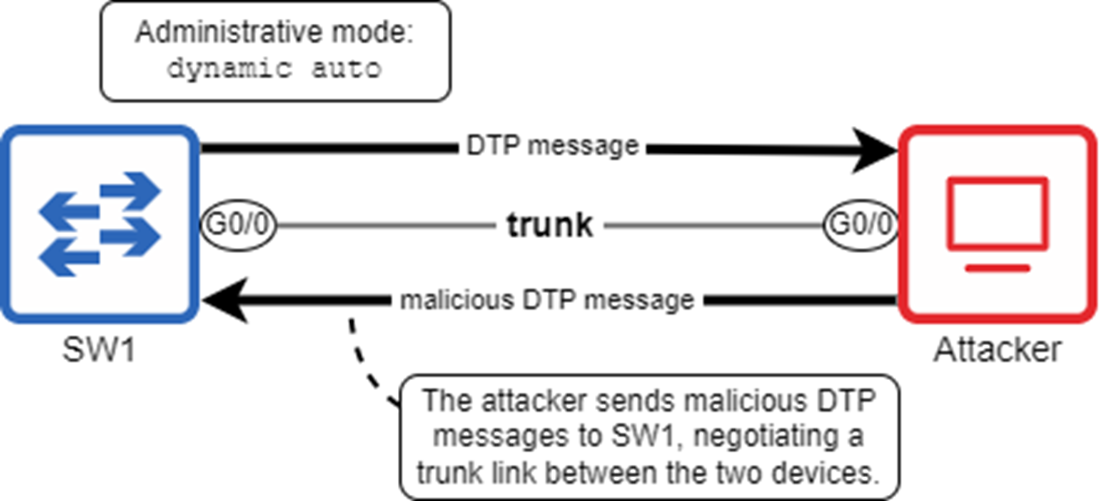
An attacker sends malicious DTP messages to SW1 to form a trunk. This gives the attacker access to all VLANs in the LAN, presenting a security threat.
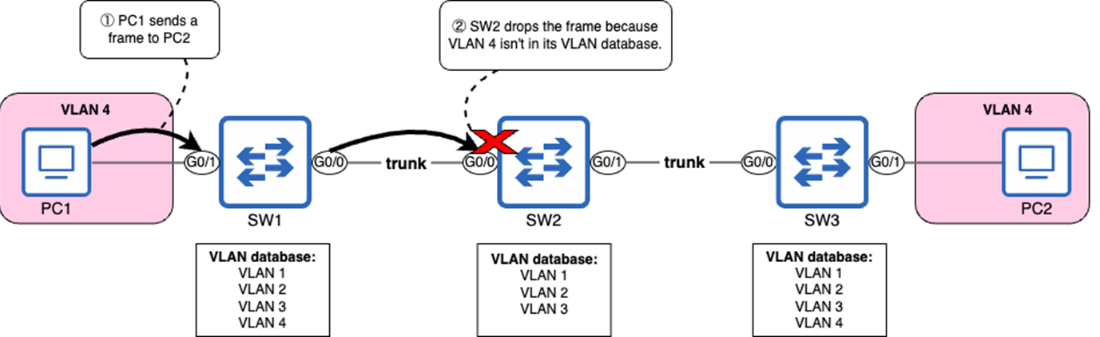
A missing VLAN on SW2 prevents PC1 from communicating with PC2. 1) PC1 sends a frame to PC2. 2) SW2 drops the frame because VLAN 4 isn’t in its VLAN database.
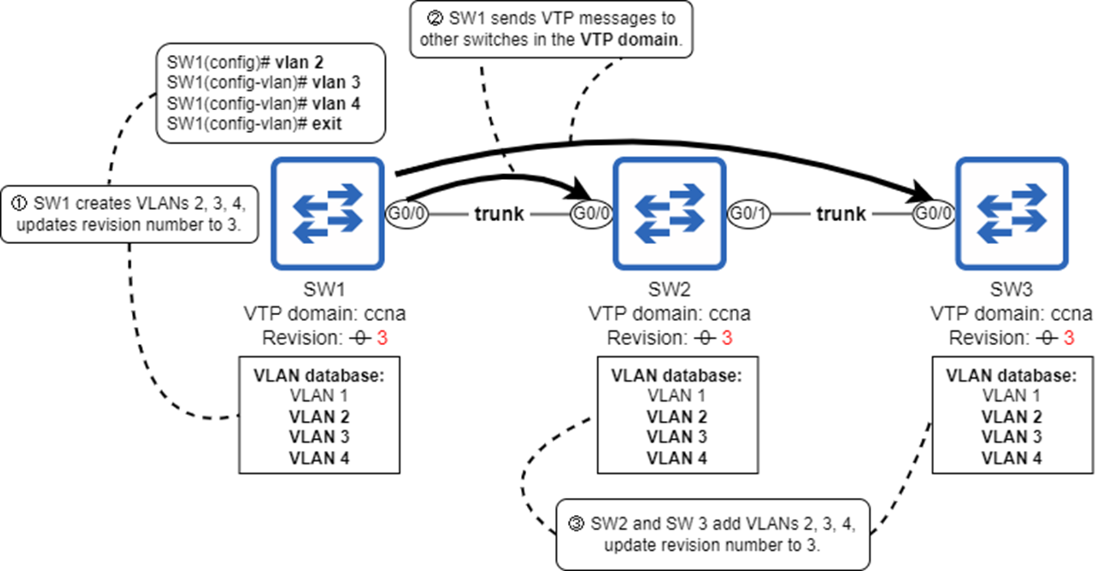
VLANs created on SW1 are propagated to other switches in the VTP domain “Manning”. 1) SW1 creates VLANs 2, 3, and 4, updating its revision number to 3 (incrementing by 1 each time it creates a VLAN). 2) SW1 sends VTP messages to other switches in the VTP domain. 3) SW2 and SW3 add VLANs 2, 3, and 4 to their VLAN databases, updating their revision number to match SW1’s.
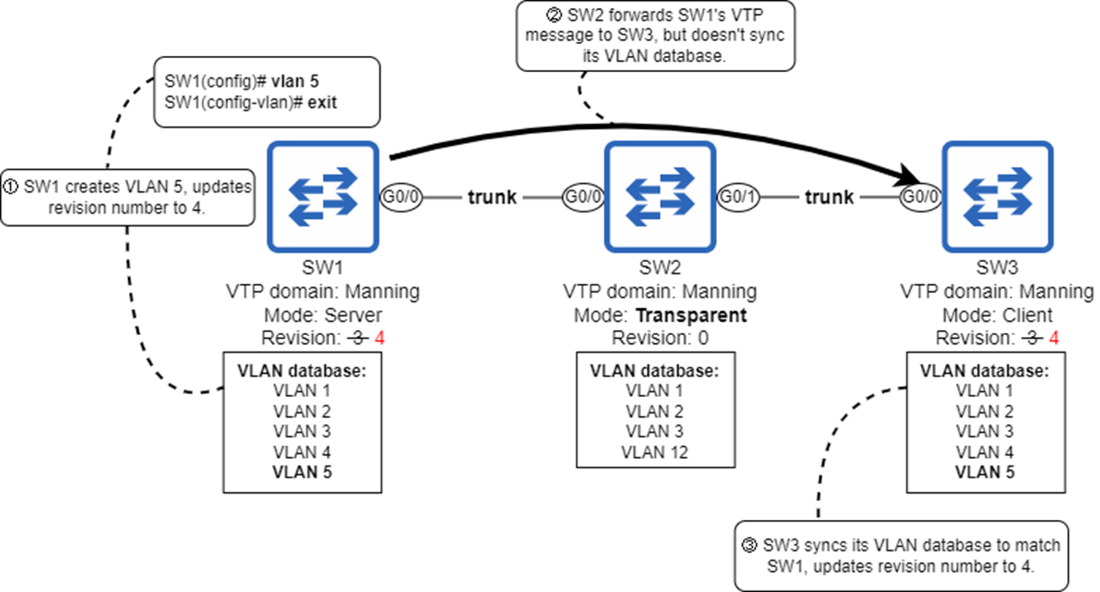
SW2, in transparent mode, forwards VTP messages but does not synchronize its VLAN database. 1) SW1 creates VLAN 5 and updates its revision number. 2) SW2 forwards SW1’s VTP messages to SW3, but doesn’t synchronize its VLAN database. 3) SW3 syncs its VLAN database to match SW1 and updates its revision number.
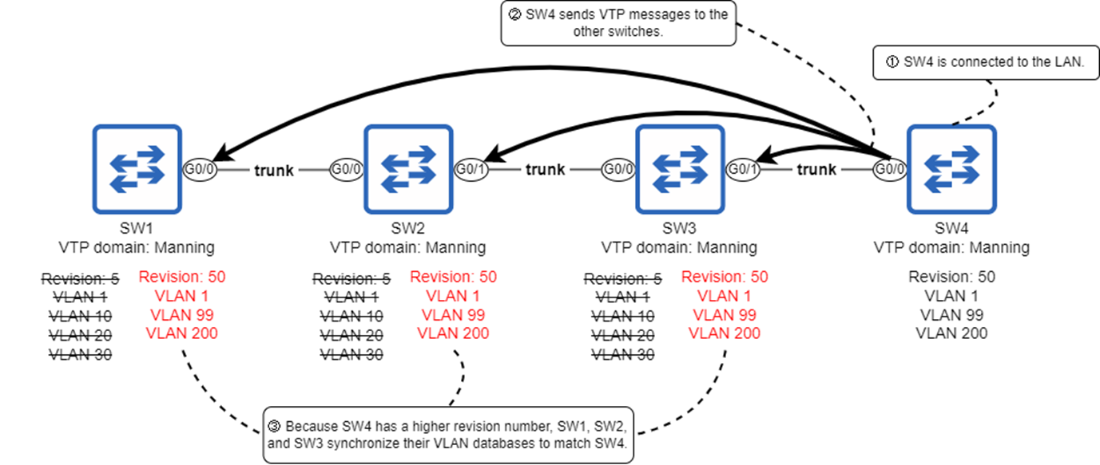
SW4 is connected to the network and overwrites the VLAN databases of SW1, SW2, and SW3. 1) SW4 is connected to the LAN. 2) SW4 sends VTP messages to the other switches. 3) Because SW4 has a higher revision number (50 vs. 5), SW1, SW2, and SW3 synchronize their VLAN databases to match SW4. Hosts in VLANs 10, 20, and 30 will be unable to communicate over the network because their VLANs no longer exist.
Summary
- Dynamic Trunking Protocol (DTP) allows Cisco switches to automatically determine the operational mode of their ports.
- A port’s administrative mode is how it is configured with the switchport mode command, and its operational mode is the mode it operates in (access or trunk).
- Use the show interfaces interface switchport command to view the administrative and operational modes of a port.
- A port configured with switchport mode access will always operate as an access port, and a port configured with switchport mode trunk will always operate as a trunk port.
- switchport mode dynamic auto and switchport mode dynamic desirable configure the port to use DTP to determine its operational mode.
- dynamic auto mode does not actively try to form a trunk with its neighbor but will form a trunk if the neighbor’s mode is trunk or dynamic desirable.
- dynamic desirable mode actively tries to form a trunk with its neighbor, and will form a trunk if the neighbor’s mode is trunk, dynamic auto, or dynamic desirable.
- DTP is considered a security vulnerability and should be disabled. It is considered best practice to manually configure each port’s mode and disable DTP with switchport nonegotiate on each port.
- VLAN Trunking Protocol (VTP) allows Cisco switches to synchronize their VLAN database — the file that stores information about VLANs on the switch (vlan.dat).
- The VTP revision number is used to keep track of the latest version of the VLAN database. Each time a change is made, the revision number is incremented by 1. A switch will synchronize to match a higher revision number, but not a lower (or equal) one.
- The VTP domain is the group of switches in a LAN that share the same VTP domain name; a switch will only synchronize with another switch in the same domain.
- By default, a switch has no domain name; it is said to be in domain NULL. In this state, the switch can create/modify/delete VLANs, but it won’t send VTP messages to other switches.
- You can configure a switch’s VTP domain name with the vtp domain domain-name command.
- Use the show vtp status command to view the current state of VTP on the switch.
- A switch can operate in one of four VTP modes: server, client, transparent, and off. Use the vtp mode mode command to configure the mode (server is the default).
- A switch in VTP server mode can create/modify/delete VLANs. It will advertise changes to its VLAN database, and synchronize its VLAN database upon receiving an advertisement with a higher revision number.
- A switch in VTP client mode cannot create/modify/delete VLANs, but otherwise behaves the same as a server.
- A switch in VTP transparent mode can create/modify/delete VLANs, but operates independently from other switches in the VTP domain. It will forward VTP messages between switches in the VTP domain, but will not send its own VTP messages or synchronize its VLAN database with other switches.
- A switch in VTP off mode can create/modify/delete VLANs, but does not participate in VTP at all.
- There are three versions of VTP: 1, 2, and 3. Versions 1 and 2 are very similar, but version 3 brought many improvements.
- VTP version 3 introduced off mode; before, VTP couldn’t be disabled. The closest thing was to configure all switches in VTP transparent mode.
- In VTP version 3, only one switch in the domain can create, modify, and delete VLANs: the primary server. Switches in the domain will only synchronize with the primary server. Other servers are called secondary servers; they function the same as VTP clients.
- Use the vtp primary command (in privileged EXEC mode) on a VTP server to make it the primary server. There can only be one; if you configure vtp primary on a second server, the first one will revert to being a secondary server.
- VTP version 3 is the only version that supports extended-range VLANs (VLANs 1006 to 4094). Versions 1 and 2 only support normal-range VLANs (VLANs 1 to 1005).
- One risk of VTP is that a newly-connected switch with a higher revision number can overwrite the VLAN database of all switches in the LAN. Version 3 solves this problem because switches will only synchronize with the primary server.
- To reset a switch’s VTP revision number to 0, you can change the domain name to a different one and then back to the original. Alternatively, you can change the mode to transparent or off, and then back to server or client, but this only works in versions 1 and 2.

 Acing the CCNA Exam, Volume 1 ebook for free
