12 VLANs
Virtual LANs segment a single physical LAN into multiple isolated broadcast domains at layer 2, complementing layer 3 segmentation with subnets. This improves security by forcing interdepartment traffic through a routing decision point, reduces unnecessary flooding, and scales better than flat networks. The chapter positions VLANs as a one-to-one partner with subnets in most CCNA scenarios and focuses on two skills: configuring and verifying VLANs across switches, and building reliable interswitch connectivity.
Operationally, you create and (optionally) name VLANs, understand the default state (all ports in VLAN 1) and reserved ranges, then place switch interfaces in the correct mode. Access ports belong to a single VLAN; trunk ports carry multiple VLANs using IEEE 802.1Q tags that encode priority, drop eligibility, and a VLAN ID. You manually configure trunks (and, on older platforms, specify dot1q vs. ISL), verify with show interfaces trunk, and restrict the allowed VLAN list to what’s needed. The native VLAN dictates how untagged frames are handled; mismatches between peers cause drops or VLAN hopping, so both ends must agree, and best practice is to use an unused, nondefault VLAN as native.
To route between VLANs, the chapter compares three designs: one physical router interface per VLAN (simple but port-hungry), router-on-a-stick using subinterfaces with dot1q encapsulation (scales with a single link, optional native VLAN handling), and multilayer switching with SVIs after enabling ip routing. It details SVI configuration and the prerequisites for an up/up state (VLAN exists and is enabled, active on an access or trunk port, SVI not shutdown), plus using routed ports and routes for external connectivity. Key exam takeaways include correctly setting access vs. trunk mode, managing allowed VLANs (avoid replacing the list when you mean to add), and distinguishing the default VLAN from the native VLAN.
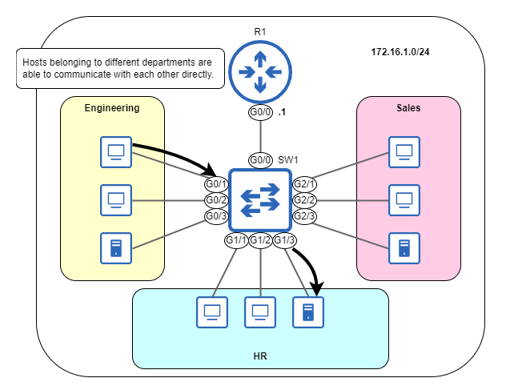
An unsegmented LAN. All hosts are in the 172.16.1.0/24 network, and VLANs are not used to segment the LAN at layer 2. Hosts belonging to different departments can communicate with each other directly (by sending their packets in frames addressed directly to each other).
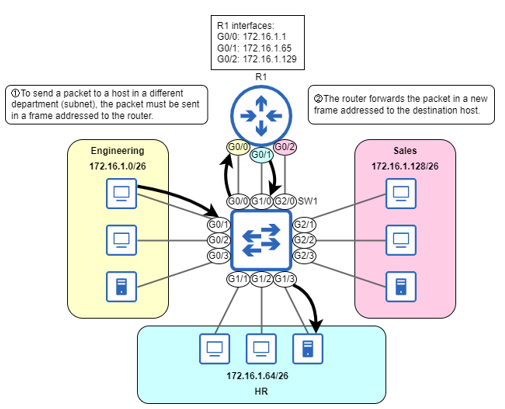
A LAN segmented into three subnets. The engineering department uses subnet 172.16.1.0/26, the HR department uses subnet 172.16.1.64/26, and the sales department uses subnet 172.16.1.128/26. R1 has one interface in each subnet. Communication between hosts in different departments must go through R1.
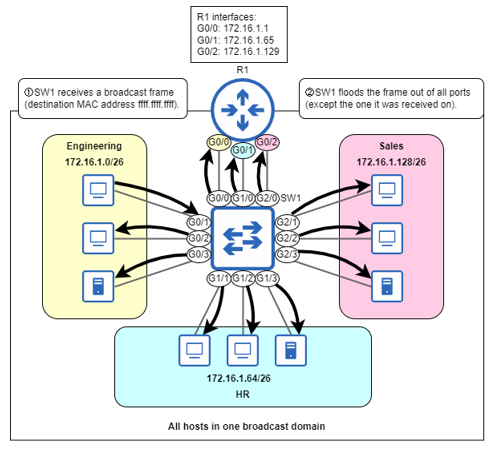
Although hosts are divided into three subnets, at layer 2 they are still part of the same broadcast domain (LAN). 1) SW1 receives a broadcast frame from a host in the engineering department. 2) SW1 floods the frame out of all ports, except the one it was received on. The LAN has been segmented at layer 3, but not at layer 2.
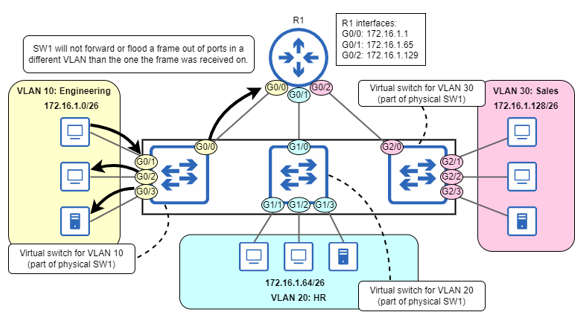
By assigning SW1’s interfaces to three separate VLANs, SW1 is divided into three virtual switches, each a separate broadcast domain. G0/0, G0/1, G0/2, and G0/3 are part of VLAN 10. G1/0, G1/1, G1/2, and G1/3 are part of VLAN 20. G2/0, G2/1, G2/2, and G2/3 are part of VLAN 30. SW1 will not forward or flood a frame out of ports in a different VLAN than the port the frame was received on.
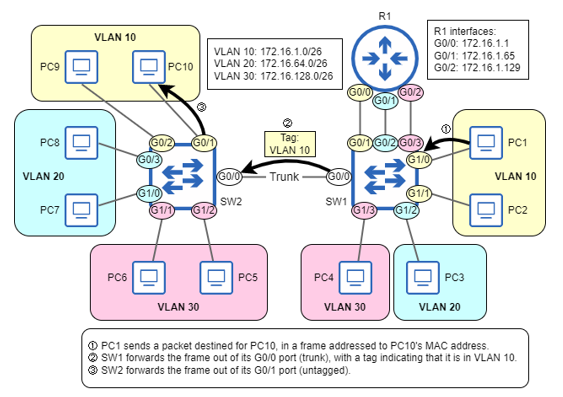
SW1 and SW2 are connected by a trunk link, which can carry traffic in multiple VLANs. SW1 and SW2 are two physical switches, each consisting of three virtual switches — one for each VLAN. 1) PC1 (connected to SW1) sends a frame addressed to PC10’s MAC. 2) SW1 forwards the frame out of its G0/0 port, which is in trunk mode. It adds a tag to the frame, indicating that the frame is in VLAN 10. 3) SW2 forwards the frame out of its G0/1 port (untagged).
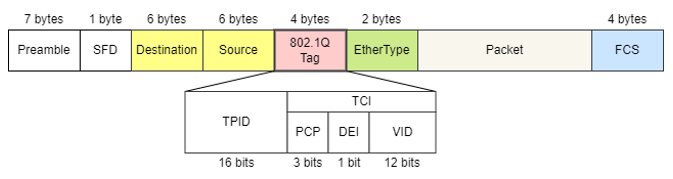
The 802.1Q tag’s position in an Ethernet frame, and the field of the tag. The fields are TPID (Tag Protocol Identifier) and TCI (Tag Control Information). TCI contains three subfields: PCP (Priority Code Point), DEI (Drop Eligible Indicator), and VID (VLAN Identifier).
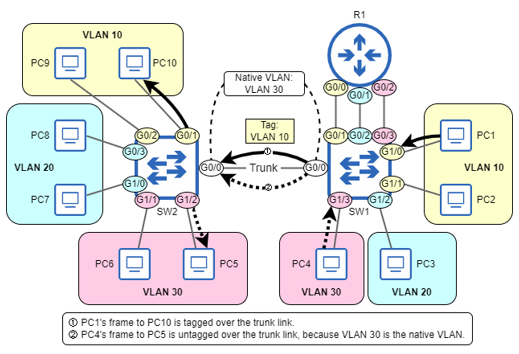
Frames forwarded over a trunk link, in the native VLAN and a non-native VLAN. 1) PC1’s frame to PC10 is tagged over the trunk link because VLAN 10 is not the native VLAN. 2) PC4’s frame to PC5 is untagged over the trunk link because VLAN 30 is the native VLAN.
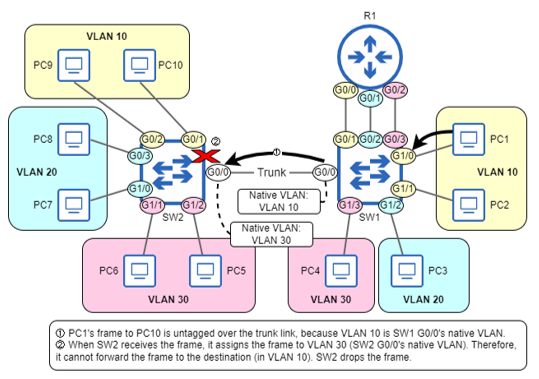
A native VLAN mismatch resulting in frames being dropped. SW1 G0/0’s native VLAN is VLAN 10, and SW2 G0/0’s is VLAN 30. 1) PC1’s frame to PC10 is untagged over the trunk link because VLAN 10 is SW1 G0/0’s native VLAN. 2) When SW2 receives the frame, it assigns the frame to VLAN 30 (SW2 G0/0’s native VLAN), and therefore cannot forward the frame to its destination (in VLAN 10); it must drop the frame.
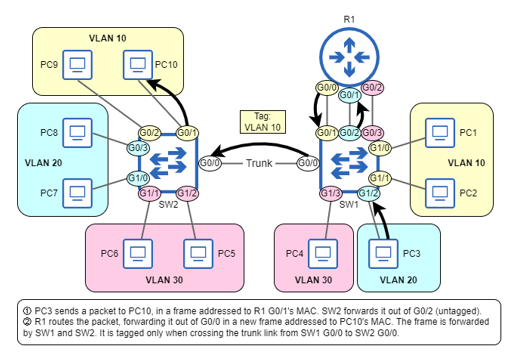
PC3 (in VLAN 20) sends a packet to PC10 (in VLAN 10). 1) PC3 sends the packet in a frame addressed to its default gateway (R1 G0/1). SW2 forwards it out of its G0/2 port (untagged). 2) R1 routes the packet, forwarding it out of G0/0 in a new frame addressed to PC10. The frame is forwarded to PC10 by SW1 and SW2. It is tagged only when crossing the trunk link from SW1 G0/0 to SW 2 G0/0.
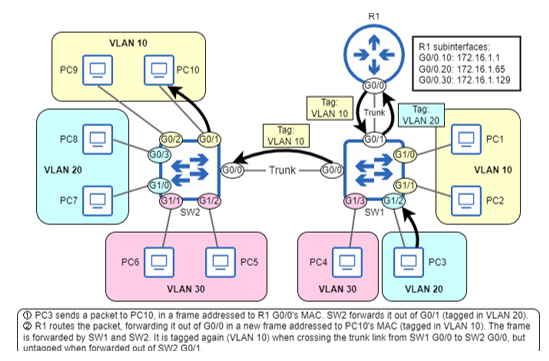
PC3 (in VLAN 20) sends a packet to PC10 (in VLAN 10), and the packet is routed using the router on a stick method. R1’s G0/0 interface has three subinterfaces: G0/0.10 (VLAN 10, 172.16.1.1), G0/0.20 (VLAN 20, 172.16.1.65), and G0/0.30 (VLAN 30, 172.16.1.129). PC3’s frame to R1 is tagged in VLAN 20 over the trunk link from SW1 G0/1 and R1 G0/0. R1’s frame to PC10 is tagged in VLAN 10 over the trunk link from R1 G0/0 to SW1 G0/1, and the trunk link from SW1 G0/0 to SW2 G0/0.
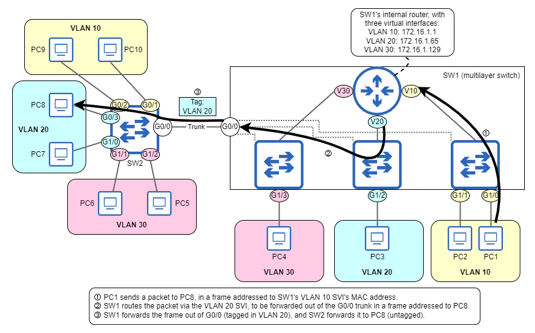
SW1, a multilayer switch, routes a packet from PC1 to PC8. SW1 has three SVIs: VLAN 10 (172.16.1.1), VLAN 20 (172.16.1.65), and VLAN 30 (172.16.1.129), allowing SW1 to route packets internally, without relying on an external router.
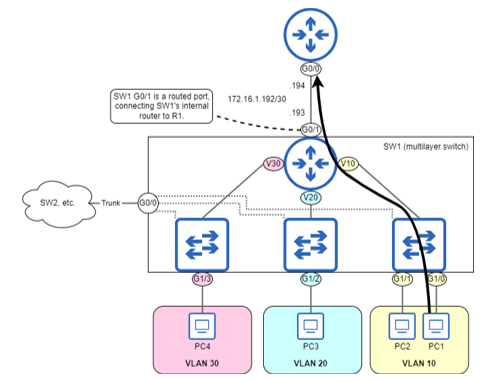
SW1, a multilayer switch, uses a routed port (G0/1) to provide connectivity to external networks (via R1, in this case). Like a router interface, SW1 G0/1 is configured with an IP address: 172.16.1.193.
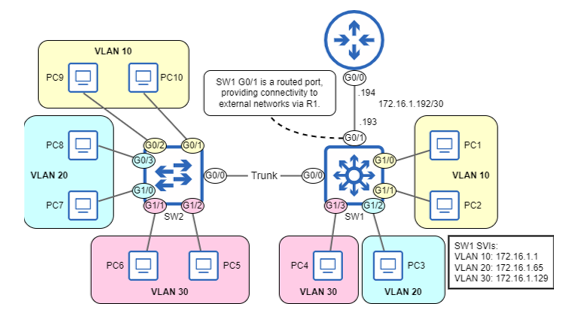
A host in the LAN sends a packet to an external destination, routed by SW1. G0/1 is a routed port, connecting SW1’s internal router to R1.
Summary
- Network segmentation is the process of dividing a network into smaller parts, and provides network security and performance benefits. Subnets can be used to segment a network at layer 3, and virtual LANs (VLANs) can be used to segment a network at layer 2.
- VLANs divide a broadcast domain (LAN) into multiple broadcast domains, by dividing a physical switch into multiple virtual switches. Frames sent by a host in one VLAN cannot be forwarded/flooded to hosts in another VLAN.
- Although there can be multiple subnets per VLAN, for the CCNA exam you can assume a one-to-one relationship (one subnet per VLAN).
- Use the
show vlan briefcommand to view the VLANs that exist on the switch, and which ports are in each VLAN. - VLANs 1 and 1002-1005 exist by default, and cannot be deleted. VLAN 1 is the default VLAN — the VLAN that all ports are in by default. VLANS 1002-1005 are reserved for use by FDDI and Token Ring — two legacy data link layer technologies.
- Use the
vlanvlan-idcommand to create a VLAN, and then thenamevlan-namecommand to give the VLAN an optional name (the default name is VLANxxxx). You can use theshutdowncommand to temporarily disable the VLAN, orno vlanvlan-idto delete the VLAN. - An access port is a switch port that sends and receives traffic in a single VLAN. Access ports are also called untagged ports because they send and receive frames without VLAN tags.
- Use the
switchport mode accesscommand to configure a port in access mode. Then, use theswitchport access vlanvlan-idcommand to configure which VLAN the port belongs to. If you assign a port to a VLAN that doesn’t exist yet on the switch, the switch will automatically create the VLAN. - A trunk port is a switch port that sends and receives traffic in multiple VLANs. Trunk ports differentiate between VLANs by adding a VLAN tag to each frame using the IEEE 802.1Q protocol.
- The 802.1Q tag is four bytes in length and is added between the Source and EtherType fields of the Ethernet header. The main fields of the 802.1Q tag are TPID and TCI.
- The Tag Protocol Identifier (TPID) field always contains the value 0x8100; it is used to identify 802.1Q-tagged frames.
- The Tag Control Information (TCI) field consists of three subfields: Priority Code Point (PCP) and Drop Eligible Indicator (DEI) are used for Quality of Service (QoS). The VLAN Identifier (VID) field is used to indicate which VLAN the frame is in. The VID field is 12 bits in length, and for that reason, there are 4096 (212) VLANs in total.
- To configure a trunk port, use the
switchport mode trunkcommand. If the switch supports both 802.1Q and ISL, you must use theswitchport trunk encapsulation dot1qcommand first; if the switch only supports 802.1Q, this command is not needed. - Use the
show interfaces trunkcommand to verify trunk ports, including information such as which VLANs are allowed on each trunk port. - By default, all VLANs are allowed on a trunk port, meaning it can forward and receive frames in all VLANs.
- Use the
switchport trunk allowed vlancommand to specify the VLANs allowed on a trunk. You can specify the list of VLANs, or use the keywordsadd,all,except,none, orremove. - The native VLAN is the VLAN that is untagged on a trunk port. Untagged frames received on a trunk port are assigned to the native VLAN, and frames in the native VLAN are forwarded untagged. The native VLAN of a trunk port is VLAN 1 by default.
- The native VLAN can be configured with the
switchport trunk native vlanvlan-idcommand. The command is configured per port, so each port on a switch can have a different native VLAN, but make sure the native VLAN matches on both sides of a trunk connection. - It is recommended to configure an unused VLAN (that is not the default of VLAN 1) as the native VLAN, which is equivalent to disabling it.
- Inter-VLAN routing is the process of routing between subnets in a LAN that is segmented using VLANs. Inter-VLAN routing can be performed by an external router, or by a multilayer switch (a switch that has routing capabilities).
- A router can perform inter-VLAN routing by using a separate interface per subnet/VLAN, or by router on a stick (ROAS), in which a trunk link connects the router and switch.
- ROAS uses virtual subinterfaces. To configure a subinterface, use the
interfacecommand, and add a period and a number to identify the subinterface to the end of the interface name (ie.interface g0/0.10). The subinterface identifier does not have to match the VLAN ID. - Configure a subinterface’s VLAN with the
encapsulation dot1qvlan-idcommand. Then, configure an IP address in the same manner as on a router. - If using the native VLAN over the ROAS trunk, use the
encapsulation dot1qvlan-idnativecommand on the native VLAN’s subinterface. Or, configure the native VLAN’s IP address on the physical interface (theencapsulation dot1q commandis not necessary on the physical interface). - A multilayer switch can also be called a layer 3 switch (in contrast to a standard layer 2 switch). A multilayer switch uses switch virtual interfaces (SVIs) to perform inter-VLAN routing. Each SVI is associated with a VLAN and can be configured with the
interface vlanvlan-idcommand. - Use the
ip routingcommand on a multilayer switch to allow the switch to route packets. - A physical port on a multilayer switch can be configured as a routed port, which functions like a router interface. Use the
no switchportcommand to convert a switch port to a routed port, and then configure an IP address on it. - To forward packets to external destinations, multilayer switches need routes, just like routers — either static routes or routes learned via a dynamic routing protocol (such as OSPF).
FAQ
Why do we need VLANs if we already use subnets?
VLANs segment the LAN at layer 2, creating separate broadcast domains on the same physical switch. This reduces unnecessary flooding, improves performance, and adds security by forcing inter-VLAN traffic to pass through a router or multilayer switch where policies can be applied. For CCNA, assume a one-to-one mapping: one subnet per VLAN.What are the default and reserved VLANs, and which VLAN IDs are usable?
- VLAN 1 is the default VLAN; all ports start in VLAN 1 by default.- VLANs 1002–1005 are reserved (legacy FDDI/Token Ring).
- Total VLAN IDs: 0–4095; VLAN 0 and 4095 are reserved.
- Usable ranges: 1–1001 and 1006–4094.
How do I create, name, disable, and delete VLANs?
- Create: vlan VLAN_ID- Name (optional): name VLAN_NAME (in VLAN config mode)
- Temporarily disable: shutdown (status shows act/lshut)
- Delete: no vlan VLAN_ID
How do I assign access ports to VLANs and what about DTP?
- Best practice: manually set mode, don’t rely on DTP.- Configure access mode: switchport mode access
- Assign VLAN: switchport access vlan VLAN_ID (auto-creates the VLAN if it doesn’t exist)
- Remember: access ports belong to one VLAN and send/receive untagged frames.
Access vs trunk ports and how 802.1Q tagging works
- Access (untagged): carries a single VLAN; frames are not tagged.- Trunk (tagged): carries multiple VLANs; frames are 802.1Q-tagged with a 4-byte header (TPID=0x8100). The VLAN Identifier (VID) is 12 bits (up to 4096 VLANs).
How do I configure and verify a trunk? What if the switch supports ISL?
- If the switch supports both ISL and 802.1Q: set encapsulation first (switchport trunk encapsulation dot1q), then switchport mode trunk.- On switches that only support 802.1Q: encapsulation command isn’t needed/available.
- Verify: show interfaces trunk to check mode, encapsulation, native VLAN, allowed/active VLANs.
How do I control which VLANs are allowed on a trunk (and avoid the “add” mistake)?
- Set list: switchport trunk allowed vlan 10,20,30 (replaces the list).- Add/remove: switchport trunk allowed vlan add 40; switchport trunk allowed vlan remove 30.
- Other options: all, none, except.
- Common pitfall: using the set form (without add) when you intended to add a VLAN overwrites the list.
What is the native VLAN, how do I set it, and what happens if it mismatches?
- Native VLAN: untagged frames on a trunk are assigned to this VLAN; traffic in the native VLAN is sent untagged on that trunk.- Default is VLAN 1; change per port with switchport trunk native vlan VLAN_ID.
- Mismatch across a link can cause drops or VLAN hopping; ensure both sides match.
- Best practice: use an unused, non-1 VLAN as native (effectively “disabling” it for security).
How do devices in different VLANs communicate (inter-VLAN routing)?
- Options:1) Separate physical links per VLAN to a router (rare, doesn’t scale).
2) Router-on-a-stick (ROAS): trunk to router, subinterfaces with encapsulation dot1q VLAN_ID (use native keyword or put native VLAN IP on the physical interface if using native).
3) Multilayer switch: create SVIs (interface vlan X) with IPs and enable ip routing.
What are SVIs and what must be true for an SVI to be up/up?
- SVI: a layer 3 virtual interface on a switch, bound to a VLAN; used for inter-VLAN routing on multilayer switches.- Enable routing: ip routing (global).
- Up/up requirements:
1) The VLAN exists on the switch.
2) At least one access port in that VLAN is up/up or a trunk allowing that VLAN is up/up.
3) The VLAN is not shutdown.
4) The SVI itself is not shutdown.
- Remember: VLAN (layer 2) is created with vlan X; SVI (layer 3) with interface vlan X.

 Acing the CCNA Exam, Volume 1 ebook for free
