Chapter 10. Creating acceptance tests with Fit
Fit is presented as a popular acceptance-testing framework that helps bridge the gap between customers and programmers by turning table-based examples into executable tests. The chapter frames acceptance TDD as a three-step collaboration: the customer sketches a test document in familiar language, the team cleans it up so Fit can parse it, and developers implement the fixture classes that connect those tables to the system under test. This workflow keeps the customer’s intent visible while giving the technical team a way to automate verification and produce readable, color-coded results.
The core idea is that a Fit test document is just a mix of narrative text and executable fixture tables, usually in HTML. Fit ignores the prose and processes the tables by matching them to fixture classes, which act as the backing code for the examples. The chapter explains three built-in fixtures in detail: one for simple calculations and expected results across columns, one for comparing sets of returned objects against table rows, and one for modeling actions like starting, entering values, pressing controls, and checking outcomes. Together, these illustrate how Fit can support both state-based and interaction-based testing.
The chapter also shows that Fit is designed to be extended. Custom fixtures can be created to better suit a domain, and FitLibrary adds more powerful options such as flow-style testing and setup-oriented tables that read more naturally. Finally, it covers how to run Fit tests from the command line, across whole folder structures, and as part of automated builds with Ant, emphasizing that acceptance tests are most useful when they are easy to execute and publish. Overall, the chapter positions Fit as a practical tool for collaboration, readable specifications, and automated acceptance testing in real projects.
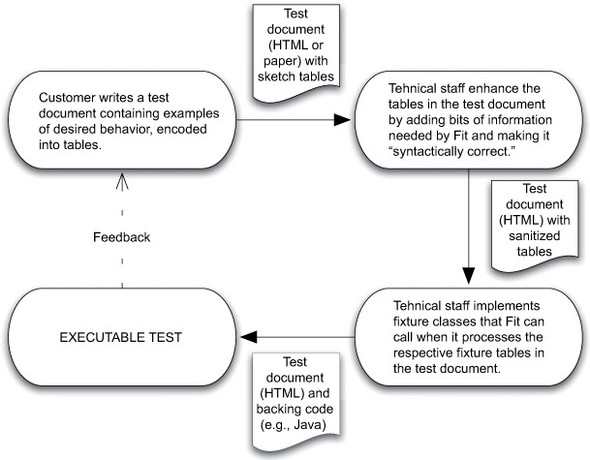
The transitions from a test document informally described by the customer to an executable test. After the customer has created the initial test document, the development team first sanitizes the tables so that Fit can interpret it correctly. With a syntactically valid test document, the development team next implements the backing code—the fixture classes—so that Fit has something to invoke when processing the test document. When all three of these steps are done, we have an executable test in the form of the combination of a document containing fixture tables and code that implements the tables.
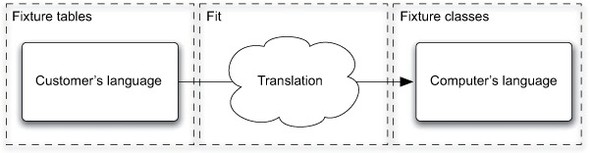
The Fit framework translates the customer’s language encoded in fixture tables into the computer’s language encoded in fixture classes. The fixture classes can be implemented with a variety of programming languages, typically—but not necessarily—in the same language as the system under test is implemented. Scripting languages, for example, are often a good candidate for implementing the backing code for fixture tables due to their flexibility and ability to integrate with other technologies.
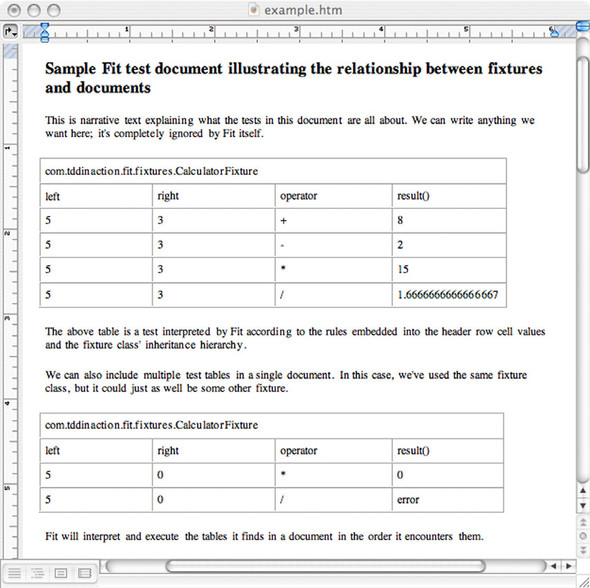
Fit test documents are regular HTML files that can be edited with a regular word processor. The example document shown here illustrates how the format allows for mixing executable test or fixture tables with narrative text around them.
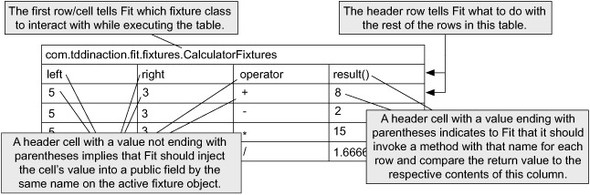
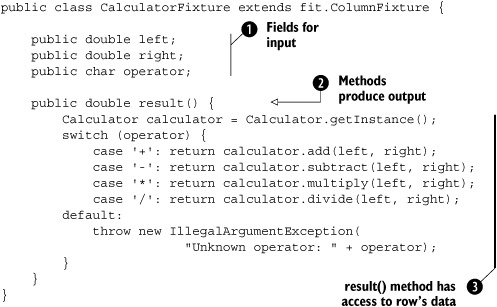
The column fixture table from figure 10.4 with explanations of the meaning of key elements of the table structure
Listing 10.1. CalculatorFixture.java
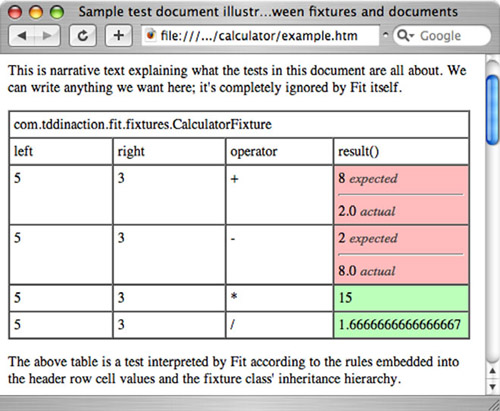
As Fit executes our tests, the relevant table cells are colored to indicate success and failure. For any mismatch, both the expected and actual values are displayed next to each other.
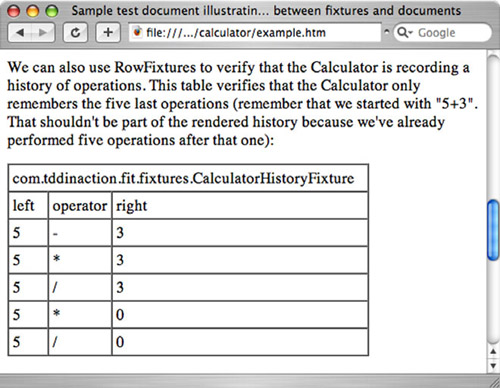
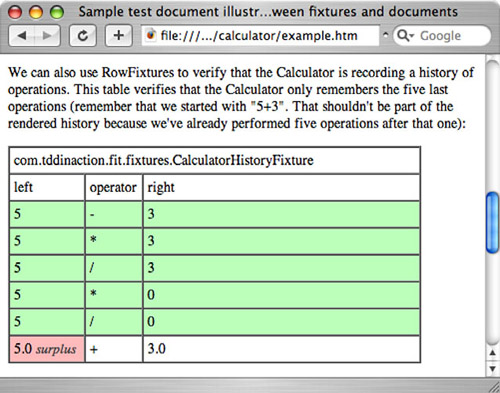
The RowFixture can be used to compare larger datasets easily. The RowFixture compares the set of objects described by the table rows to the set of objects returned by a query method on the fixture class.
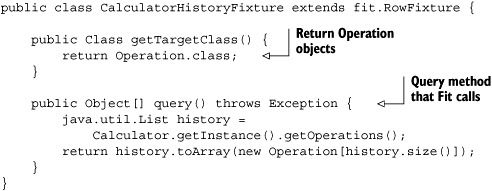
Listing 10.2. Example RowFixture verifying that calculator records history correctly
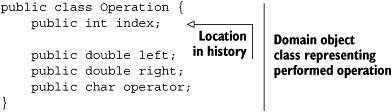
Listing 10.3. The domain object class returned by the query method
RowFixture finds and highlights differences between the expected and actual data by invoking a query method that returns an array of objects, comparing it to the array of objects constructed from the fixture table’s rows. Any surplus or missing records will be highlighted with a pink background while the matching records get the familiar green shade.
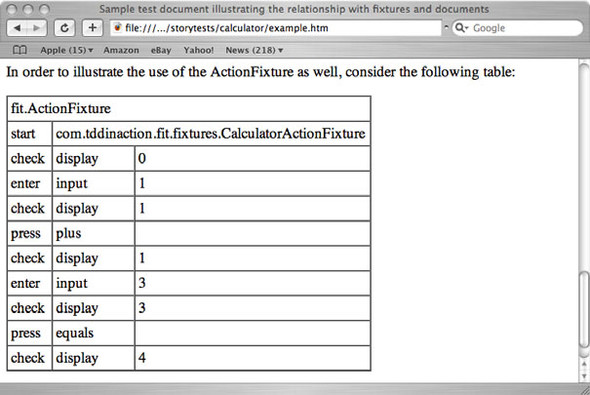
ActionFixtures are, as their name implies, action-oriented and are suited for modeling interaction with the system under test. The four available actions to use in the fixture table are “start”, “check”, “enter”, and “press”.
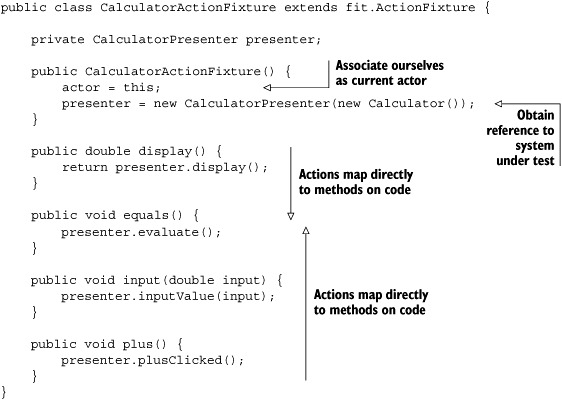
Listing 10.4. CalculatorActionFixture.java
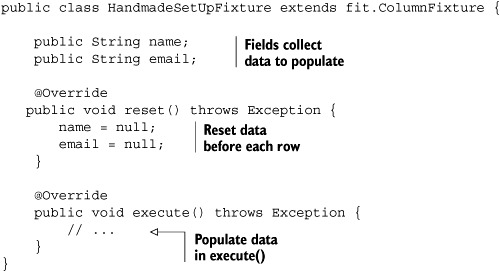
Listing 10.5. Extending ColumnFixture to create a data-population fixture
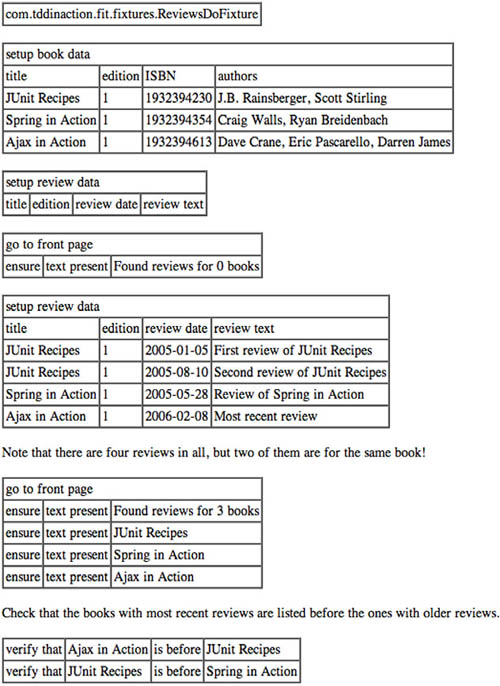
Example of a test making use of a custom DoFixture and ReviewsDoFixture, showcasing some of DoFixture’s additional features compared to the built-in ActionFixture. Although the document contains multiple fixture tables, they’re all handled by the ReviewsDoFixture, activated with the first table on the page. The remaining tables and rows map to methods on the ReviewsDoFixture instance, except when such a method returns a Fixture. When the method returns a Fixture object, that particular Fixture object handles the remainder of that table.
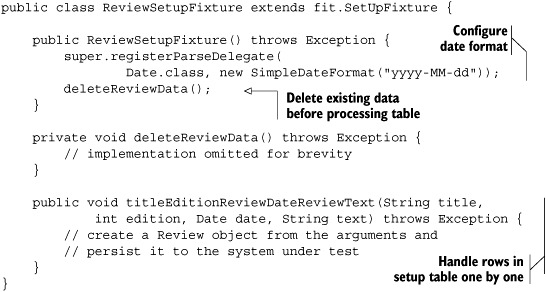
Listing 10.8. Example of a SetUpFixture
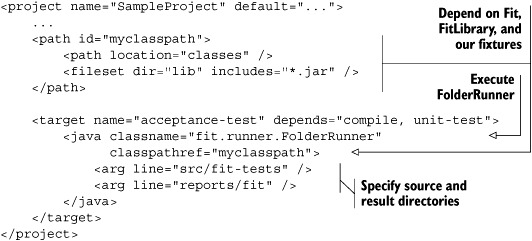
Listing 10.9. Running Fit with an Ant build script

 Test Driven ebook for free
