Overview

Chapter 10. Deploying your microservices

The chapter emphasizes that deployment is a core part of microservices success, not an afterthought. Because microservices are meant to be small, independently changeable units, the path from code change to production should be fast, automated, repeatable, and fully controlled by scripts. The chapter frames this around DevOps practices and the idea that developers should own more of the operational responsibility for building, packaging, and deploying their services.

Using the EagleEye system as an example, the chapter walks through setting up the cloud foundation needed to run the services on Amazon. It separates the database and cache into managed Amazon services, creates an ECS cluster for the Dockerized microservices, and configures networking and security so traffic flows through the API gateway rather than directly to the services. The discussion also shows how application settings are updated through external configuration so the services can connect to the new cloud-based infrastructure.

The second half focuses on deployment workflows, first by showing a manual ECS deployment and then by automating the process with a CI/CD pipeline. The pipeline uses source control tagging, Maven builds, Docker image creation, Docker Hub publishing, ECS deployment, and post-deployment platform tests to verify that the system works in its target environment. Along the way, the chapter stresses immutable servers, infrastructure as code, traceability, and the value of running tests after deployment to catch problems that unit and integration tests cannot reveal.

Figure 10.1. By using Docker, all your services can be deployed to a cloud provider such as Amazon ECS.
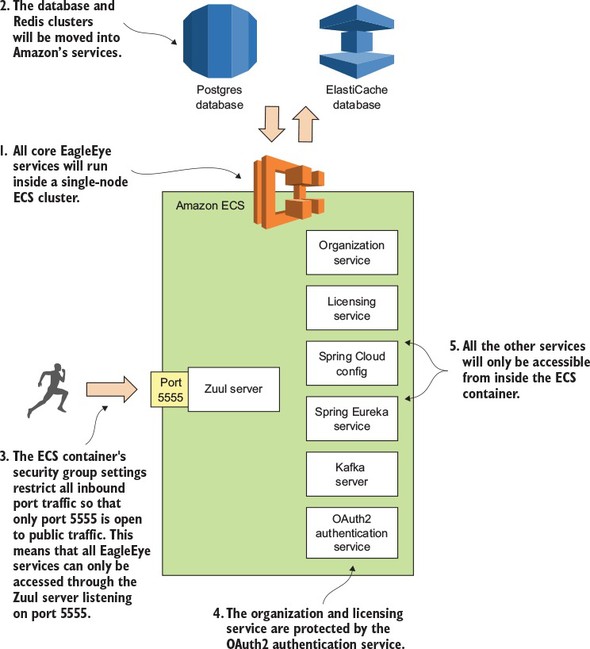
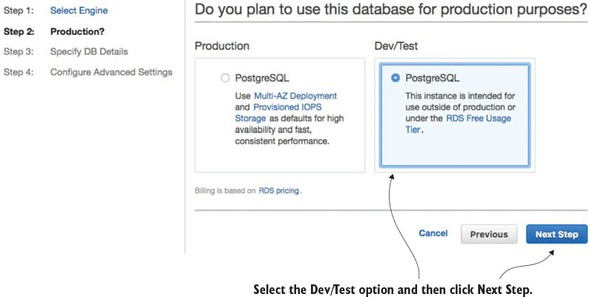
Figure 10.2. Selecting whether the database is going to be a production database or a test database

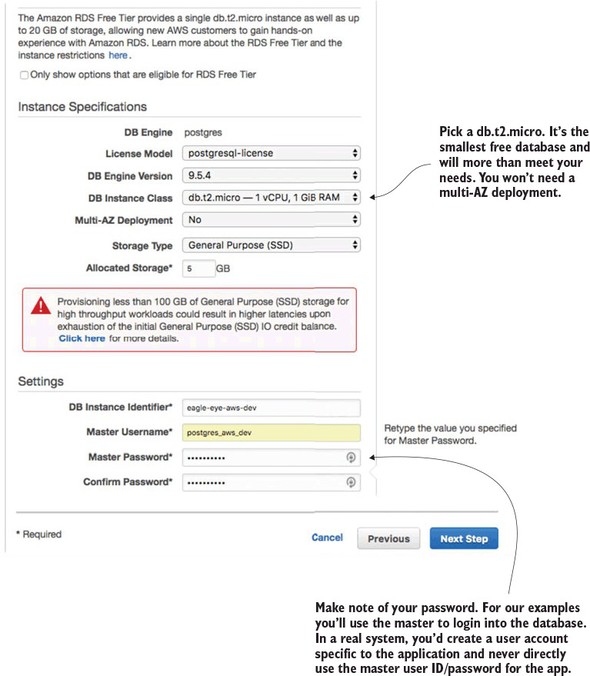
Figure 10.3. Setting up the basic database configuration

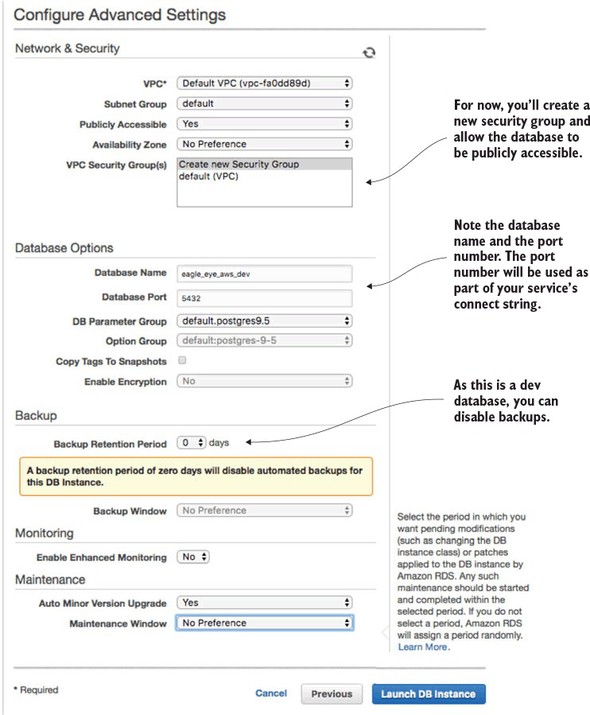
Figure 10.4. Setting up the security group, port, and backup options for the RDS database

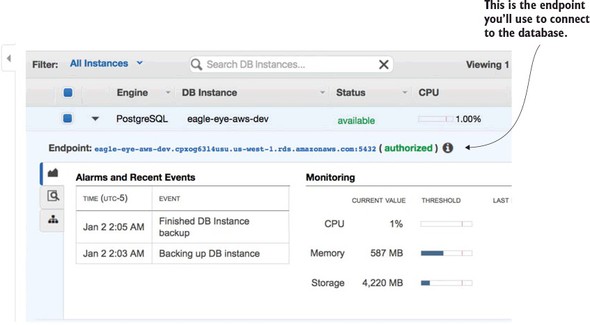
Figure 10.5. Your created Amazon RDS/PostgreSQL database

Figure 10.6. With a few clicks you can set up a Redis cluster whose infrastructure is managed by Amazon.
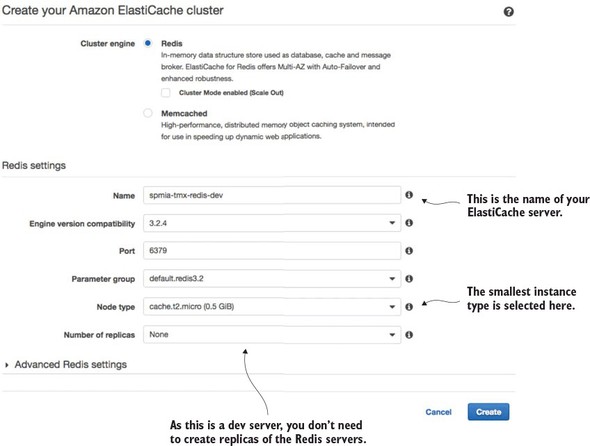
Figure 10.7. The Redis endpoint is the key piece of information your services need to connect to Redis.
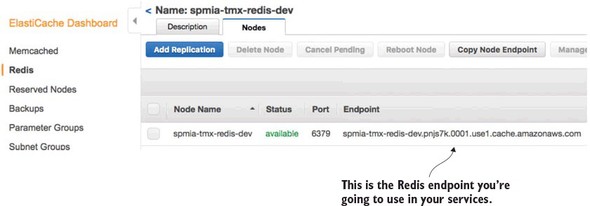
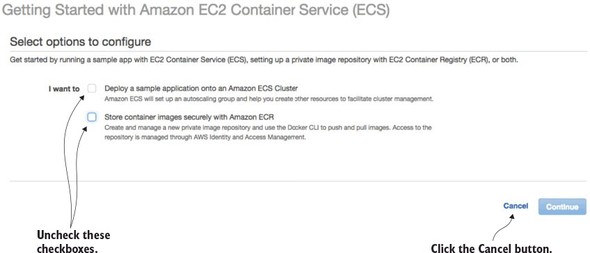
Figure 10.8. ECS offers a wizard to bootstrap a new service container. You’re not going to use it.

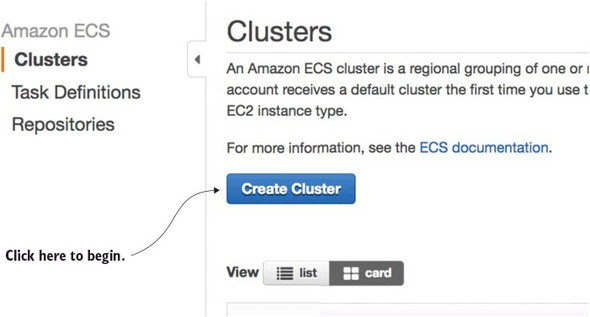
Figure 10.9. Starting the process of creating an ECS cluster

Figure 10.10. In the “Create Cluster” screen size the EC2 instances used to host the Docker cluster.
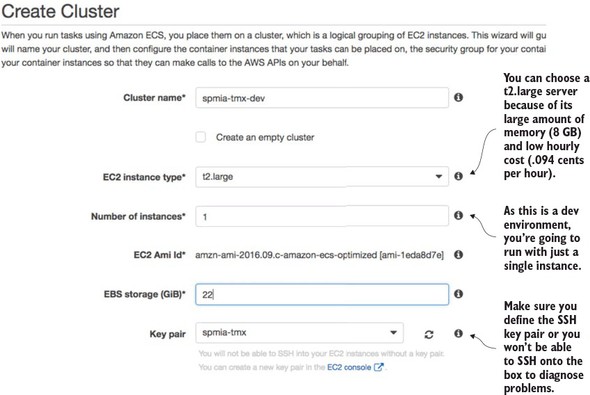
Figure 10.11. Once the servers are set up, configure the network/AWS security groups used to access them.
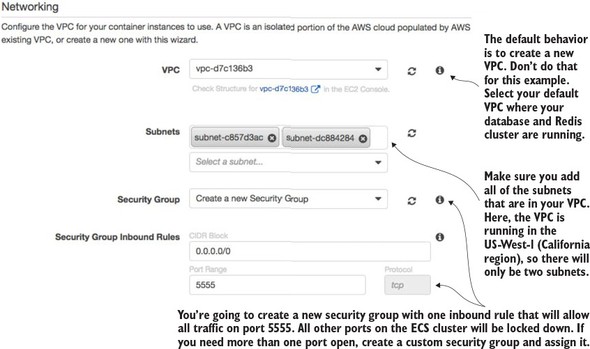
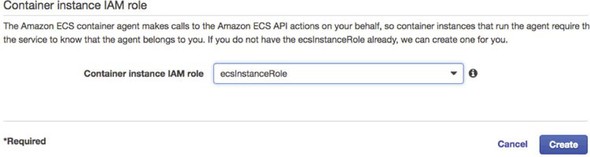
Figure 10.12. Configuring the Container IAM role

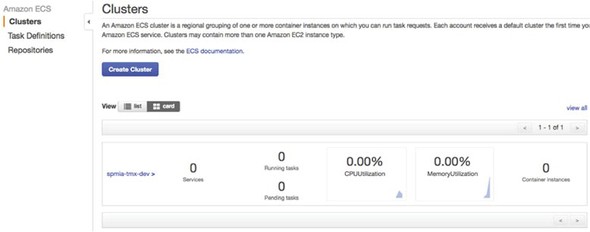
Figure 10.13. The ECS cluster up and running

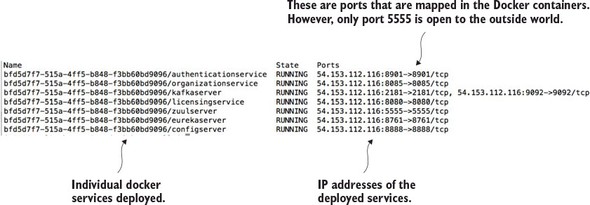
Figure 10.14. Checking the status of the deployed services

Figure 10.15. Each component in the build and deployment pipeline automates a task that would have been manually done.
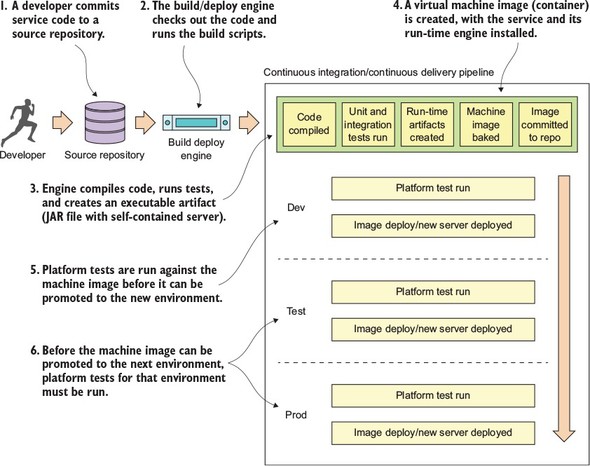
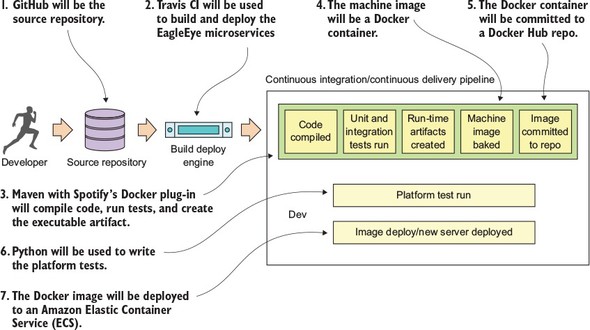
Figure 10.16. Technologies used in the EagleEye build

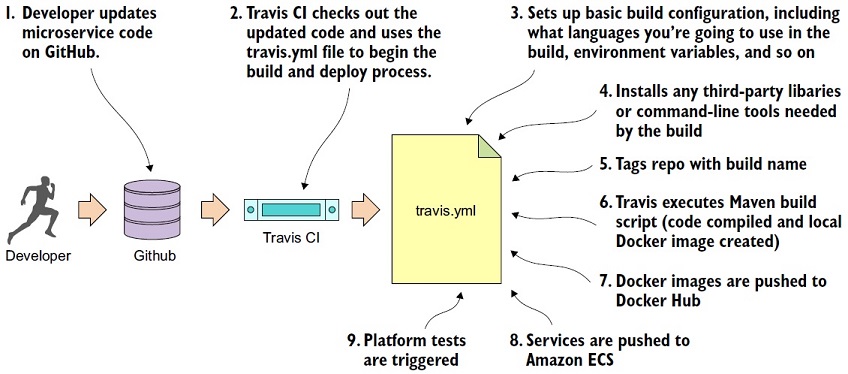
Figure 10.17. The concrete steps undertaken by the .travis.yml file to build and deploy your software

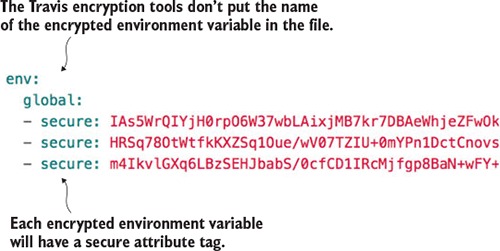
Figure 10.18. Encrypted Travis environment variables are placed directly in the .travis.yml file.

Summary

  • The build and deployment pipeline is a critical part of delivering microservices. A well-functioning build and deployment pipeline should allow new features and bug fixes to be deployed in minutes.
  • The build and deployment pipeline should be automated with no direct human interaction to deliver a service. Any manual part of the process represents an opportunity for variability and failure.
  • The build and deployment pipeline automation does require a great deal of scripting and configuration to get right. The amount of work needed to build it shouldn’t be underestimated.
  • The build and deployment pipeline should deliver an immutable virtual machine or container image. Once a server image has been created, it should never be modified.
  • Environment-specific server configuration should be passed in as parameters at the time the server is set up.

FAQ

Why is a build and deployment pipeline so important for microservices?Microservices are meant to be small, independently deployable units, so the pipeline must support fast, low-friction releases. A good pipeline lets you build, test, package, and deploy services quickly—ideally in minutes rather than days.
What qualities should a microservices deployment process have?The process should be automated, repeatable, complete, and immutable. That means no manual intervention, consistent results every time, a full runtime environment included in the artifact, and no changes made to the image after deployment.
What does “infrastructure as code” mean in this chapter?It means provisioning and configuring servers, images, and related infrastructure through scripts stored in source control. The infrastructure is treated like software, so changes are versioned, repeatable, and reviewed alongside the service code.
What cloud infrastructure does EagleEye use in Amazon?The chapter separates core data services from Docker-based microservices. PostgreSQL is moved to Amazon RDS, Redis is moved to Amazon ElastiCache, and the application services run as Docker containers in a single-node Amazon ECS cluster.
How do you manually deploy the EagleEye services to Amazon ECS?You configure the ECS CLI with your AWS credentials and target cluster, build the services with Maven, create Docker images, and then deploy them using ecs-cli compose --file docker/common/docker-compose.yml up. After deployment, ecs-cli ps helps verify the running containers and their IP address.
Why does the ECS cluster only expose port 5555 to the outside world?Port 5555 is used for the Zuul API gateway, so external traffic is routed through a single entry point. Other services remain private behind the security group and are not directly exposed to the internet.
What is the role of Travis CI in the deployment pipeline?Travis CI monitors the GitHub repository, triggers builds on commits, runs the Maven build, creates Docker images, pushes them to Docker Hub, deploys to Amazon ECS, and then triggers platform tests as a separate job.
Why does the chapter use Docker Hub and GitHub releases with the same build name?Using the same build name for the source tag and Docker image creates traceability. It lets you connect a deployed container back to the exact source code and build that produced it, which is useful for auditing and rollback.
What is the difference between unit tests, integration tests, and platform tests?Unit tests check small pieces of code in isolation. Integration tests verify workflows while mocking or stubbing external dependencies. Platform tests run against a live deployed environment and use real third-party services to validate the full system behavior.
Why does the chapter emphasize immutable and “Phoenix” servers?Immutable servers reduce configuration drift and make deployments more reliable. The Phoenix server idea is that a server can be killed and recreated from the same image without changing behavior, which improves consistency and helps uncover hidden state or recovery problems.