This chapter introduces the move from an in-memory web service to one backed by a real database. It begins by setting up a local PostgreSQL instance, creating a sample database, and manually defining tables for questions and answers so the reader can see how application structs map onto relational schema. Along the way, it explains practical setup concerns such as running the server, using the command-line client, and making sure the database can be created again when the application is deployed.
The next major step is integrating database access into the Rust codebase. The chapter compares ORM-based approaches with writing SQL directly, then chooses SQLx for its async support, PostgreSQL compatibility, multi-database support, and community adoption. The application’s store layer is refactored to hold a connection pool rather than in-memory collections, and route handlers are updated to call store methods for reading, creating, updating, and deleting questions and answers. This redesign also introduces pagination handling, error propagation, and clearer separation between business logic and database logic.
Finally, the chapter focuses on making database work more maintainable and production-friendly. It adds structured error handling and tracing so internal database failures are logged while clients receive appropriate HTTP responses, then introduces SQL migrations so schema changes can be reproduced automatically instead of being done by hand. The chapter closes with a case study on switching database systems, showing that good abstractions keep most of the application stable even if the underlying database changes, though SQL syntax and supported data types may still require adjustments.
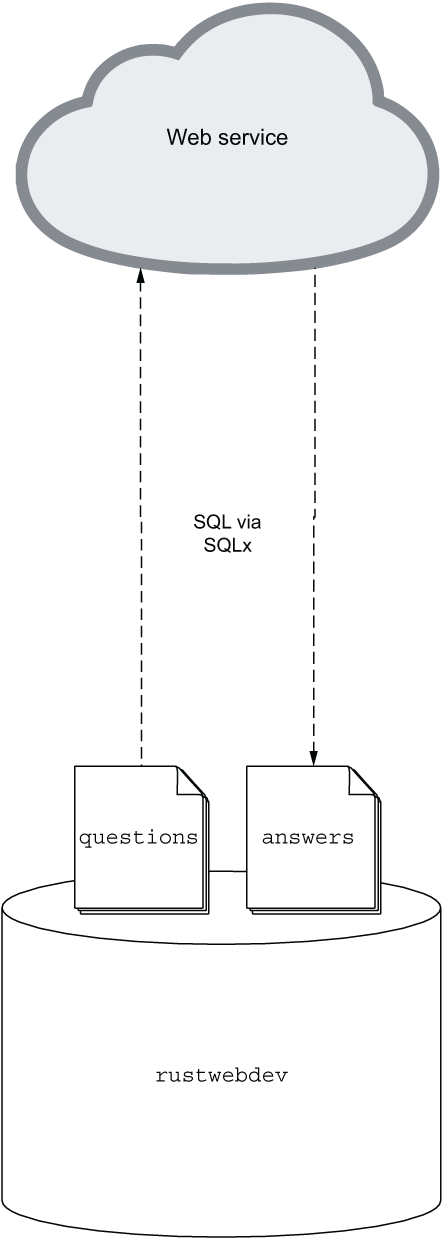
Our rustwebdev database and the questions and answers tables are interacting via SQLx and SQL with our web service.
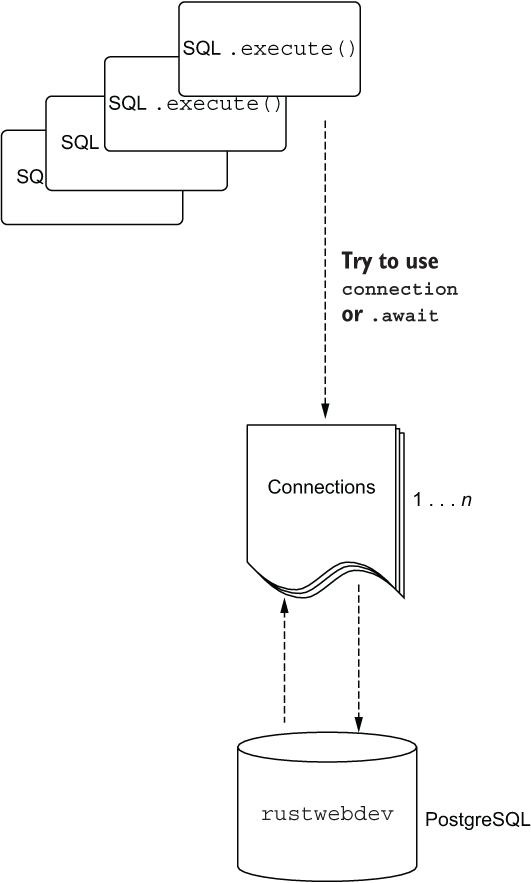
Connection pools allow us to keep more than one connection to the database open so we can process more database operations at the same time.
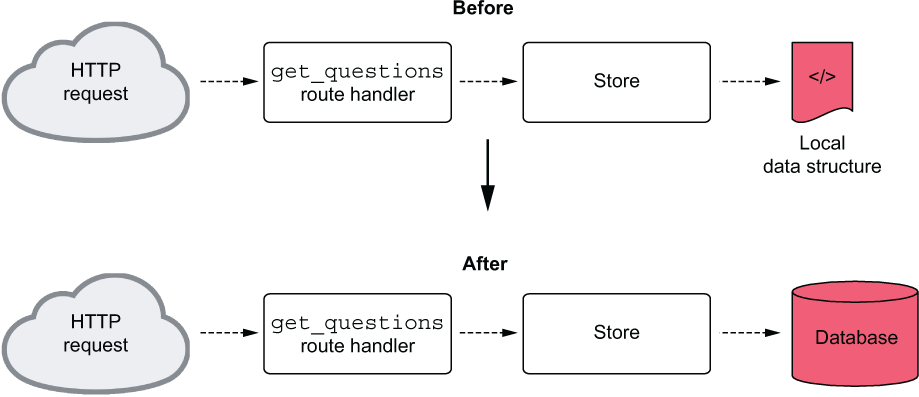
Replacing the local Vec<Questions> and Vec<Answers> storage objects with a PostgreSQL database
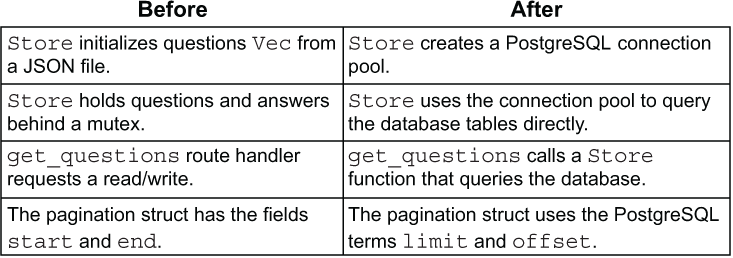
Brief overview of the changes in the codebase so far
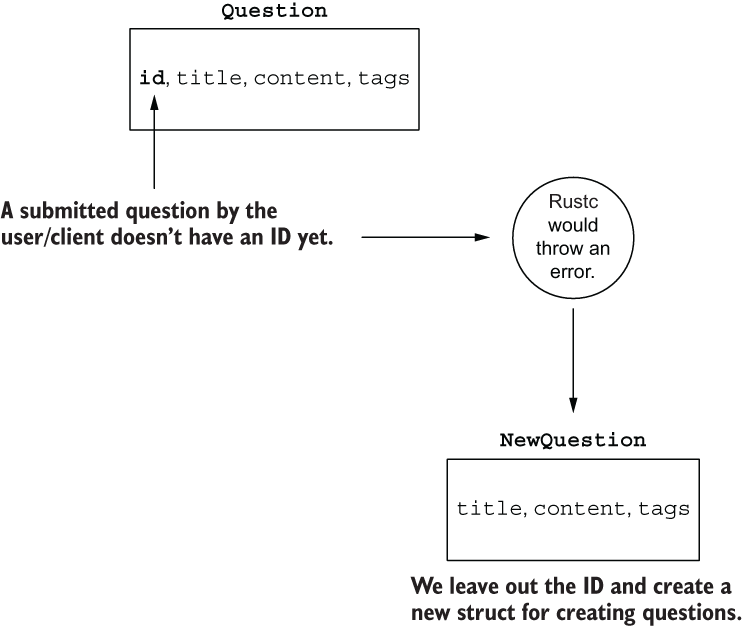
We create a new question type for the creation of a question, which doesn’t have an ID yet.
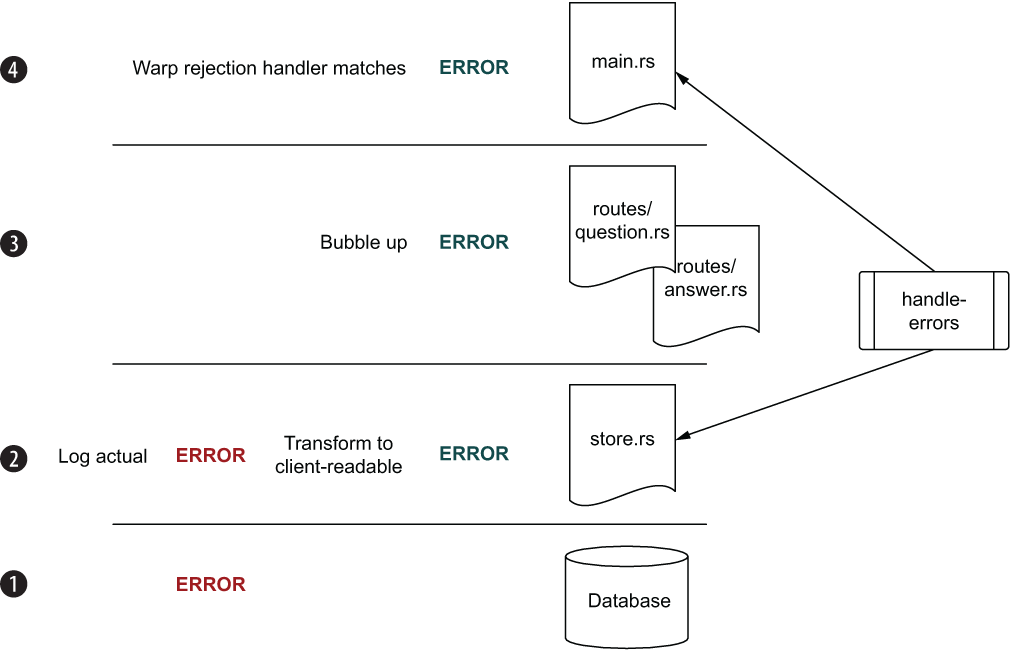
We log the actual error via the Tracing library and return a client-appropriate error from the store up to the Warp error handler we implemented in the handle-errors crate.
Summary
You have to decide whether you prefer an ORM to handle your database queries or would rather write your SQL yourself.
The de facto crate to handle your SQL queries is SQLx in the Rust ecosystem.
Adding a database to your web service opens many design decisions about your codebase.
It is generally advised to separate the data layer from the other business logic.
With smaller applications, it could make sense to query the database directly from the route handlers.
With SQLx, you write plain SQL yourself and pass the resulting data around in your application.
You use the bind function to add local values to your SQL query.
Use fetch/fetch_one/fetch_all when data will be returned a query, and execute when no data will be returned.
You are adding a whole new layer of complexity, so don’t forget to properly instrument/trace the internal interactions with your database and codebase to spot errors.
It is best to create, drop, and alter your tables via migrations.
You can run migrations from your codebase or via a command-line tool.
Switching out the DBMS doesn’t affect our business logic, but depending on the new system you are choosing (SQLite or MySQL, for example), you have to adapt to the supported database types.
FAQ
How do I set up a local PostgreSQL database for this chapter?Install PostgreSQL locally, make sure the server is running, and use the PSQL CLI to connect to the default `postgres` database. Then create a new database for the project, such as `rustwebdev`. The chapter recommends Docker or the official PostgreSQL documentation if local setup differs by operating system.What should I consider when choosing a SQL crate for my Rust web app?Think about whether you want an ORM or plain SQL, whether the crate supports async or sync code, whether it supports migrations, whether it offers type safety for queries, and whether it includes features like connection pooling, transactions, and batch processing.Why does the chapter choose SQLx instead of an ORM like Diesel?SQLx is chosen because it works well with async Rust, supports PostgreSQL and other databases, works with multiple runtimes, and is widely used. The book prefers writing SQL directly rather than using an ORM, so the database logic stays explicit and separated from the Rust types.Why does the Store struct now hold a database connection pool?The `Store` is changed from in-memory data storage to a database-backed abstraction. It stores a connection pool so route handlers can access the database through `Store` instead of directly managing connections themselves.What is a connection pool, and why is it useful?A connection pool keeps multiple database connections open at once. This helps asynchronous applications handle several queries concurrently and prevents the app from creating too many connections and overwhelming the database server.How are questions mapped from Rust structs to PostgreSQL tables?The `Question` struct maps to a `questions` table with fields like `id`, `title`, `content`, `tags`, and `created_on`. The chapter uses SQL such as `serial PRIMARY KEY`, `VARCHAR`, `TEXT`, and `TEXT[]` to match the Rust types.Why is a NewQuestion type introduced?`NewQuestion` represents a question before the database assigns an ID. It contains only the fields the client supplies, such as `title`, `content`, and `tags`, which makes it easier to insert new questions into the database without requiring an ID first.How does pagination work in the database-backed get_questions handler?The handler now uses a `Pagination` struct with `limit` and `offset`. If the client provides values, they are parsed and passed into a SQL query using `LIMIT $1 OFFSET $2`; otherwise, default values are used so PostgreSQL can ignore them.How are database errors handled after introducing SQLx?Database errors are logged with the Tracing library inside the store layer, and a simplified application error is returned upward. The route handlers then pass that error to the shared Warp error handler, which turns it into an appropriate HTTP response.What happens if I switch from PostgreSQL to SQLite?Most of the application can stay the same if database access is abstracted through `Store`, but some SQL and types may need to change. For example, SQLite does not support PostgreSQL-style arrays, so fields like `tags` may need a different representation, and the SQLx pool/type imports must be updated for SQLite.
pro $24.99 per month
access to all Manning books, MEAPs, liveVideos, liveProjects, and audiobooks!

 Rust Web Development ebook for free
