This chapter focuses on cleaning up a growing Rust web application by moving from a single crowded file to a more maintainable structure. It shows how Rust’s module system, visibility rules, and built-in tooling can help organize code, improve readability, and keep implementation details in the right place. The main idea is that the entry point should stay small, while route handlers, error logic, and shared types live in clearer, separate units.
As the code is reorganized, the chapter explains how modules are declared with mod, how items are made accessible with pub, and how to use crate:: paths to reference code within the same project. It also covers practical project layouts using separate files, folder-based modules with mod.rs, and, when useful, extracting shared functionality into a separate library crate. The discussion emphasizes choosing a structure based on how often code changes, how many people work on it, and whether it needs to be reused across projects.
The chapter then turns to documentation and code quality. It explains Rust’s doc comments versus ordinary comments, how to write useful API documentation with examples, and how cargo doc generates browsable project docs that can include tested code snippets. Finally, it introduces Clippy for linting and Rustfmt for formatting, showing how these tools help catch idiomatic issues, enforce consistency, and keep the codebase easier to maintain over time.
We connect all our submodules (files) via the main.rs file and expose modules (files) inside folders via a mod.rs file, in which pub mod FILENAME; is making it available throughout the application.
After creating a new library in our application folder, we can add it to the Cargo dependencies and specify a local path; afterward, we use it as any other external library in our files.
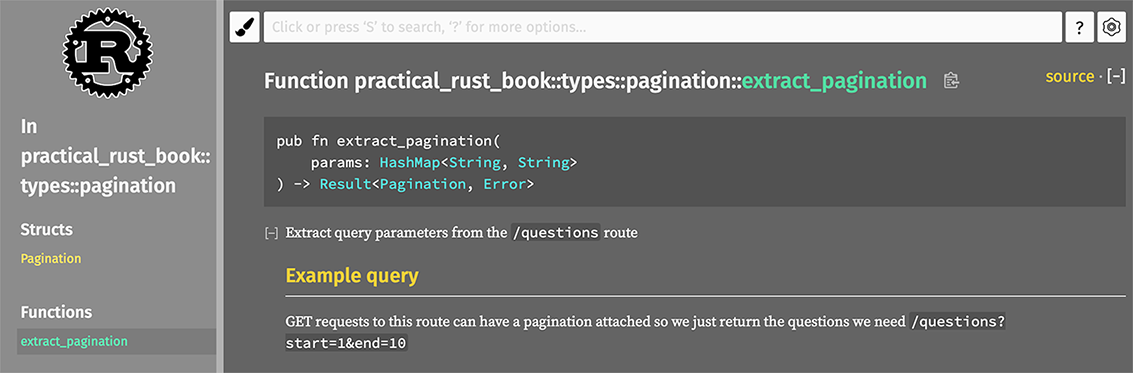
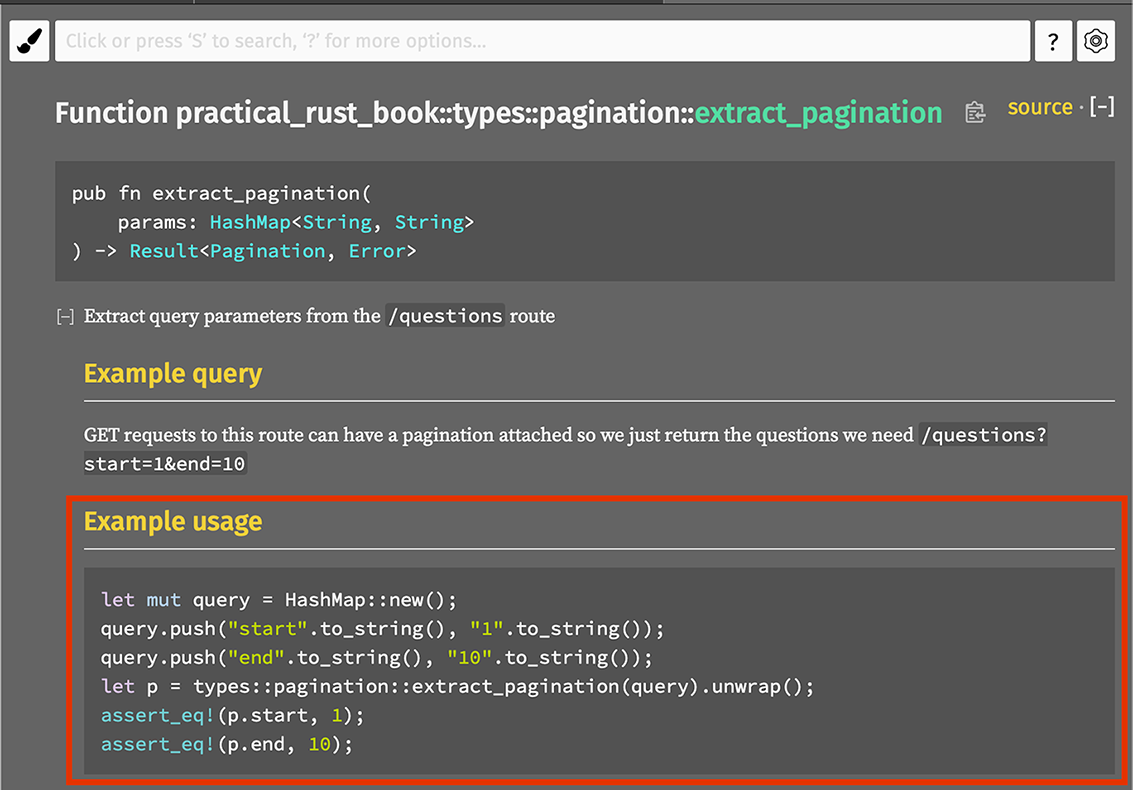
The Cargo command cargo doc produces documentation for our Rust application.
Every function and struct is listed in the documentation, and benefits from added doc comments by the programmer.
Using Markdown lets us add headers and syntax highlighting to our code examples.
Summary
Splitting your code into smaller pieces can be done via modules and the mod keyword.
Moving these modules into files is helpful to separate your codebase.
Rust automatically assumes the filename as the module name, which means you don’t have to add another mod MODULENAME {} to each new file, and can use the filename instead by default.
Having a mod.rs file in folder lets you expose submodules to the main.rs file.
All modules have to be imported into the main.rs file so they can be imported and used in other files via the use keyword.
Rust has private comments (//) and doc comments (///), and automatically publishes documentation of your project via cargo doc.
Rust offers Clippy as an officially supported linting tool.
You can import either a collection or individual rules for it.
The Rustfmt tool formats your codebase to fit a certain style, which can be adjusted through a TOML file.
FAQ
Why should you split a growing Rust web app into modules instead of keeping everything in main.rs?For a larger or actively maintained application, modules help group related logic together, make the code easier to navigate, and let you work on separate parts independently. In Rust web projects, main.rs should mainly wire everything together and start the server, not contain all implementation details.What is the difference between a binary crate and a library crate in Rust?A binary crate is meant to produce an executable and uses main.rs as the entry point. A library crate provides reusable functionality and uses lib.rs instead. In this chapter, the book shows that code like error handling can be moved into a library crate if it is reusable across projects.How do Rust modules work with the mod keyword?The mod keyword declares a module and tells the compiler about a new logical code unit. Modules create their own scope, so code inside them must import anything it needs. You access items inside a module using paths like module_name::ItemName.Why did the code stop compiling after moving Error into an error module?Because the Error enum was moved into a new scope, the rest of the code could no longer refer to it directly. The fix is to update references to error::Error and to make the enum public with pub if other modules need to use it.When should you use pub in a module?Use pub when you want an item to be visible outside its module. By default, Rust items are private. In the chapter, both the Error enum and return_error function had to be marked pub so other parts of the application could use them.How do you organize multiple Rust source files inside folders?When a folder contains multiple files, you usually add a mod.rs file inside that folder and expose the child files with pub mod declarations. Then the root main.rs file includes the folder module with mod, and submodules can access shared code using crate:: paths.What is the difference between mod and use in Rust?mod declares and includes a module in the project’s module tree, while use brings an already-available module path into scope for easier access in the current file. In short: mod defines where code lives; use imports how you refer to it.What are Rust doc comments, and how are they different from regular comments?Doc comments are used to generate documentation and come in forms like ///, /** ... */, //! and /*! ... */. Regular comments // and /* ... */ stay in the source code only. Doc comments can also be rendered by cargo doc and appear in generated docs.How do you add runnable examples to Rust documentation comments?You add them with fenced code blocks inside doc comments, usually using triple backticks and a language tag like rust. Cargo can run these examples as tests for libraries, helping keep docs and code in sync. The chapter shows this with an example for extract_pagination.What do Clippy and rustfmt do, and how do you use them?Clippy is Rust’s linting tool that warns about idiomatic issues, suspicious code, and possible mistakes. rustfmt formats code according to standard style rules. You install them with rustup component add clippy and rustup component add rustfmt, then run cargo clippy and cargo fmt.
pro $24.99 per month
access to all Manning books, MEAPs, liveVideos, liveProjects, and audiobooks!



 Rust Web Development ebook for free
